
1. Производ је готовview
The ULANZI MA93 is a versatile 10000mAh battery grip designed to extend the operational time of your camera and provide stable handheld or tabletop support. It features an integrated tripod, a real-time LCD battery display, and a universal 1/4-inch screw mount for broad compatibility.
Кључне карактеристике:
- Капацитет 10000мАх: Provides extended power for long shooting sessions.
- Real-time LCD Display: Shows the exact remaining battery percentagе (1-100%).
- Integrated Hidden Tripod: Fold-out legs provide instant tabletop stability.
- Universal 1/4"-20 Mount: Compatible with action cameras, mirrorless cameras, and smartphone rigs.
- Ергономски дизајн: Comfortable for handheld use, reducing fatigue during extended vlogging or shooting.
- Уграђени кабл за пуњење: Allows for effortless charging of connected devices.
- Спреман за путовање: 10000mAh (approx. 37 Wh) capacity is within FAA carry-on limits for U.S. domestic flights.
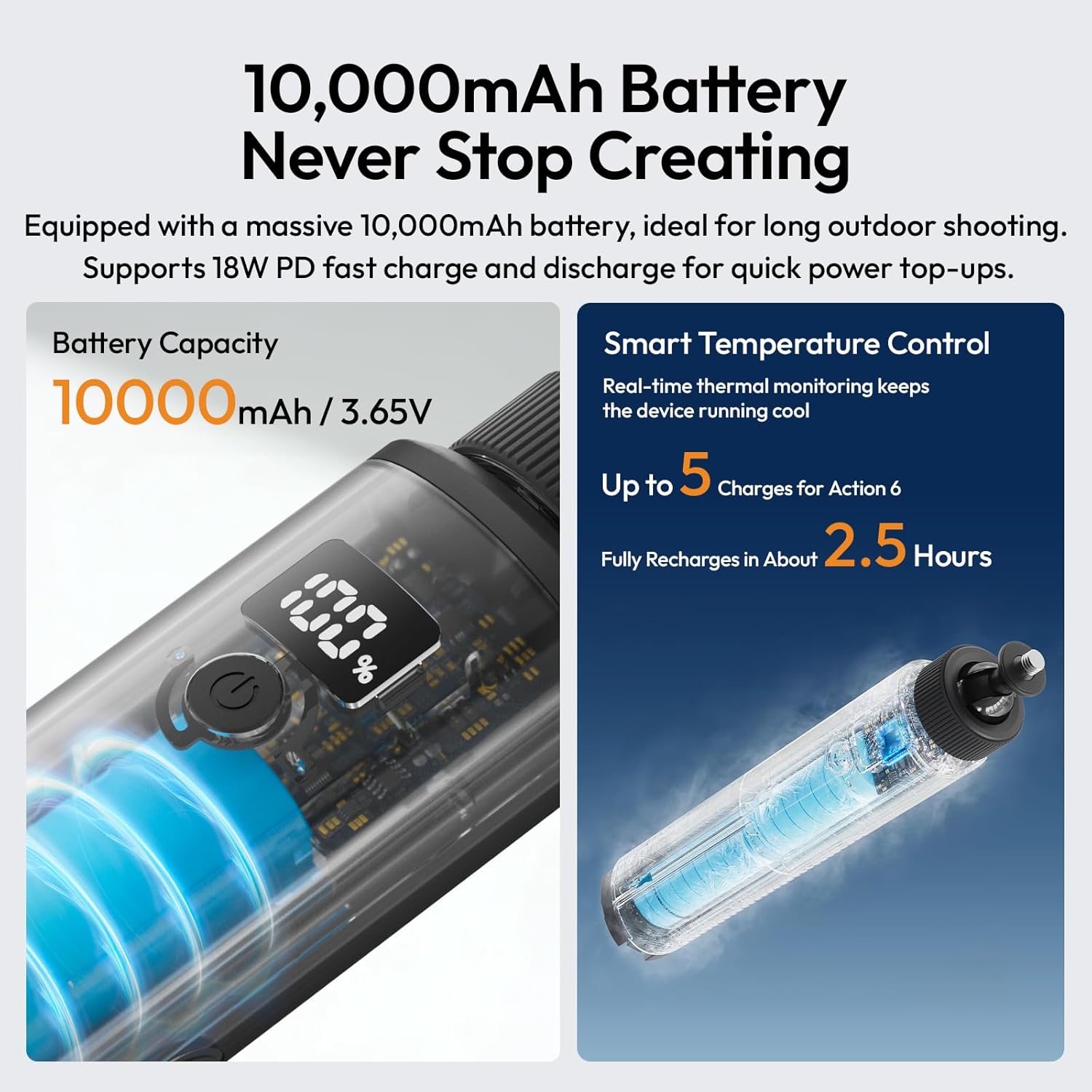
Image 1.1: The ULANZI MA93 Battery Grip with a camera attached, demonstrating its use as a handheld power source.
2. Садржај пакета
Проверите да ли су све ставке присутне у пакету:
- ULANZI MA93 Handheld Battery Grip x 1
- (Additional accessories may vary based on specific product bundles)
3. Идентификација компоненте

Image 3.1: Diagram showing the ULANZI MA93 Battery Grip with its main features highlighted, including the LCD display, power button, and integrated cable.
- 1/4"-20 Screw Mount: Located at the top for attaching cameras and accessories.
- ЛЦД екран: Показује проценат батеријеtage.
- Дугме за напајање: Активира екран и покреће пуњење.
- Интегрисани USB-C кабл: For connecting to devices for power.
- УСБ-Ц улазни порт: For charging the MA93 battery grip.
- Hidden Tripod Legs: Fold out from the base for tabletop stability.
- 1/4"-20 Threaded Hole: Located at the bottom for mounting on larger tripods or stands.
4. Упутства за подешавање
4.1 Charging the Battery Grip
- Locate the USB-C input port on the side of the MA93 Battery Grip.
- Connect a USB-C charging cable (not included) to this port and to a compatible USB power adapter (e.g., 18W PD fast charger).
- The LCD display will show the charging status and current battery percentage.
- A full charge takes approximately 2.5 hours with an 18W PD charger.

Image 4.1: The LCD screen displaying battery percentage during charging, indicating the 10000mAh capacity and fast charging capability.
4.2 Attaching a Camera or Device
- Ensure your camera or device has a standard 1/4"-20 threaded hole.
- Align the 1/4"-20 screw mount on top of the MA93 with the threaded hole on your device.
- Rotate the camera or the grip until it is securely fastened. Do not overtighten.
- For devices requiring power, connect the integrated USB-C cable from the grip to your device's charging port.
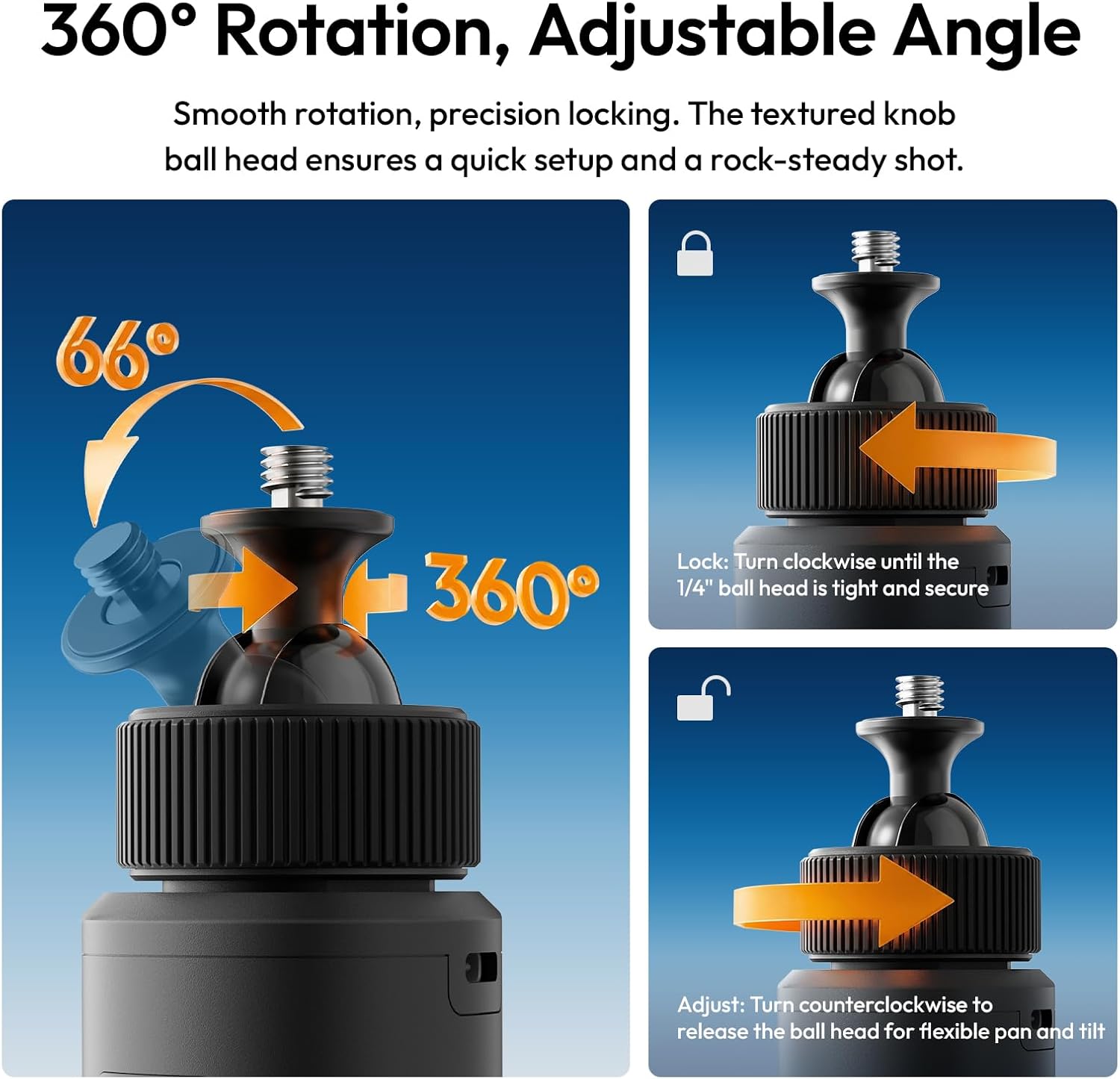
Image 4.2: A camera securely mounted on the ULANZI MA93 Battery Grip, ready for use.
4.3 Deploying the Integrated Tripod
- Locate the three hidden legs at the bottom of the grip.
- Gently pull the three support feet outwards until they are fully extended and locked into position.
- Place the grip on a flat, stable surface for tabletop use.
- To retract, push the legs back into the grip until they are flush.

Image 4.3: The ULANZI MA93 Battery Grip with its integrated tripod legs extended, supporting a camera on a flat surface.
5. Упутство за употребу
5.1 Провера нивоа батерије
Tap the power button once to activate the LCD display. The screen will show the exact remaining battery percentage (1-100%). The display will automatically turn off after a few seconds to conserve power.

Image 5.1: Close-up of the MA93's LCD screen indicating a full 100% charge.
5.2 Powering/Charging External Devices
- Connect your camera, smartphone, or other compatible device to the MA93 using the integrated USB-C cable.
- Press the power button on the MA93 to initiate power delivery. The grip will begin charging the connected device.
- The MA93 supports pass-through charging, allowing it to be charged while simultaneously powering an external device.
5.3 Adjusting the Camera Angle (360° Rotation)
The top 1/4"-20 mount features a ball head for flexible positioning:
- За подешавање: Turn the textured knob counter-clockwise to loosen the ball head. Adjust your camera to the desired angle (360° pan, 66° tilt).
- Да закључате: Turn the textured knob clockwise until the ball head is tight and secure, preventing movement.

Image 5.2: Illustration of the 360-degree rotation and adjustable angle feature of the MA93's ball head mount.
6. Одржавање
- Keep the device clean and dry. Avoid exposure to water or excessive humidity.
- Користите меку, суву крпу за чишћење спољашњости. Не користите јаке хемикалије или абразивне материјале.
- Store the grip in a cool, dry place when not in use.
- Избегавајте испуштање уређаја или излагање јаким ударима.
- Do not attempt to disassemble or repair the unit yourself, as this will void the warranty.
КСНУМКС. Решавање проблема
| Проблем | Могући узрок | Решење |
|---|---|---|
| Device not charging from MA93. |
|
|
| MA93 not charging. |
|
|
| LCD display not working. |
|
|
| Tripod legs not deploying/retracting smoothly. |
|
|
8. Спецификације
| Феатуре | Детаљ |
|---|---|
| Назив модела | MA93 Battery Grip |
| Капацитет батерије | 10000mAh (approx. 37 Wh) |
| Улаз/Излаз | 18W PD Fast Charge/Discharge (USB-C) |
| Монтажни интерфејс | Universal 1/4"-20 Screw Mount (top), 1/4"-20 Threaded Hole (bottom) |
| Дисплаи | Real-time LCD Percentagе Приказ |
| Интегрисане карактеристике | Hidden Tripod, Built-in USB-C Cable |
| Димензије производа | 8.86"Д к 1.66"Ш к 2.29"В |
| Тежина артикла | 12 унци |
| Компатибилни уређаји | Cameras, Action Cameras, MagSafe Phones (with adapter) |
| Произвођач | Shenzhen Vijim Technology Co.,Ltd. |
9. Гаранција и подршка
9.1 Информације о гаранцији
The ULANZI MA93 Battery Grip comes with a 12-месечна гаранција од датума куповине. Ова гаранција покрива производне недостатке и кварове при нормалној употреби. Не покрива штету насталу услед злоупотребе, несрећа, неовлашћених модификација или природних катастрофа.
Сачувајте доказ о куповини за гаранцијске захтеве.
9.2 Корисничка подршка
For technical assistance, warranty claims, or product inquiries, please contact ULANZI customer support through the official ULANZI webсајт или место ваше куповине.
You can also visit the official ULANZI Store on Amazon for more information and products: ULANZI Official US Store
10. Видео снимци производа
ULANZI MA93 Handheld Battery Grip Overview
Video 10.1: An official video from ULANZI demonstrating the features and usage of the MA93 Handheld Battery Grip.