
1. Увод
Thank you for choosing the Sharp 40HF2265E Full HD Google TV. This manual provides essential information for setting up, operating, and maintaining your television. Featuring integrated Google TV, HDR10 support, Dolby Digital audio, and Bluetooth connectivity, your new TV offers a rich entertainment experience. Please read this manual thoroughly before use to ensure proper operation and to maximize your viewинг задовољство.

Слика 1.1: Предња страна view of the Sharp 40HF2265E Full HD Google TV.
2. Шта је у кутији
Пажљиво распакујте телевизор и проверите да ли су укључене све следеће ставке:
- Sharp 40HF2265E Television
- Повер Цабле
- Даљински управљач (потребне су 2 ААА батерије, нису увек укључене)
- Кориснички приручник (овај документ)
- Гарантни лист
If any items are missing or damaged, please contact your retailer or Sharp customer support immediately.
3. Подешавање
3.1 Инсталација постоља
To install the TV stand, place the TV screen-down on a soft, flat surface to prevent scratches. Align the stand feet with the corresponding slots on the bottom of the TV and secure them with the provided screws. Ensure the stand is firmly attached before placing the TV upright.

Слика 3.1: Предња страна view of the TV with stand feet attached.
3.2 Монтажа на зид
If you prefer to wall-mount your TV, you will need a VESA-compatible wall mount (not included). The Sharp 40HF2265E supports a VESA mounting standard of 200 x 200 mm. Refer to the wall mount's instructions for installation. Always ensure the wall can support the weight of the TV and the mount.

Слика 3.2: Позади view of the TV, highlighting VESA mounting points and ports.
3.3 Повезивање периферних уређаја
Connect your external devices to the appropriate ports on the back and side of the TV. The TV features multiple HDMI, USB, and other connectivity options.
- ХДМИ портови: За повезивање Блу-реј плејера, играћих конзола, сет-топ боксова итд.
- УСБ портови: За повезивање УСБ уређаја за складиштење података ради репродукције медија или ажурирања софтвера.
- Етхернет порт: За жичану интернет везу.
- Улаз за антену/кабл: За повезивање антене или кабловског ТВ сигнала.
- Аудио излаз: За повезивање екстерних аудио система.
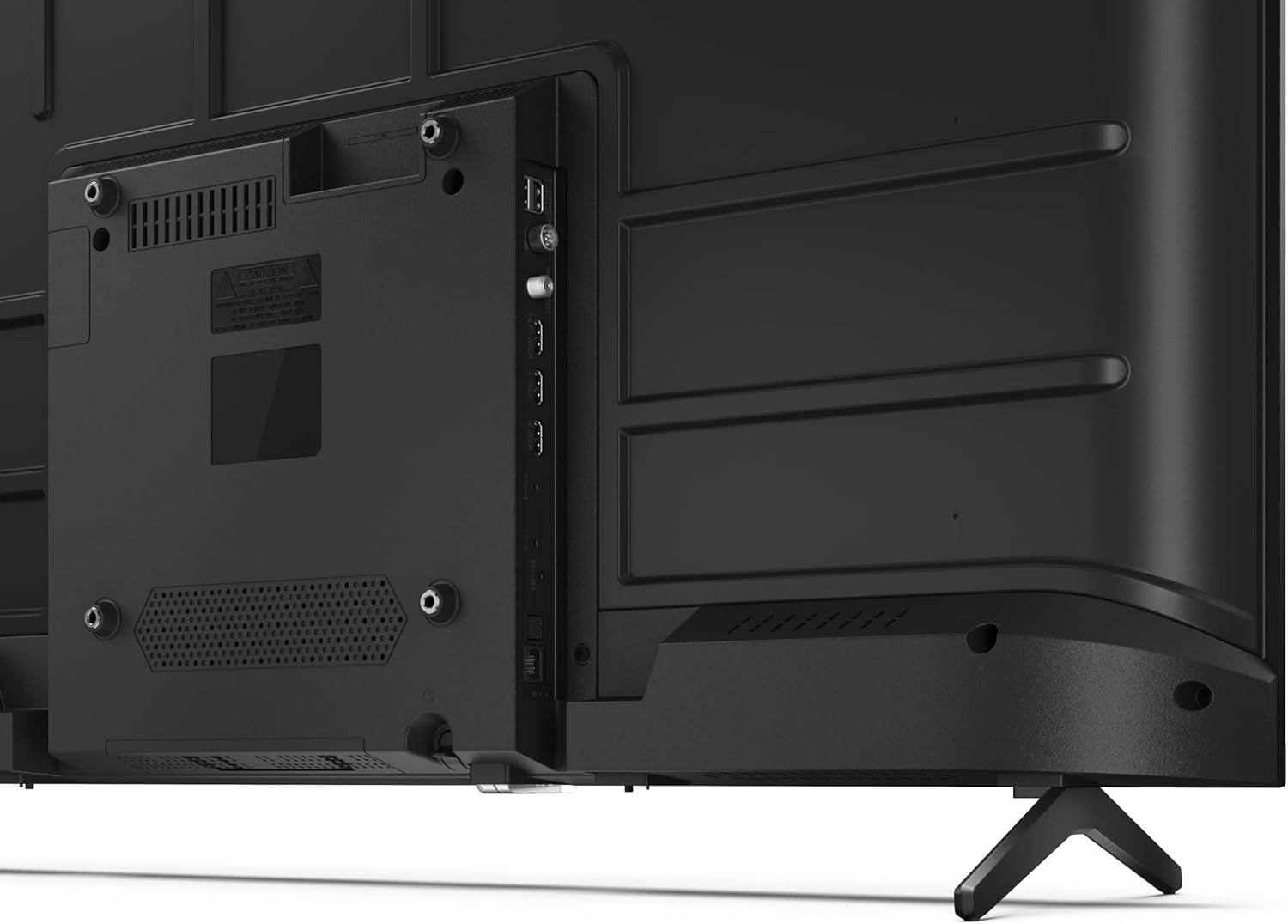
Слика 3.3: Детаљно view портова за повезивање телевизора.
3.4 Почетно укључивање и подешавање Google TV-а
After connecting all necessary cables, plug the power cable into an electrical outlet. Press the power button on the remote control or on the TV. Follow the on-screen instructions to complete the initial setup, including network connection, Google account login, and channel scanning.
4. Оперативни
4.1 Функције даљинског управљача
The remote control allows you to navigate the TV's features. Common buttons include Power, Volume Up/Down, Channel Up/Down, Input Source, Home (Google TV), Navigation (directional arrows, OK), Back, and Google Assistant.
4.2 Интерфејс Google TV-а
Your Sharp TV runs on Google TV, providing a personalized home screen with content recommendations from your subscriptions. Use the remote's navigation buttons to browse movies, shows, apps, and your library.

Image 4.1: The Google TV home screen on the Sharp 40HF2265E.
4.3 Избор улаза
To switch between connected devices (e.g., HDMI 1, HDMI 2, TV tuner), press the 'Input' or 'Source' button on your remote control and select the desired input from the on-screen menu.
4.4 Подешавања слике и звука
Access the TV's settings menu to adjust picture modes (Standard, Vivid, Cinema, Game), brightness, contrast, color, and sound modes (Standard, Music, Movie, Speech). The TV supports HDR10 for enhanced contrast and color, and Dolby Digital for rich audio.

Image 4.2: Visual representation of HDR (High Dynamic Range) technology.
4.5 Google асистент и Chromecast
Use the built-in Google Assistant for voice control. Press the Google Assistant button on your remote and speak your commands, such as searching for content, controlling smart home devices, or getting information. Chromecast allows you to cast content directly from compatible devices like smartphones or tablets to your TV.

Image 4.3: Google Assistant integration for voice commands.
4.6 Bluetooth повезивање
Pair Bluetooth-enabled devices such as headphones or soundbars with your TV for a wireless audio experience. Navigate to the TV's settings menu, select 'Remotes & Accessories', and then 'Pair new device' to connect.
5. Одржавање
5.1 Чишћење телевизора
Always unplug the TV before cleaning. Use a soft, dry cloth to wipe the screen and TV body. For stubborn marks, lightly dampen the cloth with water or a specialized screen cleaner. Never use abrasive cleaners, waxes, or solvents.
5.2 Ажурирања софтвера
Your Google TV may receive automatic software updates. Ensure your TV is connected to the internet to receive these updates, which can improve performance and add new features. You can also manually check for updates in the settings menu.
КСНУМКС. Решавање проблема
Ако наиђете на проблеме са телевизором, погледајте следећа уобичајена решења:
- Нема напајања: Проверите да ли је кабл за напајање добро прикључен и у телевизор и у зидну утичницу. Уверите се да је утичница исправна.
- Нема слике/звука: Verify that the correct input source is selected. Check all cable connections (HDMI, antenna). Try restarting the TV.
- Даљински управљач не ради: Замените батерије (2 AAA). Уверите се да нема препрека између даљинског управљача и инфрацрвеног сензора телевизора.
- Проблеми са мрежном везом: For Wi-Fi, check your router and ensure the TV is within range. For wired connections, check the Ethernet cable. Try restarting your router and the TV.
- Проблеми са квалитетом слике: Подесите подешавања слике (осветљеност, контраст, оштрина). Уверите се да улазни извор пружа висококвалитетни сигнал.
For more complex issues, consult the comprehensive troubleshooting section in the full digital manual or contact Sharp customer support.
7. Спецификације
Below are the technical specifications for the Sharp 40HF2265E Full HD Google TV:

Image 7.1: Dimensions of the Sharp 40HF2265E TV.
| Феатуре | Спецификација |
|---|---|
| Бранд | Схарп |
| Број модела | 40HF2265E |
| Назив модела | ХФ серија |
| Модел Иеар | 2025 |
| Величина екрана | 40 инча (81 центиметра) |
| Дисплаи Тецхнологи | ЛЕД |
| Резолуција | 1080p (Full HD) |
| Рефресх Рате | 60 Хз |
| Аспецт Ратио | 16:9 |
| Однос контраста | 100000:1 |
| Screen Finish | Мат |
| Време одговора | 8 милисекунди |
| Технологија позадинског осветљења | ЛЕД |
| Supported HDR Format | ХДР10, ХЛГ |
| Побољшање квалитета слике | Dynamic Contrast, HDR10, HLG |
| Motion Enhancement Technology | Motion Interpolation |
| Оперативни систем | Гоогле ТВ |
| Internet Applications | Apple TV, Google TV, Hulu, Prime Video, YouTube |
| Посебне карактеристике | Bluetooth, Chromecast, Dolby Digital, HD Tuner |
| Технологија повезивања | Етернет, УСБ, Ви-Фи |
| Бежична технологија | Блуетоотх |
| Блуетоотх верзија | 5.0 |
| Screen Mirroring Technology | Chromecast, Google Cast |
| Укупни ХДМИ портови | 3 |
| Total USB 2.0 Ports | 2 |
| Number of Composite Video Inputs | 1 |
| Аудио улаз | Mini composite/CVBS + audio input |
| Total Audio Output Ports | 2 |
| Режим аудио излаза | Стерео |
| Аудио Енцодинг | DD |
| Integrated Surround Sound Format | Dolby AC-4, Dolby Digital, Dolby Digital Plus |
| Максимална излазна снага звучника | 16 вати (2x8W) |
| Број аудио канала | 2.0 |
| Броадцаст Систем | DVB-T2/C/S/S2 |
| Видео Енцодинг | МКВ |
| Димензије производа (ДкШкВ) | 8.4P x 89.2D x 50.9V cm |
| Тежина артикла | 5.4 килограма |
| Тежина без постоља | 5.4 килограма |
| Басе Видтх | 765 милиметара |
| ВЕСА стандард за монтажу | 200 к 200 мм |
| Потрошња енергије | 37 Ваттс |
| Волtage | 230 Волт |
| Remote Control Battery Size | ААА |
| Remote Control Battery Quantity | 2 |
| Parental Control Technology | Kindersicherung Über Google Tv |
| Доступност резервних делова у ЕУ | 7 године |
8. Гаранција и подршка
8.1 Гаранција на производ
The Sharp 40HF2265E television comes with a 2-year manufacturer's warranty. Please refer to the included Warranty Card for detailed terms and conditions regarding coverage and service. Keep your proof of purchase for warranty claims.
8.2 Корисничка подршка
If you require further assistance, have questions not covered in this manual, or need technical support, please contact Sharp customer service. Contact information can typically be found on the Warranty Card or the official Sharp webсајту.