PowerA Advantage Wireless Controller for Nintendo Switch 2 - Mario & Yoshi
Model: NSGP0569-01V
Увод
This manual provides comprehensive instructions for the PowerA Advantage Wireless Controller, designed for use with the Nintendo Switch family of devices. It covers setup, operation, maintenance, and troubleshooting to ensure optimal performance and longevity of your controller.
Кључне карактеристике
Hall Effect Modules: Equipped with contact-free magnetic sensors in the thumbsticks to prevent stick drift, offering smoother control, enhanced precision, and increased longevity.
Advanced Gaming Buttons: Two mappable buttons can be programmed on the fly during gameplay without needing to access system settings.
Intuitive Motion Controls: Experience fluid and responsive motion controls for aiming, steering, flying, and other in-game actions.
Ц дугме: Provides quick access to GameChat features.
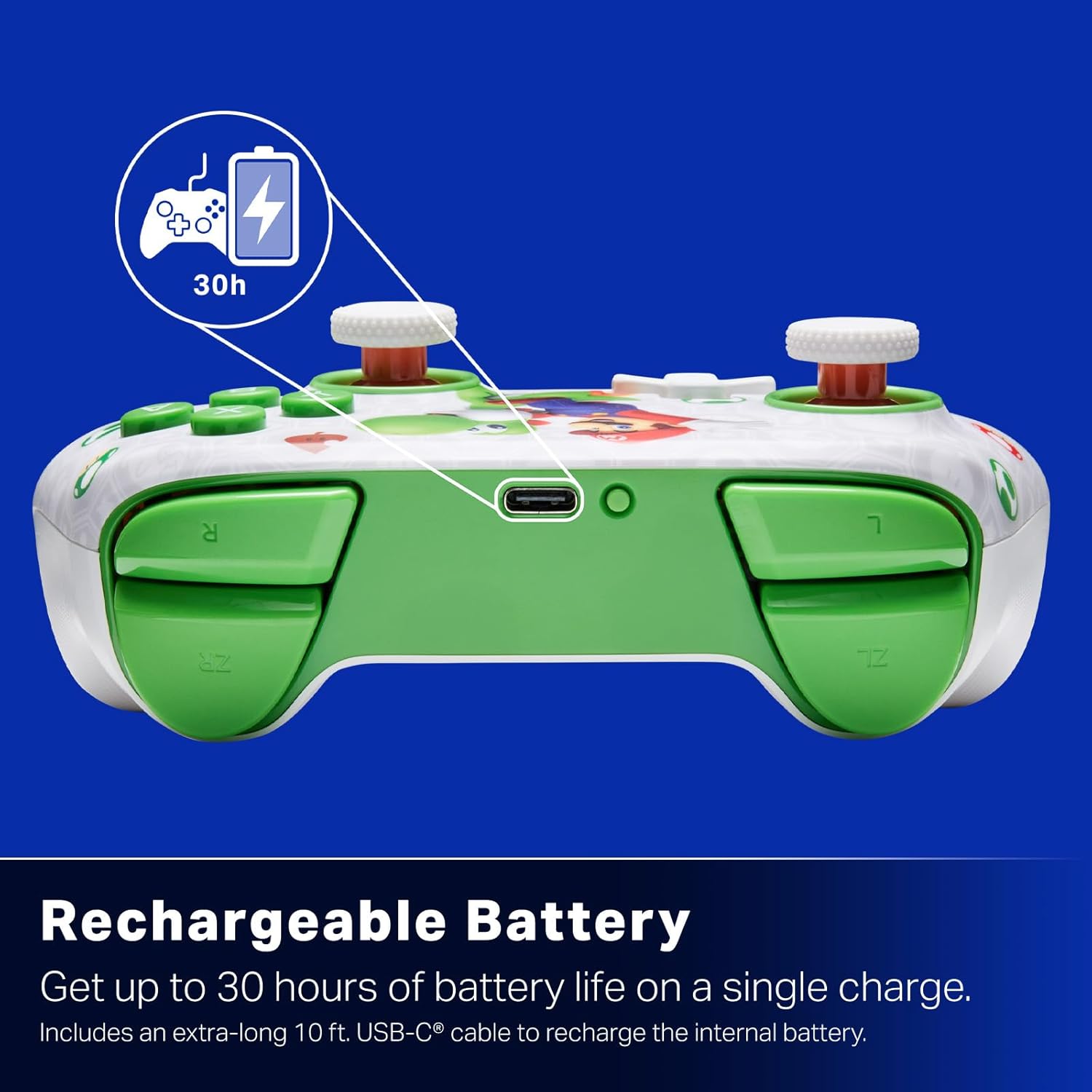
Пуњива батерија: Offers up to 30 hours of gameplay on a single charge. Includes a 10 ft. (3m) USB-C cable for recharging.
Ергономски дизајн: Crafted for comfort during extended gaming sessions, utilizing cutting-edge ergonomics and high-quality materials.
Nintendo Family Compatibility: Compatible with Nintendo Switch 2, Nintendo Switch, Nintendo Switch – OLED Model, and Nintendo Switch Lite.
Званично лиценцирано: PowerA products undergo rigorous testing by Nintendo to ensure compatibility and quality.
Упутства за подешавање
1. Почетно пуњење
Before first use, fully charge your PowerA Advantage Wireless Controller. Connect the included 10 ft. (3m) USB-C cable to the controller's USB-C port and the other end to a powered USB port on your Nintendo Switch dock or a USB wall adapter.
Figure 1: Controller connected via USB-C for charging, highlighting the rechargeable battery feature.
2. Упаривање са Nintendo Switch-ом
Уверите се да је ваша Nintendo Switch конзола укључена и ажурирана на најновији системски софтвер.
У менију ХОМЕ одаберите Контролори, онда Промените Грип/Ред.
On the PowerA Advantage Wireless Controller, press and hold the Дугме СИНЦ located on the top edge of the controller for at least three seconds. The player indicator LEDs on the bottom of the controller will begin to flash.
Once the controller successfully pairs, the player indicator LED(s) corresponding to the controller number will remain lit.
Притисните тастер Дугме to confirm and exit the pairing screen.
For subsequent uses, simply press the HOME button on the controller to wake it up and automatically reconnect to your Switch console.
Упутство за употребу
Основне контроле
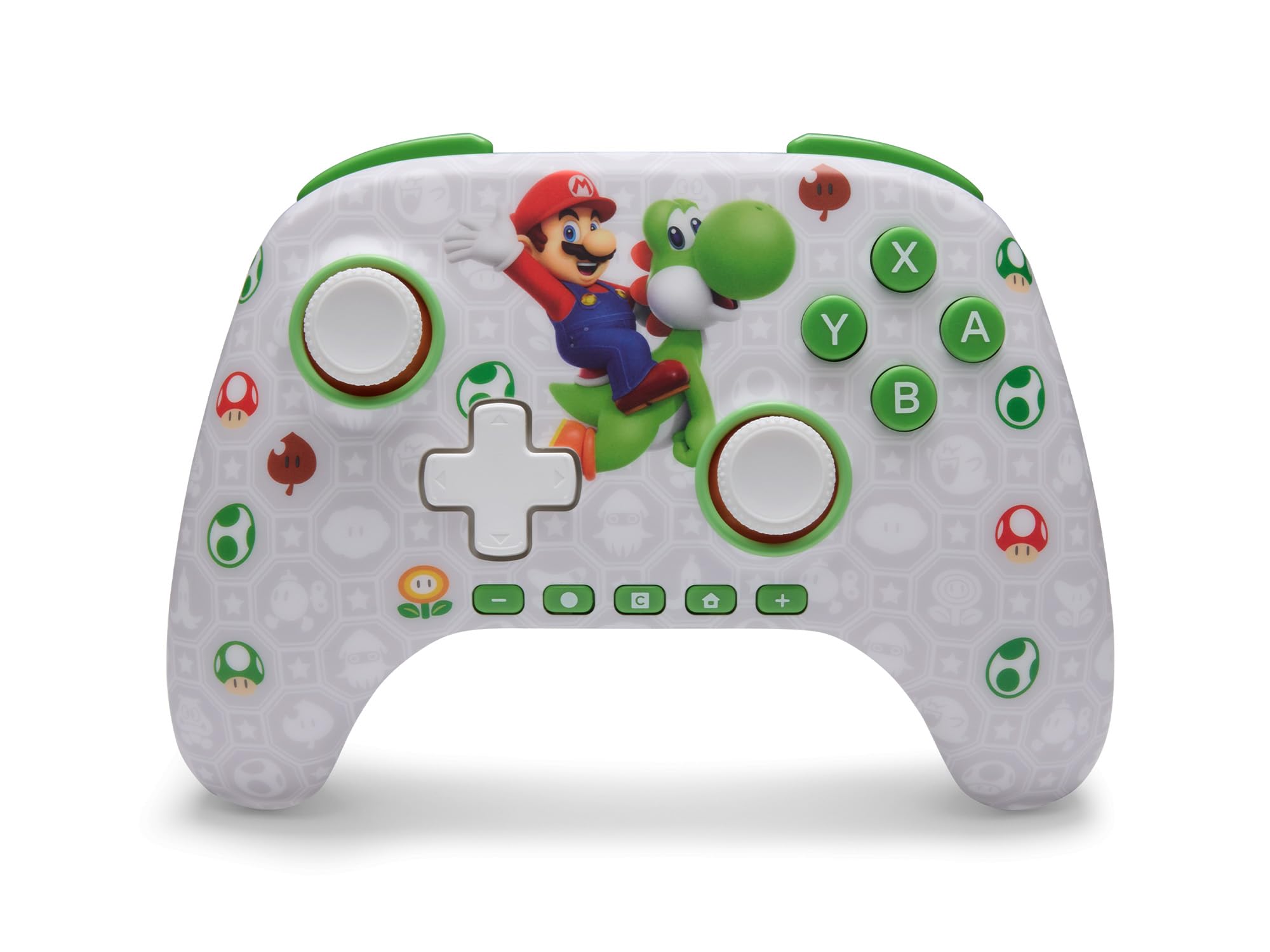
PowerA Advantage Wireless Controller features standard Nintendo Switch button layouts, including A, B, X, Y buttons, L/R and ZL/ZR shoulder buttons, a D-pad, and dual analog sticks. Familiarize yourself with these controls for general gameplay.
Слика 2: Предња страна view of the PowerA Advantage Wireless Controller, highlighting the Mario and Yoshi design and button layout.
Advanced Gaming Buttons (AGB)
The controller includes two mappable Advanced Gaming Buttons (AGR and AGL) on the back. These buttons can be assigned to replicate any other button on the controller for quick access during gameplay.
Притисните тастер Program Button (PRGM) on the back of the controller. The Program LED will flash.
Притисните тастер Advanced Gaming Button (AGR or AGL) you wish to map. The Program LED will flash rapidly.
Притисните тастер дугме you want to assign to the Advanced Gaming Button (e.g., A, B, X, Y, L, R, ZL, ZR, D-pad directions). The Program LED will stop flashing, indicating successful mapping.
To clear a mapped button, repeat steps 1-2, then press the Програм дугме опет.
Figure 3: Advanced Gaming Buttons (AGB) on the back of the controller, with an illustration of mappable functions.
Контроле покрета
The controller supports motion controls, allowing for intuitive interaction in compatible games. These controls are automatically enabled when supported by the game.
Figure 4: Controller demonstrating motion control capabilities through tilting.
C Button (GameChat)
The dedicated C Button provides quick access to GameChat features in supported titles, enhancing your multiplayer experience.
Figure 5: The 'C' button, used for GameChat features.
Одржавање
Чишћење: Користите меку, суву крпу за чишћење контролера. Избегавајте употребу јаких хемикалија или абразивних материјала.
Складиштење: Чувајте контролер на хладном и сувом месту, даље од директне сунчеве светлости и екстремних температура.
Одржавање батерије: Да бисте продужили век трајања батерије, избегавајте често потпуно пражњење контролера. Редовно га пуните, чак и ако га не користите стално.
Нега каблова: Handle the USB-C charging cable with care. Avoid bending or twisting it excessively.
Решавање проблема
Контролер се не повезује/не упарује
Уверите се да је контролер потпуно напуњен.
Verify the Nintendo Switch console is updated to the latest system software.
Repeat the pairing process (see "Pairing with Nintendo Switch" in Setup Instructions).
If issues persist, try restarting both the controller and the Nintendo Switch console.
Stick Drift
PowerA Advantage Controller features Hall Effect modules designed to prevent stick drift. If you experience any unintended input, ensure the controller's firmware is up to date (check PowerA's official webсајт за ажурирања).
Recalibrate the joysticks through the Nintendo Switch system settings if necessary (System Settings > Controllers and Sensors > Calibrate Control Sticks).
Кратко трајање батерије
Уверите се да је контролер потпуно напуњен пре сваке употребе.
Battery life can vary based on game usage and features enabled.
Use the provided USB-C cable for optimal charging.
Спецификације
Феатуре
Детаљ
Број модела
NSGP0569-01V
Повезивање
Wireless (Bluetooth), USB-C (for charging)
Компатибилни уређаји
Nintendo Switch 2, Nintendo Switch, Nintendo Switch – OLED Model, Nintendo Switch Lite
Трајање батерије
До 30 сати (зависи од употребе)
Цабле Ленгтх
10 ft. (3m) USB-C
Димензије
5.88 к 4.21 к 2.36 инча
Тежина
0.66 фунти
Посебне карактеристике
Hall Effect Thumbsticks, Mappable Advanced Gaming Buttons, Motion Controls, C Button
Гаранција и подршка
PowerA Advantage Wireless Controller comes with a Двогодишња ограничена гаранција. For detailed warranty information, product support, or to register your product, please visit the official PowerA webсајт на ПоверА.цом/Суппорт.
Figure 6: Official Nintendo Licensed Product badge, ensuring quality and compatibility.
Ask a question about this manual
Ask about setup, troubleshooting, compatibility, parts, safety, or missing instructions. Manuals+ will review the question and use this page’s manual context to help answer it.