
Увод
This manual provides detailed instructions for the proper use and maintenance of your CASIO MS-20YC desktop calculator. Please read it thoroughly before use to ensure optimal performance and longevity of your device. This calculator is designed for everyday calculations, offering a range of basic and advanced functions.
Сетуп
Извор напајања
Your CASIO MS-20YC calculator operates on solar power with a backup battery. Ensure sufficient light for optimal performance. The backup battery is pre-installed to provide power in low-light conditions.
- соларна енергија: The calculator primarily uses solar energy when sufficient light is available.
- Резервна батерија: A nonstandard battery is included and installed to ensure continuous operation when solar power is insufficient.
- Аутоматско искључивање: The calculator features an automatic shut-off function to conserve battery life when not in use.
Почетна употреба
Upon first use, ensure the calculator is exposed to light. If the display is blank or dim, press the AC (All Clear) button. The calculator is ready for use once the display shows '0'.
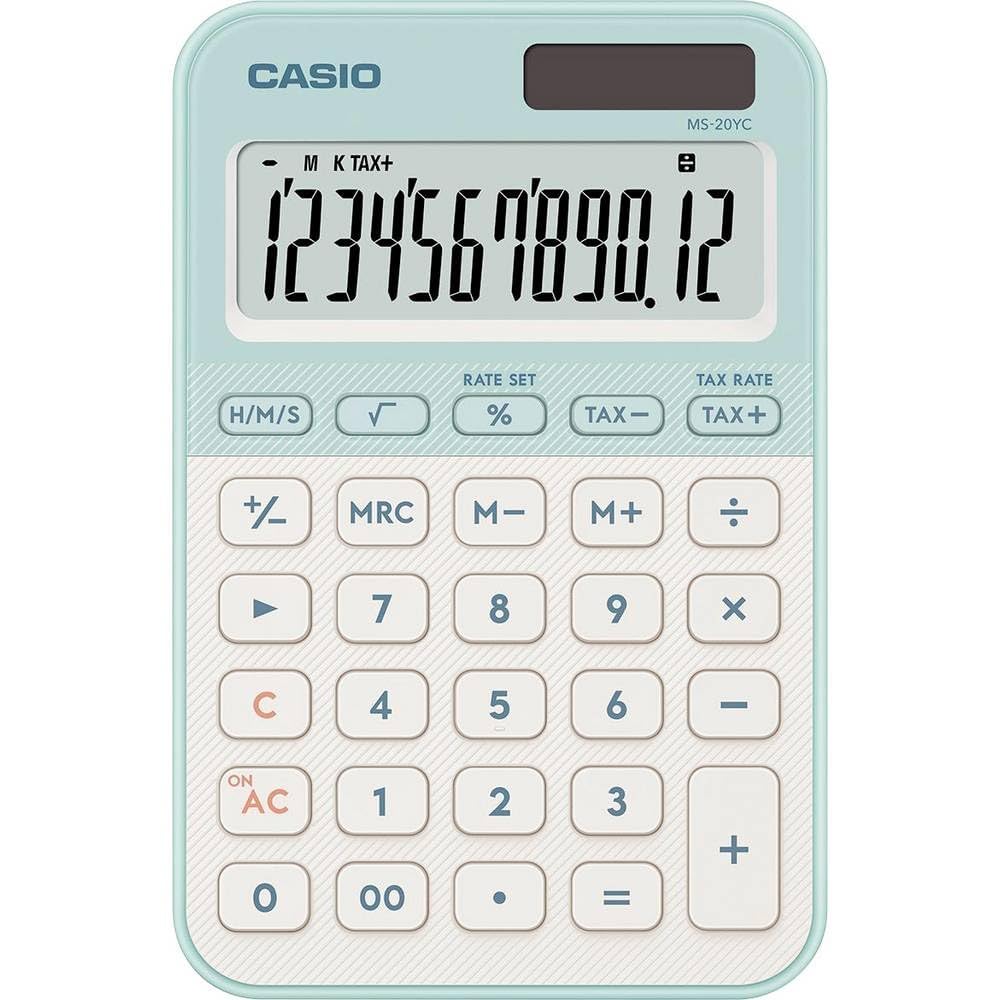
Image: CASIO MS-20YC Desktop Calculator. This image shows the calculator's front view, highlighting its 12-digit display and key layout.
Упутство за употребу
Основни прорачуни
Enter numbers using the numeric keys (0-9) and the decimal point (.). Use the arithmetic operators for addition (+), subtraction (-), multiplication (*), and division (/). Press the equals key (=) to display the result.
- Додатак:
[Number 1] [+] [Number 2] [=] - одузимање:
[Number 1] [-] [Number 2] [=] - множење:
[Number 1] [*] [Number 2] [=] - дивизија:
[Number 1] [/] [Number 2] [=]
Кључне функције су завршенеview
| Кључ | Функција |
|---|---|
| AC | All Clear: Clears all entries and memory. |
| C (Бацкспаце) | Clear Entry / Backspace: Deletes the last digit entered or clears the current entry. |
| +/- | Sign Change: Changes the sign of the displayed number (positive to negative, or vice versa). |
| 00 | Double Zero: Enters two zeros simultaneously. |
| % | Перценtage / Markup: Performs percentage calculations and markup calculations. |
| TAX+ / TAX- | Tax Calculation: Adds or subtracts a pre-set tax rate. |
| M+, M-, MR, MC | Memory Functions: Add to memory, subtract from memory, recall memory, clear memory. |
| √ (Square Root) | Израчунава квадратни корен приказаног броја. |
Advanced Calculations
- Перценtagе Обрачун: Thanks to CASIO's unique input logic, the absolute value of the percentage is displayed before markup on the base. For markup calculation, use the % кључ.
- Обрачун пореза: The calculator allows for tax calculations with display of gross, net, and tax amounts. The tax rate can be saved for convenience. Refer to the full manual for setting the tax rate.
- Рачунање времена: Perform calculations in hours:minutes:seconds format and convert results to decimal format.
- Constant Calculation: This feature allows for repetitive calculations using a constant value.
Одржавање
Чишћење
To clean your calculator, gently wipe the surface with a soft, dry cloth. Do not use abrasive cleaners, solvents, or chemical sprays, as these can damage the display or casing.
Складиштење
Store the calculator in a cool, dry place away from direct sunlight and extreme temperatures. Avoid placing heavy objects on top of the calculator to prevent damage to the display or keys.
Замена батерије
If the display becomes consistently dim even in sufficient light, the backup battery may need replacement. Battery replacement should ideally be performed by an authorized service center to ensure proper handling and to avoid voiding any warranty.
Решавање проблема
- Екран је празан или замагљен:
Ensure the calculator is exposed to adequate light. If the issue persists, the backup battery may be low or depleted. - Нетачни прорачуни:
Притисните AC to clear all previous calculations and memory. Re-enter your calculation carefully. - Тастери не реагују:
Check for any debris lodged under the keys. Gently clean around the keys. If the problem continues, contact customer support. - Calculator turns off unexpectedly:
This is likely the automatic shut-off feature. If it occurs too frequently during active use, ensure sufficient light for solar power or consider battery replacement.
Спецификације
| Феатуре | Детаљ |
|---|---|
| Бранд | Цасио |
| Модел | МС-20ИЦ |
| Димензије (Д к Ш к В) | 10.1 x 15.5 x 1.8 cm (approx. 3.98"L x 6.1"W x 0.7"H) |
| Дисплаи | 12-digit LCD, 8.0 x 2.7 cm, Digit height 1.7 cm, Calculation function indicator, 1,000s separators |
| Извор напајања | Solar powered with backup battery (1 Nonstandard Battery included) |
| Тип кључа | Smooth-operating plastic keys with key rollover |
| Тежина | 118 грама |
| Посебне карактеристике | Time calculation, Tax calculation, Advanced percentage calculation, Square root, Constant calculation, 3-key memory, Backspace key, +/- key, Double zero key (00), Non-slip rubber feet |
Гаранција и подршка
For detailed warranty information, terms, and conditions, please refer to the documentation included with your original purchase. For customer support, technical assistance, or service inquiries, please visit the official Casio website or contact your local Casio distributor.