
Производ је завршенview
The AT&T EL2131-11 is a DECT 6.0 cordless landline phone designed for reliable communication. It features a powerful call blocker, caller ID, a full-duplex speakerphone, and a backlit display and keypad for enhanced visibility. This model includes one handset.
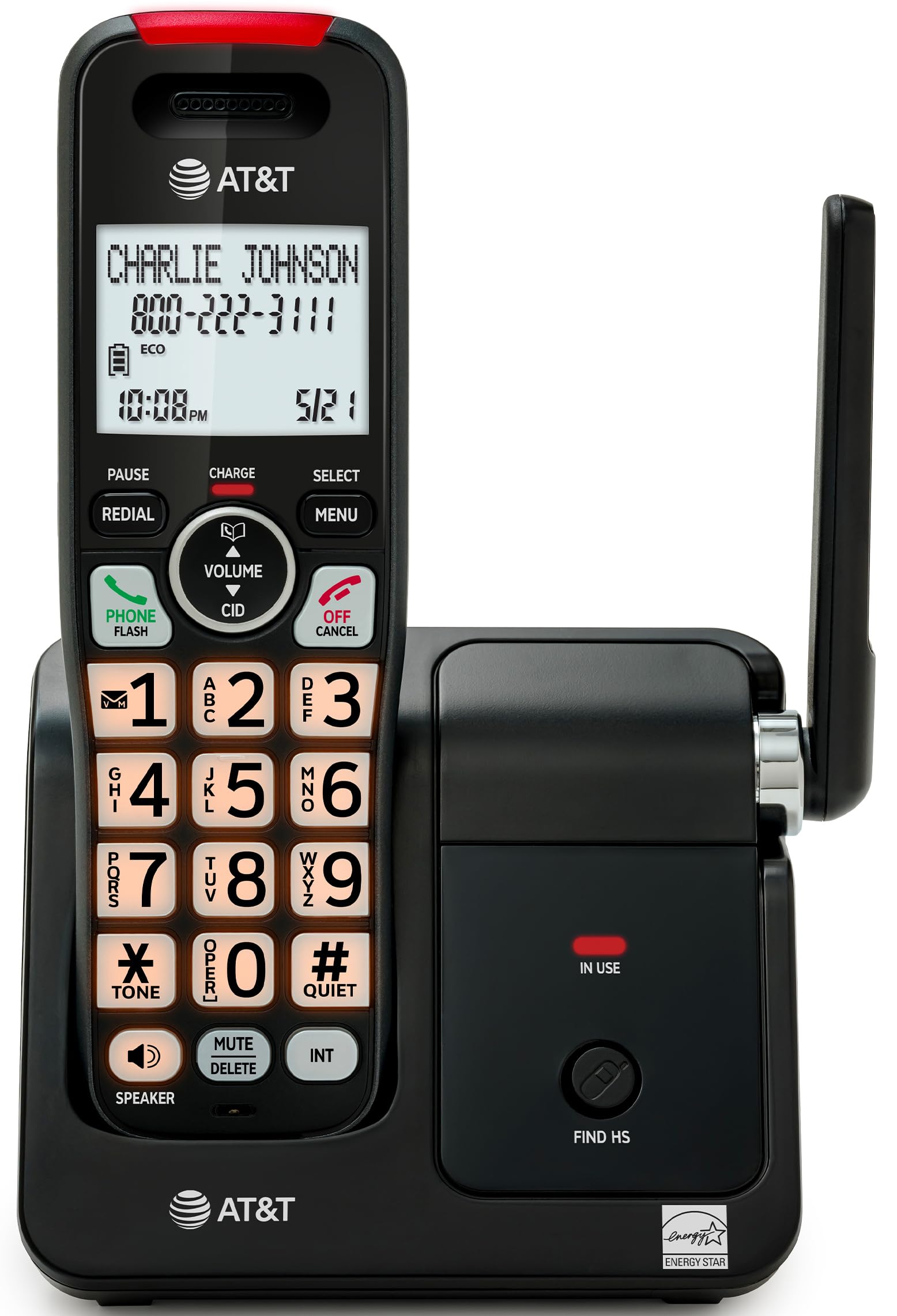
Image: The AT&T EL2131-11 cordless phone, showing the handset docked in its base unit.
Кључне карактеристике:
- Блокатор позива: Blocks up to 50 unwanted numbers.
- ИД позиваоца: Stores up to 50 calls, displaying name, number, time, and date.
- Фулл-Дуплек спикерфон: Allows both parties to speak and listen simultaneously.
- Екран и тастатура са позадинским осветљењем: Provides clear visibility in low-light conditions.
- Тихи режим: Silences the ringer instantly.
- ЕКО режим: Reduces power consumption and extends battery life.
- ДЕЦТ 6.0 технологија: Ensures interference-free communication and extended range.
Сетуп
Шта је у кутији:
- Основна јединица
- 1 бежична слушалица
- КСНУМКС адаптер за напајање
- Кабл за телефонску линију
- 2 Батеријске ћелије
- Водич за брзи почетак
- Зидни носач
1. Инсталација батерије
- Пронађите одељак за батерије на задњој страни слушалице.
- Insert the two supplied battery cells, ensuring correct polarity (+ and -).
- Добро затворите поклопац одељка за батерије.
2. Повезивање основне јединице
- Connect the small end of the power adapter to the power jack on the back of the base unit.
- Укључите већи крај адаптера за напајање у стандардну електричну утичницу.
- Повежите један крај телефонског кабла са TEL LINE прикључком на задњој страни базне јединице.
- Укључите други крај телефонског кабла у телефонску утичницу у зиду.
3. Почетно пуњење
Place the handset in the base unit with the display facing forward. The handset will begin charging. Allow the handset to charge for at least 16 hours before initial use to ensure optimal battery performance.

Image: The handset charging in its base, with an overlay indicating a 5-day battery life on a single charge.
Упутство за употребу
Упућивање и примање позива
- Да бисте упутили позив: Притисните ТЕЛЕФОН / ФЛАСХ, затим позовите број.
- Да одговорите на позив: Када телефон зазвони, притисните ТЕЛЕФОН / ФЛАСХ or any dialing key (0-9, * or #).
- Да бисте прекинули позив: Притисните ОФФ/ЦАНЦЕЛ или вратите слушалицу у базну јединицу.
Коришћење спикерфона
Током позива притисните СПЕАКЕР button to activate the full-duplex speakerphone. Press it again to switch back to the handset earpiece.

Image: A man holding a small dog, speaking hands-free using the phone's speakerphone function. The phone's base unit is visible on a table.
ИД позиваоца
When a call comes in, the caller's information (name and number) will appear on the handset display if you subscribe to Caller ID service. The phone stores up to 50 caller ID records.

Image: A close-up of the phone's display showing a caller's name and number, along with the time and date.
Цалл Блоцкер
The call blocker feature allows you to block up to 50 unwanted numbers. To block a number:
- During a call or from the Caller ID log, press МЕНУ.
- Scroll to 'Call Blocker' and press СЕЛЕЦТ.
- Пратите упутства на екрану да бисте додали број на листу блокираних.

Image: A visual representation of the call blocker feature, showing a list of blocked numbers on the phone's display.
Куиет Моде
To temporarily silence the ringer, press and hold the #КУИЕТ button on the handset. The ringer will be silenced for a set period, typically 1 to 12 hours, which can be adjusted in the settings.

Image: A close-up of the phone's display indicating that 'Quiet mode' is active.
ЕЦО режим
The ECO mode automatically adjusts power consumption to conserve battery life. This mode is typically active by default and indicated by an 'ECO' icon on the display.

Image: The phone's display showing the 'ECO' icon, indicating power-saving mode is active.
Поновно бирање
Да бисте поново позвали последњи позвани број, притисните РЕДИАЛ дугме.

Image: The phone's display showing the 'Redial' function with a previously dialed number.
Екран и тастатура са позадинским осветљењем
The handset features a backlit LCD display and illuminated keypad for easy readability and operation in various lighting conditions.

Image: A hand holding the phone, demonstrating its bright backlit screen and illuminated keypad in a low-light environment.
Одржавање
Чишћење телефона
- Користите меку, благо дamp cloth to clean the surfaces of the phone and base unit.
- Do not use cleaning sprays or harsh chemicals, as they may damage the finish or electronic components.
- Ensure the phone is unplugged from the power outlet before cleaning.
Баттери Царе
- For optimal battery life, keep the handset in the base unit when not in use.
- Ако телефон неће бити коришћен дуже време, извадите батерије да бисте спречили цурење.
- Замените батерије када више не држе довољно напуњеност. Користите само наведени тип батерије.
Решавање проблема
If you experience issues with your AT&T EL2131-11 phone, refer to the following common troubleshooting steps:
| Проблем | Решење |
|---|---|
| Нема тона за бирање |
|
| Телефон се не пуни |
|
| Не могу да упућујем/примам позиве |
|
| Лош квалитет звука/статични звук |
|
Спецификације
| Феатуре | Детаљ |
|---|---|
| Бранд | АТ&Т |
| Број модела | ЕЛ2131-11 |
| Тип телефона | Бежични |
| Технологија | ДЕЦТ 6.0 |
| Боја | Црна и сребрна |
| Материјал | Пластика |
| Извор напајања | Баттери Поверед |
| Димензије артикла (Д к Ш к В) | 5.06 x 4.65 x 7.23 инча (основна јединица) |
| Време разговора телефоном | 10 сата |
| Време приправности телефона | 5 дана |
| Идентификација позиваоца | Да |
| Вишелинијски рад | Једнолинијски рад |
| Тип система за одговор | бр |
| УПЦ | 650530034510 |

Image: The AT&T EL2131-11 base unit with handset, showing its height (7.23 inches), length (5.06 inches), and width (4.65 inches).
Информације о гаранцији
This AT&T EL2131-11 Cordless Landline Phone comes with a 1-годишња ограничена гаранција from the manufacturer. Please retain your proof of purchase for warranty claims. For specific terms and conditions, refer to the warranty card included in your product packaging or visit the official AT&T support webсајту.
Корисничка подршка
For further assistance, technical support, or to inquire about replacement parts, please contact AT&T customer service. You can typically find contact information on the official AT&T website or in the quick start guide provided with your phone.
Online resources may include FAQs, detailed user manuals, and support forums.