
1. Увод
This manual provides essential instructions for setting up, operating, maintaining, and troubleshooting your Nothing Phone (4a) Pro smartphone. Please read this guide thoroughly before using your device to ensure proper functionality and safety.
2. Садржај пакета
Проверите да ли ваш пакет садржи следеће ставке:
- Nothing Phone (4a) Pro Handset
- Слушалице
- УСБ Типе-Ц кабл
- Алат за избацивање СИМ картице
- Водич за брзи почетак
- Безбедносне информације
3. Изглед уређаја
Familiarize yourself with the physical features of your Nothing Phone (4a) Pro.
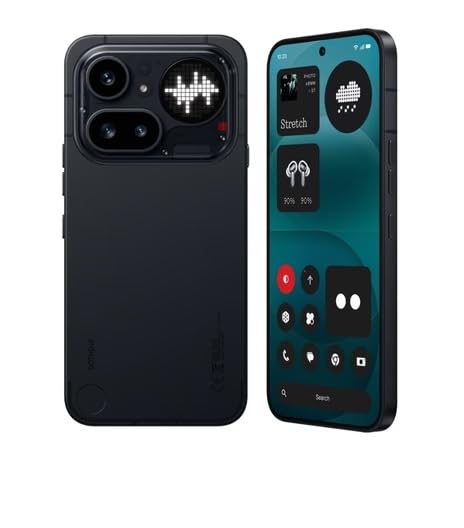
Слика 3.1: Задња страна View of Nothing Phone (4a) Pro. This image displays the back of the device, highlighting the dual camera system, LED flash, and the unique Glyph Interface. The Nothing brand logo is visible at the bottom.

Слика 3.2: Предња и бочна страна View of Nothing Phone (4a) Pro. This image shows the device from the front and a slight angle, revealing the display with its punch-hole camera, and the power and volume buttons located on the sides.
3.1. Предњи панел
- Приказ: AMOLED screen for visual output and touch interaction.
- Предња камера: За селфије и видео позиве.
- Слушалица: For audio during calls.
3.2. Задња плоча
- Главни модул камере: Contains primary and secondary cameras.
- ЛЕД блиц: Provides illumination for photos and as a flashlight.
- Глиф интерфејс: Unique LED lighting system for notifications and alerts.
3.3. Side Panels
- Дугме за напајање: Налази се на десној страни, користи се за укључивање/искључивање и закључавање/откључавање екрана.
- Дугмад за јачину звука: Located on the left side, used to adjust media and call volume.
- Лежиште за СИМ картицу: Located on the left side, for inserting SIM cards.
3.4. Top and Bottom Panels
- УСБ Типе-Ц порт: Налази се на дну, за пуњење и пренос података.
- микрофон: For voice input during calls and recordings.
- говорник: За аудио излаз.
4. Подешавање
4.1. Уметање СИМ картице
- Пронађите лежиште за СИМ картицу на левој страни уређаја.
- Уметните алат за избацивање СИМ картице у мали отвор поред лежишта и чврсто притисните док лежиште не искочи.
- Поставите Nano-SIM картицу(е) у лежиште са златним контактима окренутим надоле. Обезбедите правилну оријентацију.
- Пажљиво вратите лежиште у отвор док не кликне на своје место.
4.2. Прво укључивање
- Притисните и држите Дугме за напајање on the right side of the device until the Nothing logo appears on the screen.
- Пратите упутства на екрану да бисте изабрали језик, повезали се са Wi-Fi мрежом и подесили свој Google налог.
4.3. Пуњење батерије
Before first use, it is recommended to fully charge the device. Connect the USB Type-C cable to the phone's charging port and the other end to a compatible power adapter (sold separately) or a computer's USB port.
5. Управљање вашим уређајем
5.1. Укључивање/искључивање и поновно покретање
- Укључено: Press and hold the Power Button until the device vibrates and the Nothing logo appears.
- Искључивање: Press and hold the Power Button, then tap "Power off" on the screen.
- Поново покрени: Press and hold the Power Button, then tap "Restart" on the screen.
5.2. Основна навигација
- Додирните: Touch the screen once to open apps, select items, or press buttons.
- Превуците: Превуците прстом преко екрана да бисте се померали, мењали екране или одбацили обавештења.
- Прстохват: Користите два прста да бисте увећали или умањили фотографије и web странице.
5.3. Позивање
- Отворите Телефон апп.
- Унесите број телефона помоћу тастатуре или изаберите контакт.
- Додирните Цалл икону да бисте започели позив.
5.4. Коришћење камере
- Отворите Камера апп.
- Кадрирајте свој снимак.
- Додирните Затварач дугме за снимање фотографије или Рецорд дугме за покретање/заустављање снимања видеа.
5.5. Повезивање
- Ви-Фи: Иди на Подешавања > Мрежа и интернет > Wi-Fi да бисте се повезали са доступним мрежама.
- Блуетоотх: Иди на Подешавања > Повезани уређаји > Блутут да бисте се упарили са другим Bluetooth уређајима.
- Мобилни подаци: Иди на Подешавања > Мрежа и интернет > Мобилна мрежа to manage cellular data usage.
6. Одржавање
6.1. Чишћење уређаја
Користите меку крпу која не оставља влакна да бисте очистили екран и кућиште телефона. Избегавајте употребу јаких хемикалија или абразивних материјала.
6.2. Ажурирања софтвера
Редовно проверавајте и инсталирајте ажурирања софтвера како бисте осигурали оптималне перформансе и безбедност. Идите на Подешавања > Систем > Ажурирање система.
6.3. Брига о батерији
To prolong battery life, avoid extreme temperatures and do not let the battery completely drain frequently. Use only approved chargers and cables.
КСНУМКС. Решавање проблема
If you encounter issues with your Nothing Phone (4a) Pro, try the following solutions:
- Уређај се не укључује: Уверите се да је батерија напуњена. Повежите је са пуњачем најмање 15 минута, а затим покушајте да је укључите.
- Апликације се руше или замрзавају: Close and reopen the app. If the issue persists, restart your phone.
- Слаб мрежни сигнал: Check your SIM card insertion. Move to an area with better network coverage.
- Батерија се брзо празни: Смањите осветљеност екрана, затворите некоришћене апликације и онемогућите непотребне функције попут GPS-а или Bluetooth-а када их не користите.
- Екран осетљив на додир не реагује: Restart the device. If the problem continues, contact support.
8. Спецификације
| Феатуре | Детаљ |
|---|---|
| Бранд | Ништа |
| Модел | Phone (4a) Pro |
| Оперативни систем | Андроид 14 |
| РАМ меморија | 8 ГБ |
| Интерна меморија | 128 GB (Flash Memory Supported Size Maximum) |
| ЦПУ модел | G4 |
| Брзина процесора | 2.5 ГХз |
| Боја | Црно |
| Тип конектора | USB Type C (USB 2.0) |
| Капацитет батерије | 5000 Милиamp Hours (Lithium-Ion) |
| Тежина артикла | 250 грама |
| Димензије артикла | 16.4 к 7.8 к 0.8 центиметара |
| Дисплаи Типе | АМОЛЕД |
| Максимална резолуција екрана | 1920 к 1080 |
| Целлулар Тецхнологи | 5G |
| Бежична мрежна технологија | ЛТЕ |
9. Гаранција и подршка
9.1. Информације о гаранцији
Your Nothing Phone (4a) Pro comes with a 1 година manufacturer's warranty from the date of purchase. This warranty covers manufacturing defects under normal use conditions. Please retain your proof of purchase for warranty claims.
For detailed warranty terms and conditions, please refer to the warranty card included in your package or visit the official Nothing webсајту.
9.2. Корисничка подршка
If you require technical assistance, have questions about your device, or need to report an issue, please contact Nothing customer support.
- Подршка на мрежи: Visit the official Nothing support webсајт за често постављана питања, водиче за решавање проблема и опције за контакт.
- Сервисни центри: Information on authorized service centers can be found on the Nothing webсајту.
Manufacturer: Nothing
Packer/Importer Contact Information: Essentially Nothing


