
1. Увод
This manual provides essential information for setting up, operating, maintaining, and troubleshooting your FIREBAT U6B 16-inch QHD Laptop. Please read this guide thoroughly to ensure optimal performance and longevity of your device.
2. Производ је готовview
The FIREBAT U6B is a high-performance 16-inch laptop designed for various computing needs. It features a lightweight metal chassis and a vibrant QHD display.

Слика 2.1: Предња страна view of the FIREBAT U6B laptop.

Слика 2.2: Завршеноview of the FIREBAT U6B Ultrabook's main features.
2.1. Портови и конектори
The laptop is equipped with a variety of ports for connectivity:
- лева страна: USB-A 3.2 Gen2 (10Gbps) x 1, USB-C 3.2 Gen2 (10Gbps) x 1 (with DP1.4 video output and 100W PD), HDMI 2.1 TMDS x 1
- Десна страна: Kensington Security Lock x 1, 3.5mm 2-in-1 Combo Audio Jack x 1, USB-A 2.0 x 1, TF Card Slot x 1, USB-A 3.2 Gen1 (5Gbps) x 1, USB-C 3.2 Gen1 (5Gbps) x 1 (with DP1.4 video output and 100W PD)
Слика 2.3: Детаљно view of the laptop's ports and their functions.
3. Подешавање
3.1. Распакивање и први преглед
- Carefully remove the laptop and accessories from the packaging.
- Прегледајте лаптоп да ли има физичких оштећења.
- Ensure all included accessories (power adapter, manual) are present.
3.2. Повезивање адаптера за напајање
Connect the provided 100W GaN power adapter to the USB-C port on the laptop and then to a power outlet. It is recommended to fully charge the battery before first use.
3.3. Прво покретање и подешавање оперативног система
Press the dedicated power button to turn on the laptop. Follow the on-screen instructions to complete the Windows 11 initial setup, including language, network connection, and user account creation.
4. Упутство за употребу
4.1. Укључивање/искључивање
- Укључено: Press the dedicated power button located on the keyboard.
- Искључивање: Кликните на дугме Старт у оперативном систему Windows, а затим изаберите Напајање > Искључи.
- Режим спавања: Затворите поклопац лаптопа или кликните на дугме Старт у оперативном систему Windows, а затим изаберите Напајање > Спавање.
4.2. Тастатура и тачпед
The laptop features a full-size backlit keyboard and a high-precision touchpad.
- Тастатура са позадинским осветљењем: Use the dedicated function key (usually Fn + a specific F-key) to adjust the backlight brightness or turn it on/off.
- Тоуцхпад: Supports multi-touch gestures for navigation and control. Refer to Windows settings for customization.

Figure 4.1: The backlit keyboard and touchpad.
4.3. Режими перформанси
You can switch between different performance modes by pressing Фн + К to optimize for battery life or performance:
- Еко режим: Maximizes battery life by reducing power consumption. Ideal for light tasks and extended use.
- Режим равнотеже: Offers a balance between performance and power efficiency. Suitable for everyday tasks.
- Режим високих перформанси: Provides maximum power for demanding applications and gaming.

Figure 4.2: Switching between performance modes using Fn+Q.
5. Карактеристике перформанси
5.1. Процесор
The FIREBAT U6B is powered by a robust AMD Ryzen 5 6600H processor, featuring 6 cores and 12 threads, with a maximum boost clock of 4.5GHz. This ZEN 3+ architecture-based CPU delivers strong performance for multitasking, productivity, and entertainment.

Figure 5.1: AMD Ryzen 5 6600H processor specifications.
5.2. Graphics
Интегрисано AMD Radeon 660M графика with 1900MHz clock speed handle visual tasks, supporting complex design software, UHD video editing, and casual gaming.
5.3. Дисплеј
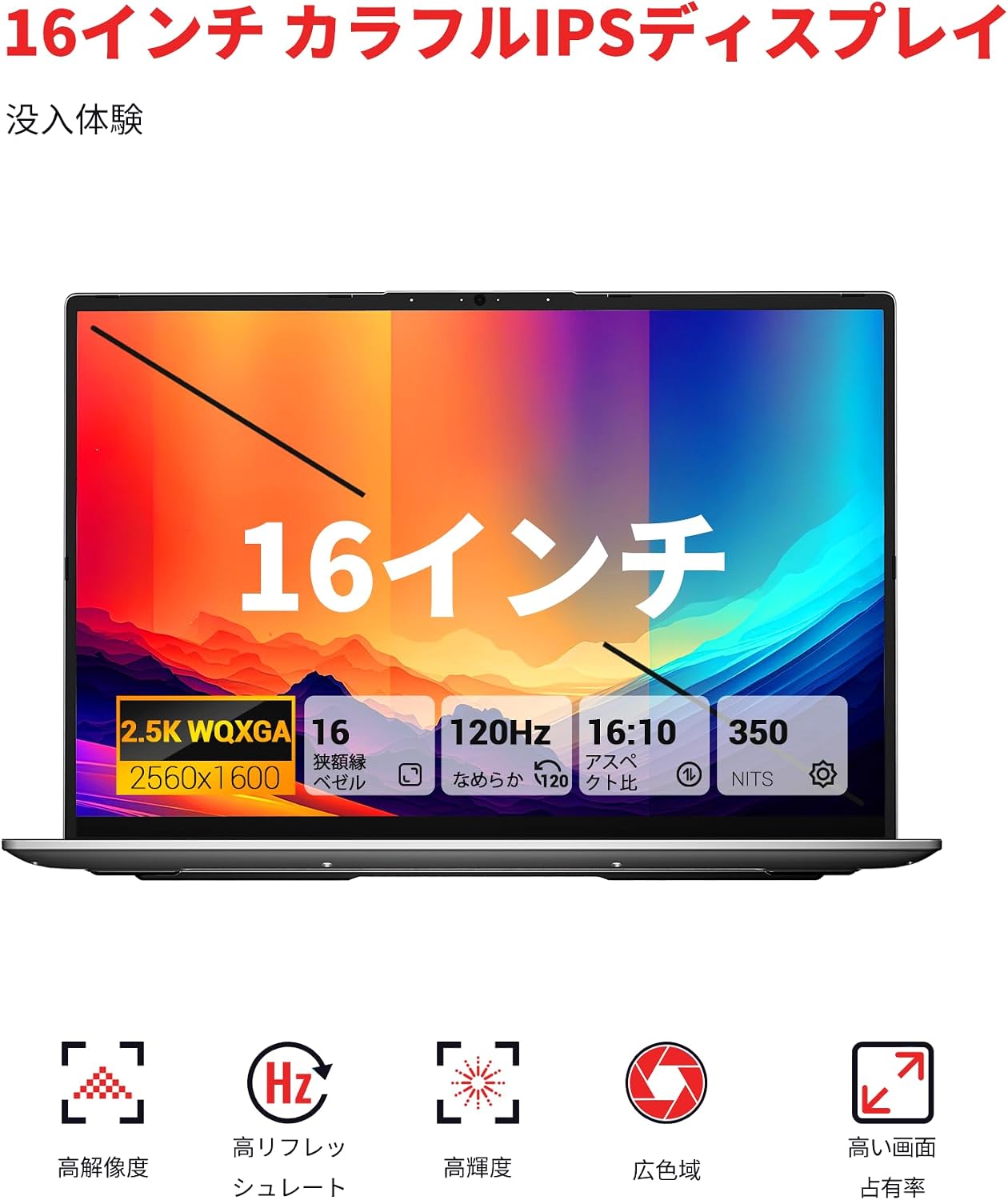
Experience superior visuals on the 16-inch QHD+ (2560x1600) IPS display. It offers a smooth 120Hz refresh rate and 100% sRGB color accuracy for vivid and detailed images.

Figure 5.2: Key display features for an immersive visual experience.

Figure 5.3: The 16:10 aspect ratio and 2560x1600 high resolution.
5.4. Систем за хлађење
The laptop incorporates an efficient cooling system with dual fans and dual heat pipes. This design maintains stable temperatures and minimizes noise, ensuring quiet operation even under load.
6. Складиштење и меморија
The FIREBAT U6B is equipped with high-speed memory and expandable storage:
- РАМ: 16GB LPDDR5 6400MHz RAM provides instant responsiveness for applications.
- Складиштење: A 512GB PCIe 3.0 SSD is pre-installed. The laptop features dual M.2 2280 NVMe PCIe 4.0 slots, allowing for easy storage upgrades.

Figure 6.1: High-speed memory and expandable storage options.
7. Повезивање
Останите повезани помоћу следећих функција:
- бежични: Wi-Fi 6 (802.11ax) for fast and stable internet, and Bluetooth 5.2 for connecting peripherals.
- Жичани портови: As detailed in Section 2.1, including HDMI 2.1 and dual USB-C ports with DisplayPort and Power Delivery capabilities.
- Подршка за више монитора: The laptop supports connecting up to three external monitors simultaneously via HDMI 2.1 and the two USB-C (DP) ports.

Figure 7.1: Connecting up to three external monitors for expanded workspace.
8. Управљање напајањем
The FIREBAT U6B is designed for portability and efficient power usage:
- батерија: Equipped with a 58Wh (5050mAh) lithium-ion battery.
- Пуњење: Comes with a compact 100W GaN fast charger for quick power replenishment.
- Режими напајања: Utilize the Eco, Balance, and High Performance modes (Fn+Q) to manage power consumption according to your needs.

Figure 8.1: Battery capacity information.
9. Одржавање
Regular maintenance helps prolong the life and performance of your laptop:
- Чишћење: Gently wipe the screen with a microfiber cloth. Use a soft brush or compressed air to clean the keyboard and ventilation grilles. Avoid harsh chemicals.
- Ажурирања софтвера: Keep your Windows operating system and device drivers updated to ensure security and optimal performance.
- Управљање складиштем: Периодично бришите непотребне files and empty the recycle bin to free up storage space.
- Одржавање батерије: Избегавајте често потпуно пражњење батерије. За дуготрајно складиштење, напуните батерију на око 50-60%.
КСНУМКС. Решавање проблема
Овај одељак се бави уобичајеним проблемима на које можете наићи:
| Проблем | Могуће решење |
|---|---|
| Лаптоп се не укључује. | Уверите се да је адаптер за напајање безбедно повезан и да је батерија напуњена. Покушајте са другом утичницом. |
| Екран је празан или трепери. | Check display settings in Windows. If using an external monitor, ensure cables are connected correctly. Try updating graphics drivers. |
| Перформансе система су споре. | Close unnecessary applications. Check for background processes. Ensure the cooling vents are not obstructed. Switch to High Performance mode (Fn+Q). |
| Wi-Fi or Bluetooth not working. | Toggle Wi-Fi/Bluetooth on/off in Windows settings. Restart the laptop. Update wireless drivers. |
| Позадинско осветљење тастатуре не ради. | Press the dedicated function key (e.g., Fn + F-key) to activate or adjust the backlight. |
11. Спецификације
| Феатуре | Детаљ |
|---|---|
| Бранд | ФИРЕБАТ |
| Назив модела | У6Б |
| Величина екрана | 16 инча |
| Боја | Греи |
| Хард диск капацитета | 512 ГБ |
| ЦПУ модел | Ryzen 5 (6600H) |
| Величина инсталиране РАМ меморије | 16 GB LPDDR5 6400MHz |
| Оперативни систем | Виндовс 11 |
| Посебне карактеристике | HD Audio, Backlit Keyboard, Lightweight |
| Опис графичке картице | Integrated (AMD Radeon 660M) |
| Тежина производа | 1.7 килограма |
| Димензије производа (ДкШкВ) | 36 к 25 к 1.9 цм |
| Display Max Resolution | 2560x1600 пиксела |
| Рефресх Рате | 120 Хз |
| Гамут боја | 100% сРГБ |
| Бежична комуникација | Блутут 5.2, Ви-Фи 6 (802.11ax) |
| УСБ портови | 5 (including USB-C with DP/PD) |
| ХДМИ портови | 1 (ХДМИ 2.1) |
| М.2 Слотс | 2 (NVMe PCIe 4.0) |
| Тип батерије | Lithium Metal (58.33 Wh) |
| Укључене компоненте | Laptop x1, Power Adapter x1 |
12. Гаранција и подршка
Your FIREBAT U6B laptop comes with a 12-месечна гаранција од дана куповине.
For technical support, warranty claims, or any inquiries, please contact us:
- Емаил: support@firebatpc.com
- Webсајт: www.firebatpc.com
Please have your product model (U6B) and purchase information ready when contacting support.