
1. Увод
Хвала вам на куповиниasing the Audizio Laredo Bluetooth Turntable. This manual provides essential information for the safe and correct operation of your device. Please read it thoroughly before use and keep it for future reference.
Кључне карактеристике:
- Integrated HiFi speakers with 160W total power output.
- Bidirectional Bluetooth for wireless audio streaming (in and out).
- High-quality Audio Technica cartridge for precise playback.
- Supports 7, 10, and 12-inch vinyl records at 33 and 45 RPM.
- Adjustable counterweight on the aluminum tonearm.
- RCA Line Out for external ampлифиер/звучници.
- AUX Input for connecting external audio sources.
- Elegant bamboo finish.
Шта је у кутији:
- Audizio Laredo Turntable Unit
- Упутство за употребу
- Повер Адаптер
- 45 RPM Adapter for singles
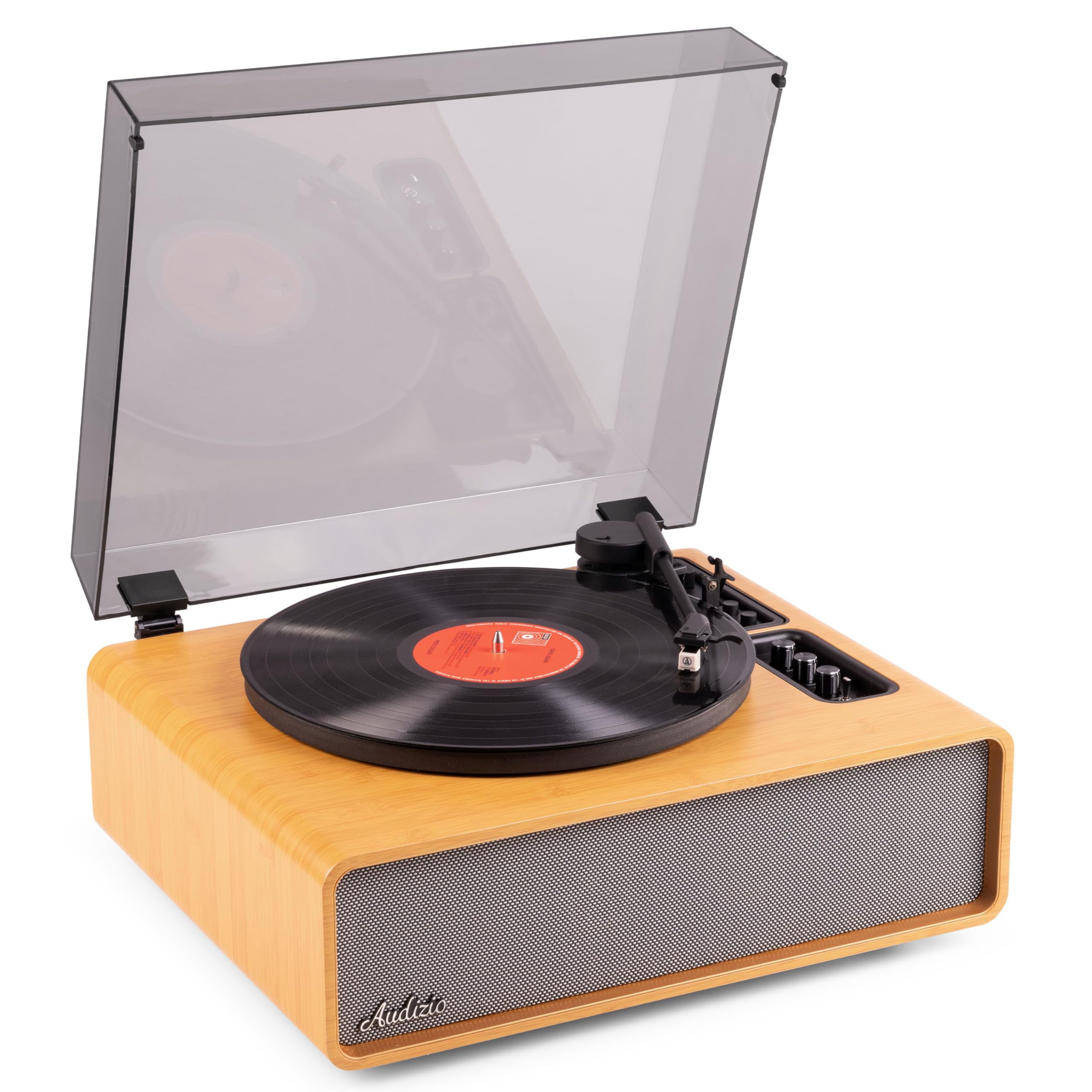
Figure 1.1: Audizio Laredo Turntable, overall view.
2. Безбедносна упутства
Please read and follow these safety instructions carefully to prevent damage to the unit and ensure your safety.
- Не излажите уређај киши или влази како бисте спречили пожар или струјни удар.
- Не отварајте цasinг. Унутра нема делова које корисник може сам да поправи. Сво сервисирање препустите квалификованом особљу.
- Place the unit on a stable, level surface to prevent it from falling.
- Држите уређај даље од директне сунчеве светлости, извора топлоте и прекомерне прашине.
- Обезбедите одговарајућу вентилацију око уређаја. Не блокирајте вентилационе отворе.
- Користите само испоручени адаптер за напајање.
- Искључите јединицу из струје током олуја са грмљавином или када се не користи дуже време.
3. Производ је готовview
Familiarize yourself with the components and controls of your Audizio Laredo turntable.
Главне компоненте:
- тањир: Supports the vinyl record.
- Тонеарм: Држи кертриџ и оловку.
- Кертриџ и оловка: Reads the grooves of the record. (Audio Technica ATN-3600)
- Поклопац за прашину: Protects the platter and tonearm from dust.
- Интегрисани звучници: За директно репродуковање звука.
- Контролна табла: For power, volume, tone, and mode selection.
- Задњи прикључци: RCA Line Out, AUX In, Power Input.

Слика 3.1: Врх view of the turntable with key components visible.

Figure 3.2: Control Panel for volume, bass, and treble adjustments.

Figure 3.3: Audio Technica ATN-3600 Cartridge and Stylus.

Figure 3.4: Tonearm base with speed and auto-stop controls.

Figure 3.5: Rear connection panel.
4. Подешавање
4.1 Распакивање
- Пажљиво извадите грамофон из паковања.
- Remove all protective materials, including the stylus guard.
- Сачувајте амбалажу за будући транспорт или складиштење.
4.2 Постављање
- Place the turntable on a stable, level surface to prevent vibrations and ensure proper playback.
- Avoid placing the unit near strong magnetic fields, heat sources, or areas with high humidity.
4.3 Dust Cover Installation
- Align the hinges of the dust cover with the slots on the back of the turntable.
- Gently push down until the cover is securely in place.
- The dust cover can be removed for playback if desired.

Figure 4.1: Turntable with dust cover.
4.4 Прикључак за напајање
- Connect the power adapter to the DC IN port on the rear of the turntable.
- Plug the adapter into a suitable wall outlet (220V).
4.5 Подешавање ручице и кертриџа
- The Audio Technica cartridge is pre-installed.
- The tonearm features an adjustable counterweight. Refer to the detailed instructions in the included manual for precise counterweight adjustment to optimize tracking force.
5. Упутство за употребу
5.1 Пуштање плоче
- Place a vinyl record on the platter. If playing a 7-inch single, use the included 45 RPM adapter.
- Select the appropriate speed (33 or 45 RPM) using the speed selector switch near the tonearm base.
- Пажљиво подигните ручицу грамофона помоћу полуге за подешавање звука.
- Position the tonearm over the desired track of the record.
- Полако спустите ручицу грамофона користећи полугу за подешавање звука. Игла ће доћи у контакт са плочом и репродукција ће почети.
- На крају плоче, функција аутоматског заустављања ће аутоматски зауставити ротацију плоче. Подигните ручицу грамофона и вратите је у положај за одмор.

Figure 5.1: Playing a vinyl record.
5.2 Bluetooth Operation (Bidirectional)
The Laredo turntable supports both Bluetooth input (receiving audio from a device) and Bluetooth output (sending audio to a Bluetooth speaker/headphones).
Bluetooth Input (BT IN):
- Press the MODE/POWER button to select Bluetooth mode. The LED indicator will flash.
- On your smartphone or tablet, enable Bluetooth and search for 'Audizio Laredo'.
- Select the turntable to pair. Once connected, the LED will glow solid.
- You can now stream audio from your device to the turntable's integrated speakers.
Bluetooth Output (BT OUT):
- Уверите се да су ваше Bluetooth слушалице или звучник у режиму упаривања.
- Set the BT OUT switch (located near the tonearm base) to 'ON'.
- The turntable will automatically search for and connect to the nearest Bluetooth audio device.
- Once connected, the audio from your vinyl record will be transmitted to your Bluetooth device.

Figure 5.2: Bidirectional Bluetooth functionality.
5.3 АУКС улаз
- Connect an external audio device (e.g., MP3 player, CD player) to the AUX IN port on the rear of the turntable using a 3.5mm audio cable.
- Press the MODE/POWER button to select AUX mode.
- Audio from the external device will play through the turntable's speakers.
5.4 RCA Line Out
- To connect the turntable to an external amplifier or powered speakers, use an RCA cable (not included) to connect the LINE OUT ports on the rear of the turntable to the corresponding input on your audio system.
- Ensure the 'Speaker ON/OFF' switch on the rear is set to 'OFF' if you only want sound from external speakers.
5.5 Контрола јачине звука и тона
- Use the VOLUME knob on the control panel to adjust the overall playback volume.
- Adjust the BASS and TREBLE knobs to fine-tune the audio output to your preference.
6. Одржавање
6.1 Чишћење јединице
- Wipe the dust cover and cabinet with a soft, dry cloth.
- Не користите абразивна средства за чишћење, воскове или раствараче.
- For the platter, use a slightly damp крпом и добро осушите.
6.2 Одржавање и замена оловке
- Оловка је осетљива компонента. Пажљиво рукујте њоме.
- Clean the stylus regularly using a soft brush designed for stylus cleaning, brushing from back to front.
- A stylus typically lasts for approximately 300-500 hours of playback. If you notice a decrease in sound quality or increased skipping, it may be time to replace the stylus.
- Replacement styli (e.g., Audio Technica ATN-3600L or compatible) can be purchased from authorized dealers. Refer to the detailed instructions provided with the replacement stylus for installation.
КСНУМКС. Решавање проблема
If you encounter issues with your turntable, please consult the following table before contacting support.
| Проблем | Могући узрок | Решење |
|---|---|---|
| Нема струје | Power adapter not connected; Power outlet not working. | Ensure power adapter is securely connected to the unit and a working outlet. |
| Нема звука из звучника | Volume too low; Speaker ON/OFF switch is OFF; Incorrect mode selected. | Increase volume; Set 'Speaker ON/OFF' switch to ON; Select correct input mode (Phono, BT IN, AUX). |
| Skipping records | Record is dirty or damaged; Stylus is worn or dirty; Turntable not level; Tracking force incorrect. | Clean record; Clean or replace stylus; Place turntable on a level surface; Adjust tonearm counterweight. |
| Проблеми са Блуетоотх упаривањем | Device too far; Turntable not in pairing mode; Interference. | Ensure devices are within range; Re-enter pairing mode; Turn off other Bluetooth devices. |
| Изобличење звука | Volume too high; Stylus worn; Record damaged. | Reduce volume; Replace stylus; Try a different record. |
8. Спецификације
Technical specifications for the Audizio Laredo Turntable.
| Феатуре | Спецификација |
|---|---|
| Назив модела | Laredo (101.537) |
| Димензије (Д к Ш к В) | КСНУМКС к КСНУМКС к КСНУМКС цм (КСНУМКС к КСНУМКС к КСНУМКС инча) |
| Тежина производа | 7.65 кг (16.86 лбс) |
| Материјал | Wood (Bamboo finish) |
| Брзине ротације | 33 РПМ, 45 РПМ |
| Цартридге Типе | Audio Technica (ATN-3600) |
| Тип мотора | Појас погон |
| Формат сигнала | Аналог |
| Интегрисани звучници | Yes, 160W total output |
| Блуетоотх верзија | 5.4 (Bidirectional) |
| Повезивање | Bluetooth (In/Out), RCA Line Out, AUX In |
| Извор напајања | Виред Елецтриц |
| Волtage | 220 Волтс |
| Компатибилни уређаји | Speakers, Headphones, Smartphone, Tablet |
9. Гаранција и подршка
9.1 Информације о гаранцији
This Audizio Laredo Turntable comes with a 2 година гаранције from the date of purchase. This warranty covers manufacturing defects and faults under normal use. It does not cover damage caused by misuse, accidents, unauthorized modifications, or normal wear and tear (e.g., stylus wear).
Сачувајте доказ о куповини за гаранцијске захтеве.
9.2 Корисничка подршка
If you have any questions, require technical assistance, or need to make a warranty claim, please contact your retailer or visit the official Audizio webсајт за ресурсе подршке и контакт информације.
Official Audizio Webсајт: ввв.аудизио.цом