
1. Увод
This manual provides essential information for the safe and efficient operation, setup, and maintenance of your ACMER Ascarva 3 S 500W CNC Milling Machine. This machine is designed for precise machining on various materials including wood, acrylic, plastic, and soft metals, offering both intricate engraving and efficient cutting capabilities.
2. Безбедносна упутства
Always prioritize safety when operating the CNC machine. Failure to follow safety guidelines can result in injury or damage to the equipment.
- Уверите се да је радни простор чист, добро осветљен и без препрека.
- Носите одговарајућу личну заштитну опрему (ЛЗО), укључујући заштитне наочаре, заштиту за уши и рукавице.
- Никада немојте руковати машином под утицајем дрога или алкохола.
- Држите руке и широку одећу даље од покретних делова.
- The machine is equipped with an emergency stop button. Familiarize yourself with its location and use it immediately in case of any unexpected operation or hazard.
- Six limit switches are installed for safe operation. Do not bypass or disable these safety features.
- Увек искључите напајање пре него што извршите одржавање или подешавања.
- Ensure proper ventilation when working with materials that produce dust or fumes.
3. Садржај пакета
Пре почетка монтаже проверите да ли су све доле наведене компоненте присутне у вашем паковању.

This image displays all components included in the ACMER Ascarva 3 S CNC Milling Machine package.
- Bolt Driver (1 pc)
- Brush (1 pc)
- Control Board (1 pc)
- Упутство за монтажу
- Instructions for using the toolbox
- Проfile Channel Seal
- Power Line (1 pc)
- Зип Тиес
- Прекидач за хитно заустављање
- Fixture (machining)
- 1/8-inch Engraving Knife
- ЕР11 Цоллет
- УСБ кабл
- Limit Wire
- Мотор Вирес
- Braided Tube Motor Wire
- Spindle Wire
- Power Supply (1 pc)
- Spindle Motor (1 pc)
- Steel Ruler (1 pc)
- Tool Setting Instrument (1 pc)
- XZ-axis Module (1 pc)
- Y-axis Module (1 pc)
4. Подешавање и монтажа
The ACMER Ascarva 3 S features a modular design for straightforward assembly. Refer to the included assembly instructions for detailed, step-by-step guidance.
4.1 Почетна монтажа
- Распакујте све компоненте и проверите садржај паковања у односу на листу.
- Assemble the main frame components, ensuring all screws are securely tightened. The reinforced aluminum alloy panels and extrusions provide a stable base.
- Install the XZ-axis and Y-axis modules according to the instructions.
- Mount the 500W spindle motor and connect its wiring.
- Connect all motor wires, limit switches, and the emergency stop switch to the control board.
- Attach the power supply and power line.
4.2 Повезивање са рачунаром
The CNC machine connects to your computer via USB. It is compatible with Windows, macOS, and Linux operating systems.
- Connect the USB cable from the control board to your computer.
- Инсталирајте потребне драјвере ако вас то затражи оперативни систем.
- Install a compatible CNC control software such as Candle, Universal G-code Sender (UGS), or Easel.
5. Упутство за употребу
This section outlines the basic steps for operating your ACMER Ascarva 3 S CNC Milling Machine.
5.1 Машина је завршенаview
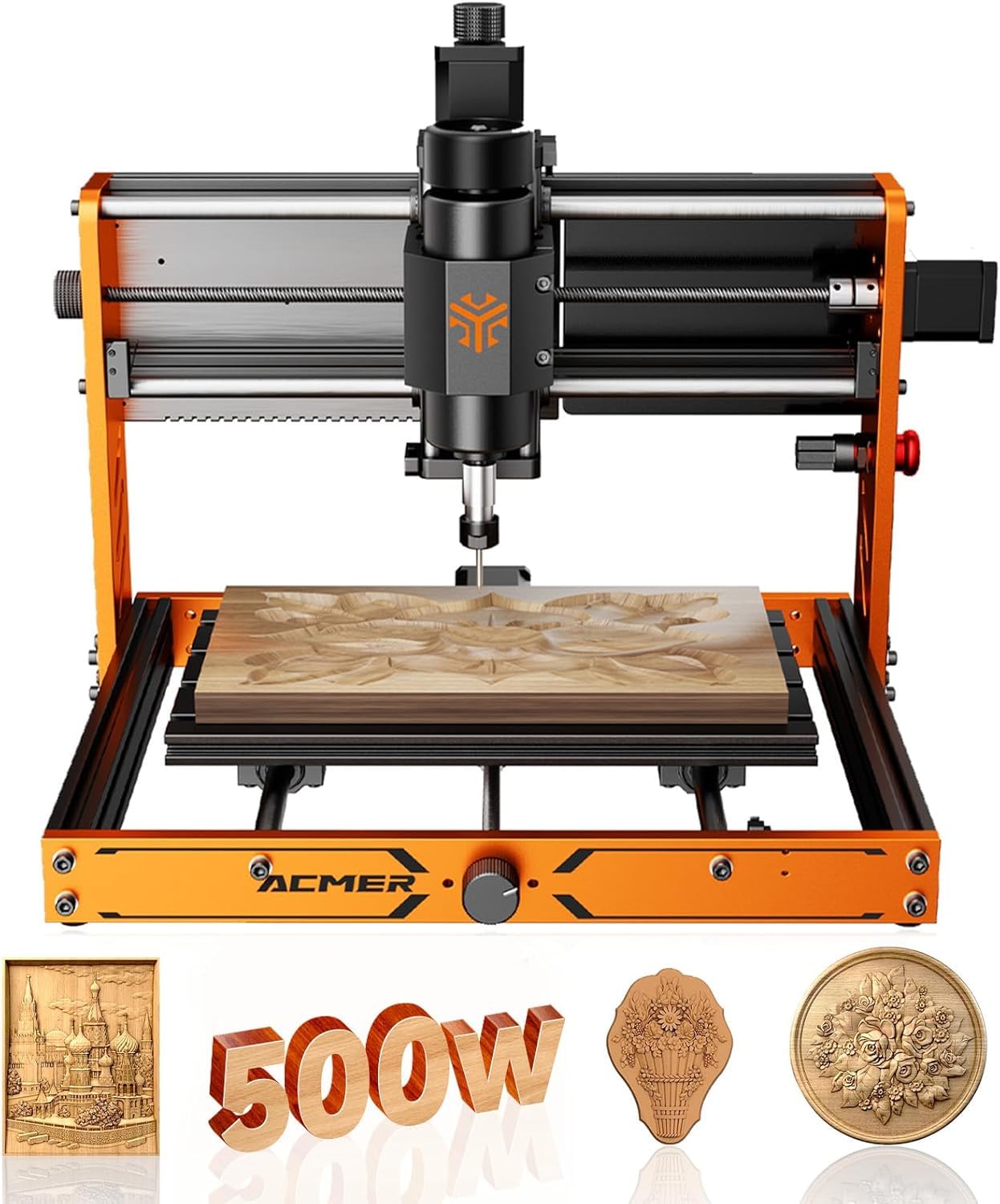
Ова слика пружа детаљан view of the ACMER Ascarva 3 S CNC machine, highlighting its full metal body structure and key dimensions, including the working area of 300mm x 180mm x 78mm.
The machine features a working area of 300 × 180 × 78 mm (11.81” x 7.09” x 3.07”). Its robust aluminum frame provides superior rigidity and stability for various projects.

This image provides a close-up of the ACMER Ascarva 3 S CNC machine's spindle motor, highlighting the 500W spindle motor (0-12000 RPM) and the hand knob for manual adjustments, emphasizing its high accuracy and stability.
The 500W (48V) high-speed DC spindle motor can reach up to 12,000 RPM, providing strong cutting performance. The ER11 collet ensures secure tool holding.

This image details the Z-axis travel of the ACMER Ascarva 3 S CNC machine, indicating a travel distance of 80mm (3.15 inches) and illustrating the maximum pass height for materials.
5.2 Software and File Компатибилност

This image illustrates the ACMER Ascarva 3 S CNC machine connected to a laptop running compatible control software, demonstrating its broad compatibility with Windows, macOS, and Linux systems and various GRBL-compatible software.
The machine is powered by an ESP32 mainboard and supports popular GRBL-compatible software such as Candle, Universal G-code Sender (UGS), and Easel. It works with standard file formats like .nc and .gcode. The intuitive multilingual interface simplifies operation.
5.3 Material Processing

This image demonstrates the ACMER Ascarva 3 S CNC machine's versatility by showing examples of its capability to cut and engrave various materials such as acrylic, wood, PCB, and soft aluminum.
The ACMER Ascarva 3 S is capable of machining a wide range of materials, including:
- Wood (e.g., plywood, density board)
- Plastics (e.g., acrylic, nylon)
- Soft Metals (e.g., aluminum)
- МДФ
- ПЦ плоца

This image shows the ACMER Ascarva 3 S CNC machine actively engraving a wooden piece, illustrating its engraving speed of 2000 mm/min and movement speed of 5000 mm/min.
The machine offers an engraving speed of 2000 mm/min and a movement speed of 5000 mm/min.
5.4 Parameter Reference Table
Use the following table as a reference for recommended cutting and engraving settings for various materials. These are starting points and may require adjustment based on specific material properties and desired finish.
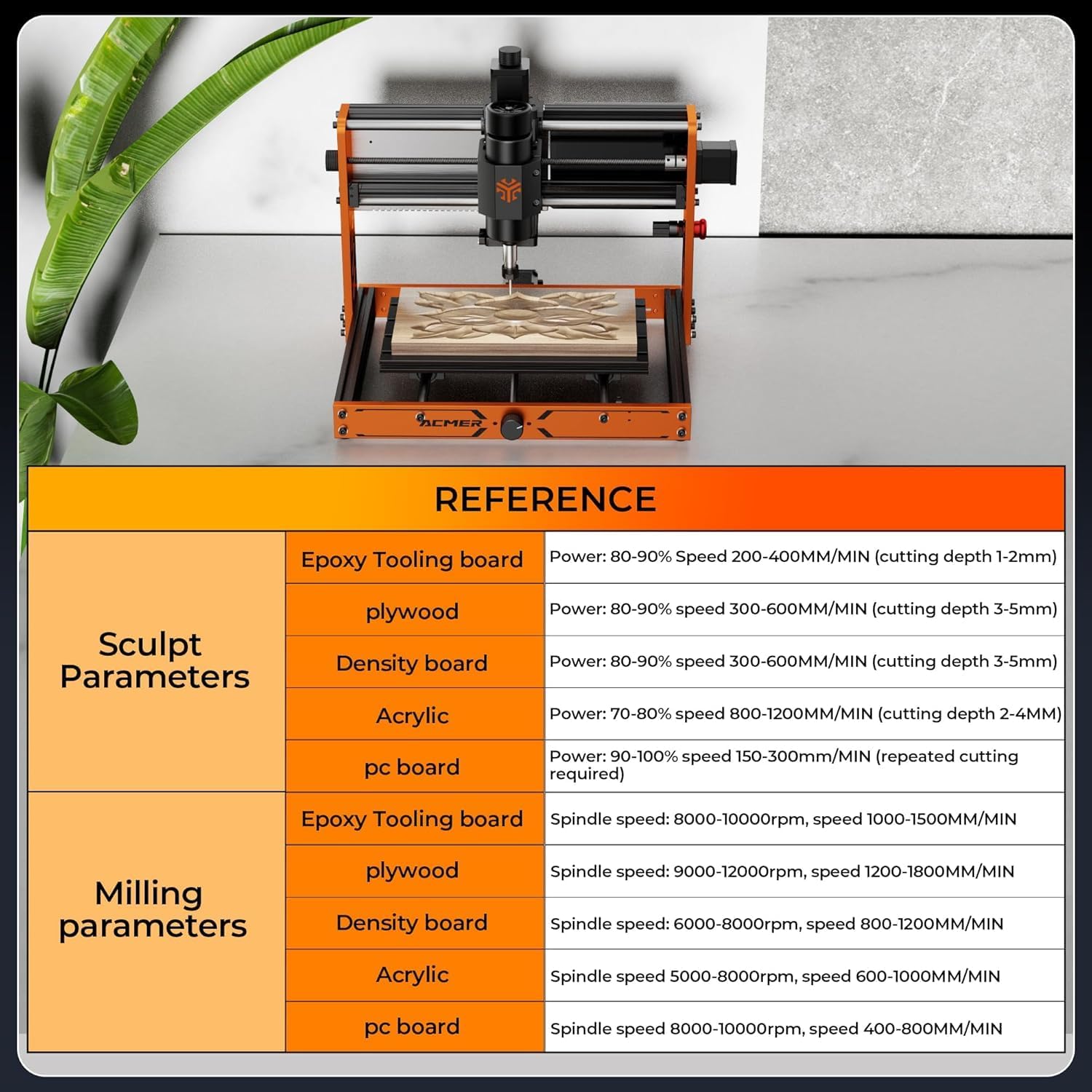
This image presents a reference table with recommended sculpt and milling parameters for various materials, including Epoxy Tooling board, plywood, density board, acrylic, and PC board, detailing power/spindle speed and cutting depth/feed rates.
| Категорија | Материјал | Препоручена подешавања |
|---|---|---|
| Sculpt Parameters | Epoxy Tooling board | Power: 80-90% Speed 200-400MM/MIN (cutting depth 1-2mm) |
| Шперплоча | Power: 80-90% Speed 300-600MM/MIN (cutting depth 3-5mm) | |
| Плоча за густину | Power: 80-90% Speed 300-600MM/MIN (cutting depth 3-5mm) | |
| Акрил | Power: 70-80% Speed 800-1200MM/MIN (cutting depth 2-4MM) | |
| ПЦ плоча | Power: 90-100% Speed 150-300MM/MIN (repeated cutting required) | |
| Milling Parameters | Epoxy Tooling board | Spindle speed: 8000-10000rpm, speed 1000-1500MM/MIN |
| Шперплоча | Spindle speed: 9000-12000rpm, speed 1200-1800MM/MIN | |
| Плоча за густину | Spindle speed: 6000-8000rpm, speed 800-1200MM/MIN | |
| Акрил | Spindle speed 5000-8000rpm, speed 600-1000MM/MIN | |
| ПЦ плоча | Spindle speed 8000-10000rpm, speed 400-800MM/MIN |
5.5 Калибрација алата
A dedicated tool setter is provided to make tool calibration quick and accurate. Follow the instructions in your software or the included assembly guide for proper tool length setting.
6. Одржавање
Редовно одржавање осигурава дуготрајност и оптималне перформансе ваше ЦНЦ машине.
- Чишћење: After each use, clean the work area and machine components to remove dust, chips, and debris. Use a soft brush or compressed air. Avoid using harsh chemicals that could damage surfaces.
- подмазивање: Periodically lubricate the lead screws and linear rails according to the manufacturer's recommendations to ensure smooth movement.
- Провера веза: Regularly check all electrical connections, wires, and mechanical fasteners for tightness and wear. Tighten any loose connections and replace damaged wires.
- Spindle Care: Keep the spindle motor clean and free of obstructions. Ensure proper airflow for cooling.
- Алати: Inspect cutting tools before each use. Replace dull or damaged bits to maintain cutting quality and prevent excessive strain on the spindle.
КСНУМКС. Решавање проблема
Овај одељак се бави уобичајеним проблемима на које можете наићи и нуди могућа решења.
| Проблем | Могући узрок | Решење |
|---|---|---|
| Машина се не укључује | Power cable disconnected; Emergency stop engaged; Faulty power supply | Check power connections; Release emergency stop button; Test power supply |
| Мотори се не покрећу | Loose motor wiring; Software connection issue; Limit switch triggered | Check motor wire connections; Verify USB connection and software settings; Check and clear limit switches |
| Inaccurate cutting/engraving | Dull or incorrect tool; Incorrect feed rate/spindle speed; Loose material clamping; Mechanical play | Replace tool, ensure correct type; Adjust parameters (refer to Section 5.4); Secure material firmly; Inspect for loose belts or screws |
| Вретено се не окреће | Spindle wiring issue; Software command error; Spindle motor fault | Check spindle wire connections; Verify G-code and software settings; Contact support if motor is faulty |
| Софтвер се не повезује са машином | Incorrect COM port selected; Driver not installed; USB cable fault | Select correct COM port in software; Install necessary USB drivers; Try a different USB cable |
If you encounter issues not listed here or require further assistance, please contact ACMER customer support.
8. Спецификације
Key technical specifications for the ACMER Ascarva 3 S 500W CNC Milling Machine.
| Феатуре | Спецификација |
|---|---|
| Бранд | АЦМЕР |
| Број модела | 3S |
| Број дела произвођача | JRT-CNC 3S-0083010002-US-001 |
| Материјал | Алуминијум |
| Извор напајања | Цордед Елецтриц |
| Снага вретена | 500W (48V DC) |
| Максимална брзина ротације | 12000 РПМ |
| Working Area (X, Y, Z) | 300 × 180 × 78 mm (11.81” x 7.09” x 3.07”) |
| Repeat Positioning Accuracy | ±0.025 мм |
| Нето тежина | 11.5 кг (25.4 лбс) |
| Димензије производа (Ш x В) | 46W x 30H Centimetres (overall) |
| Контролни одбор | ЕСПКСНУМКС |
| Повезивање | УСБ |
| Компатибилан ОС | Виндовс, мацОС, Линук |
| Компатибилни софтвер | Candle, UGS, Easel (GRBL compatible) |
| File Форматс | .nc, .gcode |
9. Гаранција и подршка
For warranty information, technical support, or service inquiries, please refer to the warranty card included with your product or contact ACMER customer service directly. Ensure you have your product model number and purchase date available when contacting support.