
1. Увод
The Valeton GP-180 is a versatile digital multi-effects processor designed for guitarists. It offers advanced modeling capabilities and flexible software, making it suitable for various musical applications, whether as a standalone unit or integrated into an existing pedalboard. This manual provides essential information for setting up, operating, and maintaining your GP-180, ensuring you can fully utilize its potential as a reliable core for your signal chain.
2. Производ је готовview
The Valeton GP-180 features a robust design with intuitive controls, including footswitches, rotary knobs, and a clear display for easy navigation and parameter adjustment. The rear panel provides comprehensive connectivity options for various setups.
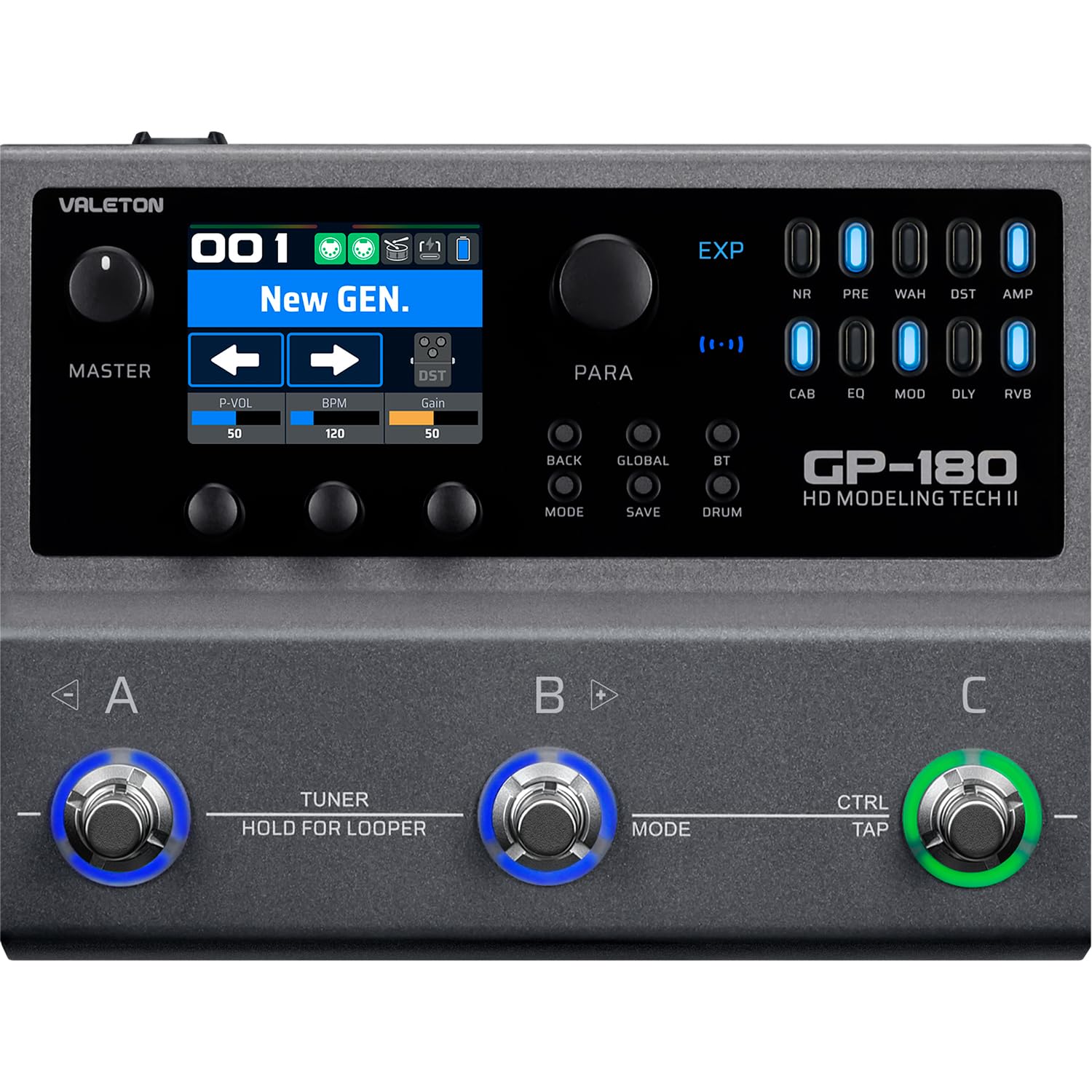
Слика 2.1: Врх view of the Valeton GP-180, highlighting the main interface with its display, rotary knobs, and three footswitches for control.

Figure 2.2: Rear panel connectivity of the GP-180, detailing the various input, output, and control ports.

Figure 2.3: The GP-180 integrated into a home studio environment, connected to headphones and a guitar.

Figure 2.4: Close-up of a user interacting with the GP-180's control knobs.

Figure 2.5: A user operating the footswitches of the GP-180 during performance.
3. Подешавање
3.1 Прикључак за напајање
Connect the included 9V DC power adapter to the POWER input on the rear panel. Ensure the adapter provides at least 1500mA of current. Use only the specified power supply to prevent damage.
3.2 Instrument and Audio Connections
- Улаз за гитару: Connect your guitar to the 'IN' jack on the rear panel.
- Аудио излаз: Connect the 'OUT' jacks (L/R Balanced) to your ampпрограмер, аудио интерфејс или миксер.
- Слушалице: For silent practice, connect headphones to the 'PHONES' jack.
- микрофон: Connect a microphone to the 'MIC' input for vocal processing or recording.
- External Expression Pedal/Footswitch: Use the 'EXP/FS' jacks to connect an external expression pedal or footswitch for additional control.
3.3 УСБ веза
Connect the GP-180 to your computer using a USB cable via the 'PD USB' port. This allows for firmware updates, software editing, and direct audio recording.
4. Упутство за употребу
4.1 Основна навигација
The GP-180 features a central display and several rotary knobs for navigating menus and adjusting parameters. The three footswitches (A, B, C) allow for preset changes, effect toggling, and other performance-oriented functions.
4.2 Footswitch Functions
- Footswitches A, B, C: These can be assigned to switch presets, toggle individual effects, or control other parameters depending on the selected mode.
- HOLD FOR LOOPER (Footswitch B): Press and hold footswitch B to activate the looper function. A short press typically engages the tuner.
- CTRL/TAP (Footswitch C): This footswitch can be used for tap tempo or as an assignable control switch.
4.3 Контролна дугмад
- НАЧИН: Switches between different operational modes (e.g., Patch Mode, Stompbox Mode).
- САЧУВАЈ: Saves your current settings as a preset.
- ГЛОБАЛ: Accesses global settings for the unit.
- БТ (Блуетоотх): Activates Bluetooth for audio streaming or app control.
- БУБАЊ: Engages the built-in drum machine for practice.
4.4 Effect Modules
The GP-180 includes a wide array of effect modules, indicated by LEDs on the right side of the display. These include:
- НР: Смањење буке
- ПРЕ: Преamp
- Вах: Вах Педал
- ДСТ: Дисторзија
- AMP: Amplifier Modeling
- ЦАБ: Cabinet Simulation
- ЕК: Еквилајзер
- МОД: Модулатион Еффецтс
- ДЛИ: Ефекти одлагања
- РВБ: Реверб Еффецтс
Use the corresponding buttons and rotary knobs to activate and adjust these effects within your signal chain.
5. Одржавање
5.1 Чишћење
За чишћење уређаја користите меку, суву крпу. Не користите абразивна средства за чишћење, воскове или раствараче. Избегавајте директно прскање течности на уређај.
5.2 Складиштење
When not in use for extended periods, store the GP-180 in a dry, cool place away from direct sunlight and extreme temperatures. Disconnect the power adapter.
5.3 Ажурирања софтвера
Periodically check the official Valeton website for firmware updates. Keeping your GP-180's software up-to-date ensures optimal performance and access to new features.
КСНУМКС. Решавање проблема
- Нема напајања: Ensure the power adapter is correctly connected and provides the specified 9V DC, 1500mA. Check the power outlet.
- Нема звука: Verify all audio cables are securely connected. Check the volume levels on the GP-180, your instrument, and your amplifier/mixer. Ensure the correct input/output settings are selected on the unit.
- Изобличен звук: Check input gain levels to avoid clipping. Ensure all cables are in good condition.
- Проблеми са УСБ повезивањем: Try a different USB port or cable. Ensure the necessary drivers (if any) are installed on your computer. Restart both the GP-180 and your computer.
- Неочекивано понашање: Perform a factory reset (refer to the full manual for instructions on how to do this, as it may vary). If issues persist, contact Valeton support.
7. Спецификације
| Феатуре | Спецификација |
|---|---|
| Бранд | ВАЛЕТОН |
| Број модела | ГП180 |
| Тежина производа | 843 грама |
| Волtage | 9 Волтс |
| Цуррент | 1500 мА |
| Хардверски интерфејс | УСБ, Блуетоотх |
| Димензије производа | 18.1 к 13.9 к 5.2 цм |
| Земља порекла | Кина |
| УПЦ | 888506830174 |
| ASIN | B0GV23QTY7 |
8. Гаранција и подршка
8.1 Информације о гаранцији
The Valeton GP-180 comes with a 1-year manufacturer's warranty. Please retain your proof of purchase for warranty claims. The warranty covers defects in materials and workmanship under normal use.
8.2 Корисничка подршка
For technical assistance, troubleshooting beyond this manual, or warranty inquiries, please contact Valeton customer support through their official website or your local distributor. Provide your product model and serial number when contacting support.