
1. Увод
This manual provides essential information for the safe and effective operation of your ACMER K1 12W Laser Engraving Machine. Please read this manual thoroughly before using the device to ensure proper setup, operation, and maintenance. Retain this manual for future reference.
The ACMER K1 laser engraving machine features a Class 1 safety enclosure and an efficient smoke extraction system, making it suitable for safe use in homes, workshops, and commercial settings. Its lightweight and compact design allows for easy portability. The 150x150 mm working area is ideal for creative projects and on-site personalized item creation. With a repetition accuracy of 0.01 mm and a speed of 10000 mm/min, it can engrave various materials such as wood, bamboo, leather, and ceramic, and cut thin plywood and acrylic. Compatible with common operating systems and file formats, it ensures stable and versatile use.

Figure 1: ACMER K1 Laser Engraving Machine in a retail setting.
2. Безбедносне информације
Your safety is paramount. The ACMER K1 is designed with a Class 1 safety enclosure to contain the laser and minimize potential hazards. Always adhere to the following safety guidelines:
- Заштита очију: Although the device has a Class 1 enclosure, never look directly into the laser beam.
- вентилација: The integrated exhaust fan helps remove smoke and odors. For optimal air quality, especially when engraving materials that produce strong fumes, ensure the work area is well-ventilated or use an external air purifier (sold separately).
- Компатибилност материјала: Only engrave or cut materials listed as compatible. Engraving certain plastics or unknown materials can produce toxic fumes.
- Противпожарна безбедност: Keep a fire extinguisher nearby. Do not leave the machine unattended during operation, especially when cutting materials that may ignite.
- Стабилан пласман: Ensure the machine is placed on a stable, level surface. The machine features a tilt detection system that will shut down operation if the tilt angle exceeds 13 degrees to prevent accidents.
- Безбедност поклопца: The machine is equipped with a lid induction design that stops operation when the lid is open and resumes when closed. Do not bypass this safety feature.
- Деца и кућни љубимци: Држите децу и кућне љубимце даље од машине током рада.

Figure 2: Safety features including lid induction and tilt detection.

Figure 3: Integrated exhaust fan for smoke and odor removal.
3. Производ је готовview
3.1 Кључне карактеристике
- 12W диодни ласер: Powerful laser module for efficient engraving and cutting.
- Висока прецизност: 0.01 mm repetition accuracy and an ultra-fine 0.08 x 0.08 mm laser spot for detailed work.
- Велика брзина: Maximum engraving speed of 10000 mm/min.
- Компактан и преносив: Weighs only 2.4 kg with dimensions of 286 x 273 x 190 mm.
- Class 1 Enclosure: Fully enclosed design for enhanced safety, odor isolation, and noise reduction.
- Integrated Exhaust System: Effectively removes smoke and odors during operation.
- Широка компатибилност са материјалима: Engraves wood, bamboo, paper, glass, plastic, leather, PCBs, alumina, non-reflective coated metals, lacquered metals, ceramic. Cuts thin plywood and acrylic.
- Компатибилност софтвера: Supports Windows, macOS, and Linux. Compatible with ACMER software, LaserGRBL, and LightBurn.
- File Подршка за формат: NC, DXF, BMP, JPG, PNG.

Figure 4: Key features and capabilities of the ACMER K1.
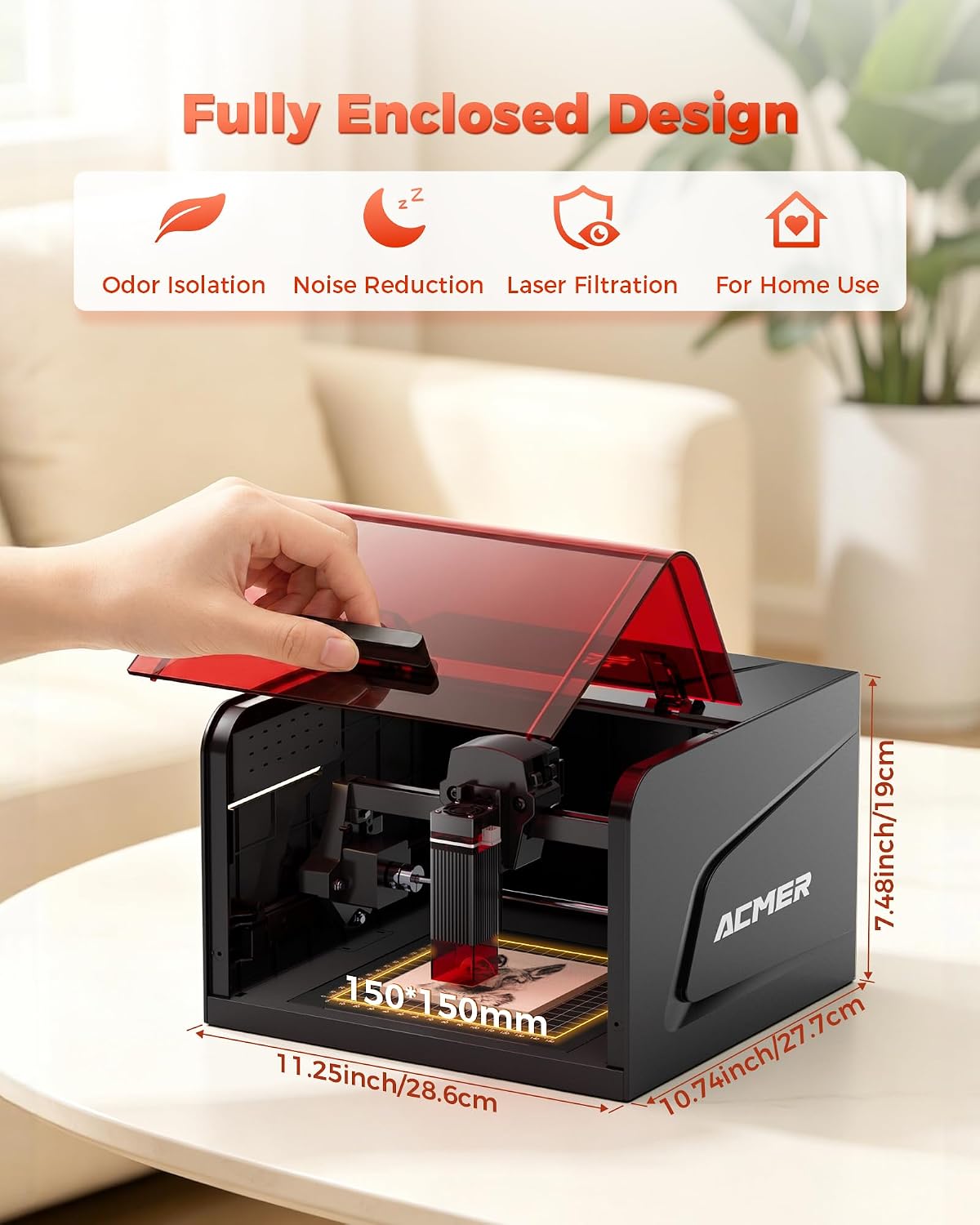
Figure 5: Fully enclosed design and compact dimensions.

Слика 6: Прample of high-precision laser engraving.
4. Подешавање
The ACMER K1 comes largely pre-assembled. Follow these steps for initial setup:
- Распакивање: Пажљиво извадите машину и сву додатну опрему из паковања.
- Пласман: Place the machine on a stable, level, and heat-resistant surface in a well-ventilated area. Ensure there is sufficient space around the machine for air circulation and access.
- Прикључак за напајање: Connect the power adapter to the machine's power input and then plug it into a suitable electrical outlet (DC 12V, 4A).
- Инсталација софтвера: Install the necessary software (ACMER software, LaserGRBL, or LightBurn) on your computer. Drivers may be required for initial connection. Refer to the software's documentation for detailed installation instructions.
- Пробни рад: Perform a small test engraving on a scrap piece of material to familiarize yourself with the machine's operation and software settings.
5. Упутство за употребу
5.1 Припрема за гравирање/сечење
- Избор материјала: Choose a compatible material for your project. Ensure it is clean and free of obstructions.
- Постављање материјала: Place the material securely on the working platform within the 150x150 mm area. Use the grid plate for precise alignment if needed.
- Подешавање фокуса: The laser module typically has a fixed focus distance (2 mm). Ensure your material is at the correct height relative to the laser head.
- Подешавања софтвера: Open your chosen software (ACMER, LaserGRBL, or LightBurn). Import your design (NC, DXF, BMP, JPG, PNG). Adjust laser power, speed, and passes according to the material and desired effect. Start with lower power and higher speed for initial tests.
5.2 Почетак рада
- Затвори поклопац: Ensure the safety lid is fully closed. The machine will not operate if the lid is open.
- Покрени посао: Initiate the engraving/cutting process from your software.
- Надгледање: Непрекидно пратите машину током рада. Обратите пажњу на све необичне мирисе, дим или знаке пожара.
- Хитно заустављање: In case of any emergency, immediately press the emergency stop button on the machine or disconnect power.

Figure 7: Software and operating system compatibility.
6. Одржавање
Regular maintenance ensures optimal performance and extends the lifespan of your ACMER K1. Always disconnect power before performing any maintenance.
- Чишћење сочива: Periodically clean the laser lens with a soft, lint-free cloth and lens cleaning solution. A dirty lens can reduce laser power and engraving quality.
- Cleaning the Working Area: Remove debris and dust from the working platform and inside the enclosure after each use.
- Издувни вентилатор: Check the exhaust fan for any blockages and clean it if necessary to maintain efficient smoke extraction.
- подмазивање: Inspect the guide rails and moving parts. Apply a small amount of lubricant if movement becomes stiff.
- Општи преглед: Regularly check all cables and connections for wear or damage.
КСНУМКС. Решавање проблема
Овај одељак се бави уобичајеним проблемима на које можете наићи.
| Проблем | Могући узрок | Решење |
|---|---|---|
| Машина се не укључује. | Power cable not connected, power outlet faulty. | Проверите прикључке за напајање. Пробајте другу утичницу. |
| Laser not firing or weak. | Lid open, laser lens dirty, incorrect power settings, material out of focus. | Ensure lid is closed. Clean laser lens. Adjust power settings in software. Check material height. |
| Engraving quality is poor/blurry. | Incorrect focus, material movement, dirty lens, incorrect speed/power settings. | Verify focus. Secure material. Clean lens. Adjust speed and power settings. |
| Machine stops unexpectedly. | Lid opened, tilt detection triggered, software error, overheating. | Ensure lid is closed. Check machine stability. Restart software/machine. Allow machine to cool down. |
| Excessive smoke/odor. | Exhaust fan blocked, material type, poor ventilation. | Clean exhaust fan. Ensure proper ventilation. Consider an external air purifier. |
8. Спецификације
| Феатуре | Детаљ |
|---|---|
| Број модела | K1 |
| Ласер Повер | 12В |
| Ласер Типе | Диодни ласер |
| Таласна дужина | 455 ± 5 нм |
| Величина ласерске тачке | 0.08 × 0.08 мм |
| Прецизност понављања | 0.01 мм |
| Воркинг Ареа | 150 × 150 мм |
| Max Engraving Speed | 10000 мм/мин |
| Сафети Левел | Class 1 Enclosure |
| Повер Инпут | ДЦ 12 В, 4 А |
| Тотал Повер | 48 В |
| Димензије производа (Д к Ш к В) | 28.6 x 27.7 x 19 цм (приближно 11.25 x 10.74 x 7.48 инча) |
| Тежина производа | 2.4 кг |
| Структура | Алуминиум Проfile |
| Систем покрета | Водич за ваљање |
| Компатибилни материјали | Wood, bamboo, paper, glass, plastic, leather, PCBs, alumina, non-reflective coated metals, lacquered metals, ceramic, thin plywood, acrylic. |
| Оперативни системи | Виндовс, мацОС, Линук |
| Подржано File Форматс | NC, DXF, BMP, JPG, PNG |
9. Гаранција и подршка
The ACMER K1 Laser Engraving Machine comes with a 12-месечна гаранција од датума куповине. Ова гаранција покрива производне недостатке и кварове при нормалној употреби.
For technical assistance, troubleshooting, or warranty claims, please contact ACMER customer support. We offer Корисничка подршка 24/7 да вам помогнемо са свим питањима.
Please have your model number (K1) and purchase information ready when contacting support.