
Увод
This manual provides detailed instructions for the operation and maintenance of your RadioShack Portable CD Player Boombox. Please read this manual thoroughly before using the device to ensure proper function and to maximize your listening experience. This boombox combines classic CD playback with modern connectivity options including Bluetooth, FM radio, USB, and AUX input.
Шта је у кутији

Figure 1: Box Contents. This image displays the items included with your purchase: the boombox unit, AC power cord, remote control, and telescopic antenna.
- 1x RadioShack Portable CD Player Boombox Unit
- 1к кабл за напајање наизменичном струјом
- 1к даљински управљач
- 1x Telescopic Antenna (pre-attached)
- 1x Упутство за употребу (овај документ)
Note: 4 C batteries are required for portable operation and are not included.
Производ је завршенview и карактеристике
The RadioShack Portable CD Player Boombox offers multiple audio playback options and user-friendly controls.

Figure 2: Key Features. This diagram highlights the boombox's main functionalities including Bluetooth 5.0, various CD formats, USB MP3 playback, FM radio, AUX input, and playback modes.
- Репродукција ЦД-а: Supports CD, CD-R, CD-RW, and CD-MP3 formats.
- Блуетоотх повезивање: Stream audio wirelessly from compatible devices.
- ФМ радио: Built-in tuner with telescopic antenna and 18 preset stations.
- УСБ репродукција: Пусти МП3 fileс директно са УСБ диска.
- АУКС улаз: Повежите екстерне аудио уређаје помоћу 3.5 мм кабла.
- Режими репродукције: Includes random, repeat, and program play functions.
- даљински управљач: За практичан рад са удаљености.
Сетуп
1. Напајање уређаја

Figure 3: Power Options. The boombox can be powered by the included AC cord or by 4 C batteries for portable use.
Your boombox can be powered in two ways:
- АЦ напајање: Connect the included AC power cord to the AC input jack on the back of the boombox and then plug it into a standard wall outlet (110V-240V).
- Снага батерије: For portable use, open the battery compartment on the bottom of the unit and insert 4 "C" size batteries (not included), ensuring correct polarity (+/-). Close the compartment securely.
2. Antenna Setup (FM Radio)
For optimal FM radio reception, fully extend the telescopic antenna located on the back of the unit. Adjust its position for the best signal.
Упутство за употребу
Опште контроле
- Дугме за укључивање (⏻): Притисните да укључите или искључите јединицу.
- Дугме за јачину звука: Окрените у смеру казаљке на сату да бисте повећали јачину звука, у смеру супротном од казаљке на сату да бисте смањили.
- Функционално дугме (FUNC): Press to cycle through playback modes: CD, Bluetooth, FM, USB, AUX.
- Пусти/паузирај (⏸/⏸) Дугме: Покреће или паузира репродукцију.
- Зауставити (⏹) Дугме: Зауставља репродукцију.
- Skip/Search (⏮ / ⏭) Дугмад: Press briefly to skip tracks. Press and hold to search within a track.
ЦД репродукција
- Отворите поклопац одељка за ЦД.
- Place a CD (CD, CD-R, CD-RW, or CD-MP3) onto the spindle with the label side facing up.
- Чврсто затворите поклопац одељка за ЦД.
- Притисните тастер ФУНЦ button until "CD" mode is selected.
- CD ће почети аутоматски да се репродукује. Ако не, притисните Пусти/Паузирај дугме.
Блуетоотх упаривање

Figure 4: Bluetooth Streaming. Easily stream audio from your smartphone or tablet to the boombox.
- Притисните тастер ФУНЦ button until "BT" (Bluetooth) mode is selected. The display will show "BT" and flash, indicating it's in pairing mode.
- На уређају који подржава Bluetooth (паметни телефон, таблет) идите на његова Bluetooth подешавања и потражите доступне уређаје.
- Select "RadioShack Boombox" from the list.
- Once paired, the "BT" indicator on the boombox display will stop flashing and remain solid.
- You can now play audio from your device through the boombox.
Операција ФМ радија

Figure 5: FM Presets and Programmed Playback. Use the SCAN button to automatically save FM stations and REP/PROG for custom playback sequences.
- Притисните тастер ФУНЦ button until "FM" mode is selected.
- Auto Scan and Save Presets: Притисните и држите СЦАН button (often combined with Play/Pause). The radio will automatically scan for and save up to 18 available FM stations.
- Ручно подешавање: Кратко притисните Прескочи/тражи дугмад (⏮ / ⏭) to fine-tune the frequency.
- Избор пресета: Кратко притисните ПРОГ button (often combined with Repeat) to cycle through saved preset stations.
УСБ репродукција
- Убаците УСБ флеш диск који садржи МП3 fileс у УСБ порт.
- Притисните тастер ФУНЦ button until "USB" mode is selected.
- The boombox will automatically detect and begin playing MP3 fileс са УСБ диска.
- Користите Пусти/Паузирај, Стани, и Прескочи/тражи дугмад за контролу репродукције.
АУКС улаз
- Повежите један крај аудио кабла од 3.5 мм (није укључен) са AUX IN прикључком на бумбоксу.
- Повежите други крај кабла са прикључком за слушалице или аудио излазом вашег екстерног аудио уређаја (нпр. МП3 плејера, паметног телефона).
- Притисните тастер ФУНЦ button until "AUX" mode is selected.
- Control playback and volume from your external audio device.
Употреба даљинског управљача
The included remote control allows for convenient operation of most functions from a distance. Ensure the remote has working batteries (typically 2x AAA, not included) and point it towards the front of the boombox.
- Снага: Укључите/искључите јединицу.
- ФУНКЦИЈА: Select input mode (CD, BT, FM, USB, AUX).
- Волуме +/-: Подесите ниво јачине звука.
- Play/Pause, Stop, Skip/Search: Контролишите репродукцију.
- REP/PROG: Access repeat and program functions.
- СКЕНИРАЈ: Auto-scan FM stations.
- EQ/SLEEP: Adjust equalizer settings or set sleep timer (refer to specific remote markings for details).
Playback Modes (CD/USB)
- Repeat (REP): Притисните тастер РЕП button (on unit or remote) to cycle through repeat modes:
- Repeat One: Repeats the current track.
- Repeat All: Repeats all tracks on the CD/USB.
- Repeat Folder (for MP3 CDs/USB): Repeats all tracks in the current folder.
- Program (PROG): Allows you to program a specific order of tracks for CD or USB playback.
- In CD or USB mode, with playback stopped, press the ПРОГ дугме.
- Користите Прескочи/тражи buttons to select your desired track.
- Притисните ПРОГ поново да бисте потврдили и додали нумеру на програмску листу.
- Repeat steps 2-3 to add more tracks.
- Притисните Пусти/Паузирај да бисте започели програмирану репродукцију.
- Random/Shuffle: Some models may have a dedicated shuffle button (often labeled "RDM" or "SHUF") or it may be part of the REP/PROG cycle. This plays tracks in a random order.
Одржавање
- Чишћење: Use a soft, dry cloth to clean the exterior of the boombox. Do not use abrasive cleaners or solvents. For the CD lens, use a specialized CD lens cleaner disc.
- Складиштење: Када се уређај не користи дуже време, извадите батерије да бисте спречили цурење. Чувајте уређај на хладном и сувом месту, даље од директне сунчеве светлости и екстремних температура.
- Замена батерије: Replace all 4 "C" batteries simultaneously when they are depleted. Do not mix old and new batteries or different types of batteries.
- ЦД Царе: Држите ЦД-ове за ивице. Држите их чистим и без огреботина. Чувајте их у њиховим кутијама када их не користите.
Решавање проблема
| Проблем | Могући узрок | Решење |
|---|---|---|
| Нема струје | Кабл за наизменичну струју није повезан; Батерије су празне или неправилно уметнуте. | Ensure AC cord is securely plugged in. Replace batteries with new ones, checking polarity. |
| Нема звука | Volume too low; Incorrect input mode; Headphones connected. | Increase volume. Press FUNC to select correct mode. Disconnect headphones. |
| CD прескаче или се не репродукује | CD dirty or scratched; CD inserted incorrectly; CD compartment not closed. | Clean CD. Reinsert CD correctly. Close lid firmly. Try another CD. |
| Блуетоотх се не упарује | Boombox not in BT mode; Device too far; Device already paired to another unit. | Ensure boombox is in BT mode and flashing. Move device closer. Disconnect from other devices. |
| Лош ФМ пријем | Antenna not extended or positioned correctly; Weak signal area. | Потпуно извуците и подесите телескопску антену. Покушајте да преместите уређај на другу локацију. |
| УСБ се не репродукује | УСБ диск није правилно уметнут; Files not MP3 format; USB drive corrupted. | Поново уметните УСБ диск. Уверите се files are MP3. Try a different USB drive. |
Спецификације
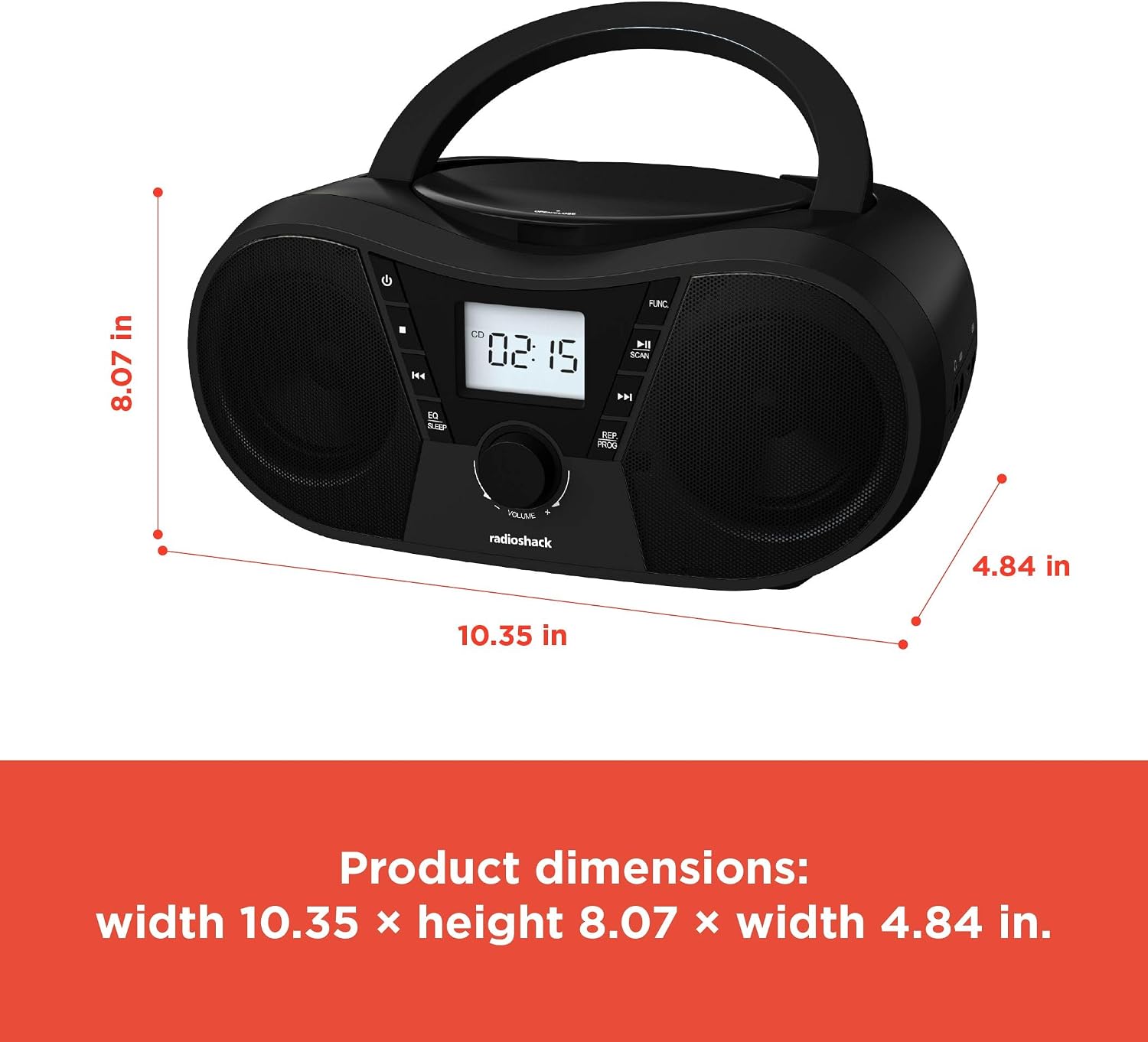
Слика 6: Димензије производа. The boombox measures approximately 10.35 inches wide, 8.07 inches high, and 4.84 inches deep.
| Феатуре | Детаљ |
|---|---|
| Број модела | 1402010 |
| Извор напајања | AC 110V-240V ~ 50/60Hz or 4 x "C" Batteries (DC 6V) |
| Подржани медији | CD, CD-R, CD-RW, CD-MP3, USB (MP3), Bluetooth, FM Radio, AUX Input |
| Блуетоотх верзија | 5.0 (Compatible) |
| ФМ Фреквенцијски опсег | 87.5 - 108 MHz |
| Режим аудио излаза | Стерео |
| Број звучника | 2 (Built-in Stereo Speakers) |
| Ватtage | 10 вати |
| Фреквенцијски одзив | 20 Hz - 20000 Hz |
| Димензије (Ш к В к Д) | Приближно 10.35 к 8.07 к 4.84 инча |
| Боја | Црно |
Гаранција и подршка
This RadioShack Portable CD Player Boombox (Model 1402010) comes with a 1-годишња ограничена гаранција од датума куповине. Ова гаранција покрива производне недостатке у материјалу и изради при нормалној употреби.
For warranty claims, technical support, or customer service inquiries, please contact RadioShack customer support through their official webсајт или контакт информације које сте добили уз документацију о куповини.
Молимо вас да сачувате доказ о куповини ради гаранције.