
Увод
The Leadjoy R20 2.4GHz Wireless USB Adapter is designed to enhance your gaming experience on Xbox Series S/X consoles by providing a robust and reliable wireless connection for compatible controllers. This manual will guide you through the installation, operation, and maintenance of your R20 adapter.
Садржај пакета
Молимо вас да проверите да ли су све ставке наведене у наставку укључене у ваш пакет:
- Leadjoy R20 Wireless USB Adapter
- Упутство за употребу (овај документ)
The image below illustrates the R20 Wireless USB Adapter and its key features.
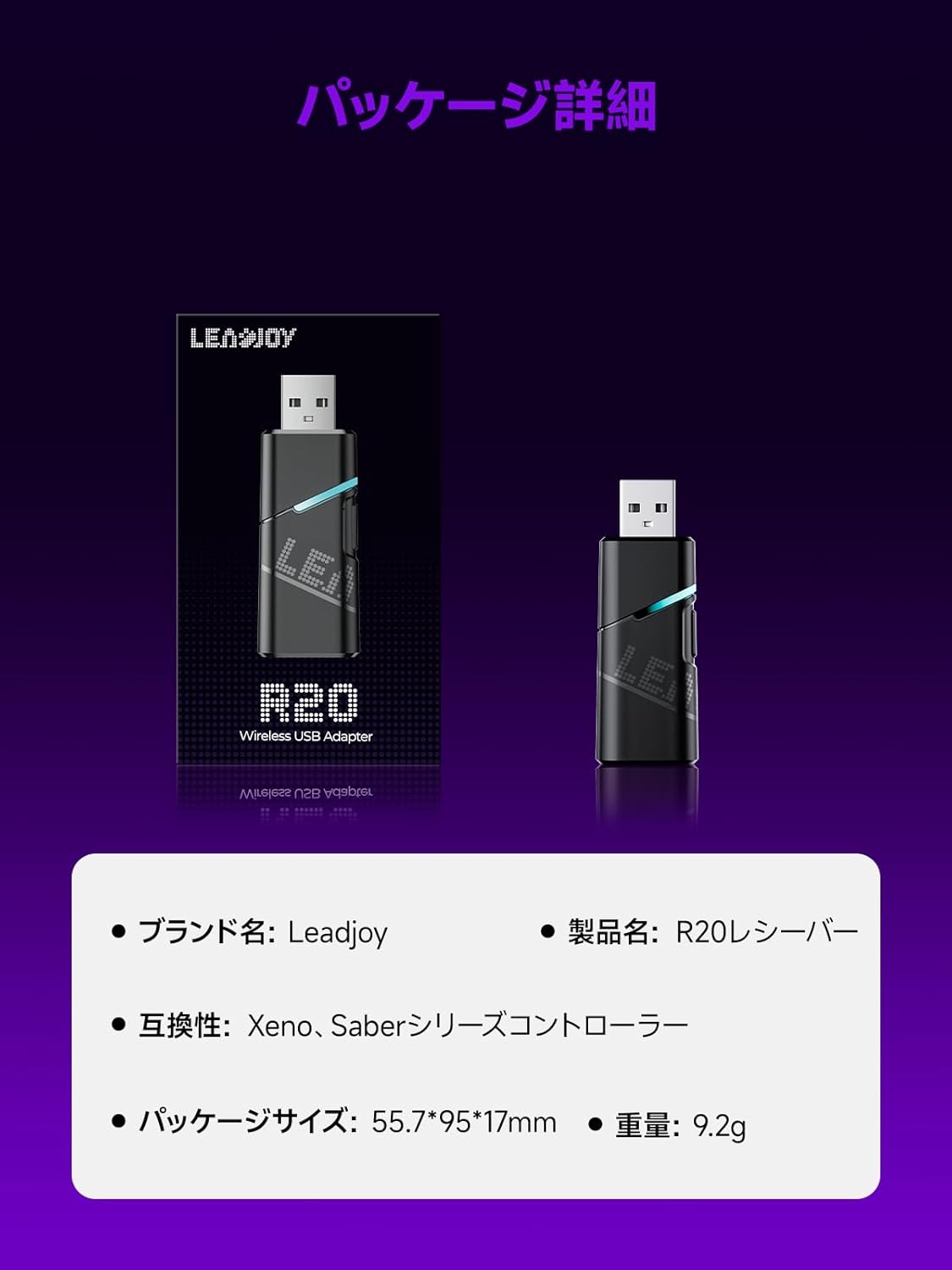
Image: Leadjoy R20 Wireless USB Adapter. This image displays the R20 adapter in its packaging, highlighting its compact design. Text overlays indicate the brand name 'Leadjoy', product name 'R20 Receiver', compatibility with 'Xeno, Saber series controllers', package size '55.7*95*17mm', and weight '9.2g'.
Подешавање и инсталација
Follow these steps to connect your Leadjoy R20 Wireless USB Adapter to your Xbox console:
- 1. корак: Insert the R20 receiver into an available USB port on your Xbox console. Ensure the console is powered on.
- 2. корак: Connect your original Xbox controller to the R20's USB port using a USB cable.
- 3. корак: Once the controller's indicator light remains steadily lit, the connection is successful. You can now pair your Leadjoy controller with the R20 receiver.
The diagram below visually explains the connection process.

Image: Connection Method. This diagram illustrates the three steps for connecting the R20 adapter. Step 1 shows inserting the R20 into the Xbox console. Step 2 shows connecting an original Xbox controller to the R20 via a cable. Step 3 shows pairing a Leadjoy controller with the R20 receiver after successful connection.
Напомена: Do not disconnect the original controller from the R20 receiver during use to maintain a stable connection.
Упутство за употребу
The R20 receiver provides a stronger signal compared to the original R10 receiver, offering improved performance. If you find the functions of the original Xbox controller insufficient or the operation feel unsatisfactory, and wish to enjoy games on your Xbox console using Xeno Plus, this R20 receiver makes it possible.
After successful setup, your compatible Leadjoy controller will connect wirelessly to the Xbox console via the R20 adapter, allowing for seamless gameplay.
Спецификације
| Бранд | Leadjoy |
| Број модела | LJR2001-1 (R20) |
| Боја | Црно |
| Повезивање | КСНУМКСГХз Вирелесс |
| Компатибилност | Xbox Series S/X, Xeno, Saber series controllers |
| Тежина артикла | 9.2г |
| Димензије пакета | 55.7 к 95 к 17 мм |
| Земља порекла | Кина |
Одржавање
To ensure the longevity and optimal performance of your Leadjoy R20 Wireless USB Adapter, please observe the following maintenance guidelines:
- Адаптер одржавајте чистим и без прашине. За чишћење користите меку, суву крпу.
- Избегавајте излагање адаптера екстремним температурама, влажности или директној сунчевој светлости.
- Do not attempt to disassemble or repair the adapter yourself. This may void your warranty.
- Чувајте адаптер на безбедном месту када га не користите како бисте спречили физичка оштећења.
Решавање проблема
If you encounter issues with your Leadjoy R20 Wireless USB Adapter, please try the following steps:
- Без конекције: Ensure the R20 adapter is fully inserted into the Xbox console's USB port and the original Xbox controller is securely connected to the R20. Check if the controller's indicator light is steadily lit.
- Интермитентна веза: Ensure there are no obstructions between your Leadjoy controller and the R20 adapter. Avoid placing the adapter near other wireless devices that may cause interference.
- Контролор не реагује: Try disconnecting and reconnecting both the R20 adapter from the console and the original controller from the R20. Restart your Xbox console if necessary.
- Ажурирање фирмвера: Check the official Leadjoy website for any available firmware updates for the R20 adapter, which may resolve performance issues.
Ако проблем и даље постоји након што сте испробали ове кораке, обратите се корисничкој подршци.
Гаранција и подршка
The Leadjoy R20 Wireless USB Adapter comes with a standard manufacturer's warranty. Please refer to the warranty card included in your product packaging for specific terms and conditions, including the warranty period and coverage details.
For technical support, troubleshooting assistance, or warranty claims, please contact Leadjoy customer service through their official webсајт или контакт информације наведене у документацији вашег производа.
Молимо вас да сачувате доказ о куповини ради гаранције.