
1. Готовоview
The Philips TAZ2200 is a versatile portable sound machine designed for enjoying various audio formats. It features a top-loading CD player, a front-loading cassette player, FM radio, Bluetooth 6.0 connectivity, USB playback, and a 3.5mm audio input. Equipped with dynamic bass boost and 6W stereo speakers, it delivers rich sound. The unit can be powered by AC mains or batteries and includes a carrying handle for portability.
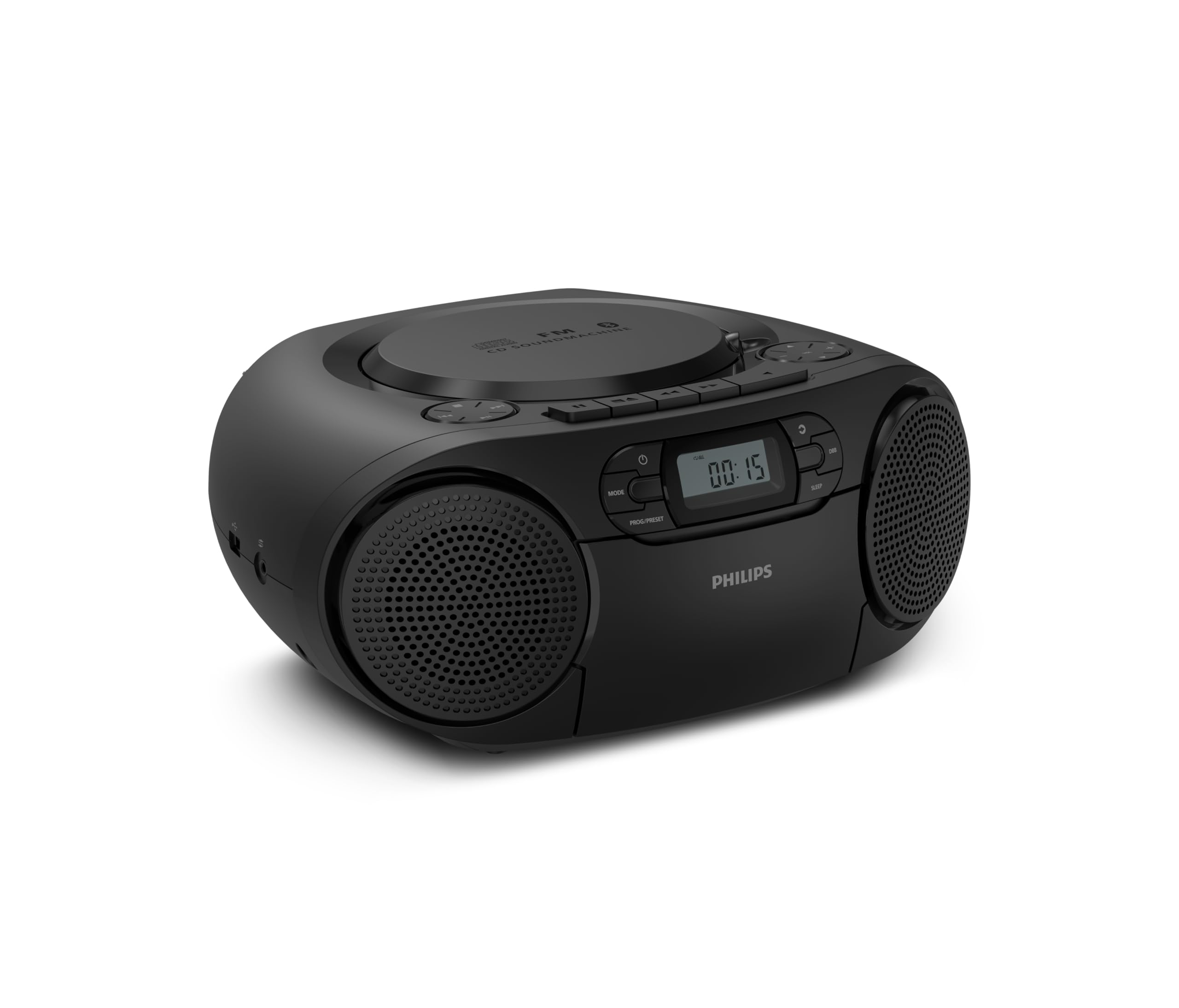
Фронт view of the Philips TAZ2200 CD Soundmachine, showing the main display and control buttons.
2. Безбедносне информације
Please read these safety instructions carefully before using your device and keep them for future reference. Incorrect use may result in hazards.
- Извор напајања: Користите само наведени адаптер за напајање или батерије. Уверите се да је јачина звукаtage matches the requirements of the unit.
- Вода и влага: Не излажите уређај киши, влази, капању или прскању. Не стављајте предмете напуњене течношћу, као што су вазе, на уређај.
- вентилација: Ensure adequate ventilation. Do not block any ventilation openings. Maintain a minimum distance around the unit for sufficient ventilation.
- топлота: Не постављајте уређај у близини извора топлоте као што су радијатори, грејни уређаји, шпорети или други уређаји (укључујући ampлифиерс) који производе топлоту.
- батерије: Follow correct polarity when inserting batteries. Do not mix old and new batteries, or different types of batteries. Remove batteries if the unit is not used for a long period.
- Чишћење: Unplug the unit from the power outlet before cleaning. Use a soft, dry cloth. Do not use liquid cleaners or aerosol cleaners.
- Сервисирање: Не покушавајте сами да сервисирате овај производ. Све сервисирање препустите квалификованом сервисном особљу.
3. Шта је у кутији
Приликом распакивања, молимо вас да се уверите да су присутни сви доле наведени предмети:
- Philips TAZ2200 CD Soundmachine
- Кабл за напајање
- Водич за брзи почетак
- Гарантна књижица
- Сигурносни лист
4. Контроле и везе
Контроле предњег панела
The front panel features the main display, power button, mode selection, program/preset buttons, and dynamic bass boost (DBB) control. Playback controls for CD and USB are also located here.

Детаљан предњи део view showing the display, power, mode, program/preset, and DBB buttons.
Бочни и задњи прикључци
The side of the unit provides a USB port for digital audio playback and a 3.5mm audio input jack for connecting external devices.

Сиде view illustrating the USB port and Audio Input jack.
The top of the unit houses the CD compartment and additional playback controls, while the rear features the AC power input and the FM antenna.

Врх view showing the CD compartment and associated controls.

Позади view displaying the AC power input and the telescopic FM antenna.
5. Подешавање
5.1 Напајање
АЦ Повер
- Уверите се да је јединица искључена.
- Connect the supplied power cable to the AC IN socket on the rear of the sound machine.
- Plug the other end of the power cable into a wall power outlet.
Снага батерије
For portable use, the unit can operate on 6 x C-type batteries (not included).
- Отворите поклопац одељка за батерије који се налази на дну јединице.
- Insert 6 C-type batteries, ensuring correct polarity (+/-) as indicated inside the compartment.
- Добро затворите поклопац одељка за батерије.
5.2 Подешавање антене
For optimal FM radio reception, fully extend the telescopic antenna located at the rear of the unit. Adjust its position and angle to achieve the clearest signal.
6. Упутство за употребу
6.1 Општи рад
- Укључивање/искључивање: Притисните тастер ПОВЕР дугме за укључивање или искључивање јединице.
- Контрола јачине звука: Користите ВОЛ + or ЗВУЧИНА - дугмад за подешавање нивоа јачине звука.
- Динамичко појачавање баса (DBB): Притисните тастер ДББ button to activate or deactivate the dynamic bass boost feature for enhanced bass sound.
- Избор режима: Притисните тастер МОДЕ button repeatedly to switch between CD, Cassette, FM Radio, Bluetooth, USB, and Audio Input modes.
6.2 Репродукција ЦД-а
- Open the CD compartment cover on top of the unit.
- Place a CD (CD, CD-R, or CD-RW) with the label side facing up onto the spindle.
- Затворите поклопац одељка за ЦД.
- Притисните тастер МОДЕ дугме за избор ЦД режима.
- Притисните тастер ПЛАИ/ПАУСЕ дугме за почетак репродукције.
- Користите СКИП дугмад (|< or >> |) да бисте прескакали нумере.
- Притисните и држите |< or >> | to search within a track.
- Притисните тастер СТОП дугме за заустављање репродукције.
6.3 Репродукција касете
- Open the cassette compartment door on the front of the unit.
- Уметните касету са отвореном ивицом окренутом нагоре.
- Затворите вратанца одељка за касету.
- Притисните тастер МОДЕ дугме да бисте изабрали режим касете.
- Притисните тастер ПЛАИ дугме за почетак репродукције.
- Користите БРЗО ПРЕМОТЕ or РЕВИНД buttons to quickly advance or rewind the tape.
- Притисните тастер СТОП дугме за заустављање репродукције.
6.4 ФМ Радио
- Притисните тастер МОДЕ button to select FM Radio mode.
- Аутоматско скенирање: Притисните и држите PROG/PRESET button to automatically scan and store available FM stations.
- Ручно подешавање: Притисните тастер ТУНИНГ дугмад (|< or >> |) to manually tune to a desired frequency.
- Чување унапред подешених вредности: After tuning to a station, press PROG/PRESET once, then use |< or >> | да бисте изабрали број претходно подешене поставке и притисните PROG/PRESET поново да потврдим.
- Подсећање на унапред подешене поставке: У ФМ режиму притисните PROG/PRESET repeatedly to cycle through saved preset stations.
6.5 Репродукција преко Bluetooth-а
- Притисните тастер МОДЕ button to select Bluetooth mode. The display will show 'BT' and flash, indicating it's in pairing mode.
- На уређају који подржава Bluetooth (паметни телефон, таблет) омогућите Bluetooth и потражите доступне уређаје.
- Select "Philips TAZ2200" from the list of devices.
- Once paired, the unit will emit a confirmation sound, and 'BT' will stop flashing.
- Start playing audio on your connected device. The sound will be streamed to the sound machine.
6.6 Репродукција са УСБ-а
- Insert a USB flash drive into the USB port on the side of the unit.
- Притисните тастер МОДЕ дугме за избор УСБ режима.
- Уређај ће аутоматски детектовати и почети да репродукује компатибилан аудио files (MP3, WAV, WMA).
- Use the playback controls (ПЛАИ/ПАУСЕ, СКИП, СТОП) as you would for CD playback.
6.7 Audio Input (AUX)
- Connect one end of a 3.5mm audio cable (not included) to the AUDIO IN jack on the side of the sound machine.
- Connect the other end of the audio cable to the headphone jack or audio output of your external device (e.g., MP3 player, turntable).
- Притисните тастер МОДЕ button to select Audio Input mode.
- Start playing audio on your external device. The sound will be played through the sound machine.
7. Одржавање
- Чишћење јединице: Wipe the exterior of the unit with a soft, slightly damp тканина. Немојте користити абразивна средства за чишћење или раствараче.
- CD Player Care: Keep the CD compartment clean. If the lens is dirty, use a specialized CD lens cleaner. Avoid touching the lens.
- Брига о касетофону: Periodically clean the tape heads and pinch rollers with a cotton swab lightly dampнапуњен изопропил алкохолом.
- Замена батерије: If using batteries, replace all 6 C-type batteries when the unit's performance diminishes or if the unit will not be used for an extended period.
- Складиштење: Када се не користи, чувајте уређај на чистом и сувом месту, даље од директне сунчеве светлости и екстремних температура.
КСНУМКС. Решавање проблема
If you encounter any issues with your Philips TAZ2200, please refer to the table below for common problems and solutions.
| Проблем | Могући узрок | Решење |
|---|---|---|
| Нема струје | Кабл за напајање није повезан; Батерије су празне или неправилно уметнуте. | Check AC power connection; Replace batteries or ensure correct polarity. |
| Нема звука | Volume too low; Incorrect mode selected; Headphones connected. | Increase volume; Select the correct source mode (CD, FM, BT, etc.); Disconnect headphones. |
| CD се не репродукује | CD inserted incorrectly; CD is dirty or scratched; CD format not supported. | Insert CD with label side up; Clean or replace CD; Ensure CD is CD-R/RW compatible. |
| Cassette not playing | Cassette inserted incorrectly; Tape is damaged. | Insert cassette correctly; Try a different cassette. |
| Лош ФМ пријем | Антена није правилно испружена или постављена; Слаб сигнал. | Потпуно извуците и подесите телескопску антену; покушајте да преместите уређај на другу локацију. |
| Блуетоотх се не повезује | Unit not in pairing mode; Bluetooth device too far; Device already paired with another unit. | Ensure unit is in Bluetooth mode and flashing; Move device closer; Disconnect from other devices. |
| Проблеми са репродукцијом са USB-а | УСБ диск није правилно уметнут; Некомпатибилан file формат; УСБ диск оштећен. | Reinsert USB drive; Ensure files are MP3, WAV, or WMA; Try a different USB drive. |
9. Спецификације
| Феатуре | Спецификација |
|---|---|
| Бранд | ПХИЛИПС |
| Број модела | TAZ2200/10 |
| Технологија повезивања | Bluetooth 6.0, USB, Audio Input (3.5mm) |
| Спеакер Типе | Stereo (2 speakers) |
| Излазна снага | 6 вати (макс.) |
| Подржани медији | CD, CD-R, CD-RW, Cassette, USB (MP3, WAV, WMA) |
| Радио тјунер | Digital FM with 20 presets |
| Извор напајања | AC (wired), 6 x C-type batteries (not included) |
| Димензије (ДкШкВ) | 24.5 к 28.5 к 12.5 цм |
| Тежина | 1.35 килограма |
| Боја | Сребро |
10. Гаранција и подршка
10.1 Гаранција на производ
This Philips TAZ2200 CD Soundmachine comes with a 2 година гаранције од датума куповине. Молимо вас да сачувате доказ о куповини за потребе гаранције. Гаранција покрива производне недостатке и кварове у нормалним условима употребе.
10.2 Корисничка подршка
For technical assistance, troubleshooting beyond this manual, or warranty service, please refer to the contact information provided in the warranty booklet included with your product. You can also visit the official Philips support website for your region for further assistance and FAQs.


