
Увод
The Infinix Note 60 Pro is a 5G smartphone designed for powerful performance, extended battery life, and a premium visual experience. It features a Snapdragon 7s Gen 4 processor, a 6.78-inch Full HD+ AMOLED display, and a 50MP camera system. This manual provides instructions for setting up, operating, and maintaining your device.

Image: The Infinix Note 60 Pro smartphone in Deep Ocean Blue, showcasinг његов елегантан дизајн.
Шта је у кутији
- Infinix Note 60 Pro Smartphone
- Адаптер за пуњење
- УСБ Типе-Ц кабл
- Алат за избацивање СИМ картице
- Протецтиве Цасе
- Водич за брзи почетак
- Гарантни лист
Note: Specific accessories may vary by region. Please check your packaging contents.
Сетуп
Инсталација СИМ картице
- Пронађите лежиште за СИМ картицу са стране уређаја.
- Уметните приложени алат за избацивање СИМ картице у мали отвор на лежишту да бисте га отворили.
- Carefully place your Nano-SIM cards into the designated slots on the tray. Ensure the gold contacts face downwards. The device supports Dual SIM functionality.
- Пажљиво гурните лежиште назад у телефон док не кликне на своје место.

Слика: Са стране view of the Infinix Note 60 Pro, highlighting the location of the SIM card tray and volume/power buttons.
Укључивање и почетна конфигурација
Press and hold the power button located on the side of the device until the Infinix logo appears on the screen. Follow the on-screen prompts to select your language, connect to a Wi-Fi network, and set up your Google account. This process will guide you through essential settings to personalize your device.
Пуњење уређаја
Connect the USB Type-C cable to the charging port at the bottom of the phone and plug the other end into the charging adapter. Plug the adapter into a power outlet. The device supports 90W wired fast charging and 30W wireless charging for quick power replenishment. A full charge of the 6500mAh battery provides extended usage time.
Оперативни
Дисплаи Феатурес
The Infinix Note 60 Pro features a 6.78-inch Full HD+ AMOLED display with a 144Hz refresh rate, offering smooth scrolling and vibrant visuals. It boasts up to 4500 Nits Peak Brightness for clear visibility even in bright conditions. The device also incorporates an Active Matrix Display on the rear for interactive notifications and information at a glance.
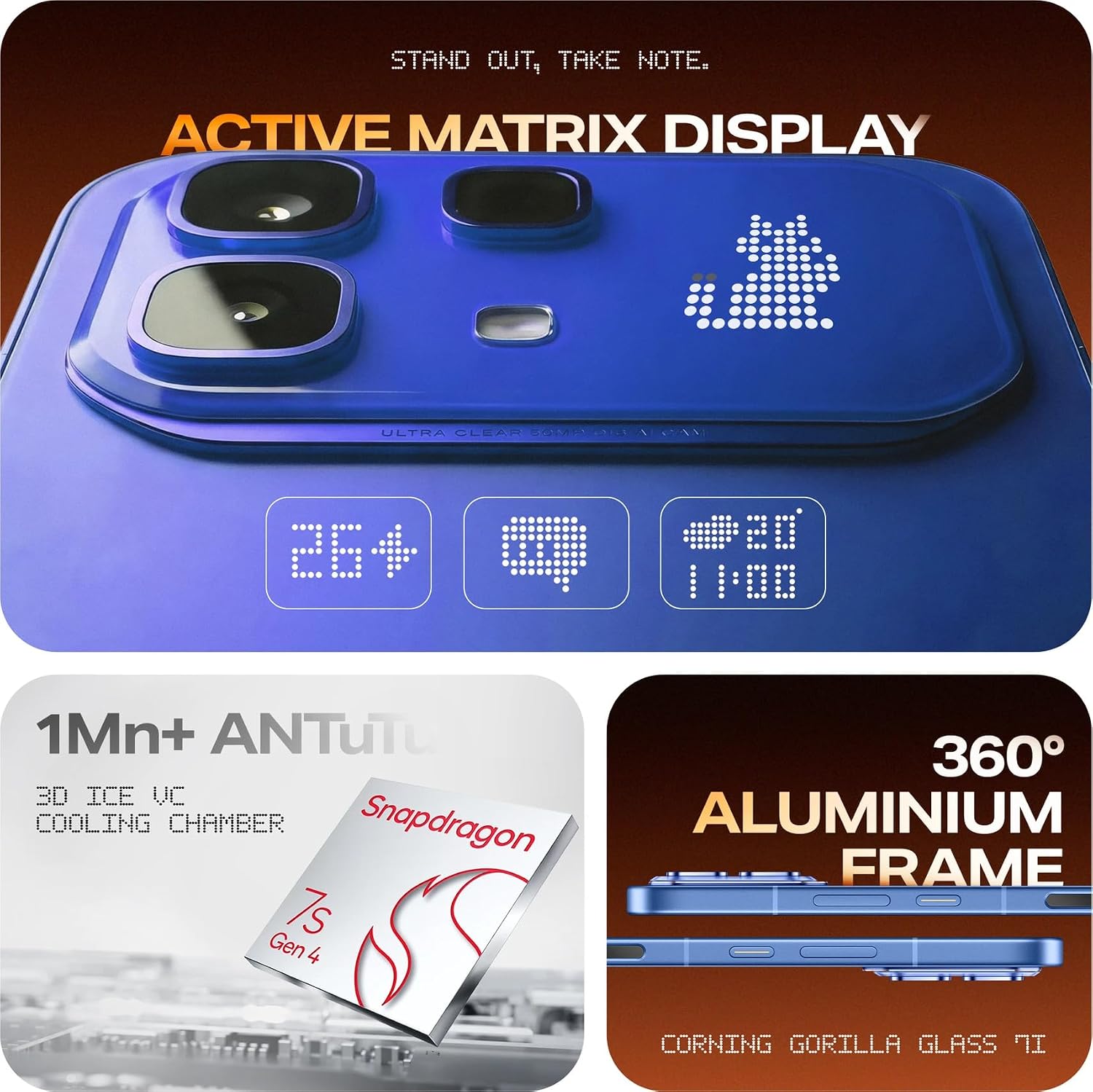
Image: Close-up of the Infinix Note 60 Pro's rear panel, showcasing the Active Matrix Display with dynamic light patterns for notifications and information.
Употреба камере
The device is equipped with a 50MP rear camera and a 13MP front camera, allowing for high-quality photography and video recording. To open the camera application, tap the camera icon on your home screen or lock screen.
- Режими снимања: Available modes include High Dynamic Range (HDR) for improved detail in varied lighting conditions.
- AI Studio Features: Enhance your photos with advanced AI capabilities:
- AI HD Enhancement: Improves overall image clarity and detail.
- AI Flare Remover: Reduces unwanted lens flare in your shots.
- AI Shadow Remover: Brightens dark areas to reveal hidden details.
- AI Reflection Remover: Minimizes reflections from surfaces like glass.
- АИ гумица: Intelligently removes unwanted objects from your images.
- AI Extender: Expands the content of your image beyond its original borders.

Слика: Детаљна view of the Infinix Note 60 Pro's dual camera module on the rear, showing the 50MP lens and LED flash.

Image: Screenshot illustrating the XOS 16 AI Studio features, including AI HD Enhancement, AI Flare Remover, AI Shadow Remover, AI Reflection Remover, AI Eraser, and AI Extender.
Перформансе и игре
The Infinix Note 60 Pro is powered by the Snapdragon 7s Gen 4 processor and features 8GB of RAM, ensuring smooth performance for multitasking, demanding applications, and gaming. For an optimized gaming experience, activate the XBOOST Esports Mode through the device settings to prioritize system resources for games.
Управљање батеријом
The device is equipped with a large 6500mAh battery, providing extended usage throughout the day. Utilize the 90W wired fast charging for rapid power-ups or the convenient 30W wireless charging. To optimize battery life, manage background app usage and adjust screen brightness.

Image: Visual representation of the Infinix Note 60 Pro's key features, including the 6500mAh battery, 90W charging, 1.5K 144Hz AMOLED display, 30W wireless charging, 50MP OIS camera, and health monitoring sensor.
Operating System and AI Features
The Infinix Note 60 Pro runs on the Android operating system, customized with the XOS 16 interface. XOS 16 includes an integrated AI Assistant to help with various tasks, manage settings, and provide smart suggestions for a more intuitive user experience.
Аудио искуство
The device features audio enhancements by JBL, providing a rich and immersive sound experience for media consumption and calls.
Одржавање
Ажурирања софтвера
Regularly check for and install software updates to ensure your device has the latest features, security patches, and performance improvements. You can typically find update options in Подешавања > Систем > Ажурирање софтвера.
Чишћење уређаја
To clean your Infinix Note 60 Pro, use a soft, lint-free cloth. Gently wipe the screen and the back panel. Avoid using abrasive materials, harsh chemicals, or aerosol sprays, as these can damage the device's finish or internal components.
Отпорност на воду
The device is designed with a water-resistant rating. While it can withstand splashes and light rain, it is not fully waterproof. Avoid intentional submersion in water, exposure to high-pressure water jets, or use in humid environments like saunas or steam rooms. Damage caused by liquid exposure is typically not covered under warranty.
Решавање проблема
Уређај се не укључује
- Ensure the battery is sufficiently charged. Connect the device to the charger for at least 15 minutes before attempting to power it on.
- Perform a force restart by pressing and holding the power button for 10-15 seconds.
Лоша мрежна повезаност
- Check if your SIM card(s) are properly inserted into the tray.
- Restart the device to refresh network connections.
- Verify your mobile data or Wi-Fi settings are correctly configured and enabled.
- If using mobile data, ensure you are in an area with network coverage.
Рушење или замрзавање апликација
- Затворите проблематичну апликацију и поново је отворите.
- Обришите кеш меморију апликације: Идите на Settings > Apps > [App Name] > Storage > Clear Cache.
- Уверите се да је апликација ажурирана на најновију верзију из Google Play продавнице.
- Ако проблем и даље постоји, покушајте да деинсталирате и поново инсталирате апликацију.
Техничке спецификације
| Феатуре | Спецификација |
|---|---|
| Бранд | Инфиник |
| Серија модела | Infinix Note 60 Pro |
| Оперативни систем | Андроид |
| ЦПУ модел | Снапдрагон 7с Ген 4 |
| Брзина процесора | 2.4 ГХз |
| РАМ | 8 ГБ |
| Интерна меморија | 128 ГБ |
| Величина екрана | 6.78 инча |
| Дисплаи Типе | ФХД + АМОЛЕД |
| Max Display Resolution | 2392 × 1080 пиксела |
| Пеак Бригхтнесс | 4500 гњида |
| Реар Цамера Ресолутион | 50 МП |
| Резолуција предње камере | 13 МП |
| Капацитет батерије | 6500 Милиamp Сати |
| Жично пуњење | 90В |
| Бежично пуњење | 30В |
| Целлулар Тецхнологи | 5G |
| Број слотова за SIM картице | Дуал СИМ |
| Тип конектора | УСБ тип Ц |
| Ниво отпорности на воду | Отпоран на воду |
| Димензије артикла | 16.4 к 7.5 к 0.9 центиметара |
| Тежина артикла | 190 грама |
| Модел Иеар | 2024 |
| Земља порекла | Индија |
Гаранција и корисничка подршка
Информације о гаранцији
The Infinix Note 60 Pro comes with a 1 Year Warranty from the date of purchase. Please retain your proof of purchase (invoice or receipt) as it is required for any warranty claims. The warranty covers manufacturing defects but typically excludes damage caused by misuse, accidents, unauthorized repairs, or liquid exposure.
Корисничка подршка
For technical assistance, service inquiries, or any questions regarding your Infinix Note 60 Pro, please contact Infinix customer care:
- Линија за помоћ корисницима: 1800-419-0525
- Произвођач: Infinix India Pvt. Ltd.
- Адреса: Building No. 9, Tower B, DLF Cyber City, Gurugram, Haryana – 122002, India
For additional information and support resources, you can visit the official Инфиникс продавница на Амазону.