
1. Увод
The QCY MeloBuds A30 are advanced wireless earbuds designed to deliver a superior audio experience. They feature active noise cancellation, high-resolution audio support, and a robust wireless connection, making them suitable for various listening environments.
2. Производ је готовview
Familiarize yourself with the components of your QCY MeloBuds A30 earbuds.

Image: QCY MeloBuds A30 earbuds and charging case.
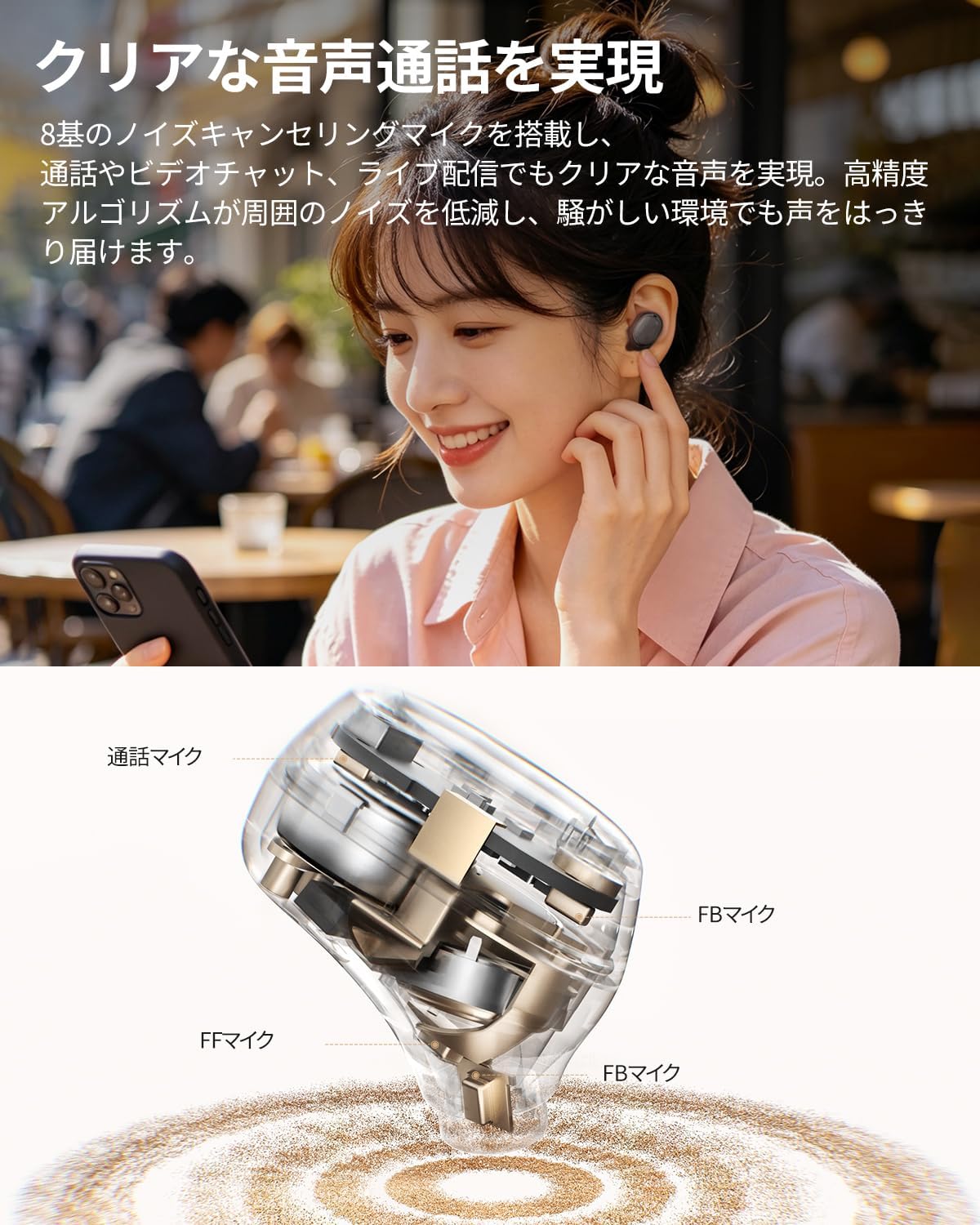
Image: Detailed internal view of a QCY MeloBuds A30 earbud, highlighting microphone components.
3. Подешавање
3.1 Почетно упаривање
- Отворите кућиште за пуњење. Слушалице ће аутоматски ући у режим упаривања.
- На свом уређају (паметном телефону, таблету, рачунару) омогућите Блутут.
- Тражи "QCY MeloBuds A30" in the list of available Bluetooth devices and select it to connect.
- Када се једном повеже, гласовна порука ће потврдити успешно упаривање.
3.2 Повезивање више уређаја
The MeloBuds A30 supports simultaneous connection with up to 3 devices. To switch between connected devices, simply play audio on the desired device. The earbuds will automatically switch to the active audio source.

Image: Man playing game with phone and QCY MeloBuds A30 earbuds, illustrating multi-device connection.
3.3 QCY App Installation
For full customization and advanced features, download the dedicated QCY app from your device's app store. The app allows for EQ adjustments, firmware updates, and personalized control settings.

Image: Smartphone displaying the QCY app interface for MeloBuds A30, showing various customization options and settings.
4. Упутство за употребу
4.1 Контроле на додир
The MeloBuds A30 feature intuitive touch controls on each earbud. You can customize these controls via the QCY app.
- Пусти/паузирај: Двапут додирните било коју слушалицу.
- Следећа нумера: Трипут додирните десну слушалицу.
- Претходни запис: Трипут додирните леву слушалицу.
- Одговори/заврши позив: Двапут додирните било коју слушалицу.
- Одбиј позив: Притисните и држите било коју слушалицу 1.5 секунде.
- Гласовни асистент: Трипут додирните леву слушалицу.
- ANC Mode Cycle: Press and hold the right earbud for 1.5 seconds to cycle through ANC ON → ANC OFF → Transparency Mode.

Image: Diagram illustrating touch controls for QCY MeloBuds A30 earbuds.
4.2 Активно поништавање буке (АНЦ)
The MeloBuds A30 feature up to 60dB hybrid ANC and 5.5kHz wideband noise cancellation. Adaptive ANC automatically adjusts to your environment and wearing conditions. AI scene-adaptive ANC and wind noise-adaptive ANC provide optimal noise cancellation, ensuring a clear listening experience even in windy conditions.

Image: Person wearing QCY MeloBuds A30 earbuds, demonstrating active noise cancellation.

Image: Diagram illustrating the effect of Active Noise Cancellation (ANC) on and off with sound waves around a person wearing QCY MeloBuds A30.
4.3 Функције позива
Equipped with 8 noise-cancelling microphones and a high-precision algorithm, the MeloBuds A30 effectively reduce ambient noise during calls, video chats, and live streaming. This ensures your voice is clearly transmitted even in noisy environments.

Image: Woman talking on phone while wearing QCY MeloBuds A30 earbuds in an outdoor setting.
5. Пуњење
The earbuds provide approximately 11 hours of continuous playback on a single charge (ANC off), and up to 50 hours with the charging case. With ANC on, the earbuds offer about 6 hours of playback, extending to 27 hours with the charging case.

Image: QCY MeloBuds A30 earbuds and charging case, illustrating battery life with and without ANC.
To charge the earbuds, place them back into the charging case. To charge the case, connect it to a power source using the provided USB-C cable.
6. Одржавање
- Редовно чистите слушалице и кућиште за пуњење меком, сувом крпом.
- Избегавајте употребу абразивних материјала или јаких хемикалија.
- Ensure the charging contacts on both the earbuds and case are clean and dry to prevent charging issues.
- Чувајте слушалице у њиховој кутији за пуњење када их не користите како бисте их заштитили од прашине и оштећења.
6.1 Отпорност на воду
The MeloBuds A30 are IPX5 water resistant, protecting them from sweat and water splashes. This makes them suitable for workouts and commuting. However, they are not designed for submersion in water.

Image: QCY MeloBuds A30 earbuds with water droplets, demonstrating IPX5 water resistance.
КСНУМКС. Решавање проблема
- Слушалице се не упарују: Уверите се да су обе слушалице у кућишту за пуњење, а затим отворите поклопац да бисте активирали режим упаривања. Проверите подешавања Bluetooth-а на уређају и покушајте поново да се повежете.
- Нема звука из једне слушалице: Place both earbuds back into the charging case, close the lid, wait a few seconds, then open it again. This often re-syncs the earbuds.
- Проблеми са пуњењем: Clean the charging contacts on both earbuds and the case. Ensure the charging cable is securely connected and the power source is working.
- Лош квалитет позива: Ensure the microphones are not obstructed. Try adjusting the earbuds' position in your ears.
- Проблеми са повезивањем апликације: Ensure Bluetooth is enabled and the earbuds are connected to your device. Restart the QCY app or reinstall it if problems persist.
8. Спецификације
| Бранд | КЦИ |
| Назив модела | MeloBuds A30 |
| Број модела | БХ26ХТ22А |
| Боја | Црно |
| Технологија повезивања | Бежични |
| Блуетоотх верзија | 6.0 |
| Блуетоотх домет | 10 метара |
| Контрола буке | Active Noise Cancellation, Adaptive Noise Cancellation, Environmental Noise Cancellation |
| Аудио кодеци | LDAC, Hi-Res Audio Wireless |
| Микрофон | 8-mic system with AI Call Noise Cancelling |
| Време репродукције (слушалице) | Approx. 11 hours (ANC off), Approx. 6 hours (ANC on) |
| Укупно време репродукције (са футролом) | До 50 сати (искључено ANC), до 27 сати (укључено ANC) |
| Отпорност на воду | ИПКС5 |
| Контролни метод | Контрола додиром |
| Компатибилни уређаји | Windows/Macbook Air/Pro PCs, iPads, iPhones, Android devices (Galaxy, Huawei, Xiaomi, OPPO, Xperia, Nexus, ASUS, Fujitsu, etc.) |
9. Гаранција и подршка
QCY products come with a standard manufacturer's warranty. For detailed warranty information, please refer to the warranty card included in your product packaging or visit the official QCY webсајту.
For technical support, troubleshooting assistance, or any product-related inquiries, please contact QCY customer service through their official webсајт или контакт информације наведене у документацији вашег производа.