
Увод
Thank you for choosing the Gritin 2026 Gen2 LED Motion Sensor Light. This product is designed to provide versatile and efficient lighting for various indoor spaces, featuring a motion sensor, adjustable light settings, and a convenient flashlight mode. This manual provides detailed instructions for setup, operation, and maintenance to ensure optimal performance and longevity of your device.
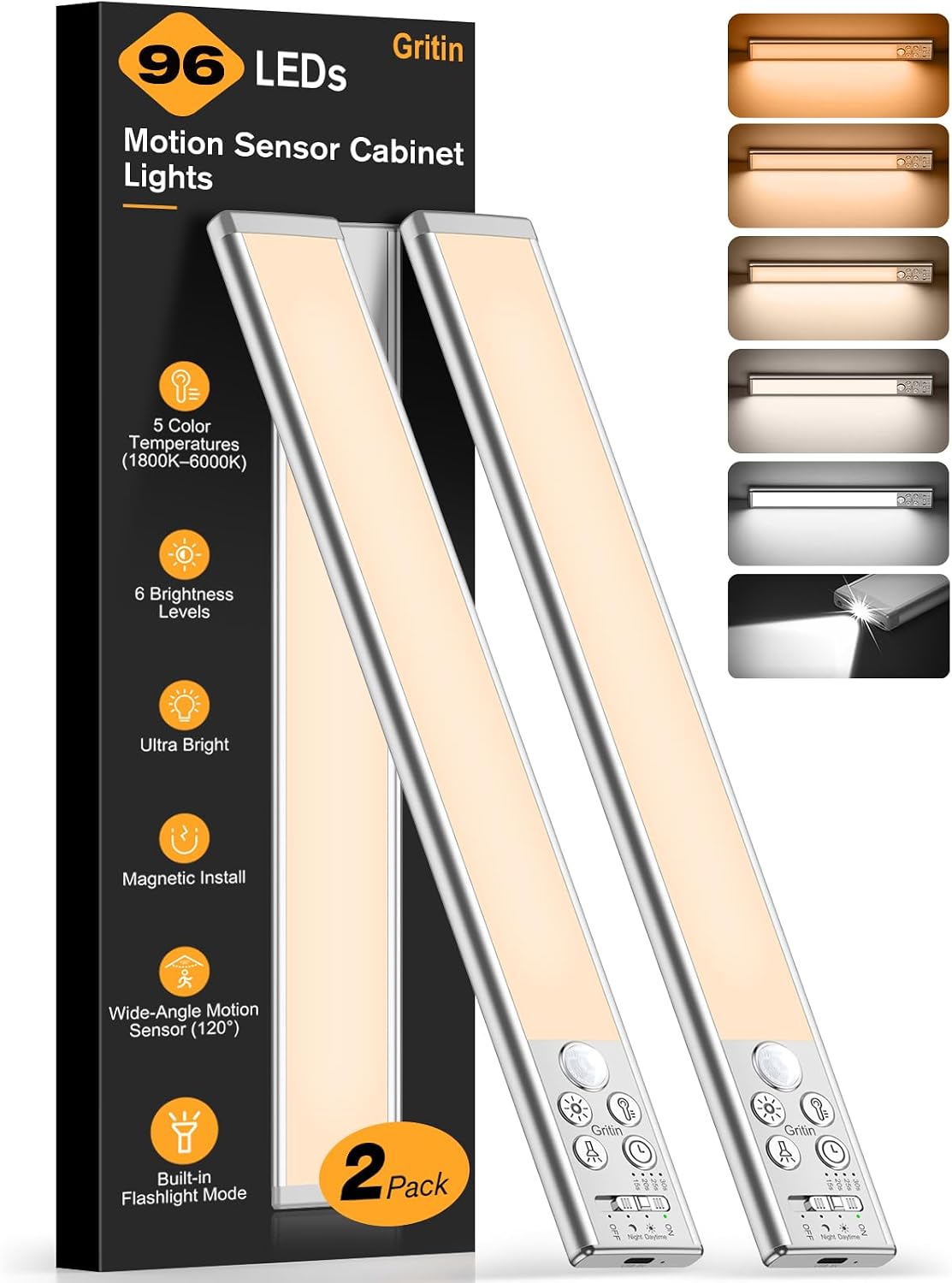
Image: The Gritin 2026 Gen2 LED Motion Sensor Light, 32.3CM Silver model.
Садржај пакета
Молимо вас да проверите пакет за следеће ставке:
- Gritin 2026 Gen2 LED Motion Sensor Light (32.3CM Silver)
- УСБ-Ц кабл за пуњење
- Magnetic Mounting Plates with Adhesive
- Mounting Screws (optional use)
- Упутство за употребу
Производ је завршенview
The Gritin 2026 Gen2 LED Motion Sensor Light combines a powerful under-cabinet light with a portable flashlight. It features multiple control buttons and a switch for various modes and settings.

Слика: Детаљна view of the light's control panel, showing buttons for color temperature, brightness, and mode selection, along with the flashlight LED.
Кључне компоненте:
- ЛЕД светлосна трака: Main illumination for cabinet/under-surface use.
- Сензор покрета: Detects movement to activate the light.
- ЛЕД лампа: Located at one end for portable illumination.
- Прекидач режима: Toggles between OFF, Night Sensing, Day Sensing, and ON modes.
- Дугме за температуру боје: Adjusts light color (1800K-6000K).
- Дугме осветљености: Adjusts light intensity (10%-100%).
- Detection Duration Button: Sets how long the light stays on after motion detection (15s/20s/25s/30s).
- УСБ-Ц прикључак за пуњење: За пуњење унутрашње батерије.
- Лампица индикатора пуњења: Приказује статус пуњења.
Сетуп
1. Почетно пуњење
Before first use, fully charge the light. Connect the provided USB-C cable to the light's charging port and a USB power adapter (not included). The charging indicator will be red while charging and turn green when fully charged. A flashing red light indicates low battery.
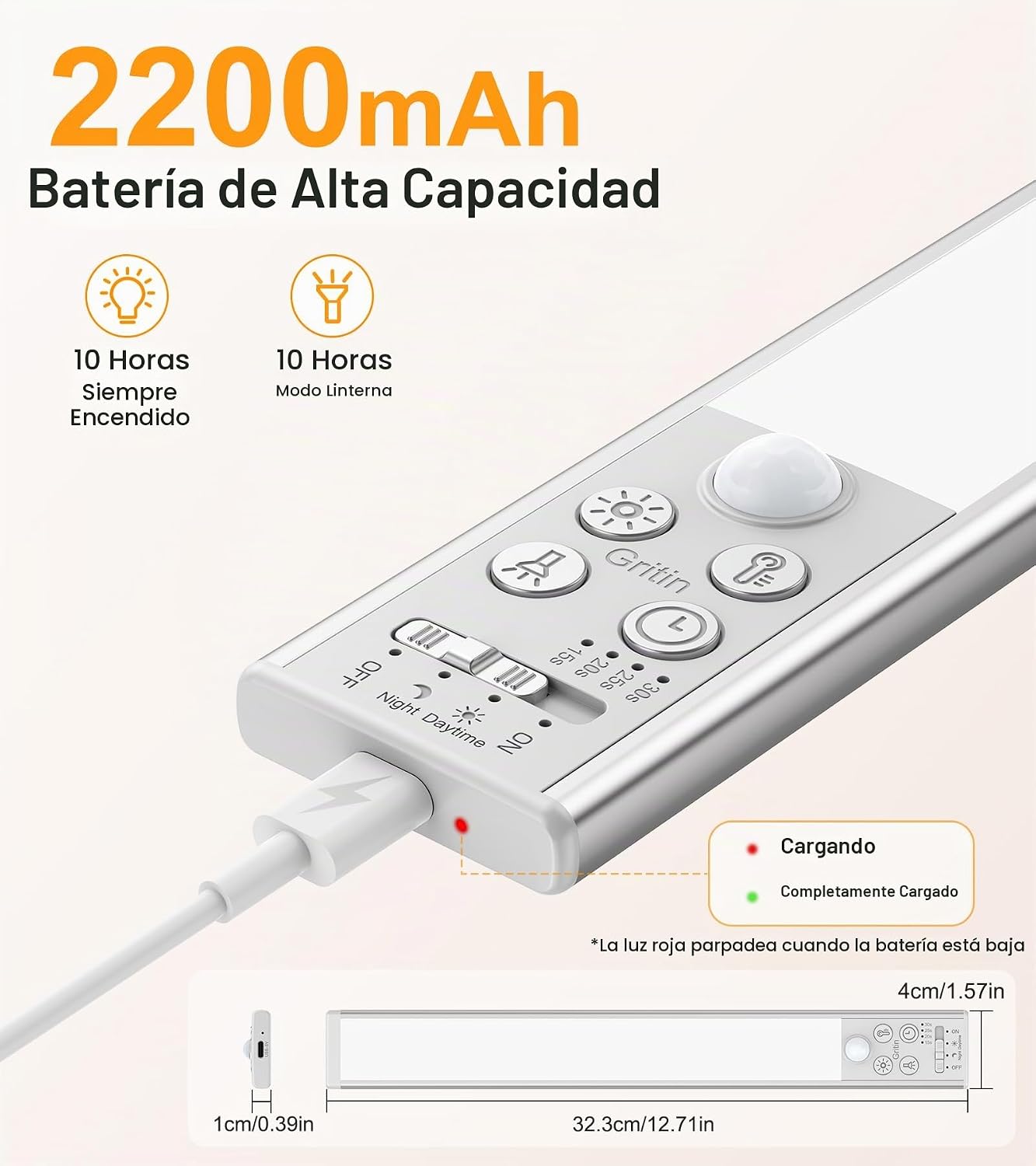
Image: Close-up of the light showing the USB-C charging port and indicator lights (red for charging, green for fully charged, flashing red for low battery).
2. Инсталација
The light offers flexible magnetic installation:
- За металне површине: The light has integrated magnets. Simply attach it directly to any metallic surface.
- For Non-Metallic Surfaces: Use the included magnetic mounting plates. Clean the desired surface thoroughly. Peel off the protective film from the adhesive side of the magnetic plates and firmly press them onto the surface. Ensure the plates are aligned with the magnets on the back of the light. Once the plates are secured, the light can be magnetically attached to them. You can also use the provided screws for a more permanent installation if preferred.
Image: Visual guide demonstrating magnetic installation on both metal and non-metal surfaces using adhesive plates.
Упутство за употребу
1. Cabinet Light Function
The main light bar provides illumination for cabinets, shelves, and other areas.
a. Power Modes:
Use the slide switch on the light to select one of the following modes:
- ВАН: Светло је угашено.
- Режим ноћног детекције (икона Месеца): The light will turn on automatically when motion is detected in dark or low-light conditions.
- Day Sensing Mode (Sun Icon): The light will turn on automatically when motion is detected, regardless of ambient light conditions.
- НА: Светло остаје непрекидно укључено.

Image: Illustrations of the four operating modes: Day Sensing, Night Sensing, Always ON, and OFF, showing typical use cases.
b. Color Temperature Adjustment:
The light offers 5 color temperature options and stepless adjustment:
- Кратки притисак: Briefly press the color temperature button to cycle through 5 preset color temperatures: 1800K (Amber Light), 2500K (Warm Light), 3000K (Warm White), 4500K (Natural Light), and 6000K (Cool White).
- Дуго притисните: Press and hold the color temperature button for stepless adjustment between 1800K and 6000K to find your preferred shade.

Image: A visual representation of the 5 distinct color temperatures available, ranging from warm amber to cool white, demonstrated in a closet setting.
c. Brightness Adjustment:
The light provides 6 brightness levels and stepless adjustment:
- Кратки притисак: Briefly press the brightness button to cycle through 6 preset brightness levels: 10%, 25%, 50%, 75%, 90%, and 100%.
- Дуго притисните: Press and hold the brightness button for stepless adjustment from 10% to 100% brightness.

Image: A grid showing the 6 distinct brightness levels, from Level 1 (dimmest) to Level 6 (brightest), and a diagram illustrating stepless dimming from 10% to 100%.
d. Detection Duration:
When in sensing modes, you can adjust how long the light stays on after motion is detected:
- Press the detection duration button to cycle through 15 seconds, 20 seconds, 25 seconds, and 30 seconds.

Image: A person in a kitchen with the light activated by motion, highlighting the 96 LEDs, 190LM output, 3m/10ft detection distance, and 120° detection angle, along with the 4 adjustable auto-off timers.
2. Функција батеријске лампе
The light includes a dedicated flashlight LED at one end for emergencies or portable use.
- Активација: The flashlight switch is located at the end of the light. Short press to turn the flashlight ON/OFF.
- Подешавање осветљености: Press and hold the flashlight switch for stepless brightness adjustment from 30% to 100%.
Напомена: The cabinet light and flashlight cannot be used simultaneously. Activating one will automatically turn off the other for stable performance.

Image: A person using the light as a flashlight to illuminate an electrical panel, demonstrating its use in emergency situations. A close-up inset shows the powerful flashlight LED.
3. Функција паметне меморије
The light features an intelligent memory function that saves your last used settings. This includes the color temperature, brightness level, light mode (cabinet light/flashlight), and detection duration. When the light is turned on again, it will recall these settings, eliminating the need for re-configuration.
Одржавање
- Чишћење: Wipe the light with a soft, dry cloth. Do not use abrasive cleaners or solvents.
- Одржавање батерије: To prolong battery life, avoid fully discharging the battery frequently. Recharge the light when the low battery indicator flashes red.
- Складиштење: Ако складиштите лампу дуже време, пуните је потпуно свака 3-6 месеци како бисте одржали здравље батерије.
Решавање проблема
| Проблем | Могући узрок | Решење |
|---|---|---|
| Светлост се не пали. | Low battery; Incorrect mode selected; Sensor obstructed. | Charge the light; Ensure the mode switch is set to a sensing mode or ON; Clear any obstructions from the sensor. |
| Сензор покрета не ради. | Incorrect mode selected; Ambient light too bright (in Night Sensing mode); Sensor obstructed. | Ensure the mode switch is set to Night Sensing or Day Sensing; Test in a darker environment for Night Sensing mode; Clear sensor. |
| Светло трепери или је слабо. | Ниска батерија. | Recharge the light fully. |
| Flashlight does not work. | Low battery; Cabinet light is active. | Charge the light; Ensure the cabinet light is off before activating the flashlight. |
Спецификације
- Број модела: Г1359
- Димензије: 32.3 цм (Д) к 4 цм (Ш) к 1 цм (В)
- Тежина: 284 г
- Материјал: Алуминијум
- Број ЛЕД диода: 96
- Излаз светлости: До КСНУМКС Лумена
- Температура боје: 1800K-6000K (5 presets, stepless adjustment)
- Нивои осветљености: 10%-100% (6 presets, stepless adjustment)
- батерија: 2200 mAh (Non-standard battery, included)
- Порт за пуњење: УСБ-Ц
- Motion Sensor Angle: 120°
- Опсег сензора покрета: До 3 метара (10 стопе)
- Auto-off Timers: 15с/20с/25с/30с
- Извор напајања: Напаја се батеријама
- Тип инсталације: Магнетна монтажа
- Метод контроле: Push button, Slide switch
- Унутрашња/спољашња употреба: Indoor, Outdoor (Note: Not waterproof for permanent outdoor exposure)
Гаранција и подршка
Gritin offers a 60-month (5-year) warranty for this product. For warranty claims or technical support, please contact Gritin customer service through the retailer where you purchased the product or visit the official Gritin webсајт за контакт информације.
Молимо вас да сачувате доказ о куповини ради потврде гаранције.