Приручници и кориснички водичи за дуготрајну негу
LTC allows for a diverse range of consumer electronics, specializing in gaming peripherals like mechanical keyboards and mice, alongside home audio and cooling appliances.
О приручницима за дуготрајну негу Manuals.plus
LTC is a versatile consumer electronics brand known for delivering affordable and functional technology solutions. The brand operates prominently in the gaming sector, offering enthusiast-grade peripherals such as the Nimbleback series of mechanical keyboards and precision wireless mice. These products often feature tri-mode connectivity (Bluetooth, 2.4G, Wired), hot-swappable switches, and customizable RGB lighting tailored for gamers.
In addition to gaming gear, LTC manufactures home electronics including floor fans, portable cooling devices, and audio equipment like public address amplifiers and waterproof speakers. Whether facilitating a high-performance gaming setup or improving home comfort, LTC products are designed for ease of use and reliability.
Приручници за дуготрајну негу
Најновији приручници од manuals+ курирано за овај бренд.
ЛтЦ АУДИО МФА1200-УСБ-БТ Ampлифиер са корисничким приручником за Блуетоотх функцију
ЛТЦ АУДИО МЕГА20В пуњиви 20В мегафон са функцијом снимања Упутство за употребу
Лтц АУДИО Хифи Стерео AmpЛифиер 2 Кс 50в са ФМ, Блуетоотх & Караоке упутством за употребу
LTC GM-031 Wired Gaming Mouse Quick Guide
Кратки водич за коришћење бежичног миша LTC OM021
LTC Sound Slave SS-502 Упутство за употребу гејмерских слушалица
LTC Mosh Pit WHM-01 бежични гејмерски миш - упутство за употребу
LTC LED 1909, 2209, 2409 Кратки водич за почетак
LTC Nimbleback NB-981 Кратки водич: Мултимедија и основне контроле
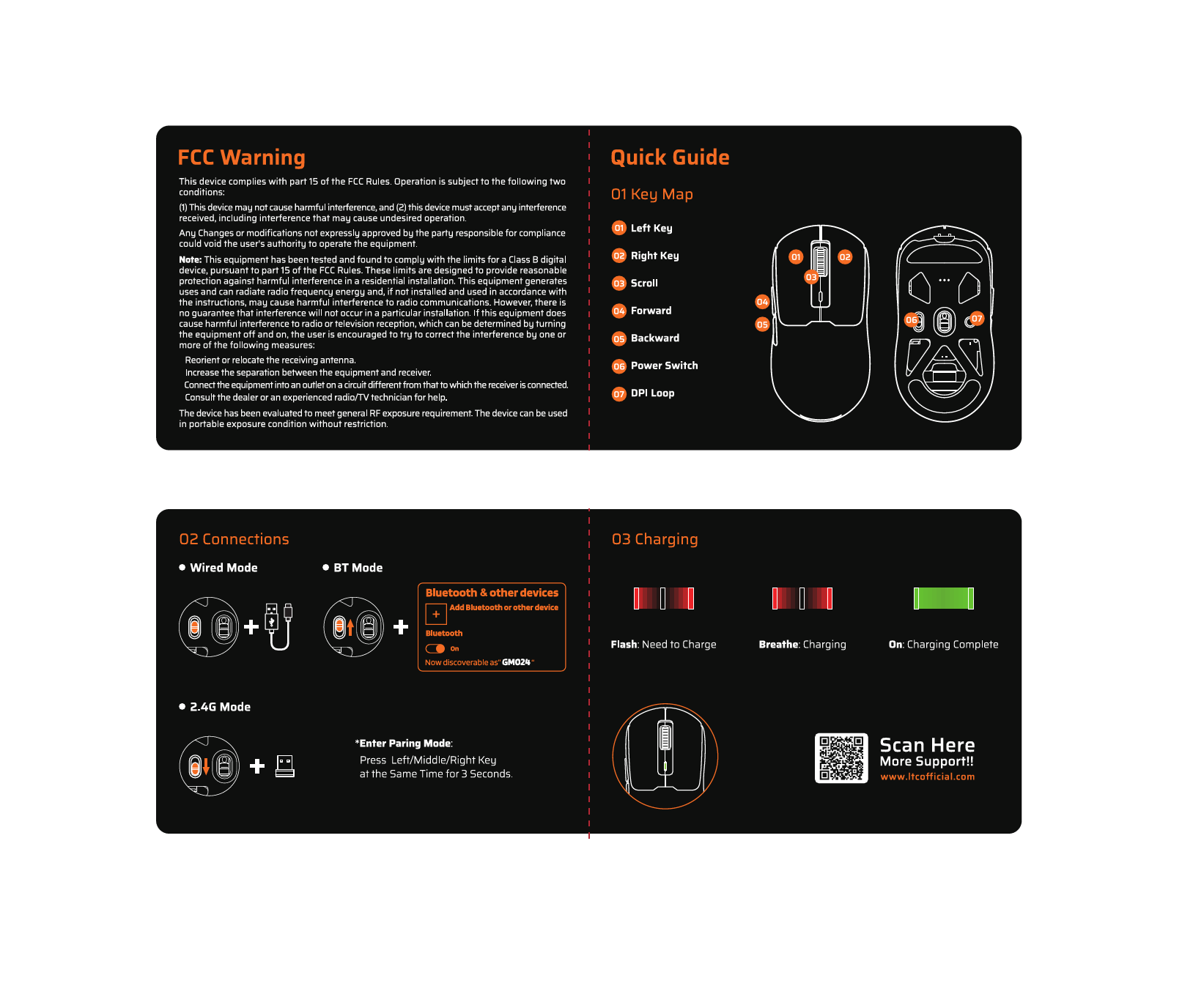
Кратки водич за употребу бежичног миша LTC GM024 и FCC упозорење
LTC Smart Living COOL 30/50 Rechargeable преносиви хладњак - упутство за употребу
Водич за брзу инсталацију бежичног рутера LTC 4G
Бежична тастатура LTC MK-791: Карактеристике, повезивање и FCC усаглашеност
LTC NB-1041 Nimbleback тастатура - Упутство за употребу - Карактеристике, подешавање и подршка
LTC MKM-051 Гејмерски миш - кратки водич и информације о производу
Приручници за дуготрајну негу од онлајн продаваца
LTC MC741 Gaming Mini PC Instruction Manual
LTC Nimbleback NB841 PRO 75% Бежична механичка тастатура - упутство за употребу
LTC GM-041 Wired Gaming Mouse Instruction Manual
LTC OM021 Wireless AI Mouse Instruction Manual
LTC Nimbleback LK-301 Low Profile Упутство за употребу механичке тастатуре
LTC GM023 Tri-Mode Wireless Gaming Mouse Instruction Manual
LTC GM051 Wireless Ergonomic Vertical Mouse Instruction Manual
LTC Nimbleback NB831 Бежична 75% 3-режимна механичка тастатура Упутство за употребу
LTC Nimbleback NB841 PRO 75% Бежична механичка тастатура - упутство за употребу
Мецаница Дос Солидос В.1 Упутство за употребу од Тимошенка и Гира
LTC ATM8000BT Хибрид AmpLifier Караоке Hi-Fi са FM-ом Упутство за употребу
LTC NB981 Nimbleback жичана механичка тастатура са 98 тастера - упутство за употребу
Видео водичи за дуготрајну негу
Погледајте видео записе о подешавању, инсталацији и решавању проблема за овај бренд.
LTC support FAQ
Честа питања о упутствима, регистрацији и подршци за овај бренд.
-
How do I pair my LTC wireless mouse?
To enter pairing mode on many LTC mice, press and hold the designated mode button, or hold the Left, Middle, and Right buttons simultaneously for about 3 seconds until the LED flashes rapidly.
-
Where can I download software for my LTC keyboard?
Drivers and configuration software for LTC gaming keyboards and mice can typically be found on the official website at ltcofficial.com.
-
How do I assemble my LTC standing fan?
Attach the base to the vertical riser using the included screws. Place the motor on the arm, secure the rear grille cover with the locking nut, attach the propeller blade, and finally snap the front grille frame onto the rear frame.
-
Does my LTC fan have a timer?
Yes, digital display models like the LXWT114 typically feature a programmable timer (e.g., up to 12 hours) accessible via the control panel or remote.