
1. Увод
The KinCony T16M is a compact and versatile ESP32-based smart controller designed for advanced home automation and industrial control applications. Featuring an ESP32-S3-WROOM-1U (N16R8) Wi-Fi chip, it offers robust connectivity via Ethernet, Wi-Fi, and Bluetooth. This controller supports 16 channels of MOSFET outputs and 16 channels of optocoupler-isolated dry contact inputs, along with 7 channels of 1-Wire GPIOs and an RS485 port for Modbus communication. The T16M is highly programmable, allowing users to deploy custom firmware using Arduino IDE, MicroPython, or ESP-IDF, and is compatible with popular smart home platforms like Home Assistant (via ESPHome or Tasmota firmware) and KinCony's KCS v3 firmware, which includes MQTT auto-discovery and cloud services.
Video: KinCony T16M Product Overview
2. Спецификације
| Феатуре | Опис |
|---|---|
| Модел бр. | KinCony T16M |
| Процесор | ESP32-S3-WROOM-1U (N16R8) |
| Повер Суппли | КСНУМКС-КСНУМКСВ ДЦ |
| Величина | 87 мм к 83 мм к 56 мм |
| Интерфејси | Ethernet (RJ45) - LAN 100Mbps IPv4/IPv6, Wi-Fi, RS485, Bluetooth, USB-C |
| Метод инсталације | ДИН шина |
| Излази | 16-Channel MOSFET Outputs (Max 4A per channel) |
| Инпутс | 16-Channel Dry Contact Inputs (Optocoupler isolation, supports up to 500m cable) |
| Дугмад | 1x ESP32 Reset, 1x ESP32 Download |
| ГПИО | 7-Channel 1-Wire GPIOs (with pull-up resistance on PCB) |
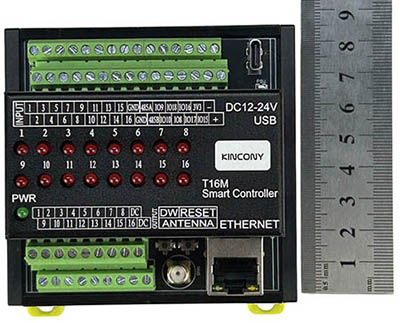
Слика 2.1: Врх view са димензијама
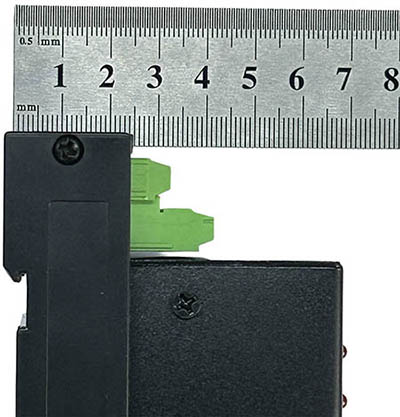
Слика 2.2: Страна view са димензијама
3. Водич за подешавање
3.1 Садржај пакета
Уверите се да су све компоненте присутне:
- KinCony T16M Smart Controller
- (Optional, with Bundle B) USB-C cable
- (Optional, with Bundle B) DC12V power supply
3.2 Физичка инсталација
The T16M is designed for DIN rail mounting, making it suitable for integration into electrical cabinets or control panels.
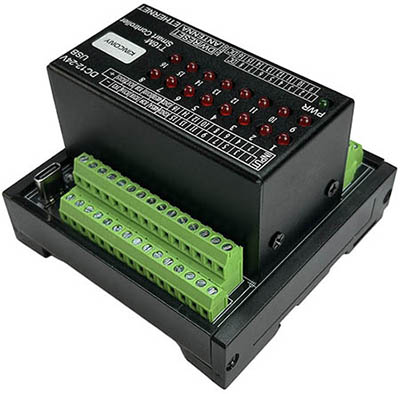
Figure 3.1: DIN Rail Mounting
3.3 Прикључак за напајање
Connect a DC 12-24V power supply to the designated power input terminals. Observe polarity: '+' for positive, '-' for negative. The 'PWR' LED indicator will illuminate green upon successful power-up.
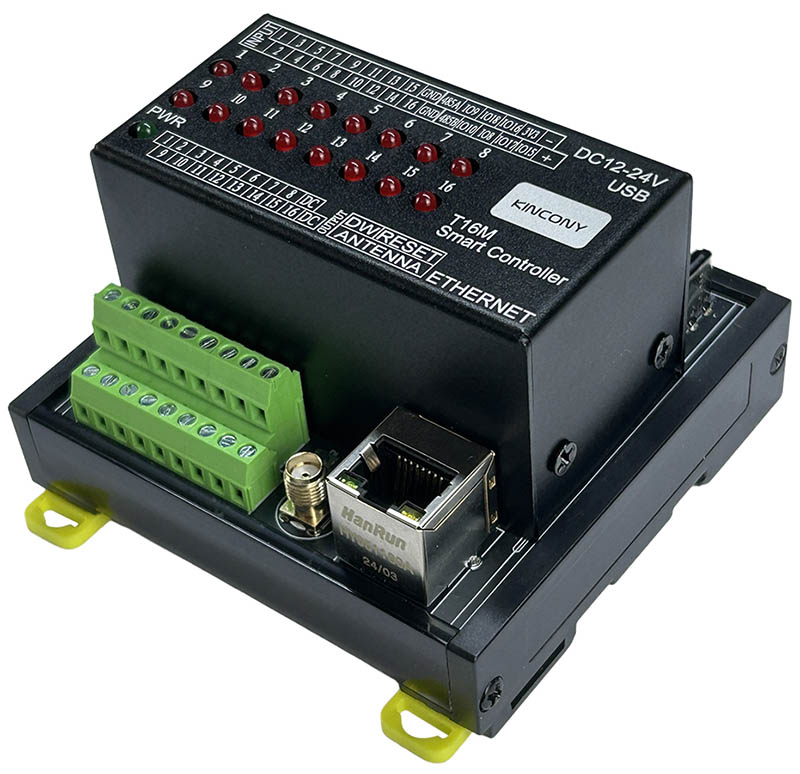
Слика 3.2: Предња страна view са улазом снаге
3.4 Input/Output Wiring
The T16M provides 16 MOSFET outputs and 16 dry contact inputs, along with 7 1-Wire GPIOs.
- MOSFET Outputs (1-16): Connect your loads (e.g., LEDs, relays, low-voltage devices) to the output terminals. Each channel supports up to 4A.
- Dry Contact Inputs (1-16): Connect switches, sensors, or other dry contact devices to these inputs. They are optocoupler isolated for protection and support long cable runs (up to 500 meters).
- 1-Wire GPIOs: These 7 channels are available for connecting 1-Wire devices (e.g., temperature sensors) or other digital sensors. They have built-in pull-up resistors.
- РС485 порт: Connect RS485 devices (e.g., Modbus sensors) to the A and B terminals.
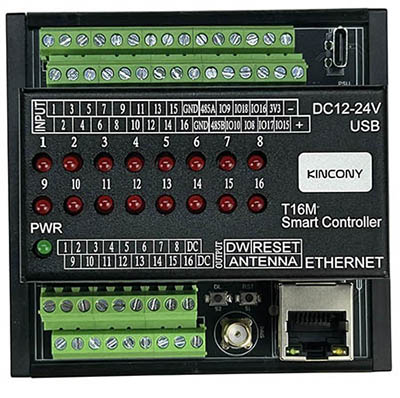
Слика 3.3: Одозго надоле view of the T16M board showing I/O terminals
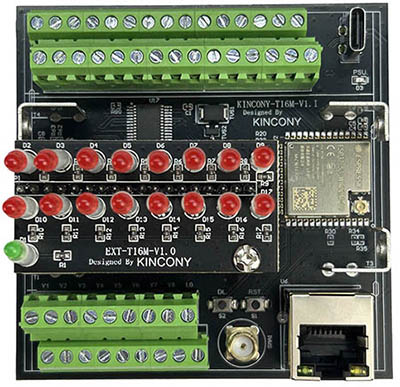
Figure 3.4: Close-up of I/O terminals
3.5 Мрежна повезаност
- Етхернет: Plug an RJ45 Ethernet cable into the Ethernet port for wired network connectivity.
- Ви-Фи: The ESP32 module provides Wi-Fi connectivity. An external antenna can be connected to the SMA connector for improved signal strength.
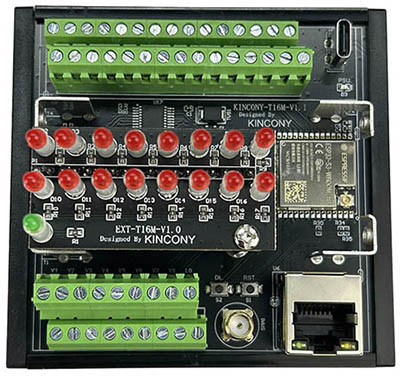
Figure 3.5: ESP32 module and Ethernet port

Figure 3.6: Ethernet port and antenna connector
3.6 УСБ-Ц порт
The USB-C port can be used for initial power (if not using DC 12-24V), programming, and serial communication with the ESP32 module.
4. Упутство за употребу
The T16M offers flexibility through various software solutions. The operational steps depend on the firmware loaded onto the ESP32 module.
4.1 Опције фирмвера
- KinCony KCS v3 Firmware: This is the official firmware offering multi-protocol support (HTTP, MQTT, TCP, RS485 Modbus). It includes features like 'momentary' and 'interlock' group functions for outputs, Home Assistant auto-discovery via MQTT (zero-code configuration), KinCony cloud service for remote monitoring and control, and integration with Loxone Miniserver and Apple HomeKit (Siri).
- ESPHome Firmware: Download ESPHome firmware to integrate the T16M directly into Home Assistant or use its web service interface. This provides deep customization and integration within the Home Assistant ecosystem.
- Tasmota Firmware: Flash Tasmota firmware for a widely supported open-source solution for smart home automation DIY projects.
- Custom Arduino/ESP-IDF Code: For advanced users, the T16M can be programmed with custom code using the Arduino IDE or ESP-IDF development framework, allowing for tailored functionalities to meet specific project requirements.
4.2 Reset and Download Buttons
- Дугме за ресетовање: Press this button to restart the ESP32 module.
- Download Button: Use this button in conjunction with the Reset button (typically hold Download, press and release Reset, then release Download) to put the ESP32 into bootloader mode for flashing new firmware via the USB-C port.
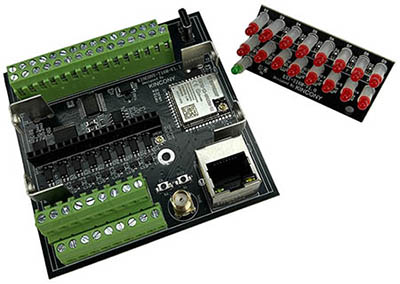
Figure 4.1: Reset and Download Buttons
5. Савети корисника
- Прилагођавање: The T16M is highly customizable. Don't hesitate to explore flashing open-source firmware like ESPHome or Tasmota, or even writing your own code, to perfectly match your automation needs.
- Интеграција кућног асистента: For Home Assistant users, leverage the KCS v3 firmware's MQTT auto-discovery feature for a seamless, zero-code setup experience.
- Даљински приступ: Utilize the KinCony cloud service (if using KCS v3 firmware) for convenient remote monitoring and control of your devices from anywhere via a web претраживач.
- Локална контрола: For local voice control without internet dependency, consider integrating KinCony AS voice assistant with KCS firmware, which also supports IFTTT functions locally.
6. Одржавање
To ensure the longevity and optimal performance of your KinCony T16M controller, follow these general maintenance guidelines:
- Одржавати уредним одржавати чистим: Regularly clean the device and its surroundings to prevent dust and debris accumulation, which can affect cooling and component lifespan. Use a soft, dry cloth.
- Правилна вентилација: Уверите се да је уређај инсталиран на месту са одговарајућим протоком ваздуха како бисте спречили прегревање.
- Стабилно напајање: Always use a stable DC 12-24V power supply within the specified voltage range. Fluctuations can damage the internal components.
- Избегавајте екстремне услове: Do not expose the device to extreme temperatures, high humidity, or corrosive environments.
- Ажурирања фирмвера: Periodically check for firmware updates from KinCony or the respective open-source communities (ESPHome, Tasmota) to benefit from new features, bug fixes, and security enhancements.
КСНУМКС. Решавање проблема
If you encounter issues with your T16M controller, refer to the following common troubleshooting steps:
- Уређај се не укључује:
- Check the DC 12-24V power supply connection and ensure it's within the specified voltagе ранге.
- Verify polarity of the power connection.
- Confirm the 'PWR' LED is illuminated green. If not, try a different power supply or USB-C power source. - No Network Connectivity (Wi-Fi/Ethernet):
- Етхернет: Ensure the RJ45 cable is securely connected to both the T16M and your router/switch. Check router settings for DHCP or static IP configuration.
- Ви-Фи: Verify your Wi-Fi credentials (SSID, password) are correctly configured in the firmware. Ensure the external antenna is properly connected for optimal signal. - Outputs Not Responding:
- Check the wiring of your loads to the MOSFET output terminals.
- Verify that the firmware is correctly configured to control the desired output channels.
- Ensure the power supply is sufficient for both the T16M and the connected loads. - Inputs Not Registering:
- Check the wiring of your dry contact devices to the input terminals.
- Confirm that the firmware is correctly configured to read the input states. - Firmware Upload Issues:
- Ensure the T16M is in bootloader mode (hold Download, press/release Reset, then release Download).
- Verify that the correct USB-C drivers are installed on your computer.
- Use a reliable USB-C cable. - RS485 Communication Failure:
- Double-check the RS485 A and B wiring for correct polarity.
- Ensure the baud rate and Modbus parameters are correctly configured in your firmware and matching the connected device.
For further assistance, consult the KinCony official website or relevant community forums for your chosen firmware (ESPHome, Tasmota, Arduino ESP32).
8. Гаранција и подршка
KinCony provides technical support for its products. For specific warranty information, please refer to the terms and conditions provided at the time of purchase or visit the official KinCony website. For technical inquiries, documentation, and community resources related to ESPHome, Tasmota, or Arduino/ESP-IDF development, please consult their respective official websites and forums.