Увод
This manual provides instructions for the setup, operation, and maintenance of your Logitech Wingman Force Joystick, model 963155-0403. This device is designed to enhance your PC gaming experience with force feedback technology and programmable controls.
Садржај пакета
Проверите да ли ваш пакет садржи следеће ставке:
- Logitech Wingman Force Joystick
- Повер Адаптер
- USB Cable (integrated or separate)
- Software CD (if applicable, for WingMan Software)
- Кориснички приручник (овај документ)
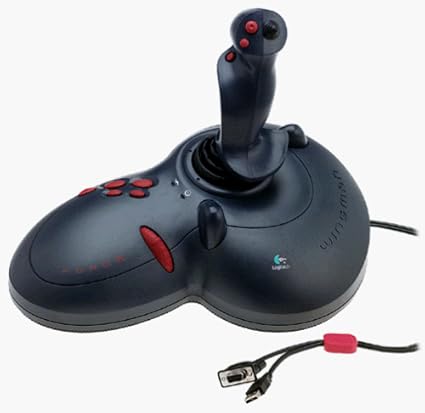
Figure 1: The Logitech Wingman Force Joystick packaging, showing the joystick and its features.
Сетуп
- Прикључите напајање: Plug the power adapter into the joystick and then into a standard electrical outlet.
- Повежите се са рачунаром: Connect the joystick's USB cable to an available USB port on your computer. The joystick also supports serial interfaces.
- Инсталирајте софтвер: Insert the WingMan Software CD (if provided) into your computer's CD-ROM drive and follow the on-screen instructions to install the drivers and WingMan Software. If no CD is provided, drivers may be automatically installed by your operating system or available for download from the Logitech support webсајту.
- Системски захтеви: Ensure your computer runs a compatible Windows operating system.
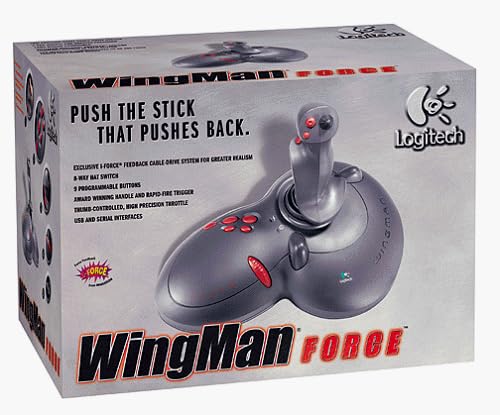
Figure 2: The Logitech Wingman Force Joystick, illustrating its ergonomic design and button layout.
Упутство за употребу
Цонтролс Оверview
- Joystick Handle: Provides precise control for in-game movement.
- 9 програмабилних дугмади: Customize these buttons using the WingMan Software for various in-game actions.
- 8-полупрекидни прекидач: Located on top of the joystick, this switch allows for quick camera views or directional commands.
- Thumb-Controlled Throttle: Adjust speed or thrust with the integrated throttle control.
Force Feedback Technology
The Wingman Force Joystick utilizes Logitech's exclusive I-Force force feedback technology with a cable-drive system. This system provides realistic tactile feedback, such as vibrations from impacts, recoil from weapons, and resistance during maneuvers, enhancing immersion in compatible games.
Using WingMan Software
The WingMan Software allows you to:
- Program the 9 buttons for specific game functions.
- Креирајте и сачувајте више професионалацаfileс за различите игре.
- Adjust force feedback intensity settings.
- Calibrate the joystick for optimal performance.
Refer to the WingMan Software's help documentation for detailed instructions on customization and profile менаџмент.
Одржавање
To ensure the longevity and optimal performance of your joystick:
- Чишћење: Use a soft, dry cloth to wipe the surface of the joystick. Avoid using abrasive cleaners or solvents.
- Складиштење: Store the joystick in a clean, dry environment away from extreme temperatures and direct sunlight.
- Нега каблова: Avoid bending or crimping the cables excessively.
Решавање проблема
- Problem: Joystick not recognized by computer.
- решење:
- Ensure the USB cable is securely connected to both the joystick and the computer.
- Покушајте да се повежете на други УСБ порт.
- Verify that the power adapter is properly connected and the joystick is receiving power.
- Reinstall the WingMan Software drivers.
- Problem: Inconsistent or absent force feedback.
- решење:
- Check the force feedback settings within the WingMan Software and ensure they are set to an appropriate level.
- Ensure the game you are playing supports force feedback and that it is enabled in the game's settings.
- Restart your computer and the game.
- Проверите да ли су све везе безбедне.
- Problem: Buttons or controls are unresponsive.
- решење:
- Calibrate the joystick using the WingMan Software.
- Ensure the joystick drivers are up to date.
- Test the joystick in a different game or application to determine if the issue is game-specific.
Спецификације
| Феатуре | Детаљ |
|---|---|
| Број модела | 963155-0403 |
| Бранд | Логитецх |
| Тип контролера | Јоистицк |
| Технологија повезивања | УСБ, серијски |
| Компатибилни уређаји | Виндовс рачунари |
| Димензије производа | 13.5 к 9.63 к 9.25 инча |
| Тежина артикла | 4.14 фунти |
| Форце Феедбацк | I-Force feedback cable-drive system |
| Дугмад | 9 програмабилних дугмади |
| Хат Свитцх | 8-смерни прекидач за шешир |
| Гас | Thumb-controlled, high precision throttle |
Гаранција и подршка
За информације о гаранцији и техничку подршку, погледајте документацију која је приложена уз ваш производ или посетите званичну страницу за подршку компаније Logitech. website. You can typically find drivers, FAQs, and contact information for customer service there.
Логитецх подршка Webсајт: ввв.логитецх.цом/суппорт