1. Увод
This manual provides essential information for the safe and efficient operation of your Roline DesignSecure 525 Uninterruptible Power Supply (UPS). Please read this manual thoroughly before installation and use to ensure proper functionality and to prevent damage to the unit or connected equipment.
The Roline DesignSecure 525 UPS is designed to provide reliable emergency power for workstations and communication technology, protecting against power fluctuations, blackouts, and surges.
2. Безбедносне информације
УПОЗОРЕЊЕ: Непоштовање ових безбедносних упутстава може довести до струјног удара, пожара или озбиљних повреда.
- Не отварајте UPS уређајasinг. Унутра нема делова које корисник може сам да поправи. Сво сервисирање препустите квалификованом сервисном особљу.
- Не повезујте уређаје који би могли преоптеретити UPS, као што су ласерски штампачи или усисивачи.
- Ensure the UPS is connected to a grounded power outlet.
- Do not expose the UPS to water or excessive humidity.
- Position the UPS in a well-ventilated area, away from direct sunlight and heat sources.
- Disconnect the UPS from the power outlet before cleaning. Use a dry cloth for cleaning.
3. Производ је готовview
The Roline DesignSecure 525 UPS provides uninterruptible power and protection for your electronic devices. Key features include:
- Поуздано напајање: Provides emergency power and protection against spikes, voltage variations, blackouts, interference, and overvoltage.
- Продужено трајање батерије: Features a battery management system for efficient charging and a digital display for battery status.
- Капацитет снаге: Supports 2000 VA / 1200 W, offering a full power runtime of 2 minutes and 4 minutes at mid-power.
- Built-in AVR: Аутоматиц Волtage Regulation protects against surges and undervoltages, regulating voltage variations via Buck and Boost technology.
- Monitoring Software: Includes built-in software for communication between the inverter microprocessor and a PC, compatible with common operating systems.
3.1. Компоненте
Below is an image of the Roline DesignSecure 525 UPS, highlighting its general appearance.
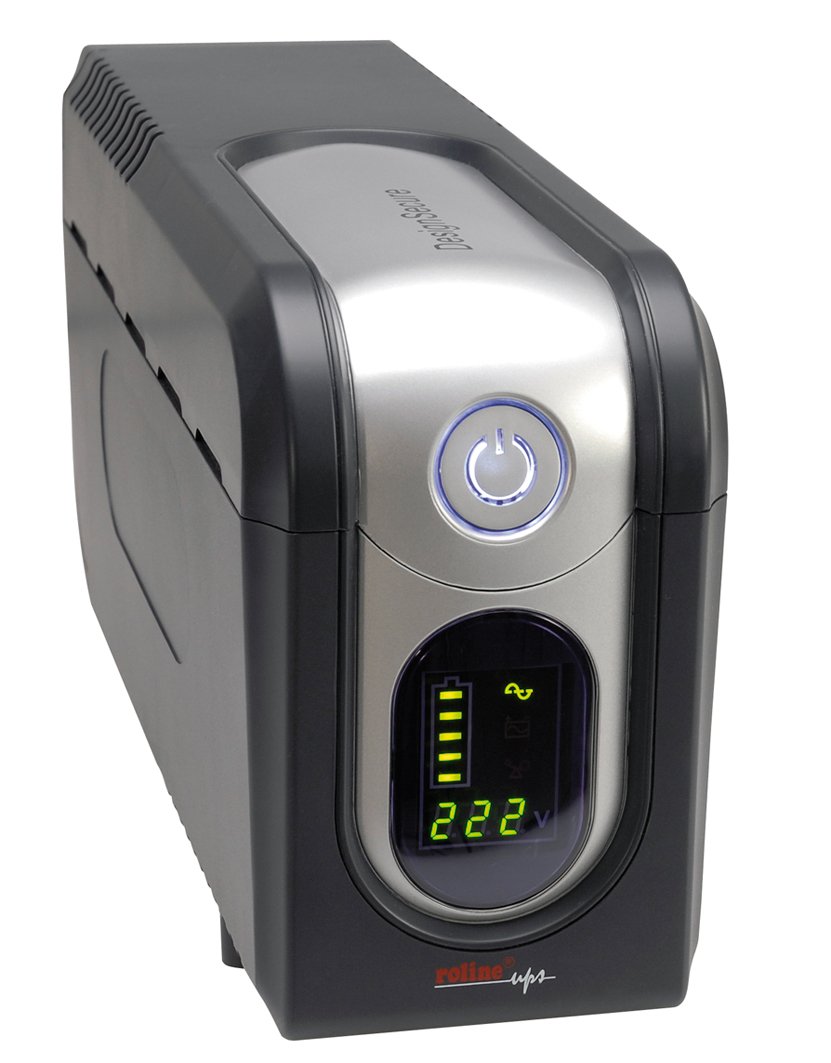
Слика 1: Предња страна view of the Roline DesignSecure 525 UPS. This image shows the main unit, including the display panel and power outlets.
The UPS typically includes:
- Улаз за напајање
- Output Power Outlets (Type B - 3 pin North American)
- Control Panel / LCD Display
- УСБ комуникациони порт
- Telephone/Modem Protection Ports (RJ11)
4. Подешавање
4.1. Распакивање
Carefully unpack the UPS and inspect it for any shipping damage. Retain the packaging for future transport or storage.
КСНУМКС. Постављање
Place the UPS on a flat, stable surface in a clean, dry, and well-ventilated area. Ensure there is adequate space around the unit for proper airflow. Avoid placing it near heat sources or in direct sunlight.
4.3. Повезивање на напајање
- Уверите се да је УПС искључен.
- Connect the UPS power input cable to a grounded Type B (3-pin North American) wall outlet.
- Оставите UPS да се пуни најмање 8 сати пре прве употребе како бисте осигурали оптималне перформансе батерије.
4.4. Connecting Equipment
- Connect your computer, monitor, and other critical devices to the UPS output receptacles.
- For telephone/modem line protection, connect your incoming telephone/modem line to the "IN" port on the UPS, and then connect a cable from the "OUT" port to your telephone/modem device.
- Do not connect surge strips or extension cords to the UPS output.
4.5. Инсталација софтвера (опционо)
For advanced monitoring and management, install the provided smart monitoring software on your computer. Connect the UPS to your computer using a USB cable. Refer to the software's specific instructions for installation and configuration.
5. Упутство за употребу
5.1. Turning On the UPS
Press and hold the power button on the front panel for approximately 2-3 seconds until you hear a beep and the display illuminates. The UPS will perform a self-test and then enter online mode.
5.2. Turning Off the UPS
To turn off the UPS, press and hold the power button for approximately 2-3 seconds until you hear a beep and the display turns off. Ensure all connected devices are properly shut down before turning off the UPS.
5.3. Приказ индикатора
The digital display provides real-time information about the UPS status, including:
- Улазни волtage
- Оутпут Волtage
- Ниво напуњености батерије
- Лоад Левел
- Режим рада (онлајн, батерија, бајпас)
- Кодови грешака (ако их има)
Refer to the software manual for detailed explanations of all display indicators and error codes.
5.4. Аутоматиц Волtagе Регулација (АВР)
The built-in AVR automatically corrects minor voltage fluctuations without switching to battery power, preserving battery life. If the input voltage goes too high or too low, the AVR will adjust it to a safe level for your connected devices.
5.5. Режим батерије
У случају напајања оуtage, the UPS will automatically switch to battery power. An audible alarm will sound, and the display will indicate battery mode. The duration of battery backup depends on the load connected. The UPS will automatically shut down when the battery is depleted to prevent deep discharge.
6. Одржавање
6.1. Брига о батерији
- To maintain optimal battery life, ensure the UPS is connected to a power source and charging when not in use.
- Избегавајте честа дубока пражњења.
- If storing the UPS for an extended period, fully charge it every three months to prevent battery degradation.
- Battery replacement should only be performed by qualified personnel.
6.2. Чишћење
Ensure the UPS is turned off and disconnected from the power outlet before cleaning. Use a soft, dry cloth to wipe the exterior. Do not use liquid or aerosol cleaners.
6.3. Услови животне средине
Maintain the UPS in an environment with stable temperature and humidity. Extreme conditions can shorten battery life and affect performance.
КСНУМКС. Решавање проблема
This section provides solutions to common issues you might encounter with your Roline DesignSecure 525 UPS.
| Проблем | Могући узрок | Решење |
|---|---|---|
| УПС се не укључује. | No input power; Low battery; Power button not pressed long enough. | Check power cord connection; Allow UPS to charge for several hours; Press and hold power button for 2-3 seconds. |
| UPS beeps continuously in online mode. | Стање преоптерећења; Унутрашња грешка. | Reduce connected load; Disconnect non-essential devices; If problem persists, contact support. |
| Кратко време резервног рада батерије. | Overload; Battery nearing end of life; Battery not fully charged. | Reduce connected load; Allow UPS to charge fully; Consider battery replacement if old. |
| Connected devices not receiving power. | UPS is off; UPS is in fault mode; Output receptacles are not active. | Turn on UPS; Check display for error codes; Ensure devices are connected to battery-backed outlets. |
If the problem persists after attempting these solutions, please contact Roline customer support.
8. Спецификације
| Феатуре | Детаљ |
|---|---|
| Број модела | 19401205 |
| Димензије производа | 4.13 к 6.61 к 13.15 инча |
| Тежина артикла | 12.79 фунти |
| Оутпут Волtage | 120 волти (АЦ) |
| Тип прикључка за напајање | Тип Б - 3-пински (Северна Америка) |
| Боја | Црна / Сребрна |
| Произвођач | РОЛИНЕ |
| Датум првог доступног | 20. августа 2012. године |
9. Гаранција и подршка
9.1. Информације о гаранцији
Roline products are manufactured to high quality standards. For specific warranty terms and conditions, please refer to the warranty card included with your product or visit the official Roline webсајт. Сачувајте доказ о куповини за потребе гаранције.
9.2. Корисничка подршка
If you require technical assistance or have questions not covered in this manual, please contact Roline customer support. Contact information can typically be found on the Roline webсајту или на паковању производа.
Када контактирате подршку, припремите број модела (19401205) и датум куповине.


