1. Увод
This manual provides essential information for the safe and efficient use of your Hama USB 7.1 Surround Sound Card, Model 00051620. Please read these instructions carefully before using the device and keep them for future reference. This external sound card allows you to connect headphones, microphones, or speakers with a 3.5mm jack to your computer or tablet via a USB-A port, enhancing your audio experience with simulated 7.1 surround sound.
2. Безбедносна упутства
- Do not open the device. Opening the device voids the warranty and may lead to electric shock.
- Заштитите производ од прљавштине, влаге и прегревања.
- Користите производ само за његову намену.
- Не испуштајте производ или га излажите јаким ударцима.
- Чувајте овај производ, као и све електричне производе, ван домашаја деце.
- Одмах одложите материјал за паковање у складу са локалним прописима.
3. Садржај пакета
Проверите да ли ваш пакет садржи следеће ставке:
- 1x Hama USB 7.1 Surround Sound Card (Model 00051620)
- 1к Упутство за употребу
4. Производ је готовview
The Hama USB 7.1 Surround Sound Card is a compact audio adapter designed to provide enhanced sound capabilities for your computer or tablet. It features a USB-A connector for easy plug-and-play functionality and includes dedicated ports for audio input and output.
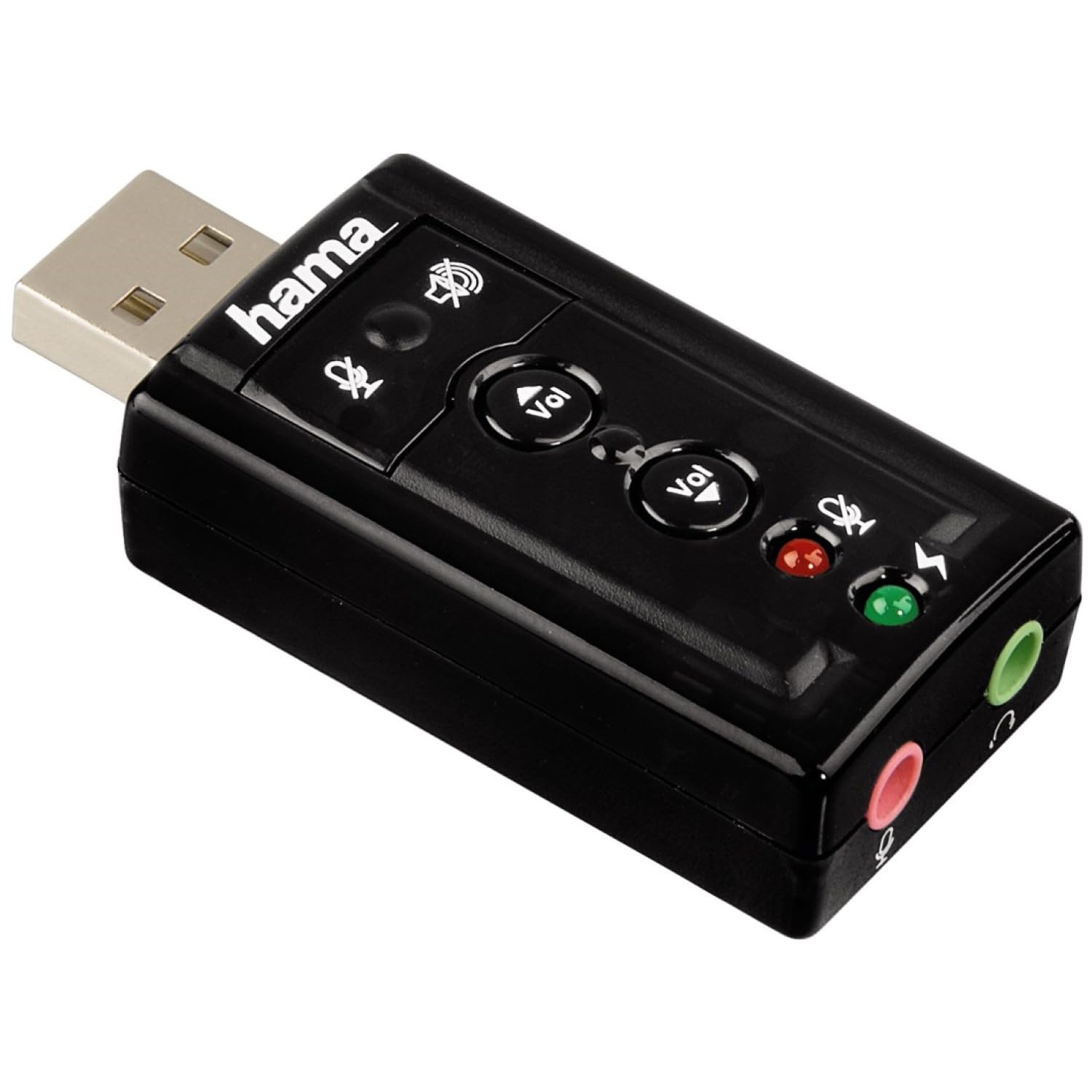
Слика 1: Врх view of the Hama USB 7.1 Surround Sound Card, showing the USB-A connector, volume control buttons, and mute indicators.
Контроле и портови:
- USB-A Connector: For connecting to your computer or tablet.
- Дугмад за појачавање / смањење јачине звука: Подешава јачину звука излаза.
- Дугме за искључивање микрофона: Mutes or unmutes the connected microphone.
- Дугме за искључивање звука звучника: Mutes or unmutes the audio output to headphones/speakers.
- 3.5mm Microphone Jack (Red): За повезивање екстерног микрофона.
- 3.5mm Headphone/Speaker Jack (Green): За повезивање слушалица или звучника.

Слика 2: Крај view of the Hama USB 7.1 Surround Sound Card, highlighting the red microphone input jack and the green headphone/speaker output jack.
5. Системски захтеви
- Operating System: Windows, macOS, or compatible tablet OS.
- Доступан USB-A порт.
- Headphones, microphone, or speakers with a 3.5mm jack connector.
6. Инсталација и подешавање
- Connect the Sound Card: Plug the USB-A connector of the Hama USB 7.1 Surround Sound Card into an available USB-A port on your computer or tablet.
- Инсталација драјвера: The device is typically plug-and-play, and your operating system should automatically detect and install the necessary drivers. If prompted, follow the on-screen instructions.
- Повежите аудио уређаје:
- For headphones or speakers, connect the 3.5mm jack into the зелена port on the sound card.
- For a microphone, connect the 3.5mm jack into the црвена port on the sound card.
- Конфигуришите подешавања звука: Access your operating system's sound settings to ensure the Hama USB 7.1 Surround Sound Card is selected as the default playback and recording device.
- Инсталација софтвера (опционо): For advanced features like XeaR-Sound 7.1 surround simulation, 10-band equalizer, and karaoke functions, install the dedicated software. Refer to the manufacturer's website for software downloads and installation instructions.
7. Операција
Basic Audio Control:
- Подешавање јачине звука: Use the 'Vol +' and 'Vol -' buttons on the sound card to increase or decrease the output volume.
- Mute Audio Output: Press the speaker mute button to temporarily silence the audio output. Press again to unmute.
- Mute Microphone Input: Press the microphone mute button to temporarily disable microphone input. Press again to enable.
Напредне софтверске функције:
If you have installed the optional software, you can access the following features:
- XeaR-Sound Technology: Enables simulated 7.1 crystal-clear surround sound for stereo speakers or headsets.
- 10-појасни еквилајзер: Customize your audio experience with various presets (e.g., Jazz, Rock, Classic) or create your own.
- Additional Sound Effects: Apply various sound effects to your audio.
- Adjustable Room Acoustics: Modify the perceived acoustic environment.
- Karaoke Recording: Record karaoke performances with original voice suppression and tone adjustment capabilities.
8. Одржавање
The Hama USB 7.1 Surround Sound Card requires minimal maintenance.
- Очистите уређај само благим дamp, крпа без длачица. Немојте користити агресивна средства за чишћење.
- Ensure the USB port and audio jacks are free from dust and debris.
КСНУМКС. Решавање проблема
Нема излаза звука:
- Ensure the sound card is securely plugged into a USB port.
- Check if your headphones/speakers are correctly connected to the green jack.
- Verify that the speaker mute button on the sound card is not active.
- Confirm that the Hama USB 7.1 Surround Sound Card is selected as the default playback device in your operating system's sound settings.
- Adjust the volume using the sound card's buttons and your computer's volume controls.
Микрофон не ради:
- Ensure your microphone is correctly connected to the red jack.
- Verify that the microphone mute button on the sound card is not active.
- Confirm that the Hama USB 7.1 Surround Sound Card is selected as the default recording device in your operating system's sound settings.
- Проверите подешавања приватности микрофона у вашем оперативном систему.
Проблеми са квалитетом звука:
- Уверите се да су све везе безбедне.
- Try connecting the sound card to a different USB port.
- If using the optional software, check equalizer settings and disable any sound effects that might be causing distortion.
10. Спецификације
| Феатуре | Детаљ |
|---|---|
| Бранд | Хама |
| Број модела | 00051620 (такође познат као 51620) |
| Боја | Црно |
| Цоннецтор | USB A male |
| УСБ Стандард | УСБ 2.0 |
| Повезивање звучника | 3.5mm female jack |
| Веза за слушалице | 3.5mm female jack |
| Контрола јачине звука | Yes, with mute function |
| Режим аудио излаза | Сурроунд |
| Конфигурација канала сурроунд звука | 7.1 (simulated with software) |
| Максимално С.ampлинг Рате | 48 кХз |
| Компатибилни уређаји | USB (PC, Laptop, Tablets) |
| Произвођач | Hama EURL |
11. Информације о одлагању
Observe the applicable local regulations for the disposal of electronic devices. The product must not be disposed of with normal household waste. Dispose of the product according to the European Directive 2012/19/EU on waste electrical and electronic equipment (WEEE) at a designated collection point for electrical and electronic equipment.
12. Гаранција
Hama GmbH & Co KG provides a limited warranty for this product. For detailed warranty terms and conditions, please refer to the official Hama webсајт или контактирајте локалног продавца. Сачувајте доказ о куповини за потребе гаранције.
13. Корисничка подршка
If you have any questions about this product or require technical assistance, please contact Hama customer support. You can find contact information on the official Hama webсајт (ввв.хама.цом) or through your local retailer.