Увод
Хвала вам на куповиниasing the Technics SL-PD807 MASH 5 Disc CD Player. This manual provides detailed instructions for the proper setup, operation, and maintenance of your new audio component. Please read this manual thoroughly before using the unit to ensure optimal performance and longevity.
The SL-PD807 features a 5-disc carousel changer, allowing for extended playback without interruption, and incorporates MASH (Multi-stage Noise Shaping) D/A conversion for high-quality audio reproduction.
Важне информације о безбедности
- Извор напајања: Ensure the unit is connected to an AC 120V, 60Hz power supply.
- вентилација: Не блокирајте вентилационе отворе. Оставите довољно простора око уређаја за правилан проток ваздуха како бисте спречили прегревање.
- Влага: Не излажите уређај киши или влази. Не стављајте предмете напуњене течношћу, као што су вазе, на уређај.
- Чишћење: Искључите уређај из зидне утичнице пре чишћења. Користите суву крпу за чишћење.
- Сервисирање: Не покушавајте сами да сервисирате овај уређај. Сво сервисирање препустите квалификованом сервисеру.
Садржај пакета
Молимо вас да проверите да ли су све ставке присутне у пакету:
- Technics SL-PD807 MASH 5 Disc CD Player
- Повер Цорд
- РЦА аудио каблови
Note: A remote control is not included with this unit.
Сетуп
1. Распакивање
Carefully remove the CD player and all accessories from the packaging. Retain the packaging materials for future transport or storage.
КСНУМКС. Постављање
Place the CD player on a stable, level surface away from direct sunlight, heat sources, and excessive dust or vibrations. Ensure there is sufficient space around the unit for proper ventilation.

Слика 1: Фронт view of the Technics SL-PD807 CD Player with included RCA cables.
3. Везе
Connect the CD player to your amplifier or receiver using the supplied RCA audio cables.
- Connect one end of the RCA audio cables (red and white plugs) to the 'LINE OUT' jacks on the rear of the SL-PD807.
- Connect the other end of the RCA audio cables to an available 'CD IN' or 'AUX IN' input on your amplifier/receiver. Match the red plug to the 'R' (right) input and the white plug to the 'L' (left) input.
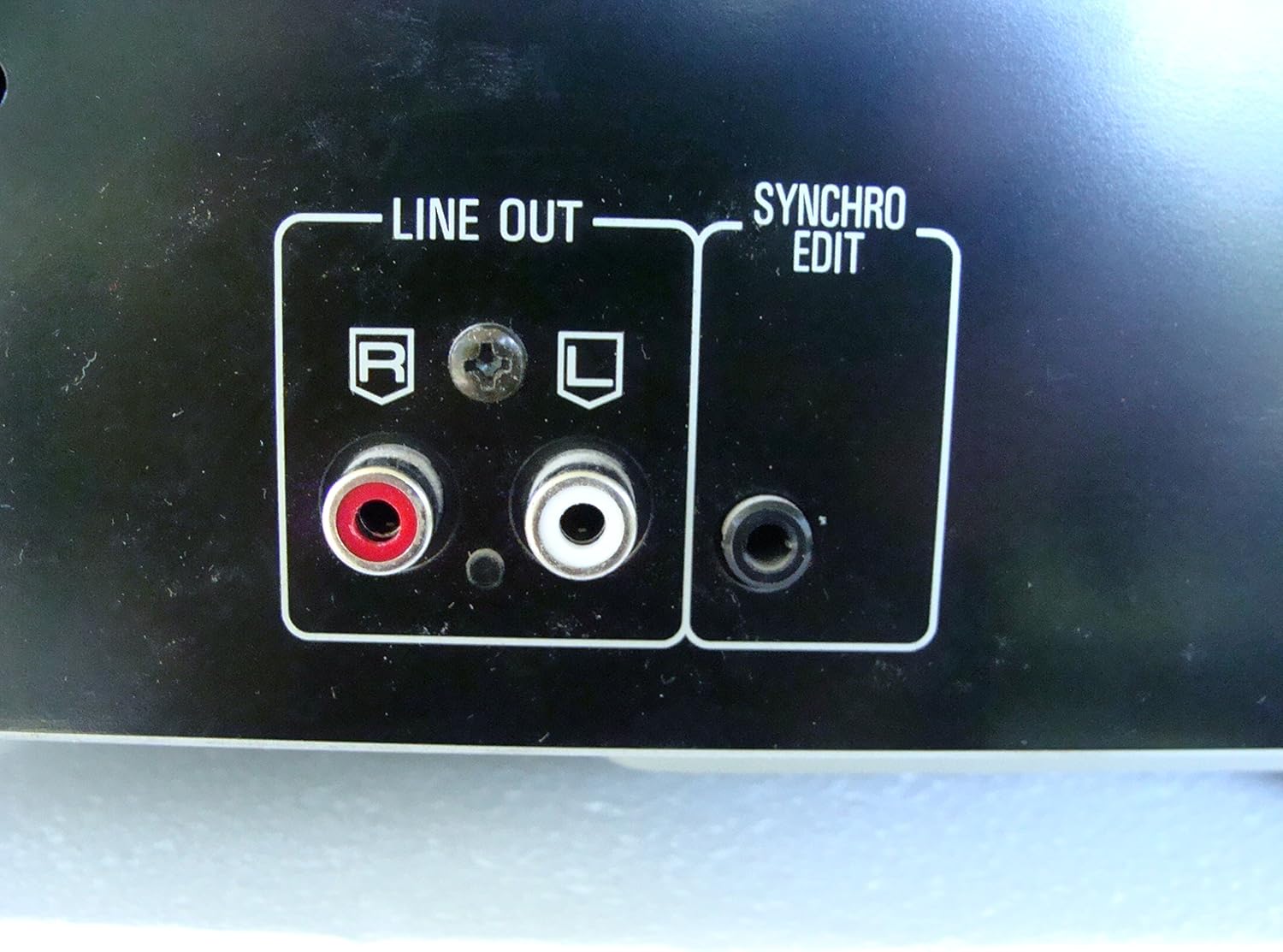
Слика 2: Rear panel connections, highlighting the 'LINE OUT' (RCA) and 'SYNCHRO EDIT' ports.
- Plug the power cord into the AC inlet on the rear of the CD player, then plug the other end into a standard AC wall outlet.
Упутство за употребу
1. Укључивање/искључивање
Притисните тастер ПОВЕР button located on the front left of the unit to turn the CD player on or off.
2. Loading Discs
The SL-PD807 features a 5-disc carousel. Press the ОПЕН/ЦЛОСЕ button to open the disc tray. Place up to five CDs onto the numbered disc slots with the label side facing up. Press ОПЕН/ЦЛОСЕ поново да затворите послужавник.

Слика 3: Front panel controls including disc tray, display, and playback buttons.
3. Основна репродукција
- Играј: Притисните тастер ПЛАИ button (►) to start playback.
- пауза: Притисните тастер ПАУСЕ button (⏸) to temporarily stop playback. Press again to resume.
- Зауставити: Притисните тастер СТОП дугме (■) да бисте зауставили репродукцију.
- Прескочи песме: Притисните тастер СКИП buttons (⏭︎ / ⏮︎) to skip to the next or previous track.
- Претрага: Држите притиснуто ТРАЖИ buttons (⏪︎ / ⏩︎) to fast forward or rewind within a track.
4. Disc Exchange
You can exchange discs while another disc is playing. Press the ДИСК СКИП button to rotate the carousel to an empty slot or a disc you wish to remove/replace. The currently playing disc will continue to play until you select a new disc to play.
5. Режими репродукције
- Случајно играње: Притисните тастер РАНДОМ button to play tracks on the current disc or all loaded discs in a random order.
- Програм репродукције: Користите ПРОГРАМ button to create a custom playback sequence of tracks from the loaded discs. Refer to the on-screen display for programming steps.
- Понови репродукцију: Притисните тастер РЕПЕАТ button to repeat the current track, current disc, or all discs.
Одржавање
1. Чишћење јединице
Wipe the exterior of the unit with a soft, dry cloth. For stubborn stains, slightly dampen the cloth with water and a mild detergent, then wipe dry. Do not use abrasive cleaners, benzene, thinner, or alcohol, as these can damage the finish.

Слика 4: Top surface of the unit, illustrating areas that may require cleaning or show wear.
2. Нега диска
- Држите дискове за ивице како бисте избегли отиске прстију на површини за репродукцију.
- Keep discs clean. Wipe from the center outwards with a soft, lint-free cloth if necessary.
- Чувајте дискове у њиховим кутијама како бисте их заштитили од прашине и огреботина.
Решавање проблема
If you experience problems with your CD player, please consult the following table before seeking service.
| Проблем | Могући узрок | Решење |
|---|---|---|
| Нема струје | Кабл за напајање није безбедно повезан. | Проверите прикључак кабла за напајање на уређај и зидну утичницу. |
| Нема звука | RCA audio cables not connected correctly. AmpУлаз за напајање/пријемник није изабран. | Ensure RCA cables are securely connected to both the CD player and amplifier. Select the correct input on your ampлифиер/рецеивер. |
| Диск се не репродукује / Прескаче | Диск је прљав или изгребан. Диск је неправилно уметнут. | Clean the disc with a soft, lint-free cloth. Ensure the disc is placed label-side up in the tray. Try another disc. |
| Carousel does not rotate | Obstruction in the disc tray. | Ensure no foreign objects are obstructing the carousel mechanism. |
Спецификације
The following are the technical specifications for the Technics SL-PD807 MASH 5 Disc CD Player:
| Феатуре | Спецификација |
|---|---|
| Назив модела | SL-PD807 |
| Произвођач | Тецхницс |
| Дисц Цапацити | 5 Дисцс |
| Захтеви за напајање | АЦ 120В, 60Хз, 13В |
| Димензије пакета | 17 к 17 к 5 инча |
| Тежина артикла | 15.02 фунти |
| Технологија повезивања | Auxiliary, Infrared |
| Посебна карактеристика | Заштита од прескакања |

Слика 5: Product label displaying model number and power specifications.
Гаранција и подршка
For information regarding warranty coverage and customer support for your Technics SL-PD807 CD Player, please refer to the warranty card included with your purchase or visit the official Technics website. If you require further assistance, please contact Technics customer service.


