Увод
This manual provides detailed instructions for the proper use and maintenance of your Royal DM2070 Electronic Organizer. Please read this manual thoroughly before operating the device to ensure safe and efficient use. Keep this manual for future reference.
Безбедносне информације
- Не излажите уређај екстремним температурама, директној сунчевој светлости или високој влажности.
- Избегавајте испуштање уређаја или излагање јаким ударима.
- Не покушавајте сами да растављате или поправљате уређај. Све сервисирање препустите квалификованом особљу.
- Држите уређај даље од воде и других течности.
- Use only the specified battery type for replacement.
Садржај пакета
Проверите да ли су све ставке присутне у вашем пакету:
- Royal DM2070 Electronic Organizer
- Stylus (if applicable)
- Водич за брзи почетак
- Гарантни лист
Сетуп
1. Инсталација батерије
The Royal DM2070 requires batteries for operation. Follow these steps to install them:
- Пронађите поклопац одељка за батерију на задњој страни уређаја.
- Померите или подигните поклопац да бисте отворили одељак.
- Уметните потребне батерије, водећи рачуна о исправном поларитету (+ и -) као што је назначено унутар одељка.
- Вратите поклопац одељка за батерије безбедно.
2. Почетно укључивање и подешавања
After installing batteries, power on your device and configure basic settings:
- Притисните и држите ПОВЕР дугме док се екран не осветли.
- The device may prompt you to set the date and time. Use the navigation buttons or stylus to enter the correct information.
- Потврдите подешавања да бисте завршили почетно подешавање.
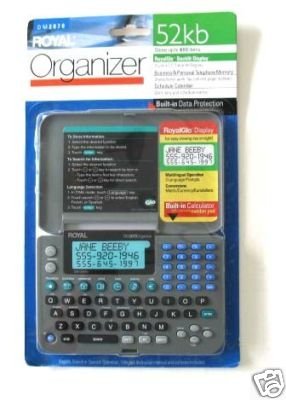
Image: Royal DM2070 Electronic Organizer. This image displays the device's front view, highlighting its screen and keypad, essential for navigation and data entry.
Упутство за употребу
1. Навигација
The DM2070 features a keypad and potentially a stylus for navigation. Use the arrow keys to move between menu options and press ЕНТЕР or a designated selection button to confirm.
2. Entering Data
To enter information such as contacts, appointments, or notes:
- Navigate to the desired application (e.g., 'Contacts', 'Calendar', 'Notes').
- Select 'New Entry' or a similar option.
- Use the alphanumeric keypad to input text. Some models may offer an on-screen keyboard via stylus.
- Save your entry before exiting the application.
3. Коришћење апликација
The DM2070 includes various applications:
- Календар: View daily, weekly, or monthly schedules. Add and edit appointments.
- Контакти: Store names, phone numbers, addresses, and email information.
- напомене: Create and manage text notes or memos.
- Калкулатор: Извршите основне аритметичке прорачуне.
- Конвертор валута: Convert between different currencies (requires manual update of exchange rates on some models).
Одржавање
1. Чишћење уређаја
To keep your DM2070 in optimal condition:
- Обришите екран и цasing with a soft, dry, lint-free cloth.
- За тврдокорне трагове, благо дampисперите крпу водом; избегавајте јаке хемикалије или абразивна средства за чишћење.
- Ensure no moisture enters openings.
2. Брига о батерији
- Одмах замените батерије када се појави индикатор празне батерије.
- Извадите батерије ако уређај неће бити коришћен дуже време како бисте спречили цурење.
Решавање проблема
If you encounter issues with your Royal DM2070, refer to the following common solutions:
| Проблем | Могући узрок | Решење |
|---|---|---|
| Уређај се не укључује. | Мртве или неправилно инсталиране батерије. | Замените батерије новим, водећи рачуна о исправном поларитету. |
| Екран је празан или замрзнут. | Грешка у софтверу или слаба батерија. | Try a soft reset (refer to Quick Start Guide for specific button combination) or replace batteries. |
| Data loss. | Battery depletion or improper shutdown. | Ensure batteries are fresh. Always save data before powering off. |
| Тастатура не реагује. | Dust/debris under keys or internal issue. | Clean keypad gently. If problem persists, contact support. |
Спецификације
Key technical specifications for the Royal DM2070 Electronic Organizer:
| Феатуре | Детаљ |
|---|---|
| Бранд | РОИАЛ |
| Број модела | ДМ2070 |
| Цовер Материал | Кожа |
| Формат | Организатор |
| Тежина артикла | 181 г |
| Димензије артикла (ДкШкВ) | 24.4 к 14.5 к 1 центиметара |
| Циљна публика | Адулт |
Гаранција и подршка
The Royal DM2070 Electronic Organizer comes with a standard manufacturer's warranty. Please refer to the warranty card included in your package for specific terms and conditions. For technical support, service, or inquiries, please contact Royal customer service through the contact information provided on the warranty card or the official Royal webсајту.


