1. Увод и крајview
The Mitel 5312 IP Phone is a versatile and user-friendly communication device designed for modern office environments. It features a full-duplex handsfree speakerphone, a multi-line backlit display, and programmable feature keys, providing intuitive access to advanced call handling and converged applications supported by Mitel's IP communication platforms.
This manual provides comprehensive instructions for setting up, operating, maintaining, and troubleshooting your Mitel 5312 IP Phone, ensuring optimal performance and user experience.
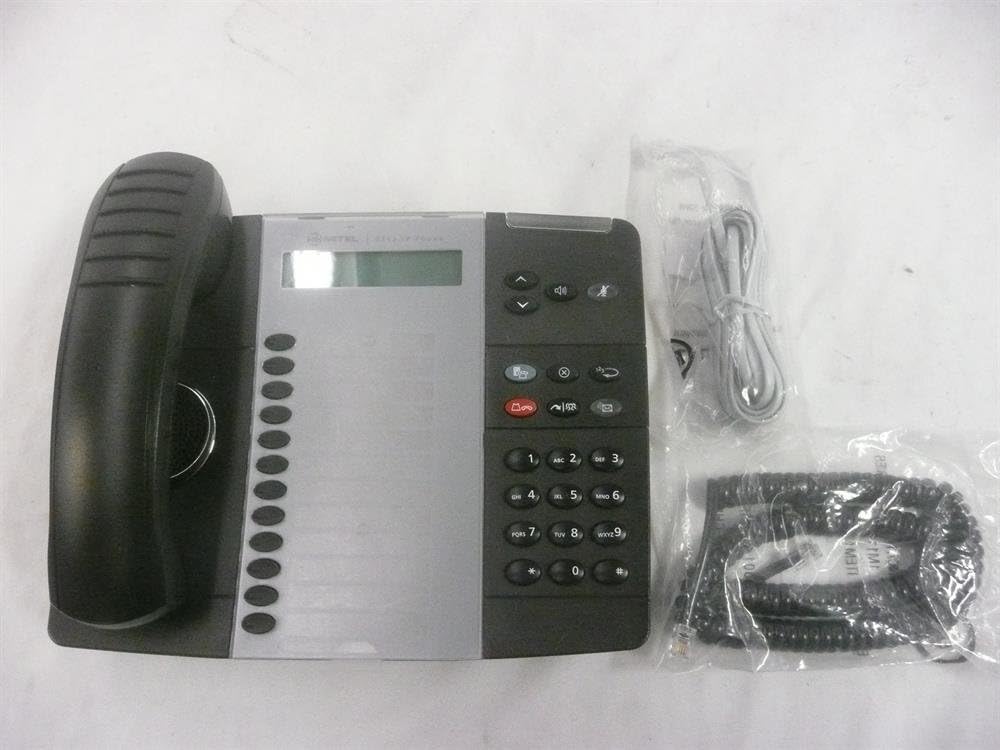
Figure 1: Mitel 5312 IP Phone with included accessories.
2. Кључне карактеристике
- Приказ: Two-line by 20-character white, backlit, graphics display with contrast control and auto-dimming.
- Програмабилни тастери: Twelve multi-function keys with dual-color LED indicators for speed dialing, line appearances, and feature access.
- Функцијски тастери: Dedicated keys for Hold, Menu, Message, Speaker, Mute, Transfer/Conference, Redial, and Cancel.
- спикерфон: Full duplex handsfree speakerphone operation.
- Прилагођавање: Browser-based desktop user tool programming for easy access to telephone system features.
3. Водич за подешавање
3.1 Садржај пакета
Пре него што почнете, уверите се да су све компоненте присутне:
- Mitel 5312 IP Phone unit
- Слушалица и спирални кабл
- Етхернет кабл
- Power adapter (if not using Power over Ethernet - PoE)
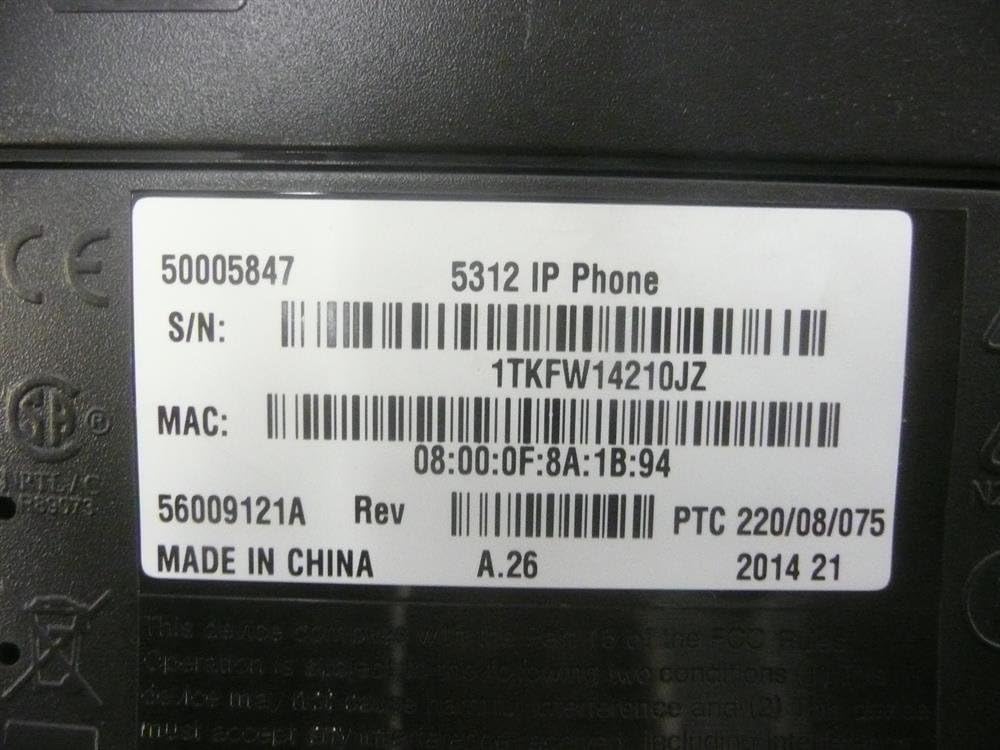
Figure 2: Mitel 5312 IP Phone and its primary accessories.
3.2 Повезивање телефона
- Повежите слушалицу: Укључите један крај спиралног кабла у слушалицу, а други крај у прикључак за слушалицу на телефонској бази.
- Повежите се на мрежу:
- If using Power over Ethernet (PoE), connect one end of the Ethernet cable to the LAN port on the phone and the other end to a PoE-enabled network switch or router.
- If not using PoE, connect one end of the Ethernet cable to the LAN port on the phone and the other end to your network switch/router. Then, connect the power adapter to the phone's power port and plug it into a power outlet.
- Optional PC Connection: If you wish to connect a computer through the phone, plug an Ethernet cable from your computer into the PC port on the phone.
- Почетно покретање: The phone will power on and begin its boot-up sequence. This may take a few moments as it obtains network configuration and registers with your IP communications platform.
4. Упутство за употребу
4.1 Основне функције позива
- Позивање: Lift the handset, press a line key, or press the Speaker button. Dial the number.
- Одговарање на позив: Lift the handset, press the flashing line key, or press the Speaker button.
- Завршавање позива: Replace the handset, or press the Speaker button if using speakerphone.
- Задржите: Током позива притисните Чекај key. To retrieve, press the flashing line key.
- Искључи звук: Притисните тастер Муте key to mute your microphone during a call. Press again to unmute.
- спикерфон: Притисните тастер Спеакер key to activate or deactivate the speakerphone.
4.2 Напредне функције
- Трансфер: Током позива притисните Transfer/Conference key. Dial the transfer destination, then press Transfer/Conference again to complete (blind transfer) or wait for an answer and announce the call (supervised transfer).
- Конференција: Током позива притисните Transfer/Conference key. Dial the number of the third party. Once connected, press Transfer/Conference поново да се придружим свим странкама.
- Поновно бирање: Притисните тастер Поновно бирање key to call the last dialed number.
- Message Access: Притисните тастер Порука key to access your voicemail.
- Програмабилни тастери: The twelve programmable keys can be configured for speed dialing, line appearances, or quick access to system features. Consult your system administrator for specific programming details.
5. Одржавање
Proper care and maintenance will extend the life of your Mitel 5312 IP Phone.
- Чишћење: Користите меку, благо дamp cloth to clean the phone's surface. Avoid abrasive cleaners, solvents, or strong chemicals. Do not spray liquids directly onto the phone.
- Окружење: Keep the phone in a dry environment, away from direct sunlight, excessive heat, or extreme cold. Ensure proper ventilation.
- Руковање: Handle the phone and its components with care. Avoid dropping the handset or pulling excessively on cords.
КСНУМКС. Решавање проблема
This section addresses common issues you might encounter with your Mitel 5312 IP Phone.
| Проблем | Могући узрок | Решење |
|---|---|---|
| No dial tone / Phone not registering | Network cable disconnected, no power (if not PoE), incorrect network configuration, server issue. | Check Ethernet cable connection. Ensure power adapter is plugged in (if applicable). Verify network settings with your IT administrator. Restart the phone by unplugging and replugging the power/Ethernet cable. |
| Екран је празан или нечитљив | No power, display settings, hardware fault. | Check power connection. Adjust display contrast (if available). If the issue persists, contact support. |
| Не чујем позиваоца / Позивалац не чује мене | Volume too low, Mute activated, faulty handset/speakerphone, network quality. | Adjust volume. Check if Mute is active. Try speakerphone or handset to isolate the issue. Check network connection quality. |
If you continue to experience issues, please contact your IT support or Mitel customer service. Be prepared to provide the model number and serial number of your device.
7. Спецификације
Detailed technical specifications for the Mitel 5312 IP Phone (Model: 50005847).
| Феатуре | Детаљ |
|---|---|
| Број модела | 50005847 |
| Бранд | Мител |
| Тежина артикла | 3 фунти |
| Боја | Црна, Сребрна |
| Тип телефона | Цордед |
| Материјал | Пластика |
| Извор напајања | Цордед Елецтриц |
| Диалер Типе | Једна тастатура |
| Тип система за одговор | Дигитал |
| Компатибилни уређаји | Mitel's IP communications platforms, VoIP services, PSTN networks |
| Могућност конференцијског позива | Басиц |
| Први доступан датум | 4. августа 2009. године |

Figure 3: Product label with identification details.
Extracted details from label:
серијски број: 1TKFW14210JZ, FSABV9236
МАЦ адреса: 08:00:0F:8A:1B:94, 08-00-0F-3B-E5-DA
Ревизија: А.26, А.2
8. Подршка и гаранција
For technical assistance, troubleshooting beyond this manual, or warranty inquiries, please contact Mitel customer support or your authorized Mitel reseller.
When contacting support, please have your product model number (50005847) and serial number ready. The serial number can be found on the label at the bottom of your phone unit (refer to Figure 3).
Information regarding protection plans and return policies may be available from your point of purchase.


