1. Увод
Хвала вам на куповиниasing the Dual MP 301 Mini Stereo System. This versatile audio system combines modern and classic audio technologies, allowing you to enjoy music from various sources including CDs, vinyl records, cassette tapes, MP3 files via USB/SD, and radio. This manual provides essential information for the safe and efficient operation of your device. Please read it thoroughly before use and retain it for future reference.
2. Безбедносна упутства
- Уверите се да је напајање волtage одговара налепници са ознакама на уређају.
- Не излажите уређај киши или влази како бисте спречили пожар или струјни удар.
- Do not block ventilation openings. Maintain adequate space around the unit for proper airflow.
- Избегавајте постављање уређаја у близини извора топлоте или на директној сунчевој светлости.
- Не отварајте цasinг. Сва сервисирања препустите квалификованом особљу.
- Искључите јединицу из струје током олуја са грмљавином или када се не користи дуже време.
3. Садржај пакета
Проверите да ли су све ставке присутне у пакету:
- Main Unit (Dual MP 301)
- ФМ антена
- 2 x Speakers (with cables)
- Даљински управљач (батерије нису укључене)
- Упутство за употребу
4. Производ је готовview
4.1. Фронт View система
This image displays the complete Dual MP 301 Mini Stereo System, including the central unit and two external speakers. The central unit features a control panel, display, CD changer, dual cassette deck, and front-facing USB/SD card slots. The speakers are two-way, designed to deliver balanced audio output.

4.2. Контролна табла и екран
This close-up shows the main control panel of the Dual MP 301. It features an LCD display, various function buttons (e.g., CD/USB, Tape, Tuner/Band, Phono), volume knob, and navigation controls. The display provides information on the current mode, track, station, and time.

4.3. Dual Cassette Deck
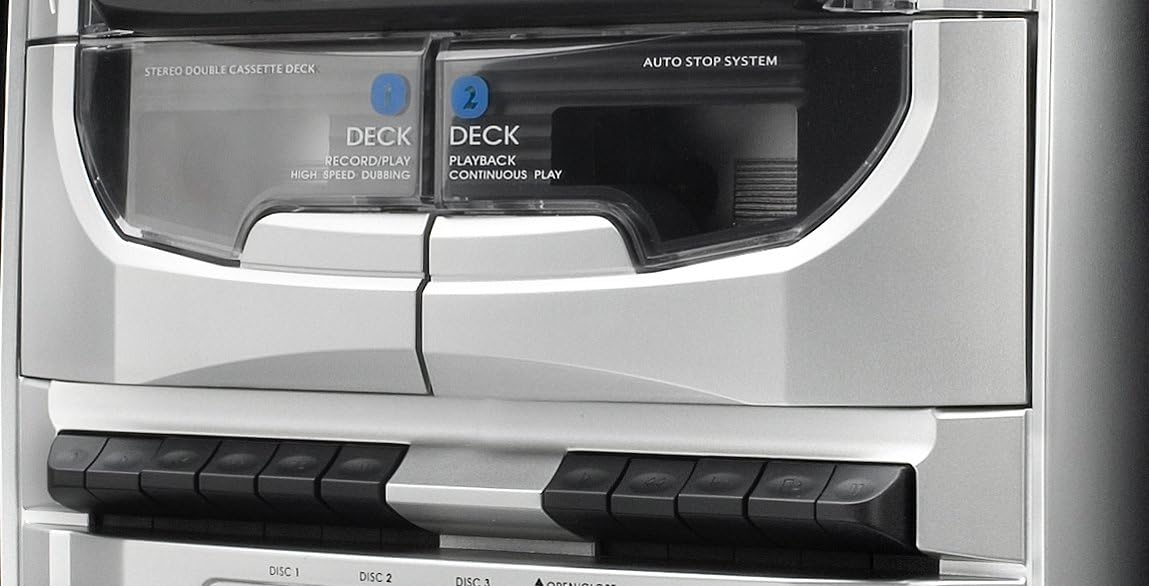
This image highlights the dual mechanical cassette deck. Deck 1 is for record/play and high-speed dubbing, while Deck 2 is for playback and continuous play. The 'Auto Stop System' ensures tape protection. Below the decks are the control buttons for cassette operations.
4.4. CD Changer and USB/SD Ports
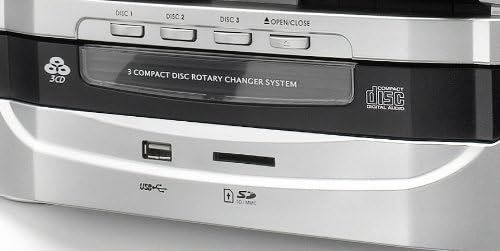
Детаљно view of the 3-compact disc rotary changer system, allowing multiple CDs to be loaded. Below the CD tray, the front panel includes a USB port and an SD/MMC card slot for playing MP3 files and recording audio.
4.5. Даљински управљач
This image shows the remote control unit for the Dual MP 301. It provides convenient access to all major functions, including power, source selection, volume, playback controls, radio tuning, and special features like EQ and sleep timer.

5. Подешавање
5.1. Повезивање звучника
- Locate the speaker terminals on the rear of the main unit.
- Connect the speaker wires from the left speaker to the 'L' terminals and from the right speaker to the 'R' terminals. Ensure correct polarity (positive to positive, negative to negative).
5.2. Повезивање FM антене
- Connect the supplied FM antenna to the 75-ohm antenna connection port on the rear of the unit.
- Extend the antenna fully and position it for optimal reception.
5.3. Прикључак за напајање
- Уверите се да су све везе безбедне.
- Укључите кабл за напајање у одговарајућу зидну утичницу.
6. Операција
6.1. Укључивање/искључивање и избор режима
- Притисните тастер У ПРИПРАВНОСТИ button on the unit or remote to power on or off.
- Користите ФУНЦТИОН or source buttons (e.g., ЦД / УСБ, ТАПЕ, ТЈУНЕР/БАНД, ПХОНО) to select the desired audio source.
6.2. Управљање CD плејером
- Притисните тастер ОПЕН/ЦЛОСЕ дугме да бисте отворили лежиште за ЦД.
- Place up to three CDs onto the respective disc trays (DISC 1, DISC 2, DISC 3).
- Притисните ОПЕН/ЦЛОСЕ поново да затворите послужавник.
- Изаберите CD mode. The system will automatically detect and play the first CD.
- Користите ДИСК СКИП to switch between loaded CDs.
- Користите ПЛАИ/ПАУСЕ, СТОП, СКИП УП/ДОВН for playback control.
- The system supports CD, CD-R/RW, and MP3 CD formats.
6.3. Управљање касетофоном
- Притисните тастер ТАПЕ button to select cassette mode.
- Open the cassette deck door by pressing the ОПЕН дугме.
- Insert a cassette tape into Deck 1 (Record/Play) or Deck 2 (Playback).
- Use the playback controls (Play, Stop, Fast Forward, Rewind) located below the decks.
- To record, ensure a blank tape is in Deck 1, select the desired source (Radio, CD, USB/SD, Phono), and press the РЕЦОРД дугме на палуби 1.
- For high-speed dubbing, insert the source tape into Deck 2 and a blank tape into Deck 1, then follow the dubbing instructions in the full manual.
6.4. Рад грамофона
- Lift the turntable cover.
- Ставите винил плочу на тањир.
- Изаберите одговарајућу брзину (33, 45 или 78 обртаја у минути) помоћу прекидача за избор брзине.
- Move the tone arm to the desired position on the record. The turntable will start automatically (auto-stop feature).
- At the end of the record, the turntable will stop automatically.
6.5. Рад радио-станице
- Притисните тастер ТЈУНЕР/БАНД button to select FM or MW radio.
- Користите ТУНИНГ +/- buttons to manually tune to a station or press and hold for automatic scanning.
- To save a station, press МЕМОРИ, а затим користите PRE-UP/DN да бисте изабрали број претходно подешене поставке и притисните МЕМОРИ поново да потврдим.
- The RDS function provides station information where available.
6.6. Репродукција и снимање са USB/SD картице
- Insert a USB flash drive or SD/MMC card into the respective slot.
- Изаберите УСБ or SD mode. The system will automatically play compatible MP3 files.
- To record from Vinyl, Cassette, or CD to USB/SD, select the source, then press the РЕЦ button while in USB/SD mode.
6.7. Clock and Alarm Functions
- The LCD display shows the current time. Refer to the full manual for detailed instructions on setting the clock.
- The integrated alarm and timer functions allow you to set the system to turn on at a specific time, for example, to wake up to radio or CD music.
6.8. Употреба слушалица
- Connect 3.5mm headphones to the headphone jack on the front panel for private listening.
- Подесите јачину звука на угодан ниво.
7. Одржавање
- Чишћење: Use a soft, dry cloth to clean the unit. Do not use liquid cleaners or aerosols.
- прашина: Regularly dust the turntable and cassette deck areas to prevent accumulation that could affect performance.
- CD сочиво: Use a specialized CD lens cleaner if playback issues occur.
- Оловка: Handle the turntable stylus with care. Replace it if worn to prevent damage to records.
КСНУМКС. Решавање проблема
- Нема напајања: Check if the power cord is securely plugged in and the wall outlet is functional.
- Нема звука: Ensure speakers are correctly connected, volume is up, and the correct source is selected. Check headphone connection if applicable.
- CD/Cassette/Vinyl Not Playing: Ensure the media is inserted correctly and is clean. For vinyl, check stylus condition and tone arm placement.
- Слаб радио пријем: Adjust the FM antenna position. Check for local interference.
- Даљински управљач не ради: Check battery polarity and replace batteries if necessary. Ensure no obstacles are between the remote and the unit's sensor.
9. Спецификације
| Бранд | Дуал |
| Број модела | МП КСНУМКС |
| Боја | Сребро |
| Технологија повезивања | УСБ |
| Посебне карактеристике | CD Recorder, Integrated Speaker (Note: Product description indicates external speakers, 'Integrated Speaker' might refer to the system's audio output capability) |
| Компатибилни уређаји | Smartphone, Tablet, MP3 Player |
| Спеакер Типе | Stereo (2-way speakers) |
| Извор напајања | AC Power (Product description mentions 'Alimenté par batterie' which is 'Battery powered', but this is likely an error given the 100W output and typical mini-system design. Assumed AC power.) |
| Излазна снага | Up to 100 Watts (peak) |
| Подржани стандарди | МП3 |
| Блуетоотх компатибилност | бр |
| Подржани аудио формати | CD, Vinyl Records |
| Брзине грамофона | 33/45/78 РПМ |
| Радио тјунер | RDS-PLL-FM/MW (30 FM, 10 MW presets) |