1. Увод
The HP 1910-8G-PoE+ 180W Switch (Model JG350A) is an advanced smart-managed, fixed-configuration Gigabit Ethernet Layer 3 switch. Designed for small businesses, it offers enhanced features in an easy-to-administer solution, providing reliable network connectivity and Power over Ethernet Plus (PoE+) capabilities.
2. Кључне карактеристике
- Гигабитни Етхернет портови: Provides 8 Gigabit Ethernet ports for high-speed network connections.
- PoE+ Capability: Supports Power over Ethernet Plus (802.3at) to power compatible devices such as IP phones, wireless access points, and IP cameras directly through the network cable.
- СФП портови: Includes additional true Gigabit SFP ports for fiber connectivity, extending network reach.
- Флексибилно распоређивање: Supports both rack mounting and desktop operation.
- Тих рад: Utilizes variable-speed fans to minimize noise.
- ИПв6 подршка: Operates at full wire-speed IPv6.
- Квалитет услуге (КоС): Supports traffic prioritization for optimal performance of critical applications.
- Сигурносне карактеристике: Includes 802.1X network login, access control lists (ACLs), and denial-of-service (DoS) prevention.
- Advanced Layer 3 Features: Customizable features such as VLANs, link aggregation trunking, static routing, and Spanning Tree Protocols (STP, RSTP, MSTP).
3. Садржај пакета
Проверите да ли ваш пакет садржи следеће ставке:
- HP 1910-8G-PoE+ 180W Switch (JG350A)
- Повер Цорд
- Rack-mount Kit (if applicable)
- Водич за брзи почетак и информације о гаранцији
Ако било који предмет недостаје или је оштећен, одмах контактирајте продавца.
4. Физички опис
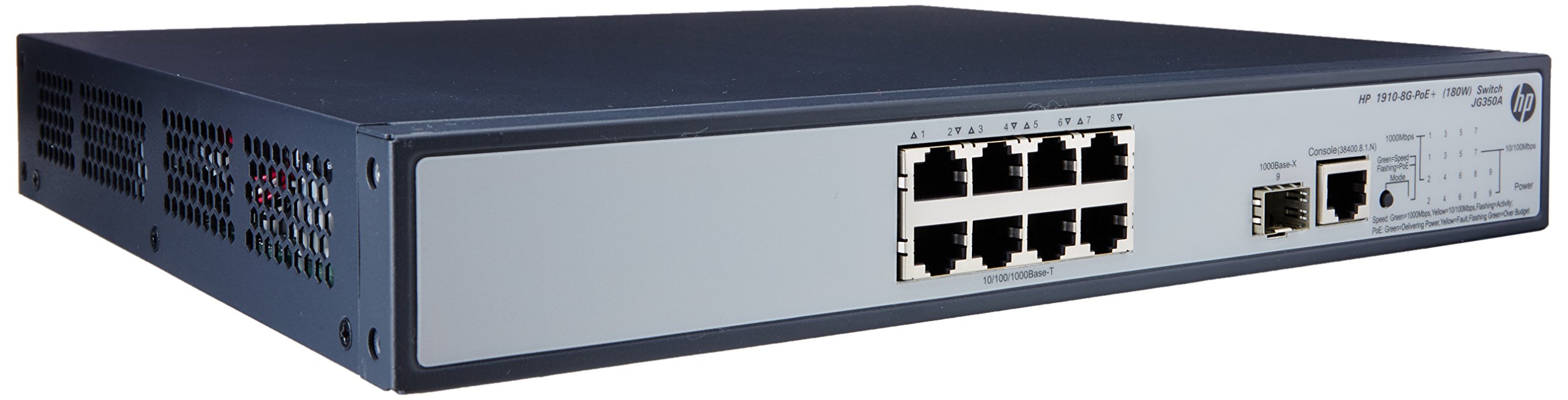

4.1 Предња плоча
The front panel of the switch includes:
- 8 x RJ45 Gigabit Ethernet Ports: These ports support 10/100/1000 Mbps connections and are PoE+ enabled, providing power to connected devices.
- 2 x SFP Ports: Dedicated slots for Gigabit fiber optic transceivers, allowing for long-distance connections.
- ЛЕД индикатори: Status lights for power, system, and individual port activity/PoE status.
4.2 Задња плоча
The rear panel typically contains the AC power input connector and ventilation openings.
5. Подешавање
5.1 Мере предострожности
- Осигурајте одговарајућу вентилацију око прекидача да бисте спречили прегревање.
- Не блокирајте вентилационе отворе.
- Користите само кабл за напајање који сте добили уз уређај.
- Avoid placing the switch in direct sunlight or near heat sources.
5.2 Монтажа прекидача
The HP 1910-8G-PoE+ 180W Switch can be deployed in two ways:
- Положај на радној површини: Place the switch on a flat, stable surface, ensuring adequate space for ventilation.
- Монтажа на рацк: Use the provided rack-mount kit to install the switch into a standard 19-inch equipment rack. Follow the instructions included with the rack-mount kit for proper installation.
5.3 Повезивање напајања
- Connect one end of the power cord to the AC power input on the rear panel of the switch.
- Прикључите други крај кабла за напајање на уземљену електричну утичницу.
- ЛЕД диода за напајање на предњој плочи треба да светли, што указује да прекидач прима напајање.
5.4 Повезивање мрежних уређаја
- РЈ45 портови: Connect your network devices (computers, servers, IP phones, wireless access points) to the RJ45 ports using standard Ethernet cables. For PoE-powered devices, ensure they are PoE+ compatible.
- СФП портови: Insert compatible SFP transceivers into the SFP slots, then connect fiber optic cables to the transceivers for fiber uplinks or long-distance connections.
5.5 Почетна конфигурација
The HP 1910 switch is a smart-managed device, typically configured via a web-based graphical user interface (GUI). Refer to the Quick Start Guide for the default IP address, username, and password to access the management interface. It is recommended to change default credentials immediately after initial access for security purposes.
6. Руковање прекидачем
6.1 Укључивање
Once connected to power, the switch will automatically power on. Observe the system LED for boot-up status. A steady green light typically indicates normal operation.
6.2 Мрежна повезаност
When a device is connected to an RJ45 port, the corresponding port LED will illuminate. A blinking LED indicates network activity. Ensure the link LED is solid green for a stable connection.
6.3 PoE+ Functionality
For devices requiring Power over Ethernet, connect them to the PoE+ enabled RJ45 ports. The switch will automatically detect and provide power to compatible devices. The PoE status LED for the port will indicate power delivery.
7. Одржавање
7.1 Чишћење
Periodically clean the exterior of the switch with a soft, dry cloth. Do not use liquid or aerosol cleaners. Ensure ventilation openings are free from dust and debris to maintain proper airflow.
7.2 Ажурирања фирмвера
Regularly check the HP support website for firmware updates. Keeping the switch firmware up-to-date ensures optimal performance, security, and access to new features. Follow the instructions provided with the firmware update package carefully.
7.3 Разматрања животне средине
Operate the switch within its specified temperature and humidity ranges to ensure longevity and stable performance. Avoid extreme conditions.
КСНУМКС. Решавање проблема
8.1 Нема напајања
- Проверите да ли је кабл за напајање безбедно повезан и са прекидачем и са електричном утичницом.
- Проверите да ли је електрична утичница функционална тако што ћете укључити други уређај.
- Ensure the power switch (if present) is in the ON position.
8.2 Нема мрежне везе
- Check the Ethernet cable connections between the switch and the device.
- Verify that the port LED on the switch is illuminated for the connected device.
- Ensure the device's network adapter is enabled and configured correctly.
- Try connecting the device to a different port on the switch or using a different Ethernet cable.
8.3 PoE Not Working
- Confirm that the connected device is PoE+ compatible.
- Проверите ЛЕД диоду за статус PoE за одређени порт.
- Ensure the total power budget of the switch is not exceeded.
- Try connecting the PoE device to a different PoE+ port.
8.4 Ресетовање прекидача
If the switch is unresponsive or experiencing persistent issues, a factory reset may be necessary. Refer to the device's management interface or the full user guide for instructions on performing a factory reset. Упозорење: A factory reset will erase all custom configurations and restore the switch to its default settings.
9. Спецификације
| Феатуре | Спецификација |
|---|---|
| Број модела | ЈГ350А |
| Тип интерфејса | PoE+, SFP |
| Број портова | 8 (Gigabit Ethernet PoE+) |
| Брзина преноса података | 1000 мегабита у секунди |
| РАМ | 128 МБ |
| Тежина артикла | 8.35 фунте (3.79 кг) |
| Димензије производа (ДкШкВ) | 17.5 к 13.12 к 3.5 инча (44.45 к 33.32 к 8.89 цм) |
| Компатибилни уређаји | Камера, десктоп, лаптоп, штампач |
| Произвођач | HP |
10. Гаранција и подршка
За детаљне информације о гаранцији и техничкој подршци, погледајте документацију која је приложена уз ваш производ или посетите званичну HP страницу за подршку. webсите. Тхе website provides access to drivers, firmware updates, troubleshooting guides, and contact information for customer service.