Увод
This manual provides essential information for the proper setup, operation, and maintenance of your Sony STR-DN1040 7.2-Channel Network A/V Receiver. Please read this manual thoroughly before using the receiver to ensure optimal performance and safety. Keep this manual for future reference.
1. Подешавање
1.1 Распакивање и постављање
Carefully remove the receiver from its packaging. Place the receiver on a stable, level surface with adequate ventilation to prevent overheating. Ensure there is sufficient space around the unit for airflow.
1.2 Повезивање уређаја
The STR-DN1040 receiver offers extensive connectivity options for your home theater system. Refer to the rear panel diagram below for connection points.

HDMI конекције: The receiver features 8 HDMI inputs and 2 HDMI outputs (one with ARC support). Connect your Blu-ray player, gaming console, cable box, and other HDMI-enabled devices to the HDMI IN ports. Connect your TV or projector to the HDMI OUT (ARC) port for audio return channel functionality.
Прикључци звучника: Connect your speakers to the corresponding terminals on the rear panel. The receiver supports 7.2-channel configurations. Ensure correct polarity (+ to + and - to -) for all speaker connections. The impedance range for speakers is 6-16 ohms.
Other Audio/Video Connections: Utilize the coaxial, optical, and component video inputs for older devices or specific audio sources. Analog audio inputs are also available.
1.3 Чаробњак за почетно подешавање
The STR-DN1040 includes an easy setup wizard to guide you through the initial configuration process. This on-screen interface simplifies connecting to the internet, setting up speakers, and adjusting basic settings.
1.4 Аутоматска калибрација
For optimal sound performance, use the included calibration microphone to perform an automatic speaker setup. Place the microphone at your primary listening position, and the receiver will automatically adjust settings based on speaker distance, delays, and placement.
1.5 Мрежна подешавања
The receiver supports both wired and wireless network connections. Follow the on-screen prompts to connect your receiver to your home network. This enables access to streaming services and firmware updates.

2. Руковање пријемником
2.1 Укључивање/искључивање
Притисните тастер ПОВЕР button on the front panel or remote control to turn the receiver on or off.
2.2 Избор улаза
Користите ИЗБОР УЛАЗА knob on the front panel or the dedicated input buttons on the remote control to switch between connected devices (e.g., BD, DVD, Game, SAT/CATV, Video 1, TV).
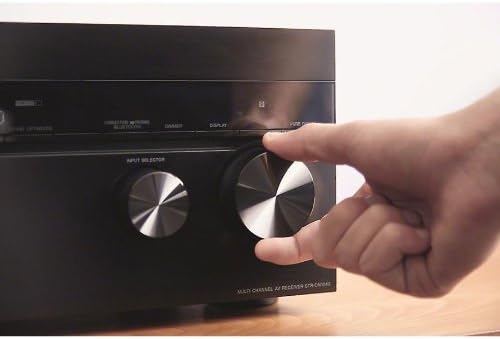
2.3 Контрола јачине звука
Подесите главну јачину звука помоћу великог МАСТЕР ВОЛУМЕ дугме на предњој плочи или ВОЛУМЕ +/- дугмад на даљинском управљачу.
2.4 Wireless Connectivity (Wi-Fi, Bluetooth, AirPlay)
The STR-DN1040 features built-in Wi-Fi, Bluetooth, and AirPlay for seamless wireless audio streaming.
- Блуетоотх: Pair your Bluetooth-enabled smartphone or tablet with the receiver. Use the pairing button or menu option to connect. You can pair up to nine Bluetooth devices.
- АирПлаи: Stream music from your iPhone, iPad, or iTunes directly to the receiver. Select the STR-DN1040 from your AirPlay-compatible device.
- Ви-Фи: Connect to your home network for access to online music services and network features.
2.5 Мрежне услуге
Access a variety of music streaming services directly through the receiver when connected to your network. Supported services include Pandora, Music Unlimited, Slacker, and vTuner.
2.6 Sound Optimizer
The Sound Optimizer feature allows you to hear every sound effect clearly, even at low volumes. It automatically recalibrates audio to maintain sound presence regardless of volume level, ensuring a complete audio experience without missing subtle details.
2.7 Front Height Effect
Enhance your audio experience with the Front Height Effect, which utilizes speakers placed above your regular front speakers. This creates a more realistic and immersive 3D audio soundstage, delivering superior audio effects with crystal-clear detail.
3. Audio Quality and Design
The Sony STR-DN1040 receiver is engineered for superior sound performance, incorporating meticulous design and high-quality components.
3.1 Precision Tuning
Sony's audio engineers meticulously tuned the receiver's audio quality using various studio and live recordings. Adjustments were made to optimize every sound, ensuring an ideal listening experience. This includes careful management of internal cabling and component placement to enhance vocal clarity and widen the sound field.
3.2 HD Digital Cinema Sound
The receiver incorporates HD Digital Cinema Sound technology, which mimics the acoustic characteristics of a movie theater. This brings a cinematic audio experience directly into your home, providing immersive and dynamic sound for movies and other content.
3.3 Redesigned Chassis and Components
The STR-DN1040 features a completely redesigned chassis to deliver superior sound performance. Key internal components include:
- Larger Transformer: A transformer larger than those in previous models is included to increase overall power and sound output, providing strong rhythmic bass and stable mid-range/high-frequency performance.
- Custom-Made Large Capacitors: Two large, custom-designed capacitors secure an enormous power supply, which is critical for consistently superior sound quality and clear separation of audio nuances.
Video 3.1: Sony STR-DN1040 Overview. Овај видео пружа детаљан прегледview of the Sony STR-DN1040 7.2-Channel Network A/V Receiver, showcasing its features, connectivity, setup process, and the advanced audio technologies that contribute to its high-quality sound performance. It highlights the ease of use with the setup wizard and the benefits of built-in Wi-Fi, Bluetooth, and AirPlay.
4. Спецификације
| Феатуре | Спецификација |
|---|---|
| Бранд | Сони |
| Број модела | СТР-ДН1040 |
| Канали | 7.2 Цханнел |
| Излазна снага | 165 Watts per channel (8 ohms, 1kHz, 0.9% THD, 1 ch. driven) |
| ХДМИ портови | 8 In / 2 Out (4K capable, one with ARC) |
| Технологија повезивања | УСБ, 3.5 мм прикључак |
| Бежична технологија | АирПлаи, Блуетоотх, Ви-Фи |
| Посебне карактеристике | 3D Pass-through, Built-in AirPlay, Built-in WiFi, Firmware update, On-screen wizard, Sound Optimizer |
| Подржане Интернет услуге | Internet Radio, Pandora, Slacker, Spotify, iHeartRadio |
| Режим аудио излаза | Сурроунд |
| Тежина артикла | 22 фунти |
| УПЦ | 027242863002 |
КСНУМКС. Решавање проблема
If you encounter issues with your receiver, please refer to the following general troubleshooting steps. For more detailed solutions, consult the full service manual or Sony's official support webсајту.
- Нема напајања: Ensure the power cord is securely connected to both the receiver and a working electrical outlet.
- Нема звука: Check all speaker connections for proper polarity and secure fit. Verify that the correct input source is selected. Ensure the volume is not muted or set too low.
- Нема видеа: Confirm HDMI cables are correctly connected between the source device, receiver, and TV. Ensure the correct input is selected on both the receiver and the TV.
- Проблеми са мрежном везом: Verify your Wi-Fi password and network settings. If using a wired connection, check the Ethernet cable. Restart your router and the receiver.
- Даљински управљач не ради: Проверите батерије у даљинском управљачу. Уверите се да нема препрека између даљинског управљача и ИР сензора пријемника.
6. Одржавање
Proper maintenance helps ensure the longevity and optimal performance of your Sony STR-DN1040 receiver.
- Чишћење: Use a soft, dry cloth to clean the exterior surfaces of the receiver. Do not use abrasive pads, scouring powder, or solvents such as alcohol or benzene.
- вентилација: Ensure that the ventilation openings on the top and sides of the receiver are not blocked. Adequate airflow is crucial to prevent overheating.
- Кабл за напајање: Периодично проверавајте кабл за напајање да ли је оштећен. Уколико је оштећен, прекините употребу и контактирајте квалификованог сервисера.
- Ажурирања фирмвера: Regularly check for and install available firmware updates to ensure your receiver has the latest features and performance enhancements. These can often be performed directly through the receiver's network connection.
7. Гаранција и подршка
7.1 Информације о гаранцији
This product is covered by a 90-day Limited Hardware Warranty. For full details, please refer to the official warranty document available at Sony Warranty Insert.
7.2 Корисничка подршка
За додатну помоћ, техничку подршку или упите о сервисирању, посетите званичну Сонијеву подршку webсајту или контактирајте њихову корисничку службу. Додатне ресурсе и честа питања можете пронаћи и на Сони продавница на Амазону.


