1. Увод
This manual provides comprehensive instructions for the proper use and maintenance of your Horizon SF-400D Digital Precision Scale. Please read this manual thoroughly before operating the device to ensure accurate measurements and prolong its lifespan.
The Horizon SF-400D is a versatile digital precision scale designed for various weighing applications, including jewelry, coins, herbs, spices, and medication. It offers high accuracy and multiple weighing modes, along with a convenient counting function.

Слика 1: Horizon SF-400D Digital Precision Scale. This image shows the overall design of the scale, featuring a black body, a stainless steel weighing platform, and a blue backlit LCD display with control buttons.
2. Мере предострожности
- Do not overload the scale beyond its maximum capacity of 500g.
- Избегавајте излагање ваге екстремним температурама, влажности или директној сунчевој светлости.
- Држите вагу даље од јаких електромагнетних поља.
- Очистите вагу меком, дamp крпа. Не користите абразивна средства за чишћење нити потапајте уређај у воду.
- Ensure the scale is placed on a stable, level surface during operation to ensure accuracy.
3. Компоненте производа
Familiarize yourself with the main parts of your SF-400D scale:
- Платформа за вагање: Stainless steel surface for placing items.
- ЛЦД екран: Backlit screen showing weight, units, and other indicators.
- Дугме за укључивање/искључивање: Укључује или искључује вагу.
- Дугме МОДЕ: Changes weighing units (g, oz, ct, dwt, gn, T).
- Дугме ТАРЕ: Resets the display to zero, useful for weighing items in a container.
- PCS Button: Activates the piece counting function.
- Дугме CAL: Used for calibration.
- Подесиве ноге: Located on the bottom for leveling the scale.
- Ниво мехурића: Integrated on the scale to assist with leveling.
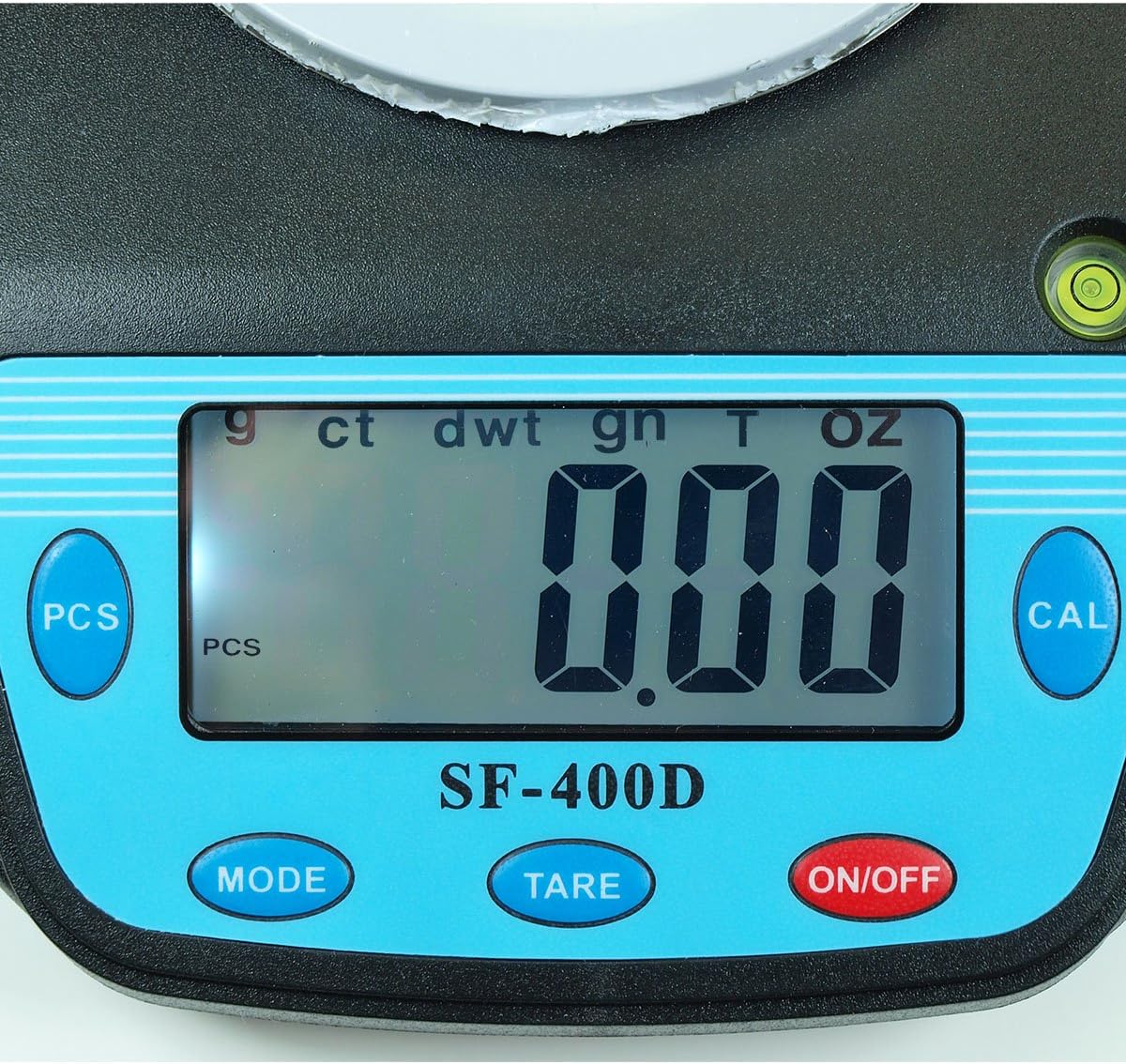
Слика 2: Close-up of the SF-400D display and control buttons. This image highlights the LCD screen, showing various unit indicators (g, ct, dwt, gn, T, oz), and the function buttons: PCS, MODE, TARE, ON/OFF, and CAL.

Слика 3: Underside of the SF-400D scale showing adjustable legs. Green arrows indicate the location of the four adjustable feet, which are used to level the scale for accurate measurements.
4. Подешавање
4.1. Напајање
The SF-400D scale operates on two AA batteries (included) or an optional AC power adapter (not included).
- Отворите поклопац одељка за батерије на доњој страни ваге.
- Уметните две АА батерије, водећи рачуна о исправном поларитету (+/-).
- Затворите одељак за батерије.
- Alternatively, connect a compatible AC power adapter (6V, amperage not specified in product details, consult manufacturer if needed) to the power port.
4.2. Постављање и нивелисање
For optimal accuracy, the scale must be placed on a stable, flat, and level surface.
- Place the scale on your desired weighing surface.
- Observe the integrated bubble level.
- Adjust the four adjustable legs on the bottom of the scale by rotating them until the bubble is centered within the level indicator.
5. Упутство за употребу
5.1. Основно мерење тежине
- Притисните тастер ОН/ОФФ button to turn on the scale. The display will show "88888" and then "0.00" (or "0.0" depending on the unit).
- If the display does not show zero, press the ТАРЕ дугме за нулирање скале.
- Притисните тастер МОДЕ button to select your desired weighing unit (g, oz, ct, dwt, gn, T).
- Gently place the item(s) to be weighed on the center of the stainless steel platform.
- Read the stable weight displayed on the LCD screen.
- Да бисте искључили вагу, притисните и држите ОН/ОФФ button for a few seconds. The scale also features an auto shut-off function to conserve battery power.
5.2. Функција тарирања
The Tare function allows you to subtract the weight of a container, so only the contents are weighed.
- Place an empty container on the weighing platform.
- Wait for the display to stabilize and show the container's weight.
- Притисните тастер ТАРЕ button. The display will reset to "0.00" (or "0.0").
- Add the items you wish to weigh into the container. The display will now show only the net weight of the items.
- To clear the tare, remove all items from the platform and press ТАРЕ again if the display does not return to zero automatically.
5.3. Piece Counting Function (PCS)
This function is useful for counting multiple identical items.
- Turn on the scale and ensure it is zeroed.
- Притисните тастер ПЦС button. The display will show "PCS" and a sample size (e.g., "25", "50", "75", "100").
- Притисните тастер МОДЕ button to cycle through the available sample sizes (25, 50, 75, 100 pieces). Select the sample size that matches the number of items you will place on the scale for sampлинг.
- Place the exact number of sample items (e.g., 25 pieces) onto the weighing platform according to your selected sampле сизе.
- Притисните тастер ПЦС button again to confirm the sample. The display will now show the number of pieces.
- You can now add more items of the same type, and the scale will display the total count.
- To exit the counting mode, press the МОДЕ дугме.
5.4. Калибрација
Calibration ensures the accuracy of your scale. It is recommended to calibrate the scale periodically or if you suspect inaccurate readings. You will need a known calibration weight (e.g., 500g) for this process.

Слика 4: SF-400D display showing "CAL" during calibration mode. This image illustrates the scale's screen indicating it is in calibration mode, prompting the user to place a calibration weight.
- Ensure the scale is on a stable, level surface and turned off.
- Притисните и држите ЦАЛ дугме, а затим притисните ОН/ОФФ button simultaneously. Release both buttons when the display shows "CAL".
- The display will then show a flashing weight value (e.g., "500.00g"). This is the required calibration weight.
- Place the exact calibration weight (e.g., 500g) onto the center of the weighing platform.
- Wait for the display to stabilize and show "PASS" or return to normal weighing mode. This indicates successful calibration.
- Remove the calibration weight. The scale is now calibrated and ready for use.
- If "FAIL" or an error message appears, repeat the calibration process.
6. Одржавање
6.1. Чишћење
- Wipe the scale surface with a soft, slightly damp тканина.
- Не користите јаке хемикалије, абразивна средства за чишћење или потапајте вагу у воду.
- Уверите се да је вага потпуно сува пре складиштења или следеће употребе.
6.2. Складиштење
- Чувајте вагу на хладном и сувом месту, даље од директне сунчеве светлости и екстремних температура.
- Ако складиштите дуже време, извадите батерије да бисте спречили цурење.
КСНУМКС. Решавање проблема
| Проблем | Могући узрок | Решење |
|---|---|---|
| Вага се не укључује. | Low or dead batteries; incorrect battery installation; no power from AC adapter. | Replace batteries; check battery polarity; ensure AC adapter is properly connected and functional. |
| Нетачна очитавања. | Scale not level; unstable surface; needs calibration; overloaded; strong air currents or vibrations. | Ensure scale is level using adjustable legs and bubble level; place on stable surface; perform calibration; do not exceed 500g capacity; operate in a stable environment. |
| "O_Ld" or "EEEE" displayed. | Вага је преоптерећена. | Remove excess weight immediately. Do not exceed 500g capacity. |
| Display shows "UNST". | Unstable environment or surface. | Move the scale to a more stable location, away from vibrations or drafts. |
| Counting function not working correctly. | Нетачно сample size selected; sample items not identical in weight. | Осигурајте сample size matches the number of items placed for sampling; use identical items for accurate counting. |
8. Спецификације
| Феатуре | Детаљ |
|---|---|
| Модел | СФ-400Д |
| Капацитет | 500 grams (g) / 17.5 ounces (oz) |
| Accuracy (Readability) | 0.01 grams (g) / 0.0005 ounces (oz) |
| Режими вагања | g (grams), oz (ounces), ct (carats), dwt (pennyweights), gn (grains), T (troy ounces), pcs (pieces) |
| Материјал платформе | нерђајући челик |
| Platform Diameter | 4.2 инча |
| Дисплаи | ЛЦД са позадинским осветљењем |
| Повер | 2 x AA batteries (included) or 6V AC adapter (not included) |
| Димензије (Д к Ш к В) | 8.25 cm x 6.0 cm x 1.75 cm |
| Карактеристике | Tare function, Piece Counting, Auto Shut-Off, Backlit Display, Adjustable Legs, Bubble Level |
9. Гаранција и подршка
For warranty information or technical support, please refer to the documentation included with your purchase or contact the retailer. Specific warranty terms may vary by region and retailer.
За општа питања или да бисте истражили друге производе, можете посетити Horizon Store on Amazon.


