Упутство за употребу даљинског управљача DIRECTV RC71
Модел: РЦ71
Увод
The DIRECTV RC71 Remote Control is designed for efficient access to functions for your DIRECTV system. This remote is compatible with various DIRECTV receivers and can also control your television's volume and power functions. It supports both Infrared (IR) and Radio Frequency (RF) communication modes.
In IR mode, the RC71 is compatible with all legacy and current DIRECTV receivers. In RF mode, it is specifically designed to work with the DIRECTV HR44 Genie and Genie clients C41 and C41W. When operating in RF mode, the remote utilizes the RF4CE protocol for enhanced speed and accuracy, confirming each button press to reduce missed inputs. For TV and AV functions, the remote will still use IR communication even when in RF mode for the receiver.
Сетуп
1. Инсталација батерије
The RC71 remote control requires two (2) AA alkaline batteries for operation.
- Пронађите поклопац одељка за батерије на задњој страни даљинског управљача.
- Померите поклопац надоле и подигните га.
- Уметните две АА батерије, водећи рачуна да се позитивни (+) и негативни (-) терминали поравнају са индикаторима унутар одељка.
- Вратите поклопац одељка за батерију тако што ћете га вратити на место док не кликне чврсто.
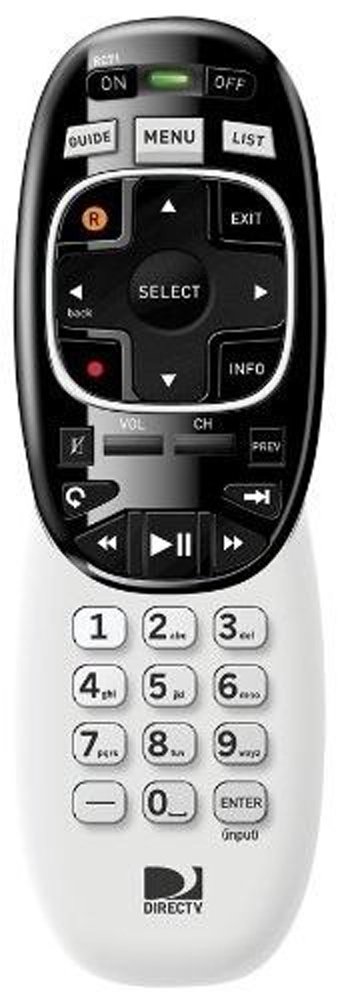
Image: The DIRECTV RC71 Remote Control, showing its ergonomic design and button layout.
2. Pairing with DIRECTV Receiver
The RC71 remote can operate in two modes: Infrared (IR) and Radio Frequency (RF).
IR Mode (for all DIRECTV receivers)
In IR mode, the remote requires a direct line of sight to the receiver. No special pairing is typically required; the remote should function immediately after battery installation.
RF Mode (for HR44 Genie, C41, C41W clients)
For RF mode functionality with compatible receivers, follow these steps:
- Ensure your DIRECTV receiver (HR44 Genie or C41/C41W client) is powered on.
- Point the RC71 remote at the receiver.
- Притисните и држите МУТЕ и ЕНТЕР дугмад истовремено док зелено светло на врху даљинског управљача не трепне два пута.
- Release the buttons. The remote is now attempting to pair in RF mode.
- Follow any on-screen prompts that may appear on your television to confirm the pairing.
3. Programming for TV/AV Functions
To control your television's volume and power, the remote needs to be programmed with your TV's code. This process typically involves using the receiver's on-screen menu.
- Притисните тастер МЕНУ button on your RC71 remote.
- Дођите до Settings & Help, онда Подешавања, and finally Ремоте Цонтрол.
- Изаберите Програм Ремоте или сличну опцију.
- Follow the on-screen instructions to select your television brand and program the remote.
- Test the volume and power buttons to ensure successful programming.
Управљање даљинским управљачем
The RC71 remote control features a streamlined button layout for intuitive operation.
- Дугме за напајање: Toggles power for the DIRECTV receiver and, once programmed, for the television.
- Водич: Приказује програмски водич.
- Листа: Accesses your recorded programs.
- Канал горе/доле: Мења канале.
- Појачавање/утишавање: Adjusts television volume (after programming).
- Искључи звук: Mutes television audio (after programming).
- Directional Pad (Arrows) and SELECT: Креће се кроз меније и бира опције.
- REW, PLAY, FWD, PAUSE, STOP, RECORD: Controls playback of recorded content.
- Numbers (0-9): Директно уноси бројеве канала.
- ИНФО: Приказује информације о програму.
- ЕКСИТ: Излази из менија или се враћа на ТВ уживо.
The ergonomic design of the RC71 is intended for comfortable handling during extended use.
Одржавање
Замена батерије
Replace batteries when the remote's response becomes sluggish or the indicator light fails to flash. Always replace both AA batteries simultaneously with new ones to ensure optimal performance.
Чишћење
Да бисте очистили даљински управљач, нежно обришите његову површину меком, сувом крпом. За тврдокорну прљавштину, благоamp cloth can be used, followed by immediate drying. Avoid using harsh chemicals or abrasive cleaners, as these can damage the remote's finish or internal components.
Решавање проблема
- Даљински не реагује:
- Проверите уградњу батерије и замените ако је потребно.
- Ensure a clear line of sight between the remote and the receiver/TV for IR functions.
- If in RF mode, ensure the remote is properly paired with the receiver. Repeat the pairing steps if needed.
- TV/AV functions not working:
- Verify that the remote has been correctly programmed for your television model. Re-program if unsure.
- Ensure the remote is pointed directly at the TV's IR sensor.
- Remote feels sluggish or inconsistent:
- Замените батерије новим.
- Consider resetting the remote to factory settings (consult your DIRECTV receiver's on-screen help or DIRECTV support for specific instructions, as this process can vary).
Спецификације
| Бранд | ДИРЕЦТВ |
| Назив модела | РЦ71 |
| Број модела | РЦ71 |
| Боја | Бела |
| Технологија повезивања | Инфрацрвена, радио фреквенција |
| Компатибилни уређаји | DIRECTV Receivers (all in IR, HR44 Genie/C41/C41W in RF), Television |
| Maximum Number of Supported Devices | 1 (DIRECTV Receiver) + 1 (Television) |
| Количина дугмета | 20 |
| Тип контролера | Контрола дугмета |
| Максимални домет | 10 Meters (RF) |
| Тип батерије | 2 АА алкалне батерије |
| Тежина артикла | 3.52 унци |
| Посебна карактеристика | Ергономски дизајн |
Информације о гаранцији
The DIRECTV RC71 Remote Control comes with a manufacturer warranty for 90 days from the date of purchase. Please retain your proof of purchase for warranty claims. For detailed terms and conditions, refer to the warranty documentation provided with your product or contact DIRECTV customer support.
Подршка
For further assistance, technical support, or to inquire about specific programming codes for your television, please contact DIRECTV customer support. You can find contact information on the official DIRECTV website or through your DIRECTV service provider.