Увод
This manual provides essential information for setting up, operating, and maintaining your Microsoft Xbox 360 E 250GB Console. Please read this guide thoroughly before using your console to ensure proper function and longevity.
Садржај пакета
Проверите да ли ваш пакет садржи следеће ставке:
- Xbox 360 E 250GB Console
- Xbox 360 Wireless Controller (Black)
- Напајање и кабл за напајање
- ХДМИ кабл
- AA Batteries for Wireless Controller
Цонсоле Оверview
Familiarize yourself with the various ports and buttons on your Xbox 360 E console.

Image: Microsoft Xbox 360 E 250GB Console. This image displays the front and side view of the Xbox 360 E console, showing its compact design and disc drive slot.
Предња плоча
- Дугме за напајање: Turns the console on or off.
- Диск уређај: Insert game discs or DVDs.
- УСБ портови: Connect accessories like USB drives or wired controllers.
- Controller Connect Button: Used to wirelessly sync controllers.
Реар Панел
- Напајање: Повежите напајање.
- ХДМИ порт: Connect to a TV or monitor for high-definition video and audio.
- AV порт: For older composite or component cables (not included with all models).
- Етхернет порт: Повежите се на жичану мрежу.
- УСБ портови: Additional ports for accessories.
Бежични контролер прекоview
The Xbox 360 Wireless Controller allows for intuitive gameplay. Familiarize yourself with its buttons and functions.
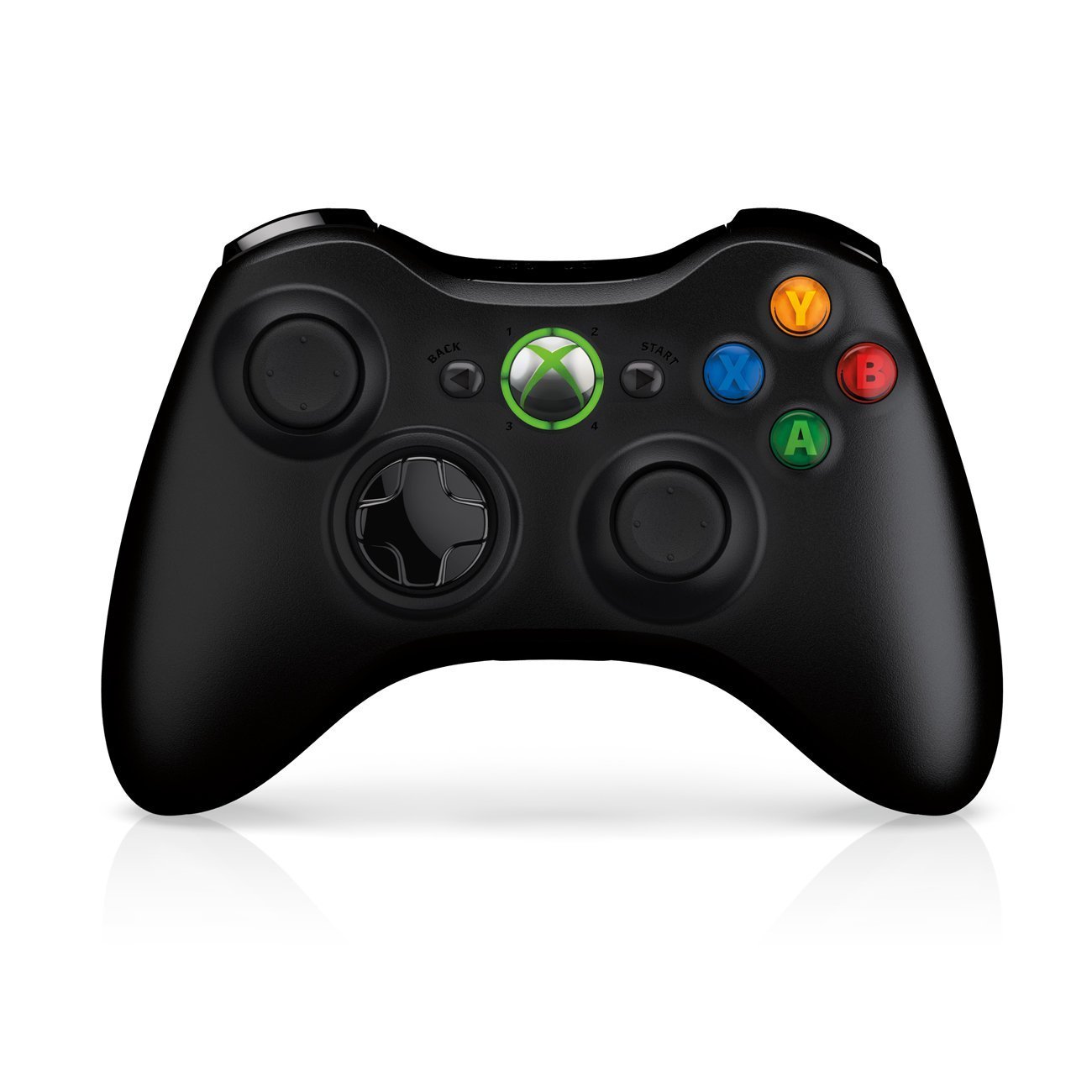
Image: Xbox 360 Wireless Controller. This image displays the front view of the black wireless controller, highlighting the D-pad, analog sticks, face buttons (A, B, X, Y), Guide button, Start button, and Back button.
Дугмад и функције контролера
- Леви/десни аналогни штапићи: За кретање и контролу камере.
- D-Pad (смерни тастер): For menu navigation and specific game controls.
- Дугмад A, B, X, Y: Primary action buttons, color-coded (Green A, Red B, Blue X, Yellow Y).
- Старт дугме: Pauses games or opens in-game menus.
- Дугме за назад: Returns to previous screens or opens specific game functions.
- Guide Button (Xbox Logo): Powers on the console, accesses the Xbox Guide, or turns off the controller.
- Left/Right Bumpers (LB, RB): Дугмад на рамену за разне радње у игри.
- Left/Right Triggers (LT, RT): Analog triggers for precise control, often used for acceleration/braking or firing weapons.
Инсталација батерије
The wireless controller requires two AA batteries. To install:
- Press the tab on the top of the battery pack and pull down to remove it.
- Уметните две АА батерије, водећи рачуна о исправном поларитету (+/-).
- Slide the battery pack back into the controller until it clicks into place.
Водич за подешавање
1. Повезивање конзоле
- Прикључак за напајање: Connect the power cord to the power supply, then connect the power supply to the console's power port. Plug the power cord into a wall outlet.
- Видео/аудио веза: Connect one end of the HDMI cable to the HDMI port on the back of your Xbox 360 E console. Connect the other end to an available HDMI input on your TV or monitor.
- Интернет конекција (опционо): For wired internet, connect an Ethernet cable from your router/modem to the Ethernet port on the console. For wireless, the console has built-in Wi-Fi.
2. Повезивање бежичног контролера
- Ensure batteries are installed in the controller.
- Turn on the console by pressing the Power button on the console or the Guide button on the controller.
- Press and release the Connect button on the console (small button near the USB ports on the front).
- Within 20 seconds, press and release the Connect button on the controller (small button on the top edge, between the bumpers).
- The lights around the Guide button on the controller and the console will flash and then glow steadily, indicating a successful connection.
3. Почетно укључивање и подешавања система
After connecting, turn on your console. Follow the on-screen prompts to:
- Изаберите свој језик и регион.
- Adjust display settings (resolution, aspect ratio).
- Set up your internet connection (wired or wireless).
- Create or sign in to an Xbox Live profile.
Operating Your Console
Играње игара и медији
- Turn on your console and TV.
- Open the disc tray by pressing the eject button on the console.
- Place a game disc or DVD/Blu-ray disc into the tray, label side up.
- Close the disc tray. The console should automatically start the game or media. If not, select it from the dashboard.
- Digital games can be launched directly from the Xbox Dashboard.
Connecting to Xbox Live
Xbox Live allows you to play online, download games and content, and access streaming services. Ensure your console is connected to the internet.
- From the Xbox Dashboard, navigate to the "Social" or "Settings" tab.
- Select "Join Xbox Live" or "Network Settings" to configure your connection and create/manage your profile.
- A 1-month Xbox LIVE Gold trial may be included with your console.
Системске поставке
Access system settings to customize your console experience:
- Екран и звук: Adjust resolution, audio output, and screen format.
- Складиштење: Manage your 250GB hard drive, view free space, and delete content.
- Подешавања мреже: Configure wired or wireless internet connections.
- Family Settings: Set parental controls for content and online access.
Одржавање
Cleaning Your Console
- Always power off and unplug the console before cleaning.
- Use a soft, dry, lint-free cloth to wipe down the exterior of the console and controller.
- Не користите течна средства за чишћење, аеросоле или абразивне материјале.
- Keep ventilation openings clear of dust and obstructions to ensure proper airflow.
Складиштење и постављање
- Place the console on a stable, flat surface.
- Ensure adequate ventilation around the console. Do not place it in an enclosed cabinet or on soft surfaces that can block vents.
- Avoid exposing the console to direct sunlight, excessive heat, or extreme cold.
Решавање проблема
If you encounter issues with your Xbox 360 E console, refer to the following common solutions:
No Power / Console Not Turning On
- Ensure the power cord is securely connected to the console, power supply, and wall outlet.
- Check the power supply unit (PSU) indicator light. If it's off or red, try a different outlet or contact support.
- Покушајте са другом утичницом.
No Video or Audio Output
- Verify the HDMI cable is securely connected to both the console and your TV/monitor.
- Уверите се да је ваш ТВ/монитор подешен на исправан HDMI улазни извор.
- Пробајте други HDMI кабл или други HDMI порт на вашем телевизору.
- Проверите подешавања јачине звука и искључивања звука на телевизору.
Грешке читања диска
- Уверите се да је диск чист и без огреботина или мрља. Нежно обришите меком крпом од средине ка споља.
- Try a different game or movie disc to determine if the issue is with the disc or the console.
- Ensure the console is placed on a stable, flat surface and not being moved during disc operation.
Wireless Controller Not Connecting
- Уверите се да контролер има свеже батерије.
- Resync the controller by pressing the Connect buttons on both the console and controller as described in the "Setup Guide".
- Уверите се да у близини нема јаких бежичних сметњи.
For further assistance, please refer to the official Microsoft Xbox support webсајту.
Спецификације
| Феатуре | Детаљ |
|---|---|
| Број модела | M9V-00001 |
| Складиштење | Чврсти диск од 250 ГБ |
| Бежично повезивање | Уграђени Ви-Фи |
| Контролор | 1 црни бежични контролер |
| Регион Цоде | НТСЦ |
| Димензије производа | 12 к 6 к 24 инча |
| Тежина артикла | 10.32 фунти |
| Батерије су потребне | 2 AA batteries for controller |
| Датум изласка | 1. јуна 2013. године |
Информације о гаранцији
For detailed warranty information regarding your Microsoft Xbox 360 E 250GB Console, please refer to the warranty card included with your product or visit the official Microsoft Xbox support webсајт. Услови гаранције могу се разликовати у зависности од региона и датума куповине.
Подршка
If you require technical assistance, have questions about your console, or need to report an issue, please contact Microsoft Xbox Support:
- Подршка на мрежи: Посетите званичника Подршка за Ксбок webсајту за честа питања, водиче за решавање проблема и опције контакта.
- Телефонска подршка: Refer to your product packaging or the Xbox Support webсајт за регионалне телефонске бројеве.


