Производ је завршенview
The Sagemcom Sixty Cordless Telephone and Answer Machine combines modern technology with a classic design. Its unique aesthetic, smooth finish, and touchscreen functionality make it a distinctive addition to any environment. Designed for user comfort, the Sixty offers a range of features including hands-free mode, extended battery life, and an intuitive interface for easy communication.
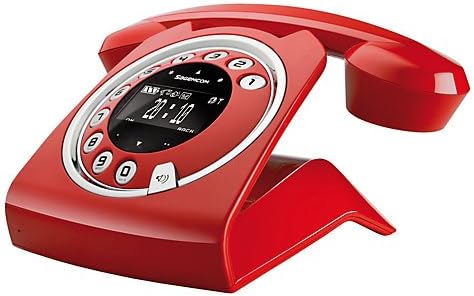
Image: The Sagemcom Sixty Cordless Telephone and Answer Machine in red, showcasing its unique retro-modern design with a circular dial and digital display.

Слика: Са стране view of the Sagemcom Sixty Cordless Telephone, highlighting its sleek profile and the cradle design.
Водич за подешавање
1. Распакивање
Carefully remove all components from the packaging. Ensure you have the base unit, handset, power adapter, and telephone line cord.
2. Повезивање основне јединице
- Connect the power adapter to the 'DC IN' port on the back of the base unit and plug the other end into a wall outlet.
- Connect one end of the telephone line cord to the 'LINE' port on the base unit and the other end to your telephone wall jack.
3. Инсталација и пуњење батерије
- Отворите одељак за батерије на слушалици.
- Уметните приложене пуњиве батерије, водећи рачуна о исправном поларитету (+ и -).
- Затворите одељак за батерије.
- Place the handset on the base unit. The display will indicate charging. Allow the handset to charge for at least 16 hours before first use to ensure optimal battery performance.
Упутство за употребу
Упућивање и примање позива
- Да бисте упутили позив: Подигните слушалицу или притисните Цалл button. Dial the number using the touchscreen keypad.
- Да бисте примили позив: Подигните слушалицу или притисните Цалл дугме када телефон зазвони.
- Да бисте прекинули позив: Вратите слушалицу на базу или притисните Заврши позив дугме.
Коришћење екрана осетљивог на додир
The Sixty features a responsive touchscreen for navigation and input. Tap icons or numbers to select functions or dial. Swipe to scroll through lists or menus.
Хандс-фрее режим
Током позива притисните Спеакер button to activate hands-free mode. Press it again to return to handset mode.
Управљање телефонским имеником
- Додавање контакта: Navigate to the Phonebook menu, select 'Add New Contact', enter the name and number using the touchscreen, and save. The phonebook can store up to 150 names.
- Searching for a Contact: Access the Phonebook and use the search function or scroll through the list.
- Editing/Deleting a Contact: Select the desired contact from the Phonebook and choose the 'Edit' or 'Delete' option.
Функције телефонске секретарице
The integrated answering machine has a recording capacity of 10 minutes.
- Активирање/деактивирање: Access the Answering Machine menu to turn it on or off.
- Пуштање порука: Select 'Play Messages' from the Answering Machine menu.
- Снимање одлазне поруке: Follow the prompts in the Answering Machine menu to record a personalized outgoing message.
Одржавање
Чишћење телефона
To clean the phone, wipe it with a soft, damp cloth. Do not use abrasive cleaners or solvents, as these can damage the surface. Ensure the phone is disconnected from power before cleaning.
Баттери Царе
- Увек користите приложене пуњиве батерије.
- Ако телефон неће бити коришћен дуже време, извадите батерије да бисте спречили цурење.
- Старе батерије одлажите одговорно у складу са локалним прописима.
Решавање проблема
| Проблем | Могуће решење |
|---|---|
| Нема тона за бирање | Check if the telephone line cord is securely connected to both the base unit and the wall jack. Ensure the power adapter is plugged in. |
| Телефон се не пуни | Ensure the handset is correctly placed on the base unit. Clean the charging contacts on both the handset and base unit with a dry cloth. Verify the power adapter is working. |
| Лош квалитет звука | Приближите се базној јединици. Проверите да ли постоје сметње од других електронских уређаја. Уверите се да телефонски кабл није оштећен. |
| Екран је празан | Check if the handset battery is charged. If not, place it on the base unit to charge. Ensure the power adapter is connected to the base unit. |
| Не могу да упућујем или примам позиве | Verify that the telephone line is active. Check all cable connections. Restart the base unit by unplugging and replugging the power adapter. |
Техничке спецификације
| Феатуре | Спецификација |
|---|---|
| Бранд | Сагемцом |
| Модел | Шездесет |
| Боја | Црвени |
| Тип телефона | Бежични |
| Време разговора телефоном | До 10 сати |
| Време приправности | До 120 сати |
| Recording Capacity (Answering Machine) | 10 минута |
| Капацитет именика | 150 Имена |
| ASIN | B00DX64LPI |
| Први доступан датум | 15. априла 2014. године |
Гаранција и подршка
For warranty information and customer support, please refer to the documentation included with your purchase or visit the official Sagemcom webсајт. Сачувајте доказ о куповини за евентуалне рекламације по гаранцији.


