1. Увод
The Sony Cyber-Shot DSC-H300 is a versatile 20.1-megapixel compact digital camera featuring a powerful 35x optical zoom lens. Designed for ease of use, it includes Optical SteadyShot image stabilization to reduce blur, various shooting modes, and the ability to capture HD videos. Its DSLR-like body provides a comfortable grip for stable shooting.
2. Шта је у кутији
Проверите да ли су све следеће ставке укључене у ваш пакет:
- Sony Cyber-Shot DSC-H300 Camera Body
- АА батерије (к4)
- Нараменица
- Поклопац објектива
- Каиш за објектив
- Мулти УСБ кабл
- Упутство за употребу (овај документ)
3. Цамера Оверview
Familiarize yourself with the main components and controls of your DSC-H300 camera.
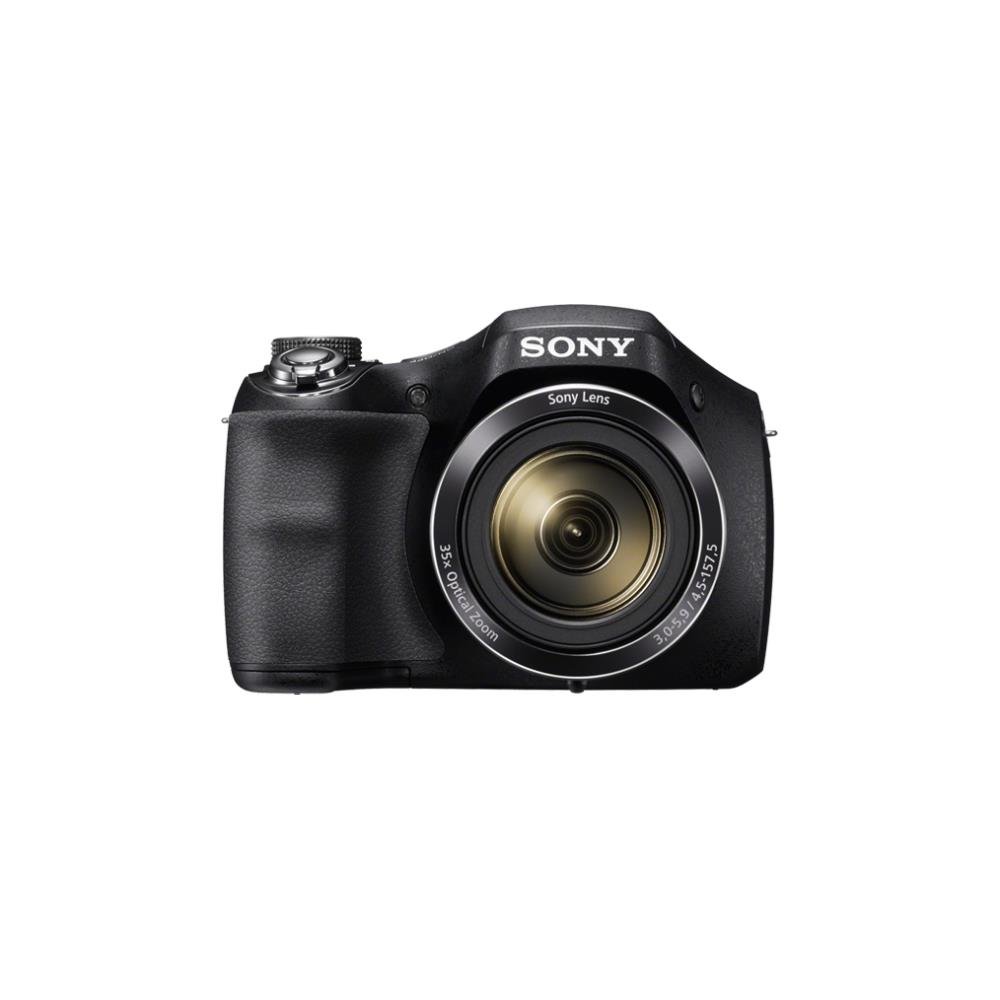
Слика 1: Фронт view of the Sony Cyber-Shot DSC-H300 digital camera, illustrating its compact size with a width of 12.75 cm (5.06 inches) and a height of 8.9 cm (3.504 inches).
Кључне компоненте:
- Објектив: Features 35x optical zoom.
- захват: Ergonomically designed for comfortable handling.
- Окидач: За снимање фотографија.
- Ручица за зумирање (W/T): Контролише оптички и дигитални зум.
- Точка за избор режима: Selects various shooting modes (Auto, Program, Manual, Scene, Movie, etc.).
- Дугме за укључивање/искључивање: Укључује или искључује камеру.
- LCD Screen (3.0 inches): For framing shots, reviewсликање и кретање по менијима.
- Контролна дугмад: For menu navigation, flash settings, display options, and playback.
- Дугме за филм: Dedicated button for starting and stopping video recording.
4. Подешавање
4.1 Уметање батерија
- Отворите поклопац одељка за батерију који се налази на дну камере.
- Уметните четири АА батерије, водећи рачуна о исправном поларитету (+/-) као што је назначено унутар одељка.
- Добро затворите поклопац одељка за батерије.
4.2 Уметање меморијске картице
- Отворите поклопац слота за меморијску картицу, који се обично налази близу одељка за батерију.
- Insert a compatible memory card (e.g., SD, SDHC, SDXC, Memory Stick PRO Duo) with the label facing the correct direction until it clicks into place.
- Затворите поклопац слота за меморијску картицу.
4.3 Причвршћивање раменог каиша и поклопца објектива
- Thread the shoulder strap through the strap eyelets on the camera body and secure it.
- Attach the lens cap to the lens using the provided lens strap to prevent loss.
5. Руковање камером
5.1 Укључивање/искључивање
Притисните тастер ОН/ОФФ дугме за укључивање или искључивање камере. Објектив ће се извући када се укључи.
5.2 Избор режима снимања
Ротирајте Бирање режима to select your desired shooting mode:
- Интелигентни аутоматски режим (iA): Camera automatically optimizes settings for various scenes.
- Програмски аутоматски (P): Камера подешава експозицију, али можете подесити и друга подешавања.
- Приоритет затварача (S): You set the shutter speed, camera adjusts aperture.
- Приоритет отвора бленде (А): You set the aperture, camera adjusts shutter speed.
- Приручник (М): You control both shutter speed and aperture.
- Избор сцене (SCN): Choose from various scene modes (e.g., Portrait, Landscape, Night Scene).
- Режим филма: За снимање видео записа.
- Панорама режим: For capturing wide panoramic shots.
5.3 Фотографисање
- Кадрирајте свој снимак: Користите ЛЦД екран да бисте компоновали слику.
- Фокус: Притисните до пола Дугме затварача to activate autofocus. The camera will beep and the focus indicator will turn green when focus is achieved.
- Сними: Потпуно притисните Дугме затварача да сликам.
- Зумирање: Користите Ручица за зумирање (W/T) to adjust the focal length. 'W' for wide-angle, 'T' for telephoto.
- Фласх: Press the flash control button to cycle through flash modes (Auto, Fill-flash, Slow Sync, Flash Off, Advanced Flash).
- Стабилизација слике: Optical SteadyShot image stabilization is built-in to reduce blur caused by camera shake.
5.4 Снимање видео записа
- Ensure the camera is in Режим филма (selected via the Mode Dial) or simply press the dedicated Дугме за филм.
- Притисните тастер Дугме за филм again to start recording. A red recording indicator will appear on the screen.
- Притисните тастер Дугме за филм once more to stop recording.
- The camera records in 720p HD with clear audio captured by the built-in microphone.
5.5 Панорамски режим
Изаберите Панорама Моде on the Mode Dial. Press the shutter button and sweep the camera horizontally or vertically across the scene to capture a wide panoramic image.
5.6 ViewСнимање и брисање слика/видео записа
Притисните тастер Дугме за репродукцију (usually indicated by a play icon) to enter playback mode. Use the navigation buttons to scroll through your captured photos and videos. To delete an item, select it and press the Дугме за брисање (trash can icon).
6. Одржавање
6.1 Cleaning the Camera Body
Обришите кућиште фотоапарата меком, сувом крпом. За тврдокорну прљавштину, благо дampen the cloth with water and then wipe dry. Avoid using organic solvents like alcohol or thinner.
6.2 Чишћење сочива
First, use a lens brush or blower to remove dust and small particles. Then, gently wipe the lens surface with a clean, soft lens cleaning cloth. Do not use excessive force or abrasive materials.
6.3 Чишћење ЛЦД екрана
Use a soft, lint-free cloth specifically designed for LCD screens. Gently wipe the screen to remove smudges or dust.
6.4 Одржавање батерије
Always use fresh AA batteries. Remove batteries from the camera if it will not be used for an extended period to prevent leakage and damage.
6.5 Складиштење
Store the camera in a cool, dry place away from direct sunlight, high temperatures, and humidity. Keep it in a camera bag or case to protect it from dust and scratches.
КСНУМКС. Решавање проблема
Ако наиђете на проблеме са камером, покушајте са следећим основним корацима за решавање проблема:
- Камера се не укључује: Уверите се да су батерије правилно уметнуте и потпуно напуњене. Пробајте нове батерије.
- Слике су мутне: Check that the lens is clean. Ensure the camera is focusing correctly (half-press shutter). Use a faster shutter speed in low light or for moving subjects. Optical SteadyShot is active to help.
- Блиц се не активира: Check flash mode settings; ensure it's not set to 'Flash Off'.
- Грешка меморијске картице: Turn off the camera, remove and reinsert the memory card. Ensure the card is compatible and not full.
- Камера се замрзава: Remove the batteries, wait a few seconds, and reinsert them to reset the camera.
For more detailed troubleshooting and solutions, please refer to the comprehensive user manual provided with your product or visit the official Sony support webсајту.
8. Спецификације
| Феатуре | Спецификација |
|---|---|
| Назив модела | DSC H300 |
| Резолуција фото сензора | 20.1 МП |
| Оптицал Зоом | 35к |
| Дигитални зум | 70к |
| Стабилизација слике | Digital, Optical (SteadyShot) |
| Величина екрана | 3 инча (LCD) |
| Видео Ресолутион | 720п |
| Тип сензора | ЦЦД |
| Минимална брзина затварача | 30 секунди |
| Максимална брзина затварача | 30 секунди |
| ИСО опсег | 100 - 3200 (Проширено) |
| Извор напајања | 4к АА батерије |
| Повезивање | УСБ |
| Компатибилне меморијске картице | Memory Stick Duo, SD Memory Card, SDHC Memory Card, SDXC Memory Card, microSD Memory Card, microSDHC Memory Card, microSDXC Memory Card |
| Тежина артикла | 495 грама |
9. Гаранција и подршка
Your Sony Cyber-Shot DSC-H300 digital camera comes with a manufacturer's warranty. Please refer to the warranty card included in your product packaging for specific terms, conditions, and duration of coverage.
For technical support, customer service, driver downloads, and additional detailed manuals, please visit the official Sony support webсајт:


