Увод
This manual provides essential instructions for the safe and efficient operation of your Yamaha HTR-2067 5.1 Channel AV Receiver. Please read this manual thoroughly before using the unit to ensure proper setup and performance. Keep this manual in a safe place for future reference.
Безбедносне информације
- Извор напајања: Уређај повежите само на АЦ утичницу вол.tagе наведено на задњој плочи.
- вентилација: Обезбедите одговарајућу вентилацију. Не блокирајте вентилационе отворе.
- Вода и влага: Не излажите уређај киши или влази. Не стављајте предмете напуњене течношћу на уређај.
- Страни предмети: Do not insert foreign objects into the unit's openings.
- Сервисирање: Не покушавајте сами да сервисирате овај уређај. Сво сервисирање препустите квалификованом сервисеру.
- Импеданса звучника: Ensure connected speakers have an impedance of 6 ohms or higher. Refer to the "CAUTION: SEE INSTRUCTION MANUAL FOR CORRECT SETTING" label near the speaker terminals.
Сетуп
Реар Панел Оверview
The following image illustrates the rear panel of the Yamaha HTR-2067 receiver, highlighting various connection points for audio, video, and speakers.
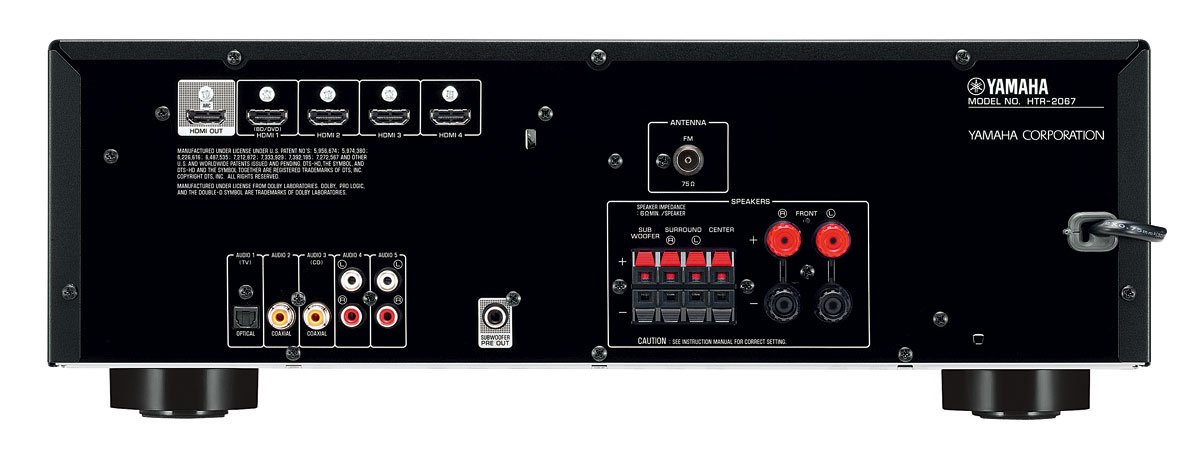
Figure 1: Rear Panel of Yamaha HTR-2067 AV Receiver
1. Распакивање
Carefully remove the receiver and all accessories from the packaging. Retain the packaging materials for future transport or storage.
2. Повезивање звучника
Connect your speakers to the corresponding terminals on the rear panel. Ensure correct polarity (+ to + and - to -) for each speaker. The HTR-2067 supports a 5.1 channel setup.
- Предњи звучници (Л/Д): Connect to the "FRONT" terminals.
- Централни звучник: Connect to the "CENTER" terminal.
- Звучници за сурроунд звук (Л/Д): Connect to the "SURROUND" terminals.
- Субвоофер: Connect a powered subwoofer to the "SUBWOOFER PRE OUT" RCA jack.
Refer to the speaker impedance warning on the rear panel, which states "SPEAKER IMPEDANCE 6Ω MIN / SPEAKER".
3. Connecting Audio/Video Devices
Use the appropriate cables to connect your source devices (e.g., Blu-ray player, game console, TV) to the receiver.
- HDMI конекције:
- HDMI OUT (ARC): Connect to your TV's HDMI input (preferably one supporting ARC for audio return).
- HDMI 1 (BD/DVD), HDMI 2, HDMI 3, HDMI 4: Connect your video source devices here.
- Дигиталне аудио везе:
- OPTICAL (AUDIO 1 (TV)): For optical digital audio from a TV or other device.
- COAXIAL (AUDIO 2): For coaxial digital audio from a CD player or other device.
- Аналогне аудио везе:
- AUDIO 3 (CD), AUDIO 4, AUDIO 5: For analog audio devices using RCA cables.
4. Повезивање антена
For FM radio reception, connect the supplied FM antenna to the "ANTENNA FM 75Ω" terminal on the rear panel.
5. Прикључак за напајање
After all other connections are made, plug the power cord into an AC wall outlet.
Упутство за употребу
1. Укључивање/искључивање
Притисните тастер ПОВЕР button on the front panel or remote control to turn the receiver on or off.
2. Избор улаза
Select the desired input source using the input selector buttons on the front panel or the remote control. For exampле, притисните БД / ДВД for a Blu-ray player connected to HDMI 1.
Тхе СЦЕНЕ buttons (BD/DVD, TV, CD, Radio) provide one-touch power-on and input selection, along with pre-set sound programs.
3. Подешавање јачине звука
Подесите главну јачину звука помоћу великог дугмета на предњој плочи или ВОЛУМЕ +/- дугмад на даљинском управљачу.
4. Sound Modes (CINEMA DSP)
The HTR-2067 features CINEMA DSP with 17 DSP programs. Use the ПРОГРАМ buttons on the remote control to cycle through different sound fields and enhance your listening experience.
5. ЕЦО режим
Activate the ECO mode to reduce power consumption by approximately 20%. This setting can be toggled via the remote control or system menu.
Одржавање
- Чишћење: Wipe the unit with a soft, dry cloth. Do not use chemical cleaners or abrasive materials.
- вентилација: Periodically check that the ventilation openings are not obstructed by dust or debris.
- Кабл за напајање: Редовно проверавајте да ли кабл за напајање има оштећења.
Решавање проблема
| Проблем | Могући узрок | Решење |
|---|---|---|
| Нема струје | Power cord disconnected; unit in standby mode. | Ensure power cord is securely plugged in; press POWER button. |
| Нема звука | Incorrect input selected; speakers not connected; volume too low; mute activated. | Select correct input; check speaker connections; increase volume; deactivate mute. |
| Нема видеа | Incorrect input selected; HDMI cable loose or faulty; TV input incorrect. | Select correct input; check HDMI connections; ensure TV is on correct input. |
| Лош радио пријем | Antenna not connected or poorly positioned. | Connect FM antenna; adjust antenna position for better reception. |
Ако проблем и даље постоји, обратите се квалификованом сервисеру.
Спецификације
| Феатуре | Детаљ |
|---|---|
| Бранд | Иамаха |
| Модел | ХТР-2067 |
| Канали | 5.1-канални сурроунд звук |
| 4K Pass-through | Yes (4K 24/30p) |
| DSP Programs | CINEMA DSP (17 programs) |
| ЕЦО режим | Yes (approx. 20% less power consumption) |
| Повезивање | HDMI, Optical, Coaxial, Analog RCA, FM Antenna |
| Импеданса звучника | 6 ома минимум |
| Тежина артикла | 8.72 кг |
| Димензије (приближно) | 55.7 x 41.4 x 22.4 цм (Димензије паковања) |
Гаранција и подршка
За информације о гаранцији и корисничку подршку, погледајте гарантни лист који је приложен уз ваш производ или посетите званичну веб страницу Yamaha-е. webсајт. Сачувајте рачун као доказ о куповини.
For technical assistance or service inquiries, contact your authorized Yamaha dealer or service center.