Увод
This manual provides comprehensive instructions for the setup, operation, and maintenance of your Genius SW-2.1 355 Speaker System. Please read this manual thoroughly before using the product to ensure proper functionality and to maximize your listening experience.
Безбедносне информације
Придржавајте се следећих мера предострожности како бисте спречили оштећење уређаја или повреде себе:
- Не излажите звучнике води или влази.
- Избегавајте постављање звучника у близини извора топлоте или на директној сунчевој светлости.
- Обезбедите одговарајућу вентилацију око сабвуфера како бисте спречили прегревање.
- Користите само струјни адаптер који је испоручен са јединицом.
- Не покушавајте сами да отворите или поправите уређај. Све сервисне радове препустите квалификованом особљу.
- Чувати ван домашаја деце.
Садржај пакета
Проверите да ли су све ставке присутне у пакету:
- 1 x Subwoofer unit
- 2 к сателитски звучник
- 1 x Audio input cable (3.5mm stereo jack)
- 1 к адаптер за напајање
- 1 x Упутство за употребу (овај документ)
Производ је завршенview
The Genius SW-2.1 355 Speaker System consists of a subwoofer and two satellite speakers designed to deliver clear audio and powerful bass for your multimedia needs.
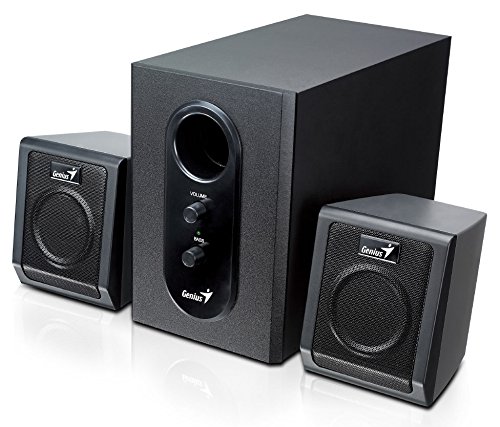
This image displays the Genius SW-2.1 355 Speaker System. It features a central, larger subwoofer unit with volume and bass control knobs on its front panel, and two smaller satellite speakers positioned on either side. All components are black.
Компоненте:
- Субвоофер: The main unit housing the bass driver and control panel.
- Сателитски звучници: Two compact speakers for mid-range and high-frequency audio.
- Контролна табла: Located on the subwoofer, featuring Volume and Bass adjustment knobs.
Сетуп
- Позиционирање звучника: Place the subwoofer on the floor or a sturdy surface. Position the satellite speakers on either side of your listening area, facing towards you for optimal stereo separation.
- Повезивање сателитских звучника: Connect the cables from the two satellite speakers to the corresponding output jacks on the rear of the subwoofer unit. Ensure a secure connection.
- Connecting Audio Source: Connect one end of the 3.5mm audio input cable to the "Audio In" jack on the subwoofer. Connect the other end to the audio output jack (e.g., headphone jack) of your computer, MP3 player, smartphone, or other audio source.
- Повезивање напајања: Plug the power adapter into the DC input jack on the subwoofer. Then, plug the power adapter into a standard electrical outlet.
- Укључено: Turn on the speaker system using the power switch, usually integrated with the volume knob.
Операција
- Укључивање/искључивање и контрола јачине звука: The main knob on the subwoofer controls both power and overall volume. Rotate clockwise to turn on and increase volume; rotate counter-clockwise to decrease volume and turn off.
- Подешавање баса: Use the "Bass" knob on the subwoofer to adjust the level of low-frequency sound. Rotate clockwise to increase bass, and counter-clockwise to decrease it, according to your preference.
- Audio Source Volume: For optimal sound quality, set the volume on your audio source (computer, phone, etc.) to about 75% and then use the speaker system's volume control for fine adjustments.
Одржавање
- Чишћење: Use a soft, dry cloth to clean the surfaces of the speakers. Do not use liquid cleaners or abrasive materials.
- Складиштење: Ако складиштите звучнике дуже време, искључите их из напајања и чувајте их на хладном и сувом месту.
- Управљање кабловима: Уверите се да каблови нису запетљани или пригњечени како бисте спречили оштећења.
Решавање проблема
| Проблем | Могући узрок | Решење |
|---|---|---|
| Нема звука |
|
|
| Изобличен звук |
|
|
| Слаб бас |
|
|
Спецификације
| Феатуре | Детаљ |
|---|---|
| Назив модела | СВ-2.1 355 |
| Спеакер Типе | 2.1 Channel Multimedia Speaker System (Bookshelf, Satellite, Subwoofer) |
| Укупна излазна снага | 10 Watts RMS (5W Subwoofer + 2.5W x 2 Satellites) |
| Материјал | Wood (Subwoofer) |
| Технологија повезивања | Жични (3.5 мм аудио улаз) |
| Компатибилни уређаји | MP3 Player, Personal Computer, Smartphones, Tablets, Televisions |
| Контроле | Јачина звука, бас |
| Извор напајања | DC |
| Тежина артикла | 2.78 кг |
| Димензије пакета | 39.6 к 25 к 18.4 цм |
Гаранција и подршка
Genius products are designed for reliability and performance. For information regarding warranty coverage, technical support, or service inquiries, please refer to the warranty card included with your product or visit the official Genius webсајт. Сачувајте рачун као доказ о куповини.


