1. Увод
This manual provides comprehensive instructions for the Monoprice MS-WN513N2 Wireless N300 4-Port Broadband Router. This device is designed to provide a high-speed wireless network connection for your home or small office, offering reliable internet access and advanced security features. Please read this manual thoroughly before operating the device.
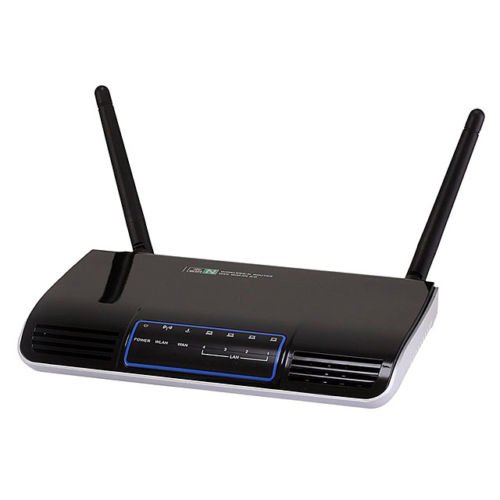
Слика 1.1: Предња страна view of the Monoprice MS-WN513N2 Wireless N300 Router. The router is black with indicator lights on the front panel.
2. Карактеристике
The Monoprice MS-WN513N2 router offers a range of features to enhance your network experience:
- Wireless N300 Performance: Complies with 802.11b/g/n standards, offering wireless transmission speeds up to 300 Mbps.
- 4-Port Broadband Router: Includes four (4) LAN ports for wired connections.
- Напредна безбедност: Supports 64-bit/128-bit WEP, WPA/WPA2, and WPA-PSK/WPA2-PSK authentication.
- ИПв6 подршка: Compatible with Internet Protocol Version 6.
- Квалитет услуге (КоС): Bandwidth control for prioritizing network traffic.
- ВПС (Ви-Фи заштићено подешавање): Simplifies wireless security configuration.
- Вишеструки режими рада: Can be configured as a Gateway, Wireless Bridge, or Wireless ISP (WISP).
- Динамички DNS (DDNS): Supports dynamic domain name system configuration.
- UPnP Support: Universal Plug and Play for easy device discovery.
- заштитни зид: Integrated firewall for network protection.
- Automatic MDI/MDIX: Automatic cable detection for Ethernet ports.
3. Садржај пакета
Молимо вас да проверите да ли су све ставке присутне у вашем пакету:
- Monoprice MS-WN513N2 Wireless N300 Router
- Адаптер за напајање (ДЦ 5В)
- Етхернет Цабле
- Водич за брзу инсталацију (ако је укључен)
4. Физички претекview
4.1 Индикатори на предњој плочи
Предња плоча има ЛЕД индикаторе који пружају информације о статусу:
- ЛЕД за напајање: Показује да ли је рутер укључен.
- ВАН ЛЕД: Indicates connection status to the internet.
- ЛЕД диоде за ЛАН (1-4): Indicate activity on the respective wired LAN ports.
- ВЛАН ЛЕД: Означава активност бежичне мреже.
4.2 Портови и дугмад на задњој плочи
The rear panel contains all physical connection points:
- ДЦ 5В порт за напајање: Повезује се са приложеним адаптером за напајање.
- ВАН порт: Connects to your modem or internet service provider's network.
- ЛАН портови (1-4): Connect to wired devices such as computers, gaming consoles, or switches.
- ВПС дугме: Покреће Wi-Fi Protected Setup за једноставно бежично повезивање.
- Рупа за ресетовање: Used to restore the router to factory default settings. Insert a paperclip and hold for 5-10 seconds.
- Антенски портови: Two (2) ports for connecting the external antennas.
5. Подешавање
5.1 Повезивање хардвера
- Повежите антене: Screw the two external antennas onto the antenna ports on the rear panel.
- Повезивање модема: Повежите један крај Етернет кабла са ЛАН портом вашег модема, а други крај са ВАН порт рутера.
- Прикључите напајање: Повежите адаптер за напајање са рутером ДЦ 5В прикључак за напајање and plug the adapter into a power outlet.
- Укључено: Wait for the router to power on. The Power LED should illuminate. Allow a few minutes for the router to boot up and establish a connection.
- Повежите рачунар (опционо): For initial configuration, it is recommended to connect a computer directly to one of the router's ЛАН портове помоћу етернет кабла.
5.2 Почетна конфигурација (Web Интерфејс)
- Приступни рутер: Отвори а web browser on a connected computer. In the address bar, type the router's default IP address (commonly
192.168.1.1or192.168.0.1) and press Enter. Refer to the label on the bottom of your router for the exact IP address and default login credentials. - Пријава: Унесите подразумевано корисничко име и лозинку (нпр.
adminза обоје). - Покрените чаробњака за подешавање: Рутера web interface will typically present a Quick Setup Wizard. Follow the on-screen prompts to configure your internet connection type (e.g., PPPoE, Dynamic IP, Static IP) and basic wireless settings (SSID, password).
- Промена подразумеваних акредитива: For security, it is highly recommended to change the default login username and password for the router's web интерфејс.
6. Оперативни
6.1 Конфигурација бежичне мреже
To configure your wireless network:
- Идите до Вирелесс Сеттингс одељак у web интерфејс.
- ССИД: Change the default Wireless Network Name (SSID) to a unique name.
- Безбедносни режим: Изаберите ВПА2-ПСК as the recommended security mode.
- Лозинка: Set a strong, unique password (at least 8 characters, including letters, numbers, and symbols).
- канал: The router can automatically select the best 2.4 GHz channel. You can also manually select a fixed channel (e.g., 1, 6, or 11) to avoid interference.
- Сачувајте промене.
6.2 Сигурносна подешавања
The router provides various security features:
- заштитни зид: The built-in firewall helps protect your network from external threats. Ensure it is enabled.
- МАЦ филтрирање: You can restrict network access to specific devices based on their MAC addresses.
- родитељска контрола: Some routers offer features to block specific websites or limit internet access times for certain devices.
- ВПС: Use the WPS button for quick, secure connections with WPS-compatible devices.
6.3 Напредне функције
Explore the advanced settings in the web interface for more control:
- Квалитет услуге (КоС): Prioritize bandwidth for applications like gaming or video streaming.
- Прослеђивање портова: Configure specific ports to allow external access to devices on your local network (e.g., for gaming servers).
- Динамички DNS (DDNS): If you have a dynamic public IP address, DDNS allows you to access your network using a consistent domain name.
- ИПв6: Configure IPv6 settings if your ISP supports it.
- Режим рада: Change the router's mode to Wireless Bridge or WISP if needed for specific network setups.
7. Одржавање
7.1 Ажурирања фирмвера
Periodically check the Monoprice website for firmware updates. Firmware updates can improve performance, add new features, and fix security vulnerabilities. Follow the instructions provided with the firmware update carefully to avoid damaging the device.
7.2 Ресетовање рутера
If you forget your login password or experience persistent issues, you can restore the router to its factory default settings:
- With the router powered on, locate the Ресетуј рупу на задњој плочи.
- Use a paperclip or a thin, pointed object to press and hold the reset button inside the hole for approximately 5-10 seconds.
- Release the button when the router's LEDs flash or restart.
- The router will reboot with factory default settings. You will need to reconfigure it using the web интерфејс.
КСНУМКС. Решавање проблема
Ево решења за уобичајене проблеме:
- Нема приступа интернету:
- Check if the WAN LED is lit. If not, ensure the Ethernet cable from the modem is securely connected to the router's WAN port.
- Поново покрените модем и рутер.
- Проверите подешавања интернет конекције у рутеру web интерфејс.
- Не могу приступити Web Интерфејс:
- Уверите се да је рачунар повезан са рутером путем Етернета или Ви-Фи мреже.
- Verify the router's IP address. Try
192.168.1.1or192.168.0.1. - Обришите кеш меморију прегледача или покушајте са другим прегледачем.
- If you forgot the password, perform a factory reset.
- Мала брзина бежичне мреже:
- Ensure your devices support 802.11n for optimal speeds.
- Check for interference from other 2.4 GHz devices (cordless phones, microwaves). Try changing the wireless channel.
- Уверите се да је рутер централно постављен и да није заклоњен.
- Ажурирајте управљачке програме бежичног адаптера вашег уређаја.
- Прекиди бежичне везе:
- Check for signal strength and interference.
- Уверите се да је фирмвер рутера ажуриран.
- Verify that the wireless security settings are correctly configured.
9. Спецификације
| Феатуре | Спецификација |
|---|---|
| Модел | MS-WN513N2 |
| Вирелесс Стандардс | IEEE 802.11n (Draft 2.0), IEEE 802.11g, IEEE 802.11b |
| Wireless Signal Rates (802.11n) | Up to 300 Mbps (270, 243, 216, 162, 135, 130, 108, 81, 65, 54, 40.5, 27, 13.5 Mbps) |
| Wireless Signal Rates (802.11g) | 54, 48, 36, 24, 18, 12, 9, 6 Мбпс |
| Wireless Signal Rates (802.11b) | 11, 5.5, 2, 1 Мбпс |
| Фреквенцијски опсег | 2.4 - 2.4835 GHz |
| Вирелесс Трансмит Повер | До 20 дБм |
| Модулатион Тецхнологи | ДБПСК, ДКПСК, ЦЦК, ОФДМ, 16-КАМ, 64-КАМ |
| Портс | 4x LAN Ports, 1x WAN Port, 2x Antenna Ports, 1x DC 5V Power Port |
| Дугмад | WPS Button, Reset Hole |
| Безбедност | 64/128-битни ВЕП, ВПА/ВПА2, ВПА-ПСК/ВПА2-ПСК |
| Повер Суппли | ДЦ 5В |
| Подржани протоколи | IPv6, PPPoE |
10. Гаранција и подршка
За информације о гаранцији и техничку подршку, обратите се званичном сајту Monoprice-а. webсајт или директно контактирајте корисничку службу компаније Monoprice. Сачувајте рачун за куповину у случају рекламације.
Моноприце Webсајт: ввв.моноприце.цом