1. Увод
The Aeotec Multi-Sensor 5 ZW074-C is a versatile Z-Wave Plus device designed to enhance your smart home environment. This advanced sensor integrates four key detection capabilities into a single compact unit: motion, temperature, humidity, and ambient light. It is engineered to provide accurate environmental data and trigger automated actions within your Z-Wave network, supporting up to 6 other Z-Wave devices upon motion detection.
With its IP42 rating, the Multi-Sensor 5 is suitable for both indoor and sheltered outdoor installations, offering flexibility in placement. It features the latest 500 series Z-Wave chip, providing improved range and communication speed compared to previous generations. This manual will guide you through the setup, operation, and maintenance of your Multi-Sensor 5.
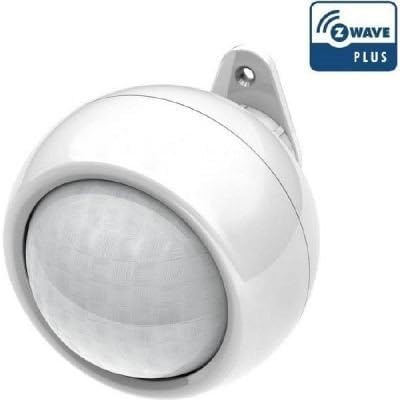
Figure 1: Aeotec Multi-Sensor 5 ZW074-C. This image shows the white, spherical device with its integrated motion sensor dome and a mounting bracket. The Z-Wave Plus logo is visible in the top right corner, indicating its compatibility with the Z-Wave Plus standard.
2. Подешавање
2.1. Садржај пакета
- Aeotec Multi-Sensor 5 ZW074-C
- Носач
- Screws and Wall Plugs (may vary by package)
- Кориснички приручник (овај документ)
2.2. Напајање уређаја
The Multi-Sensor 5 can be powered by either batteries or a 5VDC adapter.
- Снага батерије: The device requires 4 AAA batteries (not included). Open the battery compartment, insert the batteries, ensuring correct polarity, and close the compartment. The estimated battery life is approximately 1 year.
- УСБ Снага: For continuous operation, connect a 5VDC power adapter (not included) to the micro-USB port on the device.
2.3. Монтажа сензора
The Multi-Sensor 5 can be mounted on a wall or ceiling using the provided mounting bracket.
- Choose a suitable location, considering the desired detection area for motion and optimal environmental sensing.
- Secure the mounting bracket to the surface using the screws and wall plugs.
- Attach the Multi-Sensor 5 to the mounting bracket, ensuring it clicks securely into place.
- Adjust the sensor's angle as needed to cover the desired area.
Напомена: While IP42 rated for sheltered outdoor use, avoid direct exposure to rain or harsh weather conditions.
2.4. Z-Wave Network Inclusion
To integrate the Multi-Sensor 5 into your Z-Wave network, follow these steps:
- Place your Z-Wave controller into inclusion (pairing) mode. Refer to your controller's manual for specific instructions.
- Bring the Multi-Sensor 5 close to your Z-Wave controller.
- Press the inclusion/exclusion button on the Multi-Sensor 5 once. The LED indicator will flash to confirm inclusion mode.
- Once successfully included, the LED will stop flashing, and your controller should confirm the addition of the new device.
- If inclusion fails, repeat the process. If issues persist, try excluding the device first (see 2.5 Exclusion).
2.5. Z-Wave Network Exclusion
To remove the Multi-Sensor 5 from your Z-Wave network:
- Place your Z-Wave controller into exclusion (unpairing) mode.
- Bring the Multi-Sensor 5 close to your Z-Wave controller.
- Press the inclusion/exclusion button on the Multi-Sensor 5 once. The LED indicator will flash to confirm exclusion mode.
- Once successfully excluded, the LED will stop flashing, and your controller should confirm the device's removal.
3. Руковање уређајем
The Aeotec Multi-Sensor 5 provides real-time data for various environmental parameters.
3.1. Sensor Functions
- Сензор покрета: Detects movement within a range of 3 to 5 meters. Upon detection, it can trigger alerts or actions configured in your Z-Wave controller.
- Сензор температуре: Measures ambient temperature from -10°C to 50°C with an accuracy of ±1°C.
- Сензор влажности: Measures relative humidity from 20% to 80% with an accuracy of ±5%.
- Светлосни сензор: Measures ambient light intensity from 0 to 1000 LUX.
Sensor data is reported to your Z-Wave controller, allowing for automation rules, historical logging, and remote monitoring.
3.2. ЛЕД индикатор
The LED indicator provides visual feedback on the sensor's status:
- Трепери: Indicates inclusion/exclusion mode or network activity.
- Чврсто: May indicate a specific status or configuration, refer to your Z-Wave controller's interface for detailed interpretations.
3.3. Напредна конфигурација
Many Z-Wave controllers allow for advanced configuration of the Multi-Sensor 5, including:
- Adjusting motion sensor sensitivity.
- Setting reporting intervals for temperature, humidity, and light.
- Configuring association groups for direct communication with other Z-Wave devices.
Consult your Z-Wave controller's documentation for details on accessing and modifying these parameters.
4. Одржавање
4.1. Замена батерије
When the battery level is low, the device will send a low battery alert to your Z-Wave controller. To replace the batteries:
- Carefully detach the sensor from its mounting bracket.
- Отворите одељак за батерије.
- Remove the old AAA batteries and dispose of them responsibly.
- Уметните 4 нове ААА батерије, водећи рачуна о исправном поларитету (+/-).
- Close the battery compartment and reattach the sensor to its bracket.
4.2. Чишћење
To maintain optimal performance, periodically clean the sensor's exterior.
- Користите меку, суву крпу да обришете површину.
- Не користите абразивна средства за чишћење, раствараче или прекомерну влагу, јер могу оштетити уређај.
4.3. Ажурирања фирмвера
The Multi-Sensor 5 supports firmware updates. These updates are typically performed via your Z-Wave controller or a dedicated update tool provided by Aeotec. Refer to Aeotec's official website or your Z-Wave controller's documentation for information on available updates and the update process.
КСНУМКС. Решавање проблема
If you encounter issues with your Aeotec Multi-Sensor 5, consider the following common problems and solutions:
| Проблем | Могући узрок / решење |
|---|---|
| Device not pairing with Z-Wave controller. |
|
| Inaccurate sensor readings (temperature, humidity, light). |
|
| Motion detection not working or false triggers. |
|
| Кратко трајање батерије. |
|
For more specific issues or advanced troubleshooting, refer to the support documentation for your Z-Wave controller or contact Aeotec customer support.
6. Спецификације
| Параметар | Валуе |
|---|---|
| Број модела | ЗВ074-Ц |
| Повер Суппли | 4 x AAA batteries or 5VDC adapter |
| Трајање батерије (просечно) | 1 година |
| Фреквенција З-таласа | 868.42 МХз |
| Домет | Up to 100m (outdoor) / 150m (open air) |
| Опсег сензора температуре | -10°Ц до 50°Ц |
| Прецизност сензора температуре | ±1°Ц |
| Домет сензора влажности | 20% до 80% |
| Humidity Sensor Accuracy | ±5% |
| Опсег сензора светлости | 0 - 1000 LUX |
| Осетљивост детекције покрета | 3 до 5 метара |
| Димензије (Д к В) | 75 x 60 mm (approx. 7.49 x 7.49 x 7.01 cm) |
| ИП Ратинг | ИП42 |
7. Гаранција и подршка
Specific warranty details for the Aeotec Multi-Sensor 5 ZW074-C are not provided in this document. Please refer to the warranty information included with your product packaging or visit the official Aeotec webсајт за најновију политику гаранције.
For technical support, product inquiries, or further assistance, please contact your retailer or Aeotec customer support directly. You can typically find contact information on the manufacturer's webсајту.


