Увод
The ASTRO Gaming A40 TR Headset and MixAmp Pro TR are designed to provide a high-fidelity audio experience for gaming on PlayStation 4 and PC. The A40 TR headset offers user customization, allowing transformation from an open-back to a closed-back noise-canceling headset with optional Mod Kits. The MixAmp Pro TR features all-digital components for clear, interference-free audio and voice communication, with customizable settings via the ASTRO Command Center software.

Image: The ASTRO Gaming A40 TR Headset and MixAmp Pro TR, showcasing both components together. The headset is black with gold accents, and the MixAmp is a compact black unit with control dials.
Садржај пакета
Проверите да ли су све ставке наведене у наставку укључене у паковање вашег производа:
- ASTRO A40 TR Headset
- ASTRO MixAmp Pro TR
- A40 TR Inline Mute Cable (2.0m)
- TOSlink Optical Cable (3.0m)
- Micro-USB Cable (3.0m)
- Digital Daisy Chain Cable (0.5m)
- Swappable Microphone
Сетуп
Повезивање са PlayStation 4 (PS4)
- Повежите TOSlink Optical Cable from the MixAmp Pro TR's OPTICAL port to the PS4's Optical Out port.
- Повежите Мицро-УСБ кабл from the MixAmp Pro TR's USB port to an available USB port on the PS4.
- Повежите A40 TR Inline Mute Cable from your A40 TR Headset to the headset port on the front of the MixAmp Pro TR.
- On your PS4, navigate to Settings > Sound and Screen > Audio Output Settings.
- Сет Примарни излазни порт да Дигитални излаз (оптички).
- Изаберите Dolby Digital (Bitstream) for the audio format.
- Иди на Подешавања > Уређаји > Аудио уређаји.
- Сет Инпут Девице да USB Headset (ASTRO MixAmp Pro TR).
- Сет Излазни уређај да USB Headset (ASTRO MixAmp Pro TR).
- Подесите Контрола јачине звука (слушалице) до максимума.
- Сет Излаз на слушалице да Цхат Аудио or Алл Аудио as preferred.
Повезивање са рачунаром
- Повежите Мицро-УСБ кабл from the MixAmp Pro TR's USB port to an available USB port on your PC.
- Повежите A40 TR Inline Mute Cable from your A40 TR Headset to the headset port on the front of the MixAmp Pro TR.
- On your PC, ensure the MixAmp Pro TR is selected as the default playback and recording device in your sound settings.
- Преузмите и инсталирајте ASTRO Command Center software from the official ASTRO Gaming website to customize settings, update firmware, and manage EQ presets.
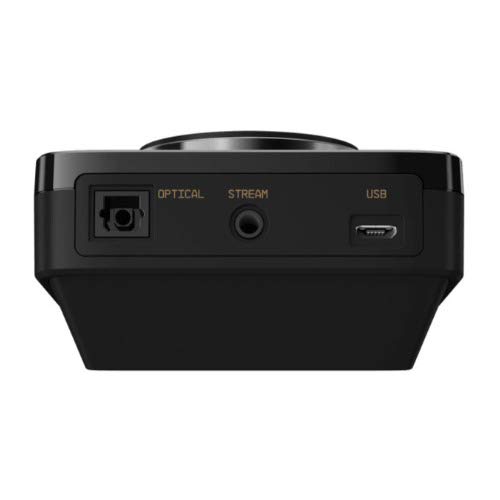
Слика: Позади view of the ASTRO MixAmp Pro TR, highlighting the Optical, USB, AUX, and Stream ports for various connections.
Operating the MixAmp Pro TR
Тхе МикAmp Pro TR provides intuitive controls for managing your audio experience:
- Главни точкић за јачину звука: The large dial on the left controls the overall volume of your headset. Rotate clockwise to increase volume, counter-clockwise to decrease.
- Game/Voice Balance Dial: The smaller dial on the right allows you to adjust the balance between game audio and voice chat.
- Rotate towards "GAME" to prioritize game audio.
- Rotate towards "VOICE" to prioritize voice chat.
- EQ Presets Button: Located in the center, this button cycles through four customizable equalizer presets. The active preset is indicated by the illuminated icon (star, headphone, etc.). These presets can be configured using the ASTRO Command Center software.
- Dolby Button: Activates or deactivates Dolby Surround Sound. When active, the Dolby logo will illuminate.
- Дугме за искључивање микрофона: Located on the A40 TR Inline Mute Cable, this switch mutes or unmutes your microphone. When muted, the MixAmp's volume dials will typically glow red.
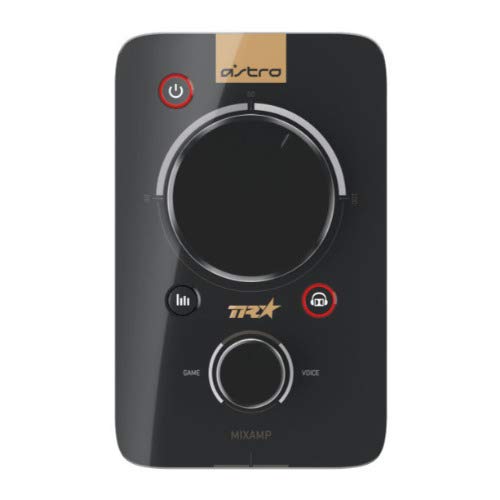
Слика: Врх view of the ASTRO MixAmp Pro TR, showing the large master volume dial, the smaller game/voice balance dial, and the EQ preset buttons.
Одржавање
- Чишћење: Use a soft, dry cloth to clean the headset and MixAmpИзбегавајте абразивна средства за чишћење или раствараче.
- Складиштење: Store the headset and MixAmp на хладном и сувом месту далеко од директне сунчеве светлости и екстремних температура.
- Нега каблова: Пажљиво рукујте кабловима да бисте спречили оштећења. Избегавајте оштре савијање или прекомерно повлачење.
- Јастучићи за уши: Periodically check ear cushions for wear and tear. Replacement cushions are available from ASTRO Gaming.
Решавање проблема
If you encounter issues with your ASTRO Gaming A40 TR Headset or MixAmp Pro TR, try the following solutions:
| Проблем | Решење |
|---|---|
| Нема звука из слушалица. |
|
| Микрофон не ради. |
|
| Изобличен или лош квалитет звука. |
|
For more detailed troubleshooting, please refer to the official ASTRO Gaming support resources.
Спецификације
- Број модела: 939-001511
- Фреквенцијски одзив: 20 - 20,000 Hz
- Номинална импеданса: 48 ома
- Притисак траке за главу: 2.6Н
- Димензије производа: 9.06 к 13.87 к 4.33 инча
- Тежина артикла: 1.06 фунти
- Повезивање: Оптички, УСБ
- Компатибилност: ПлаиСтатион 4, ПЦ
Гаранција и подршка
For detailed warranty information and product support, please visit the official ASTRO Gaming webсајт или погледајте приложену документацију:
Ensure you register your product on the ASTRO Gaming website for the latest updates and support.


