1. Увод
This manual provides essential instructions for the safe and efficient use of your Epson LQ-310 24-Pin Narrow Carriage Impact Printer. Please read this manual thoroughly before operating the printer and keep it for future reference.
The Epson LQ-310 is a compact and reliable dot matrix printer designed for fast and efficient printing of various documents, including multi-part forms, invoices, and reports. It features versatile connectivity options including USB, Serial, and Parallel ports.
2. Безбедносне информације
Observe the following safety precautions to ensure safe operation and to prevent damage to the printer or injury to yourself.
- Увек постављајте штампач на стабилну, равну површину.
- Do not block or cover the ventilation slots on the printer.
- Користите само кабл за напајање који се испоручује са штампачем.
- Do not expose the printer to water, moisture, or excessive heat.
- Искључите штампач из утичнице пре чишћења или одржавања.
- Чувати ван домашаја деце.
3. Садржај пакета
Проверите да ли су све ставке присутне у пакету:
- Epson LQ-310 Printer Unit
- Повер Цабле
- Риббон Цартридге
- Кориснички приручник (овај документ)
- Driver CD (may vary by region)
4. Подешавање
4.1 Распакивање и постављање
- Извадите штампач из амбалаже.
- Remove all protective tapes and packing materials.
- Place the printer on a flat, stable surface with adequate ventilation.
4.2 Повезивање кабла за напајање
Прикључите кабл за напајање на штампач, а затим на уземљену електричну утичницу.
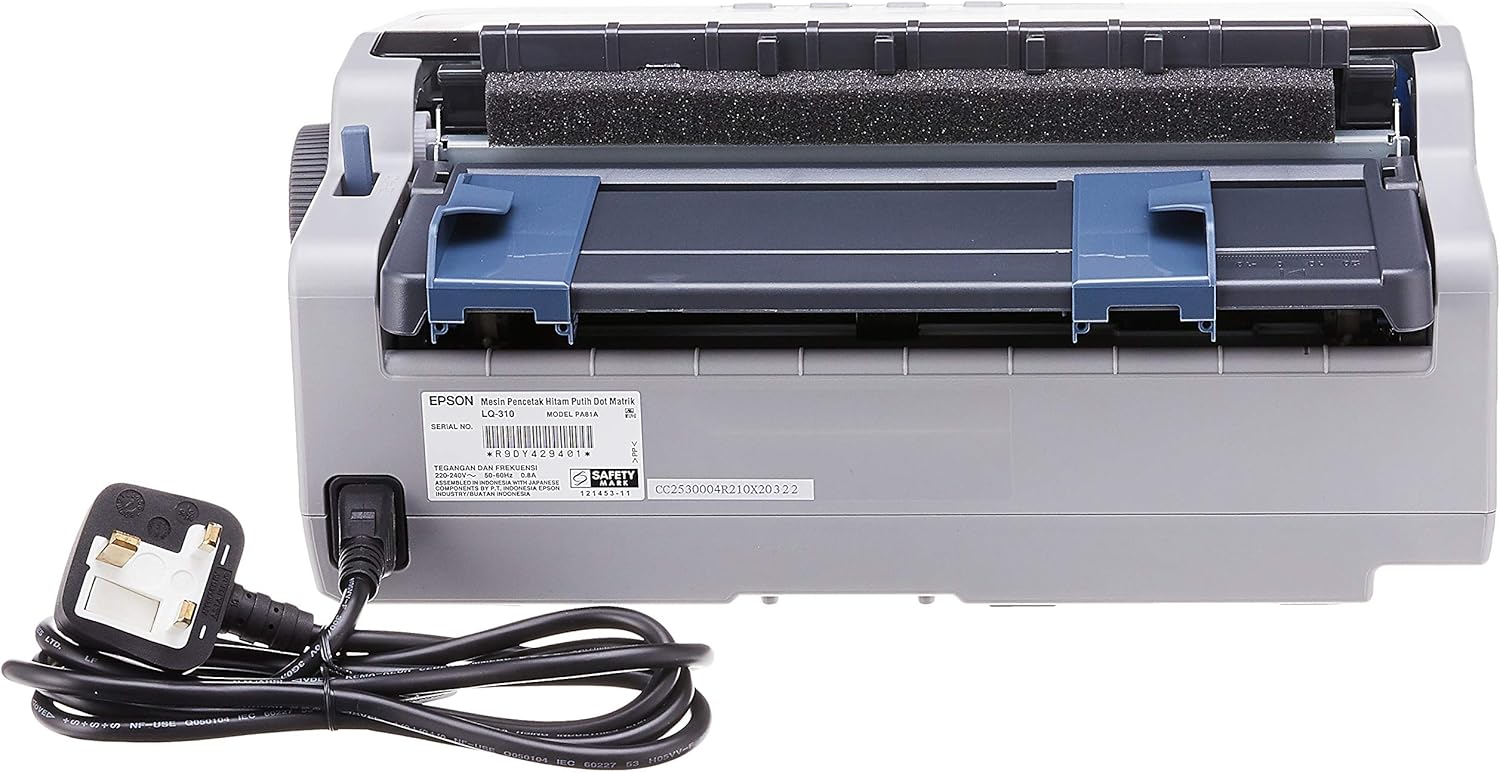
Слика 4.2.1: Позади view of the Epson LQ-310 printer, highlighting the power input and various data ports (USB, Serial, Parallel) for connection to a computer.
4.3 Повезивање са рачунаром
The LQ-310 supports USB, Serial, and Parallel connections. Choose the appropriate cable for your computer and connect it to the corresponding port on the printer.
- УСБ веза: Use a standard USB A-B cable.
- Серијска веза: Use a serial cable (RS-232C).
- Паралелна веза: Use a parallel cable (Centronics).
4.4 Installing the Ribbon Cartridge
- Уверите се да је штампач искључен.
- Отворите поклопац штампача.
- Unpack the new ribbon cartridge.
- Align the ribbon cartridge with the guides inside the printer and press down firmly until it clicks into place.
- Turn the ribbon feed knob on the cartridge to ensure the ribbon is taut and not twisted.
- Затворите поклопац штампача.

Слика 4.4.1: The ribbon cartridge for the Epson LQ-310 printer, which needs to be installed correctly for printing.
4.5 Убацивање папира
The LQ-310 can handle various paper types, including continuous forms and single sheets.
- За континуиране форме: Place the forms on the tractor feed mechanism at the rear of the printer. Adjust the tractor guides to match the paper width and engage the pins.
- For Single Sheets: Insert a single sheet into the front paper slot, ensuring it is straight.
4.6 Инсталација драјвера
After connecting the printer, install the necessary drivers on your computer. You can typically find these on the included CD or download them from the official Epson support webсајту.
5. Упутство за употребу
5.1 Контролна табла прекоview
The control panel on the front of the printer allows you to manage basic functions.

Слика 5.1.1: Фронт view of the Epson LQ-310 printer, showing the control panel with buttons for Tear Off, LF/FF, Load/Eject, Paper Out, Pause, Lock, Font, Item, Micro Adjust, and Set.
- Дугме за напајање: Укључује или искључује штампач.
- Paper Out Indicator: Lights up when the printer is out of paper.
- Дугме за паузу: Привремено зауставља штампање. Притисните поново да бисте наставили.
- LF/FF (Line Feed/Form Feed) Button: Advances paper by one line or one page.
- Load/Eject Button: Loads a single sheet of paper or ejects the current sheet.
- Tear Off Button: Advances continuous paper to the tear-off position.
- Font Button: Selects different fonts.
- Item/Set Buttons: Used for menu navigation and setting options.
5.2 Основно штампање
- Уверите се да је штампач укључен и повезан са рачунаром.
- Load paper according to the instructions in Section 4.5.
- Отворите документ који желите да одштампате на рачунару.
- Select the Epson LQ-310 as your printer in the print dialog.
- Adjust print settings (e.g., paper size, print quality) as needed.
- Кликните на „Штампај“.
6. Одржавање
6.1 Ribbon Cartridge Replacement
Replace the ribbon cartridge when print quality deteriorates or the ribbon is visibly worn.
- Искључите штампач и извуците кабл за напајање.
- Отворите поклопац штампача.
- Carefully remove the old ribbon cartridge by lifting it out.
- Install a new ribbon cartridge as described in Section 4.4.
- Close the printer cover and reconnect the power.
6.2 Чишћење штампача
Редовно чишћење помаже у одржавању перформанси штампача.
- Искључите штампач и извуците кабл за напајање.
- Обришите спољашњост штампача меком,amp тканина. Немојте користити абразивна средства за чишћење или раствараче.
- Gently clean the print head area with a soft, lint-free cloth if necessary, being careful not to touch the pins.
- Уклоните прашину или остатке папира са путање папира.
КСНУМКС. Решавање проблема
This section addresses common issues you might encounter with your LQ-310 printer.
7.1 Printer Does Not Turn On
- Уверите се да је кабл за напајање безбедно повезан и са штампачем и са исправном електричном утичницом.
- Проверите да ли је утичница функционална тако што ћете укључити други уређај.
7.2 "Paper Out" Indicator is On
- Load paper correctly as described in Section 4.5.
- Ensure the paper sensor is not obstructed.
7.3 No Print Output
- Verify the printer is powered on and connected to the computer.
- Check if the correct printer driver is installed and selected in your application.
- Ensure the ribbon cartridge is installed correctly and has ink.
- Check the printer's status on your computer; clear any pending print jobs.
7.4 Лош квалитет штампе
- The ribbon cartridge may be old or running out of ink. Replace it if necessary.
- Ensure the paper type is suitable for impact printing.
- Clean the print head area if there is visible debris.
8. Спецификације
| Феатуре | Спецификација |
|---|---|
| Технологија штампе | 24-Pin Narrow Carriage Impact Dot Matrix |
| Брзина штампања | Up to 347 / 416 cps (10 / 12 cpi) |
| Повезивање | 1 Full-Speed USB 2.0, Serial Port, Parallel Port |
| Излаз штампача | Colour (Ink Color: Black) |
| Резолуција | 240 x 170 dpi (Max Print Resolution Black and White: 240 dpi) |
| Тежина артикла | 4.1 килограма |
| Димензије производа (Д x Ш x В) | 27.5Д к 36.2Ш к 15.4В центиметара |
| Максимална величина медија | Леттер/А4 |
| Принт Медиа | Папир (обичан) |
| Назив модела | ЛК 310 |
| Број модела | ЛК-310 |
9. Гаранција и подршка
The Epson LQ-310 printer comes with a limited warranty. For detailed warranty information, please refer to the warranty card included with your product or visit the official Epson webсајту.
For technical support, driver downloads, or further assistance, please visit the Epson support website or contact your local Epson customer service center. Have your printer model number (LQ-310) and serial number ready when contacting support.


