1. Производ је готовview
The Parrot Bebop 2 is a second-generation quadcopter drone designed for enhanced flight performance and high-quality aerial photography. It features a durable design, extended flight time, and advanced camera capabilities. When paired with the Black Skycontroller, it offers an extended range and precise control for an immersive flying experience.
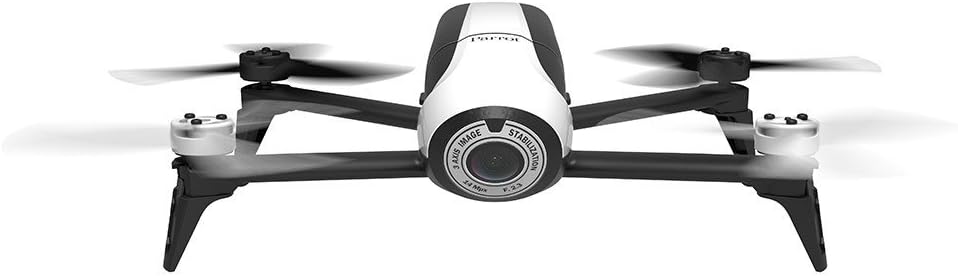
Image 1.1: Parrot Bebop 2 drone and Skycontroller in its retail packaging.
Кључне карактеристике:
- Enhanced 14 Megapixel Fish-Eye Lens: Offers 1080p video recording and high-quality image capture.
- Продужено време лета: Up to 25 minutes of flight thanks to a powerful 2700 mAh battery.
- Powerful Motors and Rear Flash LED: Designed for stable flight at various altitudes and improved visibility.
- Parrot Skycontroller: Connects to your phone or tablet, providing two joysticks for easy piloting and a Wi-Fi extender for increased range up to 1.25 miles.
- 3-Axis Digital Stabilization: Ensures a fixed angle of view regardless of flight conditions.
2. Шта је у кутији
Your Parrot Bebop 2 + Black Skycontroller package includes the following components:
- 1 x Parrot Bebop 2 Drone
- 1 x Black Skycontroller
- 2 x Batteries (for drone)
- 1 к УСБ кабл
- 8 x Propellers (4 installed, 4 spares)
- 1 x Propeller Assembly Tool
- 1 x Charger with Cable and Universal Adapters
- 1 x Neckstrap (for Skycontroller)
- 1 x Adapter for iPad Mini
- 1 x Adapter for 7-inch Tablets
- 1 x Sunshade Cover (for tablet/smartphone)
- 2 x Quick Start Guides
3. Водич за подешавање
This section provides step-by-step instructions for setting up your Parrot Bebop 2 drone for its first flight. For a visual guide, please refer to the official setup video below.
Video 3.1: Official Parrot Bebop 2 Setup Tutorial. This video demonstrates propeller installation, battery insertion, app download, Wi-Fi connection, firmware update, and magnetometer calibration.
3.1. Инсталација пропелера
- Carefully place each propeller onto its corresponding motor.
- Ensure that the polarized propellers are correctly matched to their motors (white propellers on white motor caps, black propellers on black motor caps).
- Use the supplied mounting tool to securely lock the propellers in place.
3.2. Баттери Инсертион
- Insert the charged battery into the drone's battery compartment.
- Slide the battery forward until it latches securely into place. You should hear a distinct clicking sound.
3.3. Powering On the Drone
- Press the on/off button located on the back of the Bebop 2 drone. The LED indicator will illuminate.
3.4. Преузимање апликације и повезивање
- Download the FreeFlight 3 app from your tablet or smartphone's app store.
- Go to your device's settings and activate Wi-Fi.
- Select the Wi-Fi network corresponding to your Bebop 2 drone (e.g., "Bebop2-I000371").
- Launch the FreeFlight 3 app. The app will connect to your drone.
3.5. Ажурирање фирмвера
- Upon connecting, the app will check for firmware updates. Ensure your Bebop 2 is running the latest firmware.
- If an update is available, follow the on-screen instructions within the app to download and install it.
- After the update, you will be prompted to restart your drone. The reboot process typically takes about two minutes.
3.6. Magnetometer Calibration
- Before the first flight, especially outdoors, you will need to calibrate the drone's magnetometer.
- Follow the visual instructions provided by the FreeFlight 3 app, rotating the drone along its Z, Y, and X axes as indicated.
3.7. FAA Registration
Please note that the Parrot Bebop 2 requires registration with the FAA (Federal Aviation Administration) for outdoor flight in the United States. Visit the FAA website for more information on how to register your drone and comply with local regulations.
4. Операција
Once setup is complete, you are ready to operate your Parrot Bebop 2 drone. The FreeFlight 3 app provides intuitive controls for flight and camera functions.

Image 4.1: The Parrot Bebop 2 drone in flight.
4.1. Основне контроле лета
- Полетање/Слетање: Use the dedicated 'Take Off' and 'Landing' buttons within the FreeFlight 3 app.
- Контрола смера: Use the virtual joysticks on your tablet/smartphone screen or the physical joysticks on the Skycontroller to control the drone's movement (forward, backward, left, right).
- Контрола надморске висине: Adjust the altitude using the vertical control on the app or Skycontroller.
- Стабилност: The drone's advanced stabilization system helps maintain steady flight.
4.2. Рад камере
- Видео снимак: Initiate 1080p video recording directly from the FreeFlight 3 app interface.
- Снимање фотографија: Capture 14-megapixel still images during flight.
- Поље оф View: The 186° fish-eye lens provides a wide perspective.
- Пренос уживо: View live video feed from the drone on your connected device.
4.3. Skycontroller Usage
The Black Skycontroller enhances the flight experience by providing physical controls and extending the Wi-Fi range.
- Проширени опсег: The Skycontroller acts as a Wi-Fi extender, significantly increasing the drone's operational range.
- Прецизна контрола: Physical joysticks offer more tactile and precise control compared to touch-screen controls.
- Монтажа уређаја: Use the provided adapters to securely mount your tablet or smartphone to the Skycontroller for FPV (First Person View) flying.
5. Одржавање
Regular maintenance ensures the longevity and optimal performance of your Parrot Bebop 2 drone.
- Одржавање батерије: Always use the official charger. Store batteries in a cool, dry place and avoid overcharging or fully discharging them.
- Инспекција пропелера: Regularly check propellers for any signs of damage (cracks, bends, chips). Replace damaged propellers immediately using the propeller assembly tool.
- Чишћење: Gently clean the drone's body and camera lens with a soft, dry cloth. Avoid using harsh chemicals or abrasive materials.
- Ажурирања софтвера: Keep the FreeFlight 3 app and drone firmware updated to ensure access to the latest features and performance improvements.
КСНУМКС. Решавање проблема
If you encounter issues with your Parrot Bebop 2, refer to the following common troubleshooting tips:
- Проблеми са везом: Ensure both the drone and your controlling device (tablet/smartphone) have Wi-Fi enabled and are connected to the correct drone network. Try restarting both devices.
- Дрон не реагује: Check battery levels on both the drone and Skycontroller. Ensure all propellers are securely attached.
- Лош видео квалитет: Clean the camera lens. Ensure you are flying in good lighting conditions. Check for firmware updates.
- Нестабилан лет: Perform a magnetometer calibration. Ensure propellers are not damaged and are correctly installed.
- Рушења апликације: Ensure your FreeFlight 3 app is updated. Try clearing the app's cache or reinstalling it.
7. Спецификације
Detailed technical specifications for the Parrot Bebop 2 drone:
| Феатуре | Спецификација |
|---|---|
| Бранд | Папагај |
| Назив модела | Bebop 2 |
| Број модела | ПФ726103 |
| Боја | Бела / црна |
| Материјал | Пластика |
| Тежина артикла | 1.1 фунти |
| Резолуција снимања видео записа | 1080п |
| Ефективна резолуција мировања | 14 мегапиксела |
| Технологија оптичког сензора | ЦМОС |
| Технологија повезивања | Ви-Фи |
| Технологија даљинског управљања | Ви-Фи |
| Тип контроле | Remote Control (Skycontroller) |
| Максимални домет | 1.25 Miles (with Skycontroller) |
| Капацитет батерије | 2700 Милиamp Сати |
| Састав батерије батерије | Литхиум Ион |
| Медиа Типе | Мицро СДХЦ |
8. Гаранција и подршка
8.1. Информације о гаранцији
The Parrot Bebop 2 drone comes with a једногодишња гаранција произвођачаОва гаранција покрива недостатке у материјалу и изради при нормалној употреби. Молимо вас да сачувате доказ о куповини за потребе подношења захтева за гаранцију.
8.2. Корисничка подршка
For further assistance, technical support, or to inquire about replacement parts, please visit the official Parrot support website or contact their customer service. Detailed contact information can typically be found on the Parrot website or in the quick start guides included with your product.


