1. Увод
This manual provides detailed instructions for the installation, operation, and maintenance of your Reolink RLC-410WS 4MP Super HD Dual-Band Wi-Fi Wireless Security IP Camera. Please read this manual thoroughly before using the product to ensure correct usage and optimal performance.
2. Производ је готовview
2.1 Компоненте камере
Familiarize yourself with the main components of your RLC-410WS camera:

Слика 2.1: Reolink RLC-410WS Camera Component Diagram. This image illustrates the various parts of the camera including the antenna, lens, IR LEDs, daylight sensor, and connection ports for power, network, and the reset button.
- Антена: За Wi-Fi повезивање.
- Метално алуминијумско кућиште: Издржљиво кућиште за употребу на отвореном.
- High Definition F=4.0mm Lens: Captures 4MP Super HD video.
- 36 PCS IR LEDs: Provides infrared illumination for night vision up to 100ft.
- Сензор дневне светлости: Детектује амбијентално светло за пребацивање између дневног и ноћног режима.
- Дугме за ресетовање: Користи се за враћање на фабричка подешавања.
- Напајање: For connecting the 12V DC power adapter.
- Network Cable Port: For initial setup and optional wired Ethernet connection.
2.2 Кључне карактеристике
- 4MP Супер ХД видео: Records clear video at 1440p resolution, supporting 1080p and 720p.
- 100ft Night Vision: Equipped with IR LEDs for clear surveillance in low-light conditions.
- Двопојасни Ви-Фи: Supports 2.4GHz and 5GHz Wi-Fi for flexible and stable wireless connection.
- Упозорења о детекцији покрета: Sends real-time email alerts with photos or 30-second video clips, and push notifications to mobile phones.
- Локално складиште: Built-in 16GB Micro SD card for recording and storing up to 400 motion-activated events.
- Даљински приступ: Monitor your home from anywhere using the Reolink Client software (PC/Mac) or Reolink App (iPhone/Android).
- 80-Дегрее Viewугао угла: Пружа широко поље view.
- IP67 Отпоран на временске услове: Дизајниран за употребу на отвореном у различитим временским условима.
3. Шта је у кутији
Проверите да ли су све ставке присутне у вашем пакету:

Слика 3.1: Package Contents. This image displays the camera, antenna, power adapter, extension cable, network cable, software CD, quick start guide, surveillance sign, mounting template, and screws.
- Reolink RLC-410WS Camera
- Повер Адаптер
- Продужни кабл за напајање
- Network Cable (1 meter)
- Антена
- Водич за брзи почетак
- Предложак за рупу за монтирање
- Вијци и зидни чепови
- Знак за надзор
- CD (Manual/Software)
4. Подешавање и инсталација
4.1 Почетна конфигурација
- Connect Power and Ethernet: Connect the camera to the power adapter and then to your router using the provided Ethernet cable.
- Преузмите апликацију/клијент Reolink: Download the Reolink App from the App Store or Google Play, or the Reolink Client software from the official Reolink website for PC/Mac.
- Додај камеру: Open the app/client, click the "+" icon to add the camera. The app/client should automatically detect the camera on your local network.
- Постави лозинку: Create a strong password for your camera.
- Конфигуришите Wi-Fi: Once connected via Ethernet, navigate to the camera settings in the app/client to configure Wi-Fi. Select your 2.4GHz or 5GHz network and enter the password. Ensure a strong Wi-Fi signal at the installation location. Note: Wi-Fi settings can typically only be changed while the camera is connected via Ethernet.
- Тестна веза: After configuring Wi-Fi, test the connection. Once successful, you can disconnect the Ethernet cable.
4.2 Монтирање камере
Consider the following when mounting your camera:
- Локација: Изаберите локацију која пружа жељено viewугао гледања и налази се у домету ваше Wi-Fi мреже.
- Power Cable Routing: The power cable requires a hole of approximately 3/4 inch (19mm) to pass through a wall due to the Ethernet socket and reset switch on the breakout cable. Plan your cable routing carefully.
- Подешавање носача: The mounting bracket allows for three-dimensional adjustment. Loosen the small Allen screws to adjust the camera angle, then tighten them securely.
- Заштита вода: For outdoor installations, ensure the breakout cable connections (power, network, reset button) are protected from water. Consider using a waterproof junction box.

Слика 4.1: Camera Dimensions. This image provides the physical measurements of the RLC-410WS camera, useful for planning installation.
5. Руковање камером
5.1 Приступ камери
You can access your Reolink RLC-410WS camera using various platforms:

Слика 5.1: Reolink Software Platform. This image illustrates how the Reolink camera can be accessed and managed from various devices, including Mac, Windows, iPhone, and Android.
- Reolink App: Available for iOS (iPhone/iPad) and Android devices. Provides live view, репродукција и управљање подешавањима.
- Reolink Client: Desktop software for Windows and macOS. Offers comprehensive control, multi-camera viewing, and recording options.
- Web Прегледач: Access the camera directly via its IP address using a web browser (features may be limited compared to the app/client).
5.2 Детекција и снимање покрета
The RLC-410WS camera features customizable motion detection:
- Подешавање осетљивости: Подесите осетљивост детекције покрета да бисте смањили лажне аларме.
- Зоне детекције: Дефинишите одређене области унутар камере view to monitor for motion, ignoring irrelevant areas.
- Маска приватности: Mask out sensitive areas from being recorded or viewед.
- Обавештења: Receive instant push notifications on your phone, email alerts with snapshots or video clips, and upload recordings to an FTP server.
- Локално складиште: Motion-activated events are recorded to the built-in 16GB Micro SD card for later playback.
5.3 Квалитет видеа и ноћни вид
The camera provides high-quality video day and night:
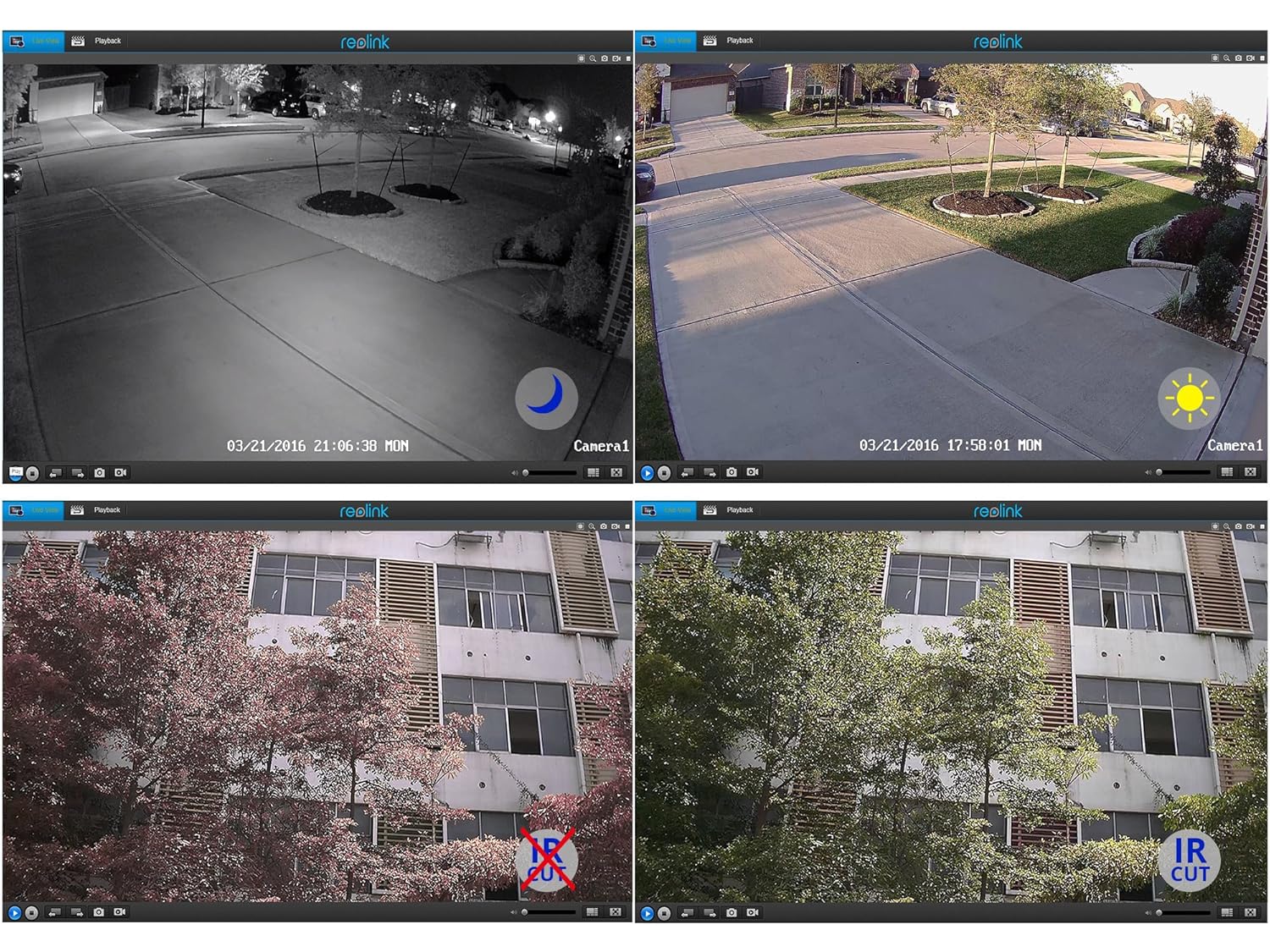
Слика 5.2: Day and Night Vision Comparison. This image demonstrates the camera's ability to capture clear video in both daylight and low-light conditions using its infrared capabilities.
- 4MP Super HD: Delivers crisp and clear video footage.
- Инфрацрвени ноћни вид: Automatically switches to night mode in low light, providing clear black and white video up to 100 feet.
- ИР Цут Филтер: Ensures accurate color reproduction during the day and enhanced infrared sensitivity at night.
6. Спецификације
Detailed technical specifications for the Reolink RLC-410WS camera:
| Феатуре | Спецификација |
|---|---|
| Модел | RLC-410WS |
| Ефективна видео резолуција | 4 MP (1440p) |
| Viewинг Англе | 80 степени |
| Ноћни вид | 100 стопа |
| Фраме Рате | 25 кадрова у секунди |
| Бежична комуникација | Wi-Fi (2.4/5Ghz Dual Band) |
| Складиштење | Built-in 16GB Micro SD Card |
| Извор напајања | 12 волти ДЦ |
| Оцена међународне заштите | ИП67 |
| Димензије (Д к Ш к В) | 18.8 к 6.6 к 6.6 центиметара |
| Тежина артикла | 454 g (1 Pound) |
| Контролни метод | Апп |
| Тип монтаже | Валл Моунт |

Слика 6.1: Reolink Model Feature Comparison. This table highlights the features available across various Reolink camera models, including PoE, Wi-Fi, Micro SD storage, optical zoom, and pan/tilt capabilities.
КСНУМКС. Решавање проблема
This section addresses common issues you might encounter with your RLC-410WS camera.
7.1 Проблеми са Wi-Fi повезивањем
- Нема Wi-Fi везе:
- Ensure the camera is initially configured via Ethernet before setting up Wi-Fi.
- Проверите да ли је лозинка за Wi-Fi исправна.
- Perform a firmware update. Outdated firmware can cause connectivity problems.
- Ensure the camera is within range of your Wi-Fi router and has a strong signal. Signal strength can drop quickly with distance.
- If changing Wi-Fi settings, ensure the camera is connected via Ethernet, run a connection test, and save changes.
- Frequent Disconnects:
- Check Wi-Fi signal strength at the camera's location. Consider using a Wi-Fi extender if the signal is weak.
- Ensure your router's 2.4GHz and 5GHz channels are not overly congested.
- Update camera firmware to the latest version.
7.2 Camera Not Responding After Settings Change/Firmware Update
- If the camera becomes unresponsive after a settings change or firmware update, try power cycling the camera (unplug and re-plug the power adapter).
- If power cycling does not work, reconnect the camera via Ethernet. This often restores connectivity and allows further troubleshooting or re-configuration.
- If the issue persists, perform a factory reset using the reset button on the breakout cable. Note: This will erase all settings.
7.3 False Motion Detection Alerts
- Adjust the motion detection sensitivity in the camera settings.
- Define specific motion detection zones to exclude areas with frequent irrelevant movement (e.g., trees swaying, busy roads).
- In night vision mode, insects flying close to the IR illuminators can trigger alerts. Consider adjusting sensitivity or, if possible, using an external IR illuminator placed away from the camera.
8. Одржавање
- Чишћење: Редовно чистите сочиво и кућиште камере меком крпомamp крпом како бисте осигурали јасан квалитет слике. Избегавајте абразивна средства за чишћење.
- Ажурирања фирмвера: Periodically check the official Reolink webсајт за ажурирања фирмвера. Одржавање фирмвера вашег фотоапарата ажурираним обезбеђује оптималне перформансе, безбедност и приступ новим функцијама.
- Инспекција каблова: Periodically inspect all cables and connections for wear or damage, especially in outdoor installations. Ensure waterproof seals are intact.
- Управљање СД картицама: While the camera manages the 16GB SD card, it's good practice to occasionally check its status via the app/client.
9. Гаранција и подршка
For warranty information, please refer to the warranty card included in your product package or visit the official Reolink website. Reolink provides dedicated customer support.
- техничка подршка: For technical assistance, troubleshooting, or any product-related queries, please contact Reolink support via their official website. Email support is typically provided with responses within 24 hours.
- Преузимања фирмвера: Latest firmware versions and software clients can be downloaded from the Reolink support page.


