1. Увод
This manual provides detailed instructions for the installation, operation, and maintenance of the Commax DR-8UM 8-Button Audio Intercom Lobby Panel. Please read this manual thoroughly before installation and use to ensure proper functionality and safety.
The DR-8UM is designed for 8-apartment buildings, facilitating audio communication between visitors at the lobby panel and residents inside their apartments.
2. Безбедносне информације
- Уверите се да је сва струја искључена пре инсталације или одржавања.
- Инсталацију треба извести квалификовано особље.
- Use only the specified power supply (DC12V, 1Amp, Commax RF-1A or equivalent).
- Do not expose the unit to excessive moisture or extreme temperatures outside the specified operating range (-10°C ~ 50°C).
- This unit is designed for flush-mounted installation.
3. Садржај пакета
Проверите да ли су све ставке присутне у пакету:
- Commax DR-8UM 8-Button Lobby Panel x1
- 4-pin connector x1
- 8-pin connector x1
- Instruction Manual x1 (this document)
4. Производ је готовview
The Commax DR-8UM is an audio intercom lobby panel featuring 8 call buttons, a speaker, and a microphone. It is constructed from aluminum and designed for flush mounting.

Слика 4.1: Фронт view of the Commax DR-8UM 8-Button Audio Intercom Lobby Panel. The panel features a speaker grille at the top, followed by a microphone, and eight call buttons arranged vertically on the right side. Each button corresponds to an apartment unit.
5. Инсталација
5.1 Монтажа панела
The DR-8UM is designed for flush-mounted installation. Ensure adequate space is available in the wall for the back box.

Слика 5.1: Installation diagram showing the dimensions for flush mounting the Commax DR-8UM. The diagram illustrates the panel's front plate, the recessed back box, and the screw points for secure installation. Key dimensions are provided in millimeters.
Димензије: 142 mm (W) x 315 mm (H) x 50 mm (D).
- Prepare the wall opening according to the dimensions provided in Figure 5.1.
- Secure the back box (not explicitly shown but implied by flush mount) into the wall opening.
- Route the necessary wiring through the back box.
- Attach the DR-8UM panel to the back box using appropriate screws, ensuring a secure and flush fit.
5.2 Ожичење
The DR-8UM requires a DC12V, 1Amp power supply (Commax RF-1A, sold separately). It is compatible only with Commax interphone series, such as the DP-SS (sold separately).
Тип ожичења: Common 3 wires + Individual 1 wire (Wire 3 wires: 1, 2, 3; Individual 1 wire: L1).
Connect the 4-pin and 8-pin connectors to the corresponding ports on the DR-8UM panel and to the interphone system according to the system's wiring diagram. Ensure correct polarity for the power supply.
6. Упутство за употребу
The Commax DR-8UM allows visitors to call and communicate with residents in an 8-apartment building.
- To Call an Apartment: A visitor presses the corresponding button for the desired apartment unit on the lobby panel.
- Двосмерна комуникација: Once the resident answers via their indoor interphone unit (e.g., DP-SS), two-way audio communication is established between the visitor at the lobby panel and the resident.
7. Одржавање
- Чишћење: Wipe the panel surface with a soft, dry cloth. Do not use abrasive cleaners or solvents.
- инспекција: Periodically check for any loose connections or physical damage.
- Функционалност дугмета: Ensure all call buttons operate smoothly. If a button becomes faulty, contact customer support for assistance.
КСНУМКС. Решавање проблема
| Проблем | Могући узрок | Решење |
|---|---|---|
| Нема напајања за јединицу. | Incorrect power supply connection or faulty power adapter. | Check power supply (DC12V, 1Amp) and connections. Ensure the power adapter is functional. |
| No audio during communication. | Incorrect wiring, faulty indoor unit, or damaged speaker/microphone. | Verify wiring connections (Common 3 wires + Individual 1 wire). Test with a known working indoor unit. |
| Call button not responding. | Faulty button or wiring issue to that specific apartment. | Inspect the button for physical damage. Check the individual wire connection for that apartment. Contact support if the button is faulty. |
| Рад са прекидима. | Loose wiring connections or unstable power supply. | Secure all wiring connections. Ensure the power supply is stable and within specifications. |
9. Спецификације
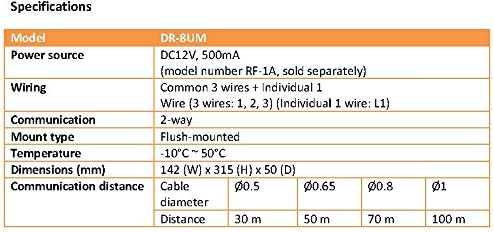
Слика 9.1: Technical specifications table for the Commax DR-8UM, detailing model, power source, wiring, communication type, mount type, temperature range, dimensions, and communication distance based on cable diameter.
| Феатуре | Детаљ |
|---|---|
| Модел | DR-8UM |
| Извор напајања | DC12V, 1Amp (Commax RF-1A, sold separately) |
| Ожичење | Common 3 wires + Individual 1 wire (Wire 3 wires: 1, 2, 3; Individual 1 wire: L1) |
| Тип комуникације | Двосмерни аудио |
| Моунт Типе | Уградна |
| Радна температура | -10°Ц ~ 50°Ц |
| Димензије (Ш к В к Д) | 142 мм к 315 мм к 50 мм |
| Compatible Interphone | Commax DP-SS series (sold separately) |
10. Гаранција и подршка
For warranty information and technical support, please refer to the official Commax webсајт или контактирајте локалног дистрибутера. Сачувајте рачун за куповину за потребе гаранције.
For replacement parts, including individual buttons, please contact Commax customer service directly as parts availability may vary.


