Увод
The Casio CTK-2550 Digital Keyboard is a versatile 61-key portable piano designed for beginners and enthusiasts. It offers a wide array of sounds, rhythms, and learning features to enhance your musical journey. This manual provides essential information for setting up, operating, and maintaining your keyboard.

Слика: Фронт view of the Casio CTK-2550 61-Key Portable Piano Keyboard, showcasing its black body, white and black keys, control panel, and built-in speakers.
Кључне карактеристике
- 61 Standard Keys: Provides a full range for playing various musical pieces.
- 400 тонова: A diverse selection of instrument sounds, including pianos, electric pianos, organs, guitars, basses, synths, and drum kits.
- 100 ритма: Accompaniment patterns across various genres like 8 Beat, 16 Beat, Ballad, Dance, Pops, Rock, Jazz, European, Latin, World, and Piano Rhythms.
- 50 Dance Music Patterns: Dedicated mode for creating electronic dance music, including EDM, House, and Hip-Hop styles.
- 60 Song Bank: Built-in songs for listening and learning, categorized into World, Event, Piano/Classics, and User Songs.
- Step-Up Lesson System: An integrated learning system to help users practice and master songs.
- Одговор на додир: Keys respond to playing dynamics, allowing for expressive performances.
- Нагибни точак: For adding expressive pitch variations to notes.
- Chordana Play App Integration: Connects with the Chordana Play app for expanded learning and functionality.
- Преносиви дизајн: Lightweight and can be battery-powered for on-the-go use.
Сетуп
1. Распакивање и компоненте
Carefully remove all components from the packaging. Ensure you have the Casio CTK-2550 keyboard, the included power supply, and the music stand.
2. Attaching the Music Stand
Locate the wire-frame music stand. Insert its prongs into the designated slots at the top rear of the keyboard. This stand is used to hold sheet music or a tablet.
3. Powering the Keyboard
The CTK-2550 can be powered in two ways:
- АЦ адаптер: Connect the included AC adapter to the DC 9.5V power input jack on the rear panel of the keyboard and then plug it into a wall outlet.
- батерије: For portable use, the keyboard can be powered by six AA-size alkaline batteries. Open the battery compartment on the underside of the keyboard and insert the batteries, ensuring correct polarity.
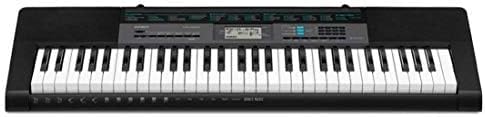
Image: Close-up of the rear panel of the Casio CTK-2550, showing the power input, audio in, phones/output, USB, and sustain pedal jacks.
Упутство за употребу
1. Укључивање/искључивање и јачина звука
- Притисните тастер ПОВЕР дугме за укључивање или искључивање тастатуре.
- Подесите главну јачину звука помоћу ВОЛУМЕ slider located on the left side of the control panel.
2. Selecting Tones (Sounds)
The CTK-2550 features 400 built-in tones. To select a tone:
- Притисните тастер ТОНЕ дугме.
- Користите нумеричку тастатуру или + / - buttons to enter the desired tone number. A list of tones is printed on the keyboard's panel.
Examples of Tone Categories: Piano (001-014), Electric Piano (015-028), Organ (043-064), Guitar (065-078), Bass (079-088), Synth-Lead (166-202), Drum Set (395-400).
3. Playing Rhythms (Accompaniment)
The keyboard includes 100 rhythms for automatic accompaniment. To use rhythms:
- Притисните тастер RHYTHM/SONG BANK CONTROLLER дугме.
- Use the number pad or + / - buttons to select a rhythm.
- Притисните СТАРТ/СТОП to begin the rhythm.
- Adjust the tempo using the ТЕМПО дугмад.
Examples of Rhythm Categories: 8 Beat (001-003), Dance (011-015), Rock (021-026), Jazz (027-033), World (054-087), Piano Rhythms (091-100).
4. Dance Music Mode
Engage the Dance Music Mode to create and play along with 50 electronic dance music patterns.
- Притисните тастер DANCE MUSIC дугме.
- Select a pattern (e.g., EDM 01-35, House 36-45, Hip-Hop 46-50).
- Use the keys to trigger different phrases and build your track.
5. Song Bank and Lesson System
The 60-song bank allows you to listen to pre-recorded songs or use the Step-Up Lesson System to learn them.
- Притисните тастер СОНГ БАНК дугме.
- Select a song using the number pad or + / - дугмад.
- Користите Слушај, ФОЛЛОВ, или ФРАЗА functions to engage with the lesson system.
6. Touch Response and Pitch Bend
- The keys are touch-sensitive, meaning the volume and tone will change based on how hard or soft you press them.
- Користите ПИТЦХ БЕНД wheel on the left side of the keyboard to smoothly raise or lower the pitch of notes while playing.
Повезивање
The rear panel of the CTK-2550 offers several connection options:
- PHONES/OUTPUT (Standard Stereo Jack): Connect headphones for private practice or connect to an external PA system/ampлифиер за ampлифиед соунд.
- AUDIO IN (3.5mm Stereo Mini Jack): Connect an external audio player (like a smartphone or tablet) to play along with your favorite music through the keyboard's speakers.
- SUSTAIN Jack: Connect an optional sustain pedal for extended note decay, similar to a traditional piano.
- УСБ (тип Б): Connect the keyboard to a computer or smart device (Android/Apple) for MIDI data transfer, allowing use with digital audio workstation (DAW) software or educational apps like Chordana Play.
Спецификације
| Феатуре | Детаљ |
|---|---|
| Бранд | Цасио |
| Назив модела | ЦТК-2550 |
| Број кључева | 61 |
| Полифонија | 48 белешки |
| Тонови | 400 AHL Tones |
| Ритмови | 100 Рхитхмс |
| Dance Music Patterns | 50 |
| Song Bank | 60 песама |
| Lesson Function | Step-Up Lesson System |
| Повезивање | USB (MIDI), Audio In, Phones/Output, Sustain |
| Извор напајања | AC Adapter (9.5V DC) or 6x AA Batteries |
| Тежина артикла | 7.3 фунти |
| Димензије артикла | 12.09 к 37.24 к 3.62 инча |
Одржавање
- Чишћење: Обришите тастатуру меком, сувом крпом. За тврдокорну прљавштину користите благоamp крпом, а затим добро осушите. Избегавајте абразивна средства за чишћење или раствараче.
- Складиштење: Чувајте тастатуру на хладном и сувом месту, даље од директне сунчеве светлости, екстремних температура и високе влажности.
- Руковање: Avoid dropping the keyboard or subjecting it to strong impacts. Do not place heavy objects on the keys.
- Одржавање батерије: Ако користите батерије, уклоните их ако се тастатура неће користити дужи период да бисте спречили цурење.
Решавање проблема
- Нема звука:
- Check if the power is on and the volume is turned up.
- Ensure headphones are not plugged in if you intend to use the speakers.
- Verify that the correct tone is selected.
- Тастери не реагују:
- Проверите напајање.
- If using batteries, ensure they are fresh and correctly inserted.
- Изобличен звук:
- Смањите јачину звука.
- Ensure external audio devices connected to AUDIO IN are not set too high.
- Проблеми са повезивањем апликација:
- Уверите се да је УСБ кабл добро повезан.
- Check app settings and device compatibility.
Гаранција и подршка
The Casio CTK-2550 comes with a 1 године гаранције на делове и рад. For technical support, service, or warranty claims, please refer to the contact information provided in your product's warranty card or visit the official Casio webсајту.
За додатне ресурсе и информације о производу, посетите Casio продавница на Амазону.