1. Увод
This manual provides detailed instructions for the installation, operation, and maintenance of the Genius 6100043 Rear Support Bracket. This product is a kit containing 6 rear supports, each with a height of 130 mm. Please note that this bracket is not compatible with 324 ENV systems. Read this manual thoroughly before proceeding with installation or use to ensure proper function and safety.
2. Безбедносне информације
Always adhere to general safety practices when handling and installing mechanical components. Failure to do so may result in injury or damage to equipment.
- Ensure all power sources are disconnected if the installation involves electrical components.
- Носите одговарајућу личну заштитну опрему (ЛЗО), као што су рукавице и заштита за очи.
- Verify that the bracket is suitable for the intended application and load capacity.
- Do not modify the bracket. Any alterations may compromise its structural integrity and void the warranty.
- Држите децу и неовлашћено особље подаље од области инсталације.
3. Садржај пакета
Након отварања паковања, проверите да ли су све компоненте присутне и да ли су неоштећене.
- 1 x Genius 6100043 Rear Support Bracket (Kit of 6 supports)
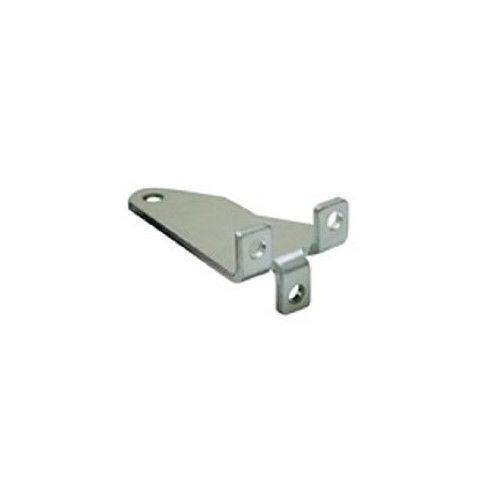
Слика 3.1: A silver-colored metal bracket, featuring a flat base with a rounded end containing a hole, and two perpendicular extensions with holes for mounting. This component is designed for rear support applications.
4. Подешавање и инсталација
Follow these steps for proper installation of the Genius 6100043 Rear Support Bracket.
- Припрема: Identify the mounting location for the rear support bracket. Ensure the surface is clean, stable, and capable of supporting the bracket and any attached components.
- Позиционирање: Place the bracket in the desired position. Mark the locations for drilling holes using the bracket's pre-drilled holes as a template.
- бушење: Drill pilot holes at the marked locations. Use a drill bit appropriate for the mounting surface and the fasteners to be used.
- Монтажа: Secure the bracket to the surface using suitable screws, bolts, or other fasteners (not included). Ensure all fasteners are tightened securely to prevent movement.
- Component Attachment: Attach the intended components to the perpendicular extensions of the bracket using appropriate hardware. Verify that all connections are firm and stable.
- Коначна провера: Inspect the installed bracket and attached components for stability and proper alignment.
5. Упутство за употребу
The Genius 6100043 Rear Support Bracket is a passive component designed to provide structural support. Once correctly installed, it requires no active operation. Ensure that any components attached to the bracket are used according to their respective operating instructions.
6. Одржавање
Regular maintenance ensures the longevity and reliability of the bracket.
- инспекција: Periodically inspect the bracket for any signs of wear, corrosion, or damage. Check for loose fasteners and tighten them as necessary.
- Чишћење: Clean the bracket with a soft, dry cloth. Avoid using abrasive cleaners or solvents that could damage the finish.
- Окружење: Ensure the bracket is not exposed to extreme environmental conditions beyond its intended use, which could accelerate wear or corrosion.
КСНУМКС. Решавање проблема
As a static support component, the Genius 6100043 Rear Support Bracket typically does not experience operational issues. However, if problems arise, consider the following:
- нестабилност: If the bracket feels unstable after installation, re-check all mounting fasteners to ensure they are securely tightened. Verify that the mounting surface is robust.
- корозија: If corrosion appears, clean the affected area and consider applying a protective coating suitable for the material. Ensure the environment is not excessively humid or corrosive.
- Оштећење: If the bracket is bent or damaged, it should be replaced immediately to prevent potential failure. Do not attempt to repair damaged brackets.
8. Спецификације
| Феатуре | Детаљ |
|---|---|
| Број модела | 6100043 |
| Бранд | Геније |
| Опис | Kit of 6 rear supports, 130 mm height |
| Компатибилност | Not for 324 ENV systems |
| Произвођач | ГЕНИУС |
| Број јединица | 1.0 unit (referring to the kit) |
| No longer produced by manufacturer | бр |
| Доступност резервних делова | Информације нису доступне |
9. Гаранција и подршка
For information regarding warranty coverage, technical support, or spare parts, please refer to the official Genius product documentation or contact your authorized Genius dealer. Keep your purchase receipt as proof of purchase.


