1. Увод
This manual provides essential information for setting up, operating, maintaining, and troubleshooting your Microsoft Surface Pro Model 1796. The Surface Pro is a versatile 2-in-1 device designed to function as both a high-performance laptop and a portable tablet. Please read these instructions carefully to ensure optimal use and longevity of your device.
2. Производ је готовview
The Microsoft Surface Pro Model 1796 features a 12.3-inch PixelSense multi-touch display, an Intel Core i5 processor, 4GB of RAM, and a 128GB SSD. It operates on Windows 10 Pro, offering a full desktop experience in a portable form factor. The device supports a detachable keyboard (Surface Pro Signature Type Cover) and a digital pen (Surface Pen), both sold separately, to enhance its functionality.

Figure 2.1: Microsoft Surface Pro in tablet mode, displaying the lock screen.
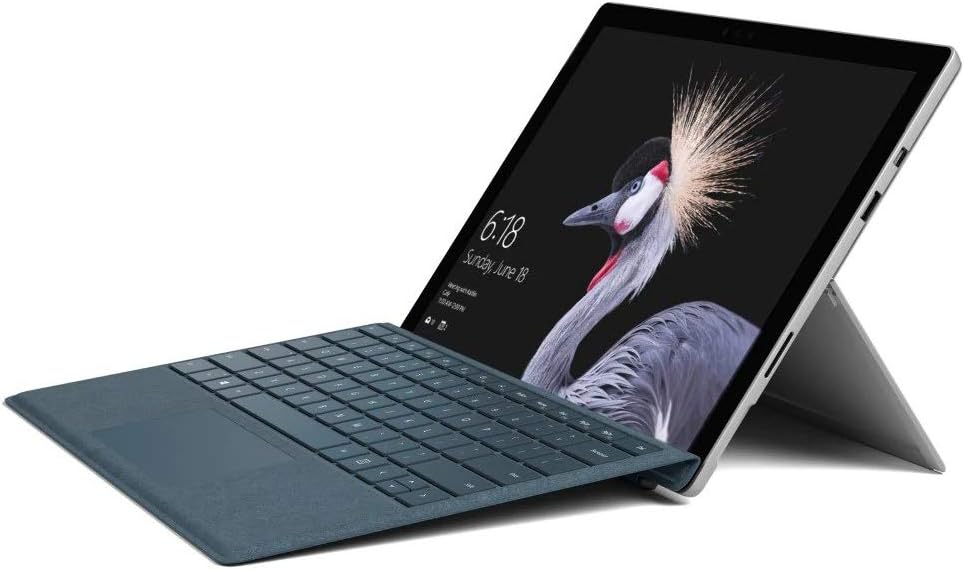
Figure 2.2: Microsoft Surface Pro with Signature Type Cover attached, configured as a laptop.

Figure 2.3: Microsoft Surface Pro tablet and detached Signature Type Cover.
3. Подешавање
3.1 Почетно укључивање
- Connect the power supply to the Surface Pro and a power outlet.
- Притисните дугме за напајање које се налази на горњој ивици уређаја.
- Пратите упутства на екрану да бисте завршили почетно подешавање система Windows 10 Pro, укључујући избор језика, мрежну везу и креирање корисничког налога.
3.2 Повезивање додатне опреме
- Surface Pro Signature Type Cover: Align the Type Cover with the magnetic connector along the bottom edge of the Surface Pro until it clicks into place.
- Површинска оловка: The Surface Pen connects via Bluetooth. Go to Подешавања > Уређаји > Блутут и други уређаји to pair the pen.
3.3 Пуњење уређаја
Use the provided power adapter to charge your Surface Pro. The charging port is located on the right side of the device. A full charge provides approximately 13 hours of typical device usage.
4. Упутство за употребу
4.1 Основна навигација
- додирните: Use multi-touch gestures on the PixelSense display for navigation, zooming, and scrolling.
- Тип корица: Utilize the keyboard and trackpad for traditional laptop input.
- Површинска оловка: Write, draw, and annotate directly on the screen.
4.2 Карактеристике система Windows 10 Pro
Your Surface Pro comes with Windows 10 Pro, offering features such as:
- Windows Hello: For fast, secure, password-free sign-in using facial recognition.
- Цортана: Your personal digital assistant.
- Microsoft Edge: Подразумевано web претраживач.
- Режим таблета: Automatically or manually switch to a touch-optimized interface when the Type Cover is detached.
4.3 Подешавања екрана
The 12.3-inch PixelSense display has a resolution of 2736 x 1824 pixels. You can adjust display settings such as brightness, resolution, and scaling through Settings > System > Display.
5. Одржавање
5.1 Чишћење уређаја
- Користите меку крпу која не оставља длачице дampened with water or an approved screen cleaner to clean the display.
- For the device body, use a soft, dry cloth. Avoid harsh chemicals or abrasive materials.
5.2 Ажурирања софтвера
Regularly check for and install Windows updates to ensure your device has the latest security patches and features. Go to Подешавања > Ажурирање и безбедност > Windows Update.
5.3 Одржавање батерије
- Избегавајте екстремне температуре, јер могу скратити век трајања батерије.
- За оптимално здравље батерије, избегавајте стално потпуно пражњење батерије или њено дуже држање на 100% напуњености.
КСНУМКС. Решавање проблема
6.1 Уобичајена питања
- Уређај се не укључује: Ensure the device is charged. Try holding the power button for 10-15 seconds to perform a force restart.
- Екран не реагује: Restart the device. If the issue persists, check for driver updates.
- Проблеми са перформансама: Close unnecessary applications, check for Windows updates, or run a disk cleanup.
6.2 Контактирање подршке
For more complex issues or technical assistance, please visit the official Microsoft Support website or contact their customer service. Have your device's model number (FJU-00001) and serial number ready.
7. Спецификације
| Феатуре | Спецификација |
|---|---|
| Назив модела | FJU-00001 |
| Величина екрана | 12.3 инча |
| Резолуција екрана | 2736 к 1824 пиксела |
| Процесор | Intel Core i5 (2.6 GHz) |
| РАМ | 4 ГБ ДДР3 |
| Складиштење | 128 ГБ ССД |
| Грапхицс Цопроцессор | Интел ХД Грапхицс 620 |
| Оперативни систем | Виндовс 10 Про |
| Вирелесс Типе | 802.11б, 802.11г, 802.11н |
| Просечно трајање батерије | 13 сата |
| Тежина артикла | 1.7 фунти |
| Димензије производа | 11.5 к 0.33 к 7.93 инча |
| Позади Webцам Ресолутион | 5 МП |
8. Гаранција и подршка
Your Microsoft Surface Pro Model 1796 is covered by a limited hardware warranty provided by Microsoft. For detailed warranty terms and conditions, please refer to the documentation included with your purchase or visit the official Microsoft support webсајт. Сачувајте доказ о куповини за потребе гаранције.
For technical support, driver downloads, and service information, please visit суппорт.мицрософт.цом. You may need to provide your device's serial number and model information.


