Увод
This manual provides comprehensive instructions for the setup, operation, and maintenance of your Pure Evoke H6 Digital Radio. Designed for high-quality audio and versatile connectivity, the Evoke H6 offers DAB+, DAB, and FM radio reception, along with Bluetooth streaming capabilities. Please read this manual carefully to ensure optimal performance and longevity of your device.
Шта је у кутији
Upon unboxing your Pure Evoke H6, please ensure all the following components are present:
- Pure Evoke H6 Digital Radio Unit
- Повер Адаптер
- Водич за брзи почетак
- Кориснички приручник (овај документ)

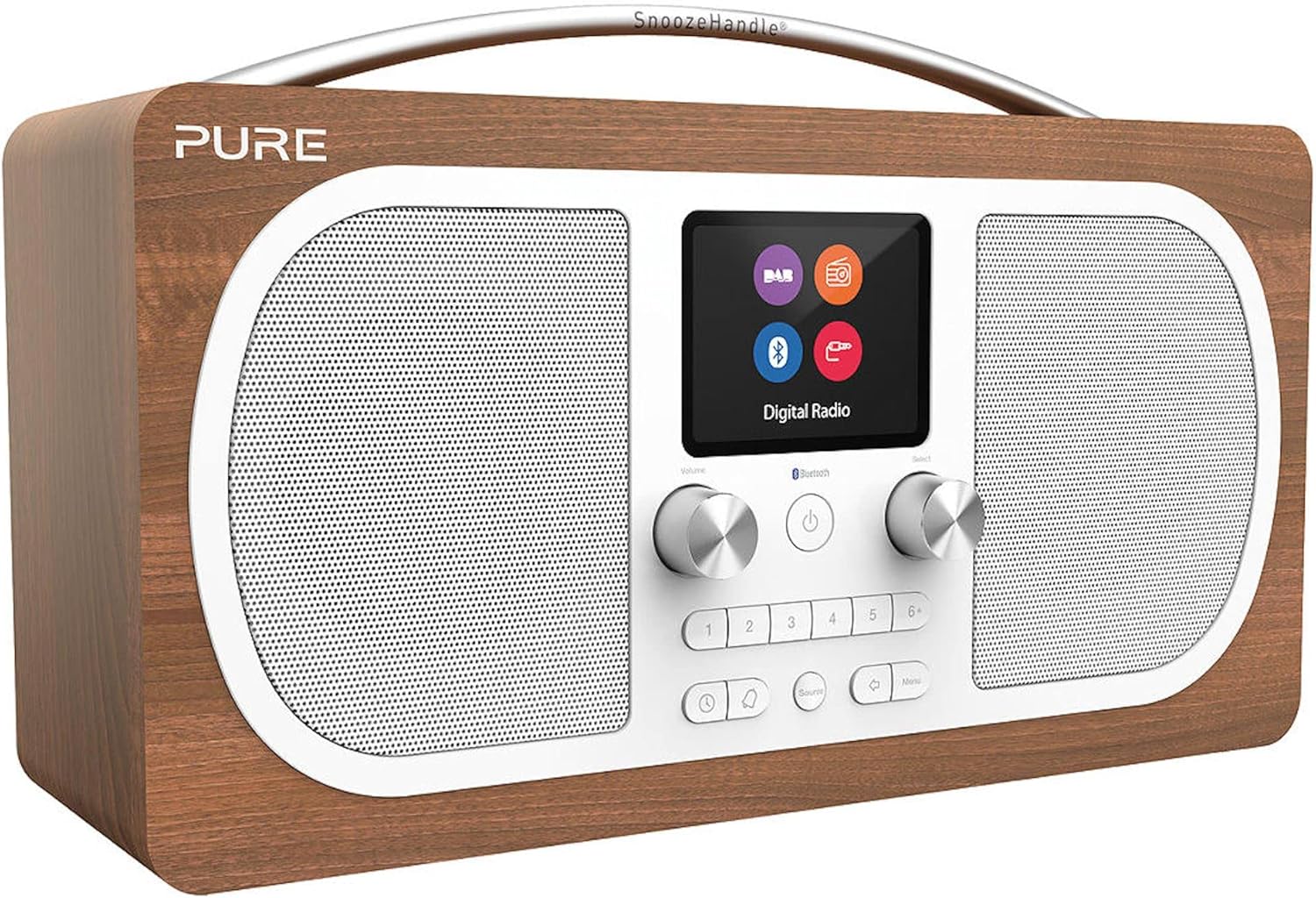
Слика: Фронт view of the Pure Evoke H6 Digital Radio. The radio features a walnut wood finish, two large speaker grilles, a central color display, and various control buttons and knobs.
Производ је завршенview
The Pure Evoke H6 is a high-quality digital radio designed for an enhanced listening experience. Key features include:
- DAB+, DAB, and FM Radio: Access a wide range of digital and analog radio stations.
- Блуетоотх повезивање: Stream audio wirelessly from your smartphone, tablet, or laptop.
- 2.8-инчни TFT екран у боји: A bright and clear screen for station information, track details, and menu navigation.
- Стерео звук: Delivers rich, immersive audio quality.
- Излаз за слушалице: За приватно слушање.
- Помоћни улаз: Повежите екстерне аудио уређаје помоћу 3.5 мм кабла.
- Alarm, Sleep Timer, and Snooze Functions: Integrated features for daily convenience.

Image: The Pure Evoke H6 radio positioned on a kitchen counter, demonstrating its compact and stylish design in a home environment.
Сетуп
1. Прикључак за напајање
- Unpack the Pure Evoke H6 and place it on a stable, flat surface.
- Потпуно извуците телескопску антену за оптималан пријем.
- Connect the provided power adapter to the '12V DC 2.4A' input port on the rear of the radio.
- Укључите адаптер за напајање у зидну утичницу.
Слика: Позади view of the Pure Evoke H6, highlighting the power input, auxiliary input, headphone jack, and the telescopic antenna.
2. Initial Power On and Scan
- Притисните тастер Повер button (usually a central button with a circle and vertical line) to turn on the radio.
- The radio will typically perform an automatic scan for DAB+ and DAB stations upon first use. This may take a few minutes.
- Once the scan is complete, the radio will display a list of available stations.
Упутство за употребу
1. Switching Modes (DAB+, FM, Bluetooth, Aux In)
Притисните тастер Извор button (often labeled with an icon resembling an arrow pointing into a circle or "Source") to cycle through the available modes: DAB+, FM, Bluetooth, and Aux In.
2. DAB+ / DAB Radio
- Ensure the radio is in DAB+ mode.
- Користите Изаберите knob or navigation buttons to browse the list of available stations.
- Притисните тастер Изаберите knob to confirm your station choice.
- To perform a full scan for new stations, navigate to the DAB menu and select "Full Scan".
3. ФМ радио
- Пребаците се на FM режим помоћу Извор дугме.
- Користите Изаберите knob to manually tune to a frequency, or press and hold the Изаберите knob to auto-scan for the next available station.
4. Блуетоотх упаривање
- Пребаците се на Bluetooth режим помоћу Извор button. The display will show "Pairing" or "Waiting for connection".
- On your Bluetooth-enabled device (smartphone, tablet, etc.), go to its Bluetooth settings.
- Select "Pure Evoke H6" from the list of available devices.
- Once connected, the radio display will confirm the connection, and you can now stream audio from your device.
5. Auxiliary Input (Aux In)
- Switch to Aux In mode using the Извор дугме.
- Connect your external audio device (e.g., MP3 player) to the 'Aux In' port on the rear of the radio using a 3.5mm audio cable.
- Audio from your external device will now play through the Evoke H6 speakers.
6. Setting Alarms and Timers
- Приступите главном менију притиском на Мени дугме.
- Navigate to "Alarms" or "Timers" using the Изаберите дугме.
- Follow the on-screen prompts to set alarm times, snooze duration, and sleep timer settings.
Одржавање
To ensure the longevity and optimal performance of your Pure Evoke H6, please follow these maintenance guidelines:
- Чишћење: Use a soft, dry, lint-free cloth to clean the radio's surfaces. Do not use abrasive cleaners, waxes, or solvents.
- Изложеност течности: Keep the radio away from liquids. If liquid spills on the unit, immediately unplug it and allow it to dry completely before re-using.
- вентилација: Ensure the ventilation openings are not blocked. Do not place the radio on soft surfaces that may block airflow.
- температура: Avoid exposing the radio to extreme temperatures (hot or cold) or high humidity.
- Брига о антени: Handle the telescopic antenna gently to prevent damage.
Решавање проблема
If you encounter issues with your Pure Evoke H6, please refer to the following common problems and solutions:
| Проблем | Могући узрок / решење |
|---|---|
| Нема струје / Радио се не укључује. |
|
| Слаб радио пријем (DAB/FM). |
|
| Блутут уређај не може да се упари. |
|
| No sound from Aux In. |
|
Спецификације
| Феатуре | Детаљ |
|---|---|
| Број модела | Евоке Х6 |
| Димензије (Ш к Д к В) | 30.5 цм к 12.8 цм к 18 цм |
| Тежина | 2.12 кг |
| Дисплаи | 2.8-inch TFT Color Display (approx. 8 cm) |
| Радио тјунер | DAB+, DAB, FM |
| Повезивање | Bluetooth, 3.5mm Aux-in, 3.5mm Headphone output |
| Извор напајања | AC Power Adapter (12V DC 2.4A), Compatible with optional battery pack (up to 50 hours battery life) |
| Посебне карактеристике | Stereo Sound, Alarm, Sleep Timer, Snooze |
| Боја | орах |

Image: Diagram showing the dimensions of the Pure Evoke H6 radio: 30.5cm width, 12.8cm depth, and 18cm height.
Гаранција и подршка
За информације о гаранцији и техничку подршку, обратите се званичном Pure webсајт или контактирајте њихову корисничку службу. Сачувајте доказ о куповини за потребе гаранције.
Official Pure Webсајт: ввв.пуре.цом