1. Увод
The MUNBYN P047 is an 80mm thermal receipt printer designed for Point of Sale (POS) systems. It features high-speed printing, an automatic cutter, and supports both USB and Ethernet connections. This manual provides detailed instructions for setting up, operating, maintaining, and troubleshooting your printer to ensure optimal performance.

Image: MUNBYN P047 Thermal Receipt Printer, a black compact device with a receipt emerging from the top.
2. Садржај пакета
Молимо вас да проверите да ли су све ставке присутне у пакету:
- MUNBYN P047 Thermal Receipt Printer
- USB Flash Drive (containing drivers, user manual, software manual, hardware manual, and operation videos)
- Повер Адаптер
- Повер Цорд
- УСБ кабл
- Thermal Paper Roll (sampле)
- Папер Роллер
- Кориснички приручник (овај документ)

Image: All components included in the MUNBYN P047 printer package, neatly laid out and numbered for identification.
3. Водич за подешавање
3.1. Повезивање штампача
The MUNBYN P047 supports both USB and Ethernet connections.
УСБ веза:
Connect the printer to your computer using the provided USB cable. This method is compatible with Windows, Android, Linux, Chrome OS, and Mac systems.

Image: Diagram illustrating the USB and Ethernet connection options for the MUNBYN P047 printer, showing compatibility with various operating systems.

Image: A visual guide demonstrating how to connect the printer via USB to a laptop, highlighting the USB port and cable.
Етернет (LAN) веза:
For network printing, connect the printer to your router or network switch using an Ethernet cable. This allows multiple devices on the network to print to the P047. This method is compatible with Windows, Android, Chrome OS, and Mac systems.

Image: A diagram illustrating the setup for printing via LAN, showing the printer connected to a router and a laptop connected to the network.
3.2. Инсталација драјвера
The printer comes with a USB Flash Drive containing the necessary drivers and manuals. Insert the USB Flash Drive into your computer and follow the on-screen instructions to install the printer driver. Refer to the detailed software manual on the USB drive for specific operating system instructions.
3.3. Убацивање термалног папира
The MUNBYN P047 uses 80mm thermal paper rolls. To load paper:
- Притисните дугме за отварање поклопца да бисте отворили поклопац штампача.
- Insert the thermal paper roll with the printing side facing up.
- Извуците малу количину папира поред резача.
- Чврсто затворите поклопац штампача док не кликне на своје место.

Слика: Крупни план view of the printer's paper compartment, illustrating how to correctly insert an 80mm thermal paper roll.
4. Операција
4.1. Основно штампање
Once the printer is connected and drivers are installed, you can print receipts from your POS software or application. The P047 offers fast printing speeds of up to 230mm/second, ensuring efficient transaction processing.

Image: The MUNBYN P047 printer actively printing a long receipt, demonstrating its high-speed capability of 230mm/s.

Image: A visual representation of the printer's fast printing speed, with receipts rapidly emerging from the device.

Image: A close-up of a printed receipt showing clear and legible text, emphasizing the printer's high-quality output.
4.2. Automatic Paper Cutter
The P047 is equipped with an automatic paper cutter for convenient and clean receipt separation. The auto-cutter has a long lifespan of up to 1.5 million cuts.
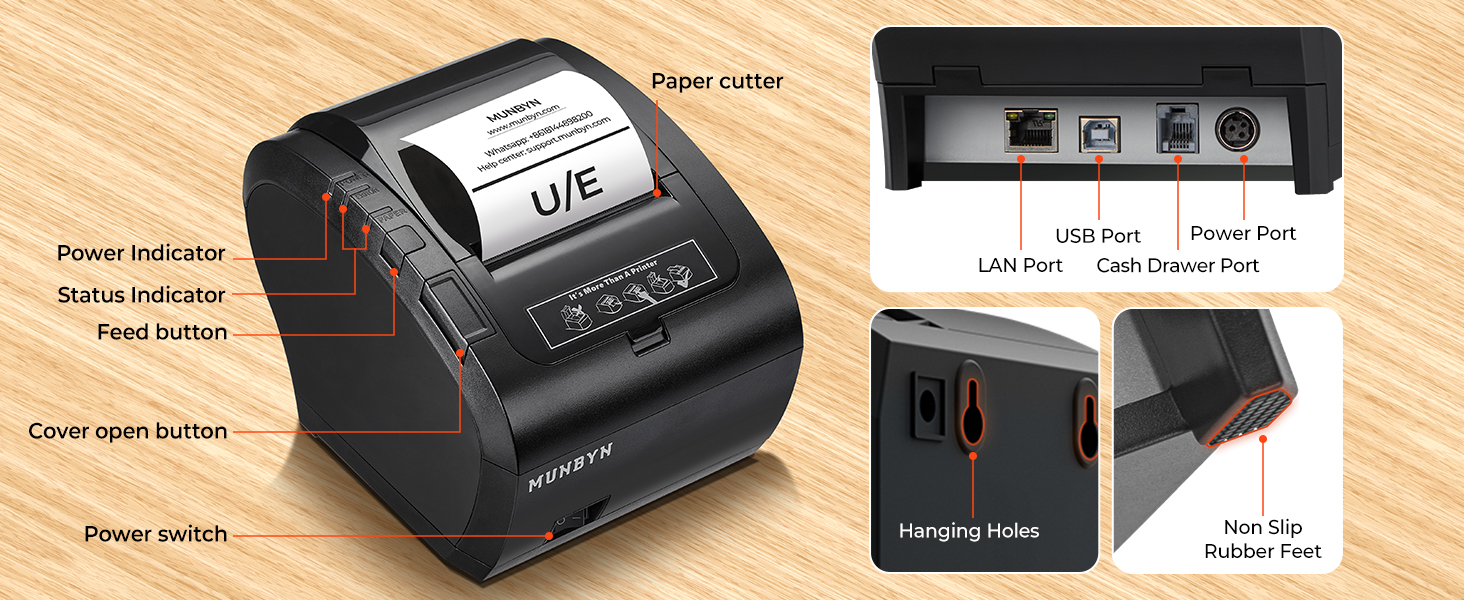
Image: A hand pulling a freshly cut receipt from the printer, demonstrating the automatic paper cutter function.
4.3. Напомене о компатибилности
Please note the following compatibility limitations:
- Штампач је НЕ compatible with iPad, iPhone, or any iOS system devices.
- Штампач НЕ work with Shopify, iZettle, Grubhub, DoorDash, Gloriafoods, or QuickBooks.
- Always check system compatibility before purchasing or using the printer with new software.

Image: Icons of various incompatible platforms and devices, including iOS, Shopify, iZettle, Grubhub, DoorDash, Gloriafoods, QuickBooks, and Uber Eats, with red 'X' marks.
5. Одржавање
5.1. Општа нега
To ensure the longevity and optimal performance of your MUNBYN P047 printer, keep it in a clean, dry environment away from direct sunlight and excessive dust. Avoid placing heavy objects on top of the printer.
5.2. Чишћење
Regular cleaning helps maintain print quality and extends the life of the print head. Use a soft, lint-free cloth slightly dampened with isopropyl alcohol to gently wipe the thermal print head. Do not use abrasive cleaners or solvents. Ensure the printer is powered off and unplugged before cleaning.
КСНУМКС. Решавање проблема
This section addresses common issues you might encounter with your MUNBYN P047 printer.
| Проблем | Могући узрок | Решење |
|---|---|---|
| Штампач не реагује | Power issue, loose cable, incorrect driver. | Check power connection, ensure cables are secure, reinstall drivers from the USB Flash Drive. |
| Лош квалитет штампе | Dirty print head, incorrect paper, low power. | Clean the print head, ensure you are using thermal paper, check power supply. |
| Застој папира | Improper paper loading, foreign object. | Open cover, remove jammed paper carefully, re-load paper correctly. |
| Auto-cutter not working | Paper not feeding correctly, mechanical issue. | Ensure paper is loaded properly. If issue persists, contact support. |
| Cannot connect via network | Incorrect IP settings, network issue. | Verify network cable connection, check printer's IP address settings, consult network administrator. |
For more detailed troubleshooting steps, refer to the comprehensive user manual and hardware manual provided on the USB Flash Drive. If problems persist, please contact MUNBYN customer support.
7. Спецификације
| Феатуре | Спецификација |
|---|---|
| Назив модела | П047 |
| Технологија штампе | Тхермал |
| Технологија повезивања | УСБ, Етхернет |
| Максимална величина медија | 80мм |
| Максимална брзина штампања Монохром | 230 ppm (mm/s) |
| Максимална резолуција црно-беле штампе | 576 дпи |
| Auto Cutter Lifespan | Up to 1.5 million cuts |
| Потрошња енергије | 2304 Watts (On-mode), 60 Watts (Rated) |
| Посебна карактеристика | Сертификат Енерги Стар |
| Димензије производа | 5.51 к 7.48 к 5.51 инча |
| Тежина артикла | 7 унце (0.44 фунте) |
8. Гаранција и подршка
8.1. Информације о гаранцији
The MUNBYN P047 printer comes with a limited warranty. Please refer to the warranty details provided in the user manual on the USB Flash Drive for specific terms and conditions.
8.2. Корисничка подршка
MUNBYN offers professional pre-sale and after-sale service. If you have any questions regarding compatibility, setup, or require technical assistance, please do not hesitate to contact our support team via email or WhatsApp. We are committed to resolving any issues you may encounter.

Image: A graphic showing the MUNBYN Offline Experience Store location and highlighting professional technical support services.

Image: An icon representing 24/7 customer service, indicating continuous support availability.


