Увод
Thank you for choosing the Sephia A11 Portable Bluetooth Speaker. This manual provides essential information for setting up, operating, and maintaining your speaker to ensure optimal performance and longevity. The Sephia A11 offers versatile connectivity options, including Bluetooth, USB, Micro SD, and AUX input, delivering clear and powerful audio in a compact design.
Шта је у кутији
- Sephia A11 Bluetooth Speaker
- Кабл за пуњење
- Аук Цабле
- Кориснички приручник (овај документ)

Image: The Sephia A11 Portable Bluetooth Speaker, showcasing its sleek black design and front grille.
Производ је завршенview
Familiarize yourself with the buttons and ports on your Sephia A11 speaker.
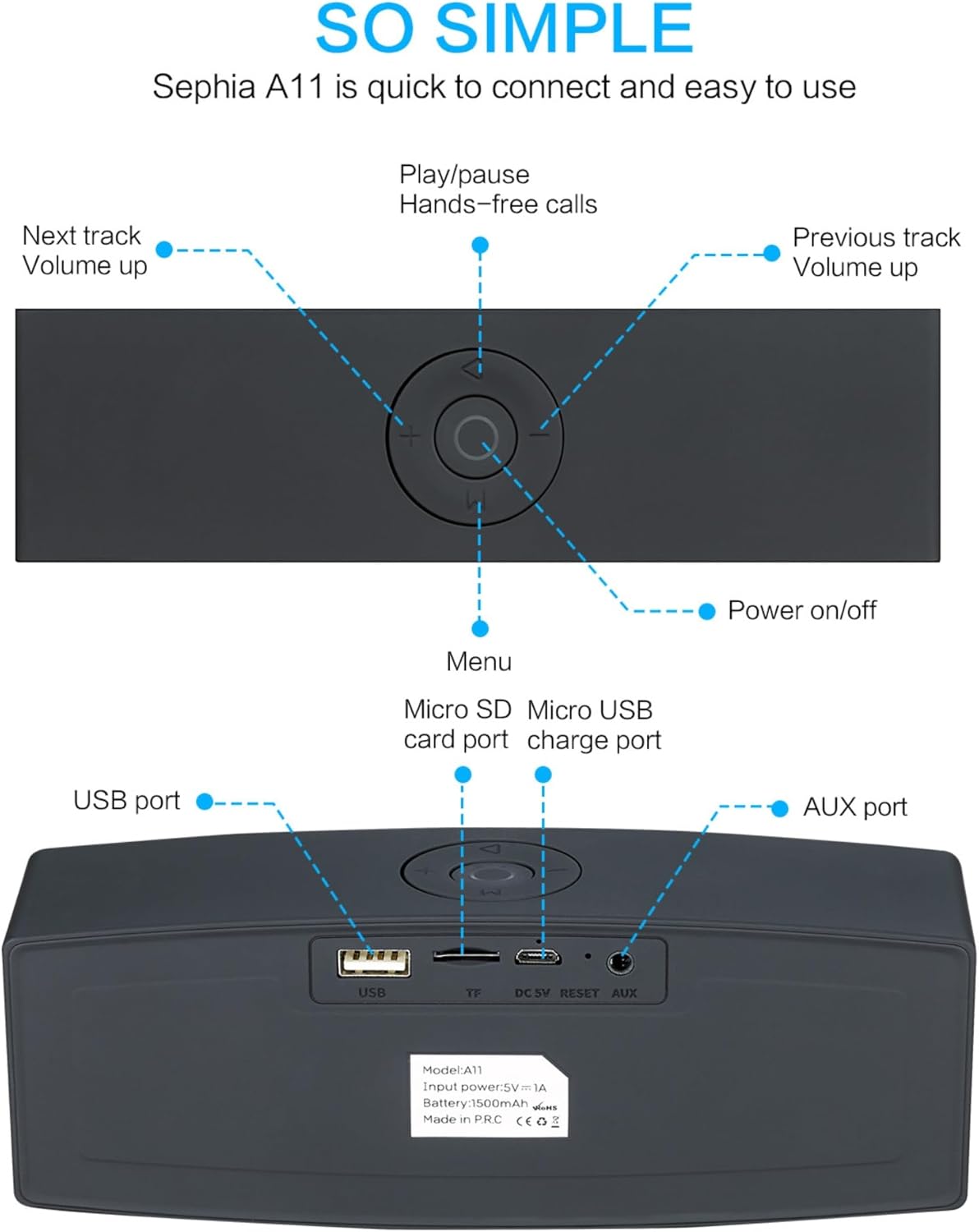
Image: Detailed diagram illustrating the top control panel and rear input/output ports of the Sephia A11 speaker.
Top Controls:
- Дугме за укључивање/искључивање: Притисните и држите да бисте укључили или искључили звучник.
- Дугме за репродукцију/паузу: Press to play or pause audio. Also used for hands-free calls (answer/end).
- Previous Track / Volume Down Button (-): Кратак притисак за претходну нумеру, дуг притисак за смањење јачине звука.
- Next Track / Volume Up Button (+): Кратак притисак за следећу нумеру, дуг притисак за повећање јачине звука.
- Дугме за мени (M): Press to switch between input modes (Bluetooth, USB, Micro SD, AUX).
Задњи портови:
- УСБ порт: For playing audio from a USB drive or charging external devices.
- Micro SD Card Slot (TF): За репродукцију звука са Micro SD картице.
- Micro USB Charge Port (DC 5V): За пуњење звучника.
- Дугме за ресетовање: Small pinhole for resetting the device if needed.
- АУКС порт: For wired audio connection using the provided 3.5mm AUX cable.
Сетуп
1. Пуњење звучника
- Connect the supplied charging cable to the Micro USB Charge Port (DC 5V) on the rear of the speaker.
- Повежите други крај кабла за пуњење са УСБ адаптером за напајање (није укључен) или УСБ портом рачунара.
- The charging indicator light will illuminate. Once fully charged, the light will change or turn off (refer to specific model behavior if indicated by LED). A full charge provides up to 8 hours of playtime.
2. Укључивање/искључивање
- To power on, press and hold the Power On/Off button on the top panel until you hear an audible prompt or see an indicator light.
- To power off, press and hold the Power On/Off button again until the speaker shuts down.
3. Блуетоотх упаривање
- Ensure the speaker is powered on and in Bluetooth mode. If not, press the 'M' (Menu) button to switch to Bluetooth mode. The speaker will enter pairing mode, indicated by a flashing LED light and an audible prompt.
- На свом мобилном уређају (паметном телефону, таблету, лаптопу) омогућите Блутут и потражите доступне уређаје.
- Select "Sephia A11" from the list of found devices.
- Once successfully paired, the speaker will provide an audible confirmation, and the LED indicator will stop flashing.
- The speaker has a Bluetooth range of up to 10 meters (33 feet).
4. Wired Connections (AUX, USB, Micro SD)
- АУКС улаз: Connect one end of the supplied 3.5mm AUX cable to the AUX port on the speaker and the other end to the audio output of your device (e.g., MP3 player, computer). The speaker will automatically switch to AUX mode or can be selected using the 'M' button.
- УСБ репродукција: Убаците УСБ флеш диск који садржи аудио files into the USB port. The speaker will automatically detect and play the audio files.
- Репродукција микро СД картице: Уметните микро СД картицу која садржи аудио files into the Micro SD (TF) slot. The speaker will automatically detect and play the audio files.
Управљање звучником
Аудио репродукција
- Пусти/паузирај: Press the Play/Pause button to toggle between playing and pausing audio.
- Подешавање јачине звука: Long press the '+' button to increase volume, and long press the '-' button to decrease volume.
- Следећа/претходна нумера: Short press the '+' button for the next track, and short press the '-' button for the previous track.

Image: A hand demonstrating how to interact with the top control buttons of the Sephia A11 speaker.
Хандс-фрее позивање
- When a call comes in while connected via Bluetooth, press the Play/Pause button to answer the call.
- Поново притисните дугме Репродукуј/Паузирај да бисте завршили позив.
- The built-in microphone allows for clear communication.
Одржавање
- Чишћење: Use a soft, dry cloth to clean the speaker's surface. Do not use abrasive cleaners, alcohol, or chemical solvents, as these may damage the finish.
- Складиштење: Чувајте звучник на хладном и сувом месту, даље од директне сунчеве светлости и екстремних температура.
- Одржавање батерије: Да бисте продужили век трајања батерије, избегавајте често потпуно пражњење звучника. Редовно пуните звучник, чак и ако га не користите дуже време.
- Отпорност на воду: Овај звучник није водоотпоран. Избегавајте излагање води или прекомерној влази.
Решавање проблема
| Проблем | Могући узрок | Решење |
|---|---|---|
| Звучник се не укључује. | Слаба батерија; Дугме за напајање није довољно дуго држано. | Charge the speaker fully. Press and hold the Power button for 3-5 seconds. |
| Нема звука из звучника. | Volume too low; Incorrect input mode; Device not connected properly. | Increase speaker and device volume. Press 'M' button to select correct input mode. Re-pair Bluetooth or re-connect AUX/USB/SD. |
| Блуетоотх упаривање није успело. | Звучник није у режиму упаривања; Уређај је предалеко; Сметње. | Ensure speaker is in Bluetooth pairing mode (flashing LED). Move speaker closer to device. Turn off other Bluetooth devices. Try forgetting "Sephia A11" on your device and re-pairing. |
| Лош квалитет звука. | Low battery; Device volume too high (distortion); Interference. | Charge the speaker. Adjust volume on both speaker and device. Move away from sources of interference. |
Спецификације
| Назив модела | А11 |
| Димензије | 18 к 7 к 5 цм |
| Тежина | 426 г |
| Технологија повезивања | Блуетоотх, УСБ, Мицро СД, АУКС |
| Излазна снага звучника | 6 вати (2 x 3W драјвера) |
| Фреквенцијски одзив | 20 Hz - 20 kHz |
| Тип батерије | Литхиум Ион |
| Плаитиме | До 8 сати |
| Блуетоотх домет | До 10 метара (33 стопе) |
| Посебне карактеристике | Bass Boost, Portable, Hi-Res Audio, Built-in Microphone, Shockproof |

Image: Visual representation of the Sephia A11 speaker's dimensions.
Гаранција и подршка
The Sephia A11 Portable Bluetooth Speaker comes with a 12-месечна гаранција од датума куповине, покривајући производне недостатке. Молимо вас да сачувате доказ о куповини за потребе гаранције.
For technical support, warranty inquiries, or further assistance, please refer to the contact information provided with your purchase or visit the official Sephia webсајту.


