1. Производ је готовview
Тхе ViewSonic PS501X is a short throw projector designed for versatile use in educational and small business environments. It features 3,400 lumens brightness and native XGA (1024 x 768) resolution, ensuring clear image projection even in smaller rooms. The projector incorporates SuperColor technology for accurate color reproduction and offers flexible connectivity options.
Кључне карактеристике:
- Versatile Projection: Advanced visual features suitable for education and small business settings.
- Large Screen Capability: Projects a 120-inch image from a distance of 4 feet 10 inches with 3400 lumens.
- Једноставно подешавање: Designed for easy plug-and-play operation for presentations, videos, and images.
- Проширено Лamp живот: SuperEco mode extends lamp животни век до 15,000 сати.
- Флексибилно повезивање: Supports various media players, PCs, Macs, and mobile devices via HDMI, USB, and VGA inputs.
2. Водич за подешавање
2.1 Отпакивање
Carefully unpack the contents of the box. Ensure all items are present:
- ViewSonic PS501X Projector
- Повер Цабле
- ВГА кабел
- Ремоте Цонтрол
- Кориснички приручник (овај документ)
2.2 Физичко постављање
Place the projector on a stable, flat surface. For optimal short-throw projection, position the projector approximately 4 feet 10 inches from the screen to achieve a 120-inch image. Ensure adequate ventilation around the projector.
Слика 2.2.1: Предња страна view of the PS501X projector, showing the lens and top-mounted control panel.
2.3 Повезивање уређаја
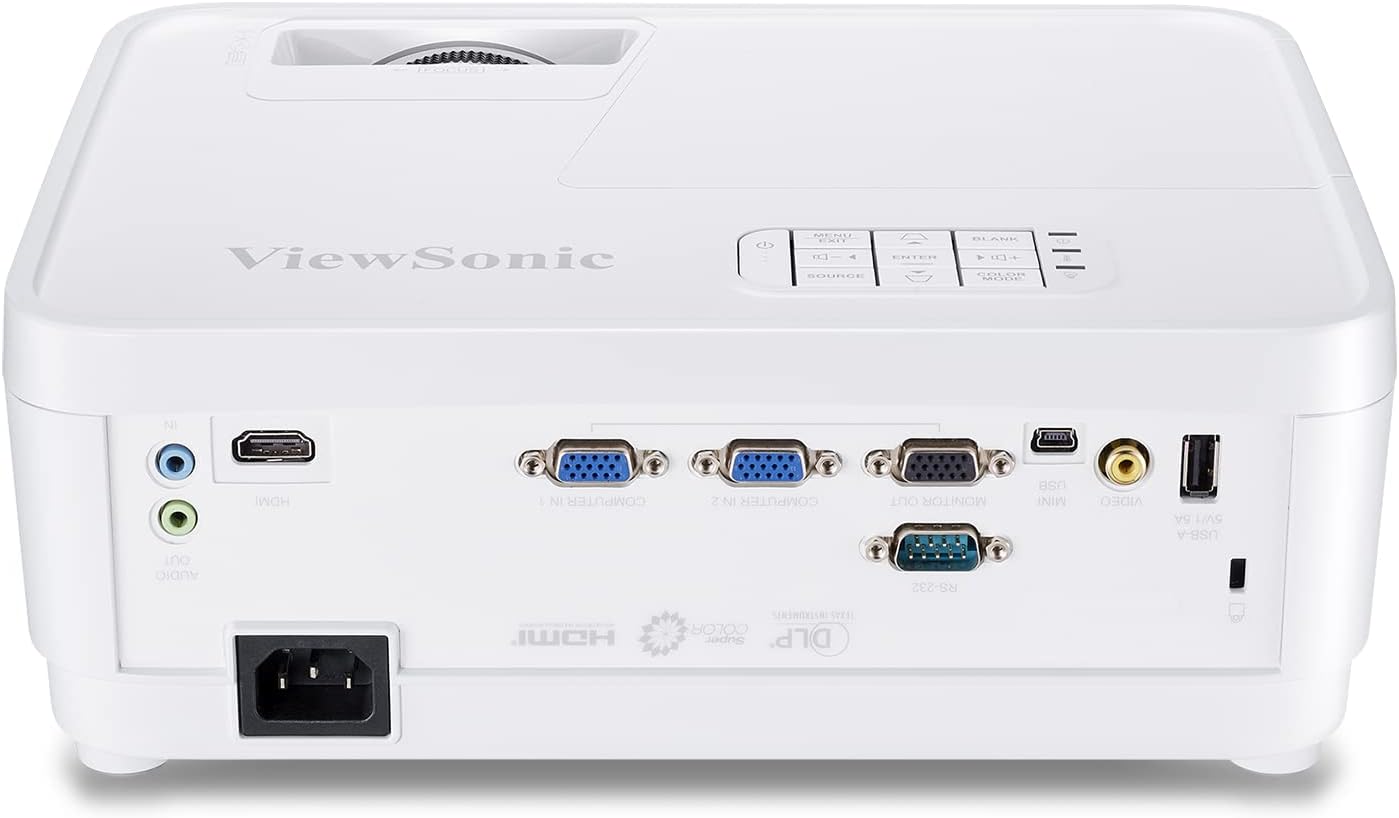
Connect your source devices (PC, Mac, media player) to the projector using the appropriate cables. The PS501X offers multiple input options:
- ДВИ: За дигитални видео и аудио високе дефиниције.
- ВГА: For analog video input from computers.
- УСБ: For connecting compatible devices.
- РС232: За интеграцију система управљања.

Figure 2.3.1: Rear panel of the PS501X projector, highlighting HDMI, VGA, and other connectivity ports.
After connecting, plug the power cable into the projector and a power outlet.
3. Упутство за употребу
3.1 Укључивање/искључивање
Press the power button on the projector or the remote control to turn the unit on or off. Allow a few moments for the lamp to warm up or cool down.
3.2 Избор улазног извора
Use the 'Source' button on the projector's control panel or remote to cycle through available input sources (HDMI, VGA, etc.) until your desired source is displayed.
3.3 Подешавање слике
- Фокус: Окрећите прстен за фокусирање на објективу пројектора док слика не постане оштра и јасна.
- Кеистоне Цоррецтион: If the image appears trapezoidal, use the keystone correction function (usually found in the OSD menu or dedicated buttons on the remote) to adjust the image geometry. The PS501X supports horizontal and vertical keystone correction.
- Подешавања боја: Access the On-Screen Display (OSD) menu to adjust settings such as brightness, contrast, color temperature, and color effects (e.g., Movie, Photo, Vivid, User, Standard, Game modes) to suit your viewокружење и садржај.
- Размера: Adjust the aspect ratio (e.g., Full) via the OSD menu to match your content and prevent distortion.

Figure 3.3.1: Illustration of horizontal and vertical keystone correction for adjusting image shape.

Слика 3.3.2: Прample of vibrant color accuracy provided by SuperColor technology.
4. Одржавање
4.1 Лamp Life Management
The PS501X features a SuperEco mode that can extend the lamp life up to 15,000 hours. Utilizing this mode can significantly reduce power consumption and prolong the life of your projector lamp.

Figure 4.1.1: Visual representation of the extended lamp life in SuperEco mode.
4.2 Вентилација
To prevent overheating and ensure optimal performance, always ensure that the air vents on the projector are clear and unobstructed. Do not place the projector in an enclosed space without proper airflow.
4.3 Чишћење
Regularly clean the projector's exterior with a soft, dry cloth. For the lens, use a specialized lens cleaning cloth and solution to avoid scratches. Avoid using abrasive cleaners or solvents.
КСНУМКС. Решавање проблема
Ако наиђете на проблеме са својим ViewSonic PS501X projector, refer to the following common troubleshooting steps:
- Нема приказане слике:
- Уверите се да је пројектор укључен и да је лamp је осветљен.
- Verify that the input source is correctly selected and the cable connections are secure.
- Check the source device (PC, media player) to ensure it is outputting a signal.
- Слика је мутна:
- Подесите фокусни прстен на сочиву пројектора.
- Уверите се да је површина за пројекцију равна и да је пројектор стабилан.
- Слика је изобличена (трапезоидна):
- Use the keystone correction function in the OSD menu to adjust the image shape.
- Ensure the projector is positioned directly in front of the screen as much as possible.
- Нема звука:
- Check the audio cable connections (if using analog audio).
- Ensure the volume on both the projector and the source device is turned up and not muted.
- If using HDMI, verify that the audio output is correctly configured on the source device.
- Прегревање пројектора:
- Уверите се да су сви отвори за вентилацију чисти од препрека.
- Користите пројектор у добро проветреном простору.
- If the issue persists, power off the projector and allow it to cool down before restarting.
6. Спецификације
| Број модела | ПС501Кс |
| Бранд | ViewСониц |
| Резолуција екрана | 1024 x 768 (XGA Native) |
| Осветљеност | 3400 лумена |
| Технологија повезивања | HDMI, USB, VGA |
| Посебна карактеристика | Схорт Тхров |
| Препоручена употреба | Пословање, образовање, кућни биоскоп |
| Lamp Ватtage | 190В |
| Димензије производа | 4.53 к 11.5 к 9.29 инча |
| Тежина артикла | 5.72 фунти |
| Батерије су потребне | 2 ААА батерије (за даљински управљач) |
| Први доступан датум | 3. марта 2018. године |
7. Гаранција и подршка
7.1 Информације о гаранцији
For detailed warranty information regarding your ViewSonic PS501X projector, please refer to the warranty card included in your product packaging or visit the official ViewСониц webсајт. Сачувајте доказ о куповини за потребе гаранције.
7.2 Корисничка подршка
If you require further assistance or have questions not covered in this manual, please contact ViewSonic customer support. Contact details can be found on the ViewСониц webсајту или у документацији вашег производа.


