Увод
The Akuvox SP-R50 is a business IP phone designed to provide high-quality, cost-effective communication solutions. It features HD Voice, a 2.3-inch 132x64 graphical LCD with backlight, and supports 3-way conferencing. This manual provides essential information for setting up, operating, maintaining, and troubleshooting your SP-R50 IP phone.
Садржај пакета
Пре него што почнете, проверите да ли су све ставке присутне у пакету:
- IP Phone (Akuvox SP-R50) x 1
- Сталак к 1
- Handset with Cord x 1
- Етхернет кабл к 1
- Адаптер за напајање к 1
Сетуп
Follow these steps to set up your Akuvox SP-R50 IP Phone:
- Причврстите постоље: Securely attach the stand to the back of the IP phone.
- Повежите слушалицу: Укључите један крај спиралног кабла слушалице у слушалицу, а други крај у прикључак за слушалицу на телефонској бази.
- Повежите се на мрежу:
- If using Power over Ethernet (PoE), connect one end of the Ethernet cable to the LAN port on the phone and the other end to a PoE-enabled network switch or router.
- If not using PoE, connect one end of the Ethernet cable to the LAN port on the phone and the other end to your network switch or router. Then, connect the power adapter to the phone's power port and plug it into a power outlet.
- Почетно покретање: The phone will power on automatically. The LCD screen will display the boot-up sequence. Once complete, it will attempt to obtain an IP address and register with your SIP server.
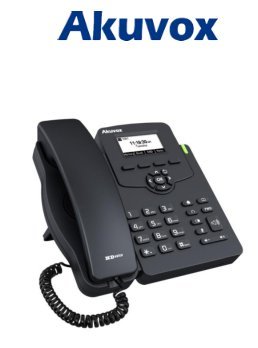
Image: Akuvox SP-R50 Business IP Phone, showing the main unit with the handset resting on its cradle and the stand attached, ready for setup.
Упутство за употребу
This section covers the basic operation of your Akuvox SP-R50 IP Phone.
Упућивање и примање позива
- Да бисте упутили позив: Pick up the handset or press the Speaker button. Dial the desired number and press the Диал or # кључ.
- Да бисте примили позив: Подигните слушалицу или притисните Спеакер дугме када телефон зазвони.
- Да бисте прекинули позив: Спустите слушалицу или притисните Спеакер дугме.
Функције позива
- Позив на чекању: Allows you to answer a second incoming call while on an active call.
- Call Forward: Redirects incoming calls to another number.
- Трансфер позива: Transfers an active call to another party.
- Call on Hold: Ставља активни позив на чекање.
- Искључи звук: Mutes your microphone during a call.
- Ауто одговор: Configures the phone to automatically answer incoming calls.
- Поновно бирање: Dials the last number called.
- Не узнемиравај (ДНД): Blocks all incoming calls.
- Local 3-Way Conference: Allows you to conduct a three-way conference call.
Phonebook and Settings
- Телефонски именик: The phone supports a phonebook of up to 500 groups and 5 remote phone book URLs. Access and manage contacts through the menu.
- Подешавање јачине звука: Use the volume keys on the phone to adjust the handset, speaker, or ringer volume.
- мелодије звона: Select from various ring tones through the phone's settings menu.
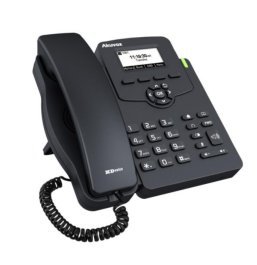
Image: Akuvox SP-R50 Business IP Phone, showcasing its ergonomic design and key layout from a slightly elevated angle, highlighting the display and navigation buttons.
Одржавање
Правилно одржавање осигурава дуготрајност и оптималне перформансе вашег IP телефона.
- Чишћење: Use a soft, dry cloth to clean the phone's surface. For stubborn marks, slightly dampНавлажите крпу водом. Не користите јаке хемикалије, абразивна средства за чишћење или раствараче.
- Окружење: Keep the phone away from direct sunlight, excessive heat sources, and moisture. Ensure it is placed on a stable surface to prevent accidental falls.
- Каблови: Periodically check all connected cables (handset, Ethernet, power) for any signs of wear or damage. Replace damaged cables immediately.
Решавање проблема
If you encounter issues with your Akuvox SP-R50, refer to the following common problems and solutions:
| Проблем | Могући узрок | Решење |
|---|---|---|
| Телефон се не укључује. | Нема прикључка за напајање или је адаптер за напајање/PoE неисправан. | Check if the power adapter is securely plugged in or if the Ethernet cable is connected to a PoE-enabled port. Try a different power outlet or PoE port. |
| Нема тона за бирање. | Network connection issue or SIP registration failure. | Verify the Ethernet cable is properly connected. Check the network status on the phone's display. Contact your network administrator or SIP service provider if the issue persists. |
| Не могу да упућујем или примам позиве. | SIP registration failed, DND enabled, or network problem. | Ensure the phone is registered (check display). Disable DND if active. Confirm network connectivity. |
| Лош квалитет позива (ехо, статички шум). | Загушење мреже или сметње. | Ensure your network has sufficient bandwidth. Avoid placing the phone near other electronic devices that may cause interference. |
Спецификације
Key technical specifications for the Akuvox SP-R50 Business IP Phone:
| Феатуре | Опис |
|---|---|
| Бранд | Акувок |
| Модел | Akuvox SP-R50 |
| Дисплаи | 2.3'' 132*64 Graphical LCD with Backlight |
| СИП налози | 1 Line (Support 1 SIP account) |
| Гласовне карактеристике | HD Voice, 3-Way Conference |
| Капацитет именика | 500 groups, 5 Remote Phone Book URL Подржано |
| Дневници позива | 100 уноса |
| Повер | PoE Support, Power Adapter (included) |
| Посебне карактеристике | Call Waiting, Call Forward, Call Transfer, Call on Hold, Mute, Auto-answer, Redial, DND, Speed Dial, Hotline, Direct IP call, Music on hold, Intercom, Call Pickup, Group Call Pickup, Anonymous Call, Anonymous Call Rejection |
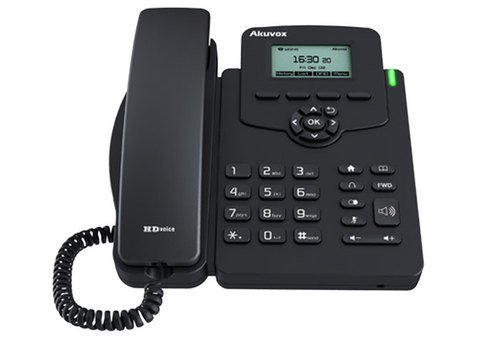
Слика: Фронт view of the Akuvox SP-R50 Business IP Phone, clearly showing the display, navigation keys, and numeric keypad.
Информације о гаранцији
The Akuvox SP-R50 Business IP Phone comes with a 2 година гаранције from the date of purchase. This warranty covers manufacturing defects and malfunctions under normal use. Please retain your proof of purchase for warranty claims. For detailed terms and conditions, refer to the warranty card included with your product or contact Akuvox customer support.
Подршка
If you require further assistance or have questions not covered in this manual, please contact your vendor or Akuvox customer support. You may also visit the official Akuvox webсајт за додатне ресурсе и често постављана питања.


